Muhimman Umarnin Tsaro
To reduce the risk of fire, electric shock, or injury, please read and follow all instructions and warnings before using this appliance.
- Always place the fan on a stable, level surface.
- Kada a yi amfani da fanka tare da lalacewa ko igiya ko filogi.
- Ka kiyaye fanka daga ruwa ko damp yankunan.
- Do not insert fingers or foreign objects into any openings.
- Unplug the fan before cleaning or performing any maintenance.
- Wannan samfurin ya ƙunshi sinadarai da aka sani ga Jihar California don haifar da ciwon daji da lahani na haihuwa ko wasu lahani na haihuwa.
Samfurin Ƙarsheview
The LEVOIT Classic 42-inch Tower Fan (Model: LTF-F422-WUS) is designed to provide powerful and quiet air circulation for your home. It features a DC motor for energy efficiency and a user-friendly design.

Hoto: Gaba view of the LEVOIT Classic 42-inch Tower Fan in white, showing its sleek design, digital display, and the included remote control. Blue arrows indicate airflow and oscillation.
Mabuɗin fasali:
- Ƙarfafan iska mai ƙarfi: Experience 1252 CFM airflow with speeds up to 25ft/s.
- Aiki shiru: Operates as low as 25dB, ideal for bedrooms and quiet environments.
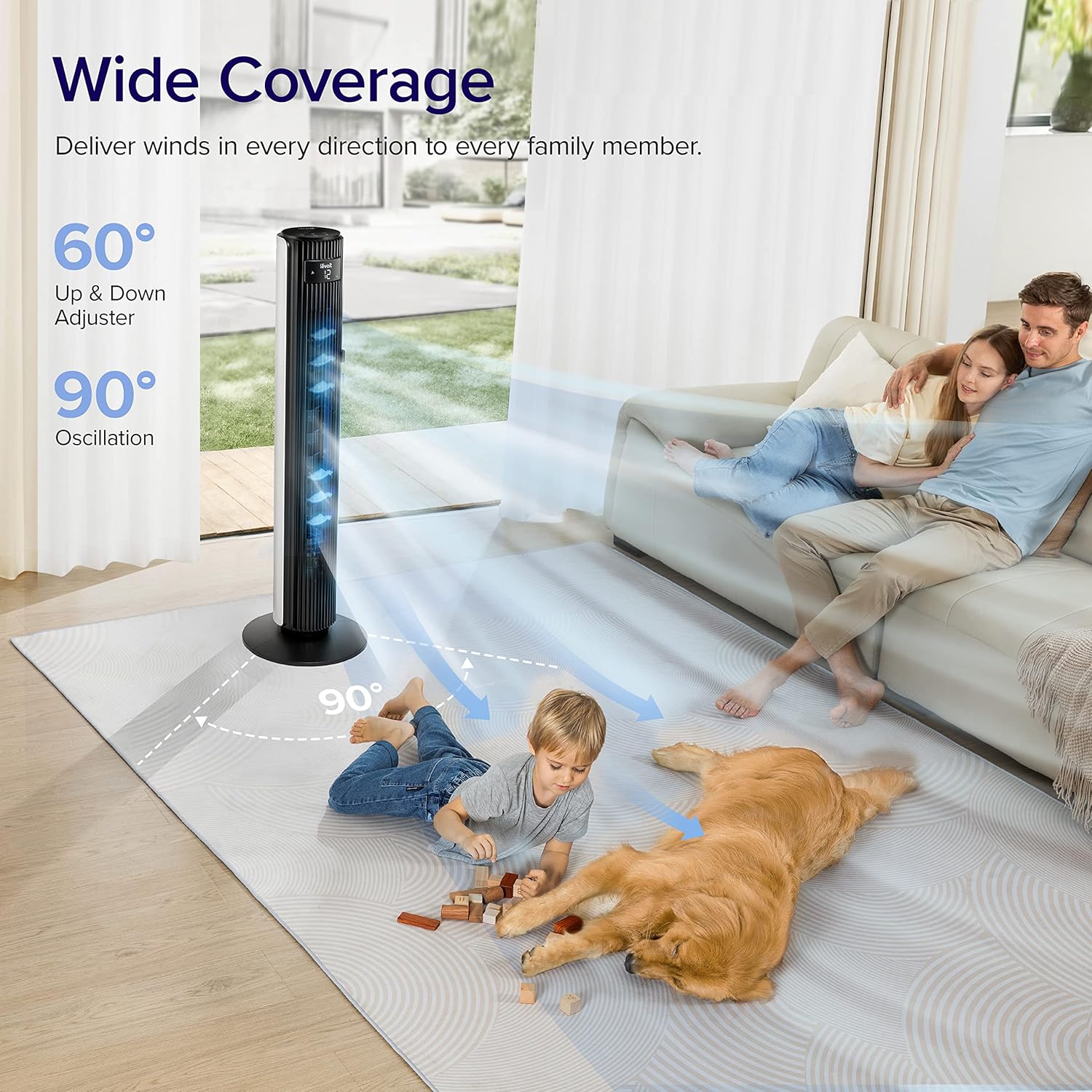
- Wide Oscillation: Features 90° horizontal and 60° vertical oscillation for comprehensive air distribution.
- Ta'aziyyar da za'a iya gyarawa: Offers 12 speed settings and 4 modes (Normal, Auto, Turbo, Advanced Sleep).
- Temperature-Responsive: Built-in sensor adjusts fan speed based on room temperature in Auto mode.
- Sauƙaƙan Kulawa: Detachable back cover and filter for thorough cleaning.
- Zane na Abokin Amfani: Includes a hidden handle and built-in remote storage.
Jagorar Saita
1. Cire Akwatunan Akwatin da Kayan Kayan Kayan Kayan Kayan Kawa
Carefully open the box from the indicated side and remove all components. Ensure all parts are present before proceeding with assembly.
Video: This video demonstrates the unboxing process, base assembly, remote control storage, and fan blade removal for cleaning.
2. Majalisar Tushe
The fan base comes in two halves. Align the two pieces and attach them together securely. Unscrew the nut from the bottom of the tower fan, then attach the assembled base to the fan and fasten the nut to secure it.

Image: Diagram illustrating the assembly of the fan base, showing how the two halves connect and attach to the main fan unit.
3. Saitin Ikon Nesa
The remote control comes with an insulating tab to preserve battery life. Pull out this tab before first use. The remote can be stored neatly in a dedicated slot on the back of the fan.
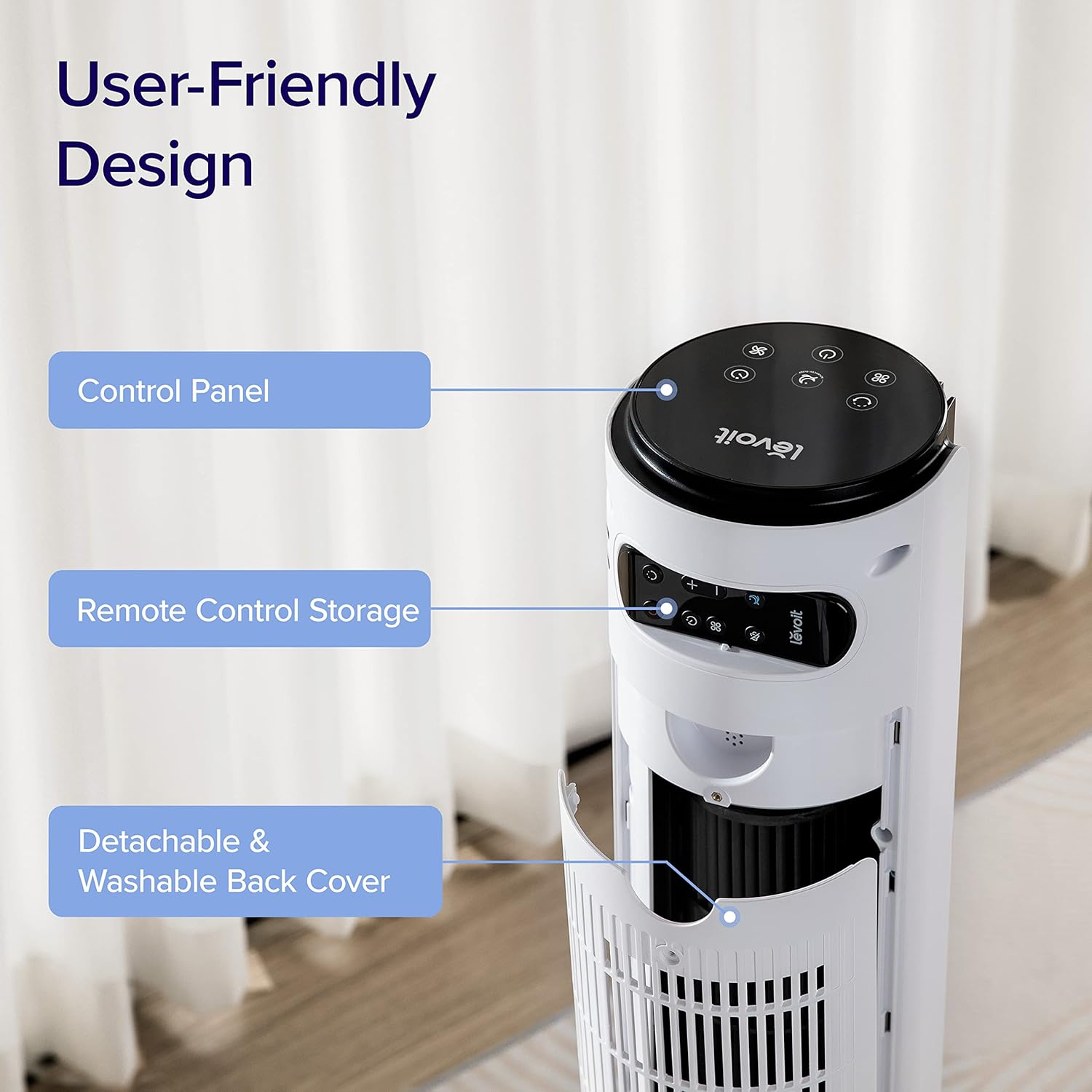
Hoto: Rufewa view of the top rear of the LEVOIT Tower Fan, highlighting the integrated storage compartment for the remote control.
Operating Your Tower Fan
Your LEVOIT tower fan offers various settings for personalized comfort.
1. Control Panel da Nuni
The fan features a touch-sensitive control panel on top and an LED display on the front. The display shows current settings such as speed, mode, and timer.
Hoto: Sama-sama view of the LEVOIT Tower Fan's control panel with various touch buttons for power, mode, speed, oscillation, and timer. The front LED display shows the current fan speed.
2. Hanyoyin Aiki
- Yanayin Al'ada: Default mode allowing manual speed adjustment.
- Yanayin atomatik: Fan speed adjusts automatically based on room temperature detected by the built-in sensor.
- Yanayin Turbo: Provides quick cooling and air circulation, starting at the highest speed with oscillation. Speed decreases as room temperature drops.
- Yanayin Barci Mai Ci Gaba: Display and sound automatically turn off after 5 seconds. Fan does not oscillate for the first hour, then oscillates and decreases speeds to maintain comfort. Speed then changes by temperature.
3. Speed and Oscillation
- Saitunan Sauri 12: Choose from gentle breezes (1-3) to storm-strength winds (10-12).
- 90° Horizontal Oscillation: Distributes air across a wide area.
- 60° Vertical Oscillation: Adjusts airflow up to 30° up or down for targeted cooling.

Image: A family and a dog enjoying the wide coverage of the LEVOIT Tower Fan's 90-degree horizontal and 60-degree vertical oscillation, illustrating effective air distribution.
4. Aikin Lokaci
Set the fan to automatically turn off after a specified period, up to 12 hours, for energy saving and convenience.
Kulawa da Tsaftacewa
Tsaftacewa na yau da kullun yana tabbatar da kyakkyawan aiki da tsawon rayuwar fan ɗin ku.
1. Detachable Back Cover and Filter
Unlike traditional tower fans, the LEVOIT Classic features a detachable back cover and filter for easy and thorough cleaning. This allows access to the wind wheel for maintenance.

Image: Illustration of the LEVOIT Tower Fan's detachable back cover and internal fan blade, submerged in water to demonstrate its washable components for hassle-free cleaning.
2. Umarnin tsaftacewa
- Cire fanka kafin tsaftacewa.
- Use a soft cloth or brush to clean the exterior surfaces.
- To clean the internal wind wheel, remove the screw under the remote storage slot, then remove the back cover. Locate and remove the screw at the bottom of the fan blade, then carefully pull out the fan blade. Clean with a soft cloth or water.
- Tabbatar cewa duk sassan sun bushe gaba ɗaya kafin sake haɗawa.
Jagoran Shirya matsala
| Matsala | Magani |
|---|---|
| Fan suddenly starts to oscillate. | This is normal in Advanced Sleep Mode. It automatically starts oscillating after one hour of operation. |
| Air output decreased after cleaning the wind wheel. | Ensure screws are aligned with the flat surface of the motor shaft during installation, not the arc surface. Incorrect alignment will reduce air output. |
| Fan suddenly stops. | Check if the timer was accidentally set. Kindly check and try again. |
| Top control panel is not responsive. | Check if the fan is in Advanced Sleep Mode or if the screen is manually turned off. In screen-off state, the operation panel enters a semi-sleep state to prevent accidental touch. Press twice to wake up the panel and then adjust settings. |
Ƙayyadaddun samfur
- Alamar: LEVOIT
- Sunan Samfura: Classic 42-inch
- Lambar Samfura: Saukewa: LTF-F422-WUS
- Launi: Fari
- Girman samfur: 6.3"D x 6.7"W x 42.4"H
- Nauyin Abu: 11 fam
- Tushen wutar lantarki: DC
- Watatage: 26 watts
- Matsayin Surutu: 25db ku
- Iyawar Jirgin Sama: 1252 Cubic Feet Per Minute (CFM)
- Adadin Matakan Wuta: 12
- Caddamarwa: 90° Horizontal, 60° Tsaye
- Mai ƙidayar lokaci: 12 Awanni
- Hanyar sarrafawa: Nesa, Taɓa
- Abubuwan da aka haɗa: Nisa
- Abu: Filastik
- Takaddun shaida: CA65, FCC, TSCA
Garanti da Taimako
LEVOIT products come with a limited warranty. For detailed warranty information and customer support, please refer to the official LEVOIT website ko tuntuɓi sabis na abokin ciniki.
Tallafin Abokin Ciniki na LEVOIT:
- Visit the official LEVOIT Store: Shagon LEVOIT akan Amazon
- For further assistance, refer to the contact information provided in your product packaging or on the LEVOIT website.


