Gabatarwa
Thank you for choosing the Faber 34L Double Glazed 1600W Oven Toaster Grill (OTG). This manual provides essential information for the safe and efficient operation, maintenance, and troubleshooting of your appliance. Please read these instructions thoroughly before first use and retain them for future reference.

Hoto: Gaba view of the Faber 34L OTG with its control panel and glass door.
Muhimman Umarnin Tsaro
Koyaushe bi ƙa'idodin aminci na asali lokacin amfani da na'urorin lantarki don rage haɗarin wuta, firgita, da rauni ga mutane.
- Read all instructions before operating the OTG.
- Kar a taɓa wurare masu zafi. Yi amfani da hannaye ko ƙulli. Koyaushe yi amfani da mitts ko safar hannu yayin sarrafa kayan zafi.
- To protect against electrical shock, do not immerse cord, plug, or any non-removable parts of the oven in water or other liquid.
- Kulawa na kusa yana da mahimmanci lokacin da kowace na'ura ke amfani da ko kusa da yara.
- Cire toshe daga kanti lokacin da ba a amfani da shi kuma kafin tsaftacewa. Bada damar yin sanyi kafin saka ko cire sassa.
- Kada a yi amfani da kowace na'ura mai igiya ko filogi da ta lalace, ko bayan na'urar ta lalace ko ta lalace ta kowace hanya.
- Kada ku yi amfani da waje.
- Kada ka bar igiya ta rataya a gefen tebur ko tebur, ko taɓa wurare masu zafi.
- Kada a sanya a kan ko kusa da iskar gas mai zafi ko wutar lantarki, ko a cikin tanda mai zafi.
- Dole ne a yi amfani da taka tsantsan lokacin motsi na'urar da ke ɗauke da mai mai zafi ko wasu ruwan zafi.
- Kada kayi amfani da na'urar don wanin amfani da aka yi niyya.
- Ba dole ba ne a saka abinci mai girma ko kayan ƙarfe a cikin tanda saboda suna iya haifar da wuta ko haɗarin girgizar lantarki.
- Wuta na iya faruwa idan an rufe tanda ko kuma ta taɓa abu mai ƙonewa, gami da labule, labule, bango, da makamantansu, lokacin da ake aiki.
- Kada a sanya ɗaya daga cikin waɗannan kayan a cikin tanda: takarda, kwali, filastik, ko makamancin haka.
- Kada a adana duk wani kayan aiki, ban da na'urorin da masana'anta suka ba da shawarar, a cikin wannan tanda lokacin da ba a amfani da su.
- Always wear protective, heat-resistant gloves when inserting or removing items from the hot oven.
- Tabbatar da samun iska mai kyau a kusa da na'urar yayin aiki.
Abubuwan Samfur da Na'urorin haɗi
Your Faber OTG comes with the following components and accessories:
- Faber 34L OTG Unit
- Enamelled Bake Tray
- Gishiri Tray
- Umbarfin goge baki
- Pizza Plate (9-inch)
- Rotisserie Rod
- Rotisserie Handle (Tongs)
- SS Wire Tray
- Silicon Heat Guard Glove

Image: All included accessories for the Faber 34L OTG, laid out for clear identification.
Saita da Amfani na Farko
Ana kwashe kaya
- Carefully remove the OTG and all accessories from the packaging.
- Remove any protective films, stickers, or packaging materials from the appliance and accessories.
- Bincika na'urar don kowace lalacewa. Kada a yi amfani idan an lalace.
Wuri
- Place the OTG on a stable, flat, heat-resistant surface.
- Ensure there is adequate space (at least 10-15 cm) around all sides of the oven for proper ventilation. Do not place it directly against a wall or under cabinets.
- Keep the appliance away from flammable materials like curtains, tablecloths, and paper.
Farkon Tsaftacewa
- Kafin amfani da farko, shafa ciki da waje na tanda tare da tallaamp zane.
- Wash all accessories (bake tray, grill tray, rotisserie rod, etc.) in warm, soapy water, rinse thoroughly, and dry completely.
- Insert the crumb tray at the bottom of the oven.
First Use Burn-in
It is recommended to run the oven empty for about 15 minutes on its highest temperature setting (250°C) with the Function Selector set to 'Top + Bottom Heating' to burn off any manufacturing residues. A slight odor or smoke may be present during this process; this is normal. Ensure the area is well-ventilated.
Umarnin Aiki
The Faber OTG features intuitive controls for various cooking functions.

Hoto: Rufewa view of the control knobs on the Faber 34L OTG, indicating their respective functions.
Control Control Overview
- Knob Aiki: Selects the cooking function (Off, Rotisserie, Convection, Rotisserie + Convection).
- Ƙunƙarar Zazzabi: Adjusts the cooking temperature from 100°C to 250°C.
- Knob Mai Zaɓa: Chooses the heating mode (Defrost, Top Heating, Bottom Heating, Top + Bottom Heating).
- Mai ƙidayar lokaci: Sets the cooking time up to 60 minutes. Includes an auto-cutoff feature.
Cooking Functions and Modes
Your OTG supports 6 cooking functions and various heating modes:

Image: Visual representation of the various cooking modes available with the Faber 34L OTG, including baking, roasting, and grilling.
- Yin burodi: Ideal for cakes, cookies, and bread. Use Top + Bottom Heating with or without Convection.
- Gasasu: Perfect for meats and vegetables. Use Top + Bottom Heating, often with Convection.
- Gasa: For browning and crisping. Use Top Heating.
- Toast: For bread and similar items. Use Top Heating.
- Yin sanyi: Thaws frozen foods. Use the Defrost setting on the Selector Knob.
- Maimaitawa: Warms up cooked food. Use Top + Bottom Heating at a lower temperature.
Aikin Rotisserie
The auto motorized rotisserie allows for even grilling of whole chickens or large cuts of meat.
- Skewer the food onto the rotisserie rod, securing it with the forks.
- Place the rotisserie rod into the designated slots inside the oven.
- Set the Function Knob to 'Rotisserie' or 'Rotisserie + Convection'.
- Adjust Temperature and Timer as required for your recipe.
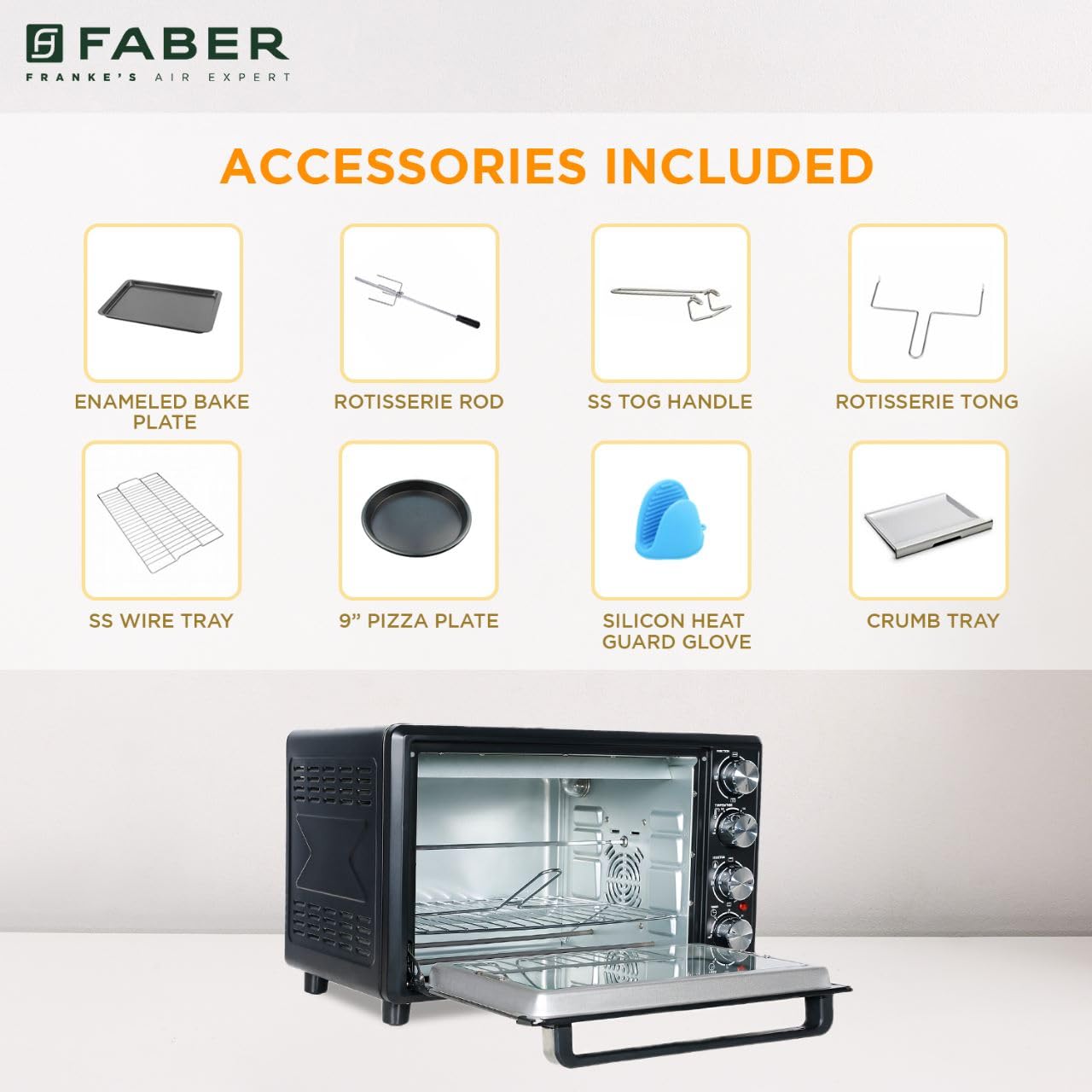
Image: The auto motorized rotisserie feature of the OTG, demonstrating two chickens being evenly grilled.
360° Convection Technology
The 360° Convection Technology ensures uniform cooking by circulating hot air throughout the oven chamber. This results in optimum browning, better crispiness, and higher nutrient retention.
- To activate convection, turn the Function Knob to 'Convection' or 'Rotisserie + Convection'.
- Convection cooking often requires slightly lower temperatures and shorter cooking times compared to conventional baking.

Image: Diagram illustrating the 360° convection technology, showing hot air circulating inside the oven for even cooking.
Timer with Auto Cut-off
The mechanical timer can be set for up to 60 minutes. Once the set time elapses, the oven will automatically switch off, indicated by a bell sound.
- Turn the Timer Knob clockwise to set the desired cooking duration.
- For shorter times (less than 10 minutes), turn the knob past 10 minutes and then back to the desired time for better accuracy.
Kulawa da Tsaftacewa
Regular cleaning and maintenance will ensure the longevity and optimal performance of your OTG.
Tsabtace Gabaɗaya
- Koyaushe cire tanda daga wutar lantarki kuma ba shi damar yin sanyi gaba ɗaya kafin tsaftacewa.
- Shafa saman waje da taushi, damp zane. Kada a yi amfani da masu goge goge ko goge goge.
- Clean the interior walls, floor, and ceiling with a damp cloth and mild detergent. For stubborn stains, a non-abrasive oven cleaner designed for OTGs can be used, following the product instructions carefully.
- The double glazed glass door can be cleaned with a glass cleaner. The double glazing helps retain heat and prevents burns from touching the outer glass.
- Remove and empty the crumb tray regularly. Wash it in warm, soapy water, rinse, and dry thoroughly.
Tsabtace Na'ura
- All removable accessories (bake tray, grill tray, wire rack, rotisserie rod, pizza plate, tongs, silicon glove) can be washed in warm, soapy water. Rinse well and dry completely before storing or reusing.
- Do not use metal scouring pads or abrasive cleaners on non-stick surfaces (if applicable) to avoid damage.

Hoto: Cikin Gida view of the Faber 34L OTG with the chamber light on, highlighting the clean racks and crumb tray, ready for use or after cleaning.
Shirya matsala
If you encounter any issues with your Faber OTG, refer to the following table for common problems and solutions.
| Matsala | Dalili mai yiwuwa | Magani |
|---|---|---|
| Tanda baya kunna. | Ba a toshe ba; iko kutage; rashin kuskure; lokacin da ba a saita ba. | Ensure the power cord is securely plugged into a working outlet. Check your household's circuit breaker. Set the timer knob to the desired cooking duration. |
| Abincin ba a dafa shi daidai ba. | Incorrect temperature/mode; overcrowding; improper rack position; convection fan issue. | Verify temperature and heating mode settings. Avoid overcrowding the oven. Use the appropriate rack position. Ensure the convection fan is not obstructed (if using convection). |
| Yawan hayaki yayin aiki. | Food spills; grease buildup; initial burn-off. | Clean the oven interior and accessories thoroughly. Ensure the crumb tray is clean. If it's the first use, some smoke is normal. |
| Rotisserie ba ya juyawa. | Rotisserie rod not properly seated; Function Knob not set to Rotisserie. | Ensure the rotisserie rod is correctly inserted into the drive socket and support. Set the Function Knob to 'Rotisserie' or 'Rotisserie + Convection'. |
| Timer ba ya aiki. | Knob not turned past 10 minutes for short times; mechanical issue. | For times under 10 minutes, turn the knob past 10 and then back to the desired time. If the issue persists, contact customer support. |
Idan matsalar ta ci gaba bayan an gwada waɗannan hanyoyin, tuntuɓi tallafin abokin ciniki na Faber.
Ƙayyadaddun bayanai
Detailed technical specifications for the Faber 34L OTG:
- Alamar: Faber
- Lambar Samfura: 131.0676.817
- Iyawa: 34 lita
- Watatage: 1600 Watts
- Launi: Baki
- Siffa ta Musamman: Temperature Control, 360° Convection, Rotisserie, Double Glazed Glass
- Nau'in Sarrafa: Knob
- Salon Kofa: Kofar saukarwa
- Nau'in Kayan Kofa: Gilashin zafi
- Tushen wutar lantarki: Corded Electric
- Nauyin Abu: 10 kg900 g
- Girman Abu (LxWxH): 51 x 39 x 32 santimita
- Ƙasar Asalin: China

Image: Diagram showing the physical dimensions (Length, Width, Height) of the Faber 34L OTG.
Garanti da Taimako
Bayanin Garanti
Your Faber OTG is covered by a manufacturer's warranty. Please refer to the warranty card included with your product for specific terms, conditions, and duration of the warranty. Keep your purchase receipt as proof of purchase for warranty claims.
Tallafin Abokin Ciniki
For any service, repair, or technical assistance, please contact Faber customer support. You can find contact details on the warranty card or the official Faber website.
- Taimako kan layi: Visit the official Faber webshafin don FAQs da albarkatun tallafi.
- Sabis Sabis: Locate authorized service centers in your region.