1. Gabatarwa
This manual provides detailed instructions for the setup, operation, and maintenance of your Creative Sound Blaster Katana SE Multi-Channel Gaming Soundbar. Designed for an immersive audio experience, this soundbar features 180W peak power, a bi-amplified 4-driver design, Super X-Fi technology, and customizable RGB lighting. Please read this manual thoroughly before using your device to ensure optimal performance and safety.

Figure 1: Creative Sound Blaster Katana SE Gaming Soundbar
2. Muhimman Bayanan Tsaro
- Karanta waɗannan umarnin.
- A kiyaye waɗannan umarnin.
- Ku kula da duk gargaɗin.
- Bi duk umarnin.
- Kar a yi amfani da wannan na'urar kusa da ruwa.
- Tsaftace kawai da bushe bushe.
- Kar a toshe kowane buɗewar samun iska. Shigar daidai da umarnin masana'anta.
- Kada a shigar kusa da kowane tushen zafi kamar radiators, rajistan zafi, murhu, ko wasu na'urori (ciki har da amplifiers) masu samar da zafi.
- Kare igiyar wutar lantarki daga tafiya a kai ko a dunƙule, musamman a matosai, madaidaitan ma'auni, da wurin da suke fita daga na'urar.
- Yi amfani da haɗe-haɗe-haɗe-haɗe/na'urorin haɗi kawai da mai ƙira ya ƙayyade.
- Cire wannan na'urar yayin guguwar walƙiya ko lokacin da ba a yi amfani da ita na dogon lokaci ba.
3. Abubuwan Kunshin
Tabbatar cewa duk abubuwa suna nan a cikin kunshin ku:
- Creative Sound Blaster Katana SE Soundbar
- Subwoofer (wired)
- Ikon nesa
- Adaftar Wuta
- USB-C USB
- Kebul na gani
4. Samfurin Ya Ƙareview
The Sound Blaster Katana SE is an all-in-one soundbar designed for powerful and immersive audio. It features a sleek design with integrated controls and a front-facing display.
4.1. Soundbar Components
- Babban Sarrafa Taɗi: Power, Volume Up/Down, Source, Mode, SXFI.
- Nunin Gaba: Shows current source (USB, AUX, OPTICAL, BT, TV), volume level, and selected sound mode.
- Front Headphone Jack: For connecting headphones directly.
- Microphone da aka gina a ciki: Don sadarwar murya.
- RGB Lighting Strip: Customizable lighting effects located at the bottom of the soundbar.
- Direbobi: Bi-amplified 4-driver design for clear and precise audio.

Hoto 2: Gaba view of the Sound Blaster Katana SE with RGB lighting
4.2. Rear Panel Connections
The rear panel provides various ports for connecting to your devices:
- HDMI Out (ARC): For connecting to a TV with Audio Return Channel support.
- SXFI Out: Dedicated port for Super X-Fi enabled headphones.
- USB Audio A: For digital audio connection to PC/Mac.
- Aux A cikin: 3.5mm analog audio input.
- Na gani In: Shigar da sauti na gani na dijital.
- Ƙarfafawa: For connecting the wired subwoofer.
- Shigar da Wuta: Don adaftar wutar lantarki.

Figure 3: Rear panel with HDMI ARC, SXFI Out, USB Audio In, Aux In, Optical In, Sub Out, and Power Input.
4.3. Subwoofer
The included wired subwoofer enhances bass response for a more dynamic audio experience.

Hoto 4: Na ciki view showing the soundbar's bi-amplified drivers and the subwoofer's design.
5. Saita
Follow these steps to set up your Sound Blaster Katana SE:
- Wuri: Place the soundbar on a stable surface below your TV or monitor. Position the subwoofer on the floor near the soundbar for optimal bass.
- Haɗa Subwoofer: Connect the wired subwoofer cable to the 'Sub Out' port on the soundbar's rear panel.
- Haɗa Ikon: Connect the power adapter to the soundbar's power input and then plug it into a wall outlet.
- Haɗa Tushen Sauti: Choose your preferred audio connection method (HDMI ARC, Optical, USB, Aux, or Bluetooth) and connect the appropriate cable.
Video 1: Official product video demonstrating the Sound Blaster Katana SE's features and connectivity options.
6. Zaɓuɓɓukan Haɗuwa
The Sound Blaster Katana SE offers a wide range of connectivity to suit various devices:
- HDMI Out (ARC): Connect to your TV's HDMI ARC port for high-quality audio and control.
- USB Audio A: Ideal for connecting to PCs, Macs, or gaming consoles that support USB audio.
- Aux A cikin: Use a 3.5mm audio cable to connect to devices with an analog audio output.
- Na gani In: For digital audio connection from TVs, game consoles, or other media players.
- Bluetooth 5.0: Pair wirelessly with your mobile devices, tablets, or computers for convenient audio streaming.
- SXFI Out: Connect Super X-Fi certified headphones for a personalized holographic audio experience.

Figure 5: Soundbar showcasing versatile connectivity with gaming consoles and mobile devices.
7. Umarnin Aiki
7.1. Kunnawa / Kashewa
Press the Power button on the soundbar's top panel or the remote control to turn the device on or off.
7.2. Sarrafa ƙara
Use the Volume Up (+) and Volume Down (-) buttons on the soundbar or remote to adjust the audio level. The current volume will be displayed on the front panel.
7.3. Zaɓin Tushen
Press the 'Source' button on the soundbar or remote to cycle through available input sources (HDMI ARC, USB, Aux, Optical, Bluetooth).
7.4. Yanayin Sauti
The soundbar features optimized sound modes for different content types. Press the 'Mode' button on the soundbar or remote to switch between:
- Kiɗa: An inganta shi don kunna kiɗa.
- Fina-finai: An inganta shi don sauti na sinima.
- Wasan kwaikwayo: Tailored for immersive gaming soundscapes.
- Effects Off: Neutral audio profile.
7.5. Amfani da Remote Control
The included remote control provides full functionality for the soundbar, including power, volume, source, mode, SXFI, RGB lighting, and custom buttons.
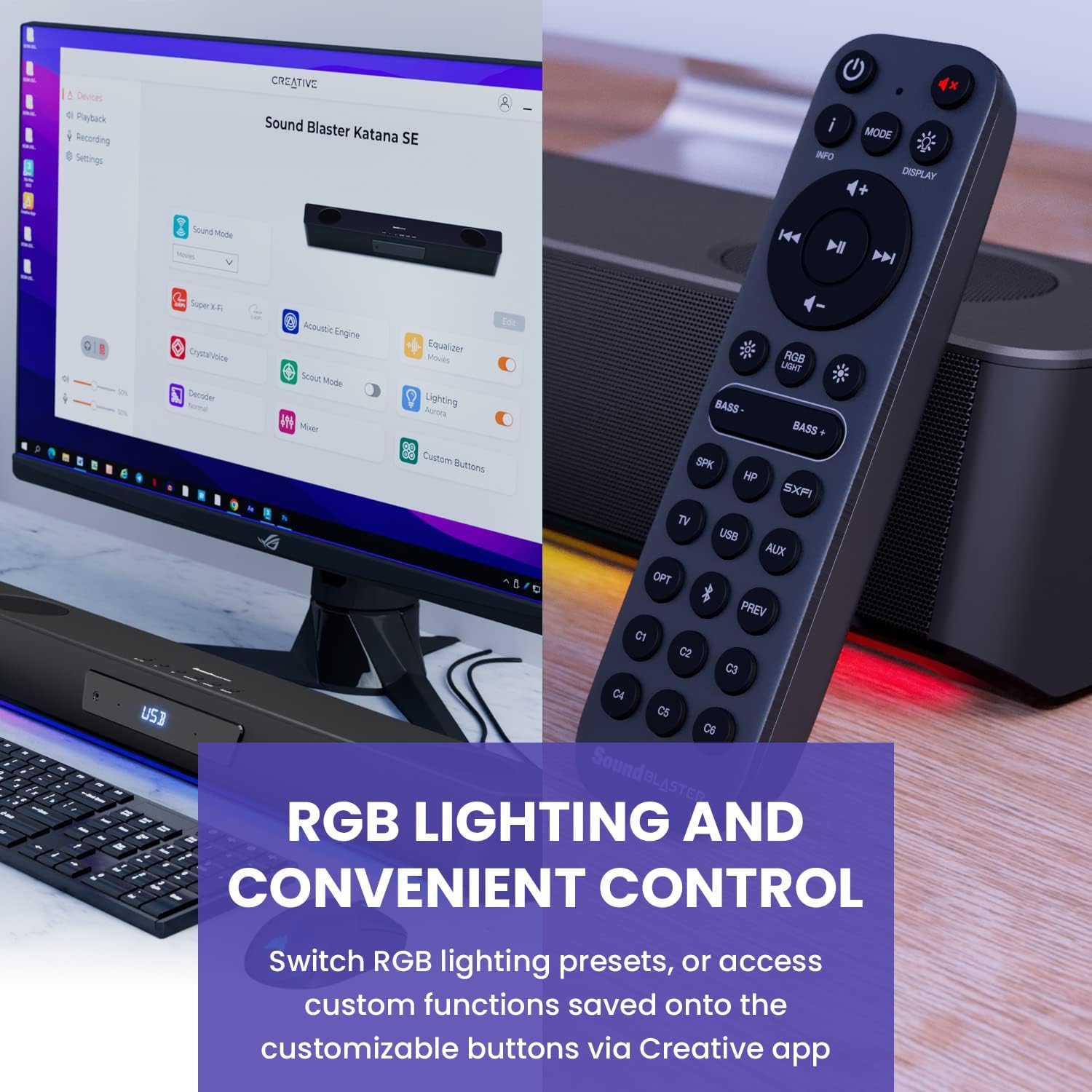
Figure 6: Remote control for the Sound Blaster Katana SE.
7.6. Creative App Customization
For advanced customization, download the Creative app on your PC or Mac. The app allows you to:
- Tune Audio Performance: Adjust EQ settings and activate Sound Blaster processing technologies.
- Keɓance Hasken RGB: Select from various RGB presets or create your own custom lighting effects.
- Map Custom Functions: Assign specific commands to the six customizable buttons on the remote control.

Figure 7: Creative app interface showing sound mode, Super X-Fi, Acoustic Engine, Equalizer, CrystalVoice, Scout Mode, Lighting, Decoder, Mixer, and Custom Buttons.
8. Super X-Fi Technology
Super X-Fi technology personalizes your headphone audio experience for optimized and realistic listening. It recreates the soundstage of a multi-speaker system in your headphones.
- SXFI Battle Mode: Samun m advantage in FPS games by accurately pinpointing enemy locations through enhanced audio cues.

Figure 8: Super X-Fi and SXFI Battle Mode for enhanced gaming audio.
9. Microphone da aka gina
The Sound Blaster Katana SE includes a built-in beamforming microphone, allowing you to participate in calls or in-game voice chat directly through the soundbar.
10. Hasken RGB
The integrated RGB lighting strip can be customized to match your setup or mood. Use the remote control to cycle through presets or the Creative app for advanced color and effect adjustments.
11. Kulawa
To ensure the longevity and performance of your Sound Blaster Katana SE:
- Tsaftace na'urar ta hanyar shafa shi da taushi, bushe bushe.
- Avoid using liquid cleaners or aerosols.
- Tabbatar cewa ba a toshe buɗewar samun iska.
- Kada a bijirar da na'urar zuwa matsanancin zafi ko zafi.
12. Shirya matsala
Idan kun ci karo da al'amura tare da mashaya sautin ku, koma zuwa hanyoyin gama gari masu zuwa:
- Babu Sauti: Check all cable connections (power, audio source, subwoofer). Ensure the correct input source is selected on the soundbar. Verify the volume is not muted or too low.
- Karkataccen Sauti: Try reducing the volume. Check audio cable integrity. Ensure the audio source is providing a clean signal.
- Matsalolin Haɗin Bluetooth: Ensure the soundbar is in Bluetooth pairing mode. Delete the soundbar from your device's Bluetooth list and re-pair. Move closer to the soundbar to reduce interference.
- Ikon nesa Baya Aiki: Check battery levels and replace if necessary. Ensure there are no obstructions between the remote and the soundbar.
- Fitilar RGB Ba Sa Aiki: Check settings in the Creative app. Ensure RGB lighting is enabled via the remote or app.
13. Ƙayyadaddun bayanai
| Siffar | Ƙayyadaddun bayanai |
|---|---|
| Sunan Samfura | 51MF8415AA000 27585486 |
| Nau'in Kakakin | Sauti |
| Nau'in hawa | Dutsen Tabletop |
| Siffa ta Musamman | Bass Boost, Built In Microphone, Radio, Stereo Pairing, USB Port |
| Abubuwan Amfani Don Samfura | For Gaming Consoles, For Computers |
| Na'urori masu jituwa | Desktop, Laptop, MP3 Player, Projector, Smartphone, Tablet, Television |
| Ƙididdigar Ƙirar | 1.0 ƙidaya |
| Kewaye Sauti Kanfigareshan | 5.1 |
| Launi | 180W Peak Power with Bluetooth 5.0 |
| Abubuwan da aka haɗa | Nisa |
| Girman samfur | 25.6"D x 4.3"W x 3.1"H |
| Nauyin Abu | 5.9 fam |
| Mai hana ruwa | KARYA |
| Nau'in Garanti | Iyakance |
| Adadin Abubuwan | 1 |
| Hanyar sarrafawa | Nisa |
| Fasahar Sadarwa mara waya | Bluetooth |
| Girman Kakakin | Inci 1 |
| Tushen wutar lantarki | Corded Electric |
| Diamita na Tweeter | Inci 1 |
| Matsayin Juriya na Ruwa | Ba Mai Tsayar da Ruwa ba |
| Nau'in Kunshin Abokin Ciniki | FFP |
| Nau'in Direba Audio | Direba mai ƙarfi |
| Fasahar Haɗin Subwoofer | Mara waya |
| Yawan Matakan Wuta | 1 |
| Takamaiman Amfani Don Samfura | Gaming Consoles, Computers |
| UPC | 054651195639 |
| Mai ƙira | Ƙirƙirar Labs |
| Siffar | rectangular prism |
| Nauyin Abu | 5.9 fam |
| ASIN | B0C5DFMB93 |
| Lambar samfurin abu | MF8415 |
| Kwanan Wata Farko Akwai | Mayu 16, 2023 |
| Alamar | Ƙirƙira |
| Matsakaicin Ƙarfin Fitar da Kakakin | 100 Watts |
| Amsa Mitar | 20000 Hz |
| Fasahar Haɗuwa | Bluetooth |
| Yanayin Fitarwa na Audio | Kewaye, Stereo |
14. Garanti da Tallafawa
Your Creative Sound Blaster Katana SE comes with a Limited Warranty. For detailed warranty information, product registration, technical support, and customer service, please visit the official Creative webshafi ko koma zuwa katin garanti da aka haɗa a cikin kunshin ku.


