1. Muhimman Umarnin Tsaro
Da fatan za a karanta kuma ku fahimci duk umarnin aminci kafin amfani da wannan samfurin. Rashin bin waɗannan umarnin na iya haifar da girgiza wutar lantarki, wuta, ko mummunan rauni.
- Kada a bijirar da na'urar zuwa matsanancin zafi, hasken rana kai tsaye, ko zafi mai zafi.
- Keep the device away from water and other liquids. If it gets wet, turn it off immediately and allow it to dry completely before reuse.
- Do not attempt to disassemble, repair, or modify the device. Refer all servicing to qualified personnel.
- Use only specified charging methods (USB-C, solar, hand crank).
- A kiyaye nesa da yara.
- Zubar da batura bisa ga dokokin gida.
2. Samfurin Ya Ƙareview
The FosPower Emergency Weather Radio Model A6 is a versatile device designed for emergency preparedness and outdoor activities. It features multiple power sources, radio reception, lighting, and a power bank function.
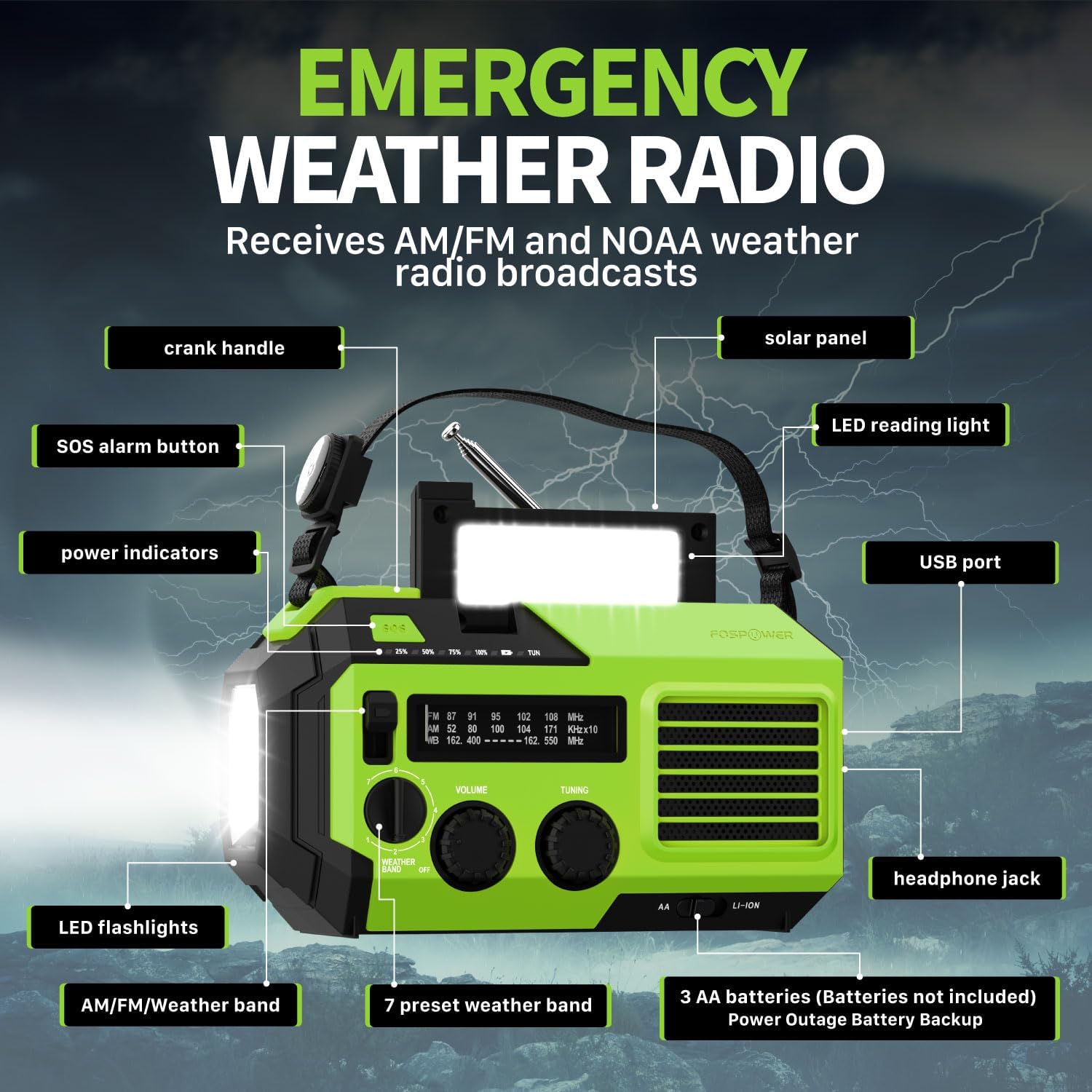
Hoto 2.1: Gaba view of the FosPower Emergency Weather Radio with key components labeled, including the crank handle, solar panel, SOS alarm button, power indicators, LED reading light, USB port, LED flashlights, AM/FM/Weather band selector, volume and tuning knobs, and headphone jack.
Mabuɗin fasali:
- NOAA/AM/FM Radio: Access local weather information and emergency hazard alerts, as well as standard AM/FM broadcasts.
- 19240mWh (5200mAh) Power Bank: Charge USB devices during power outages or in outdoor settings.
- Tushen Ƙarfi da yawa: Recharge via USB-C cable, solar panel, or hand crank. Can also be powered by AA batteries (not included).
- Ƙararrawar SOS: Activates a loud siren and flashing light for emergency signaling.
- Hasken Haɗaka: Features a powerful flashlight and a reading light.
- Juriya na Ruwa IPX3: Provides protection against splashing water.
3. Saita
3.1 Fara Cajin
Before first use, fully charge the internal battery using the provided USB-C cable. Connect the USB-C cable to the radio's USB-C port and the other end to a USB power adapter (not included) or a computer USB port. The power indicators will illuminate to show charging progress.
3.2 AA Battery Installation (Optional)
The radio can also operate on 3 AA batteries (not included) as a backup power source. Open the battery compartment cover on the back of the radio and insert 3 AA batteries, ensuring correct polarity. Close the cover securely.

Hoto 3.1: Na baya view of the radio highlighting the solar panel, hand-crank, AA battery compartment, and USB charging port, illustrating the multiple power sources.
4. Umarnin Aiki
4.1 Aikin Rediyo
- Kunnawa/Kashewa: Rotate the 'VOLUME' knob clockwise to turn the radio on and adjust the volume. Rotate counter-clockwise until it clicks to turn off.
- Zaɓin Ƙungiya: Use the 'WEATHER BAND' switch to select between AM, FM, or WB (Weather Band).
- Gyara: Rotate the 'TUNING' knob to scan for radio stations. Extend the telescopic antenna for improved reception, especially for FM and WB.
- NOAA Weather Band: When WB is selected, the radio will receive NOAA weather alerts. The radio supports 7 preset weather bands.
- Sakon kwallo: For private listening, connect 3.5mm headphones to the headphone jack.
4.2 Flashlight and Reading Light

Image 4.1: The radio demonstrating its high-power flashlight and cool-tone reading lamp fasali.
- Hasken walƙiya: Press the flashlight button located on the front of the radio to turn the flashlight on or off.
- Hasken Karatu: Lift the solar panel to reveal the LED reading light. Press the reading light button to turn it on or off.
4.3 SOS Ƙararrawa
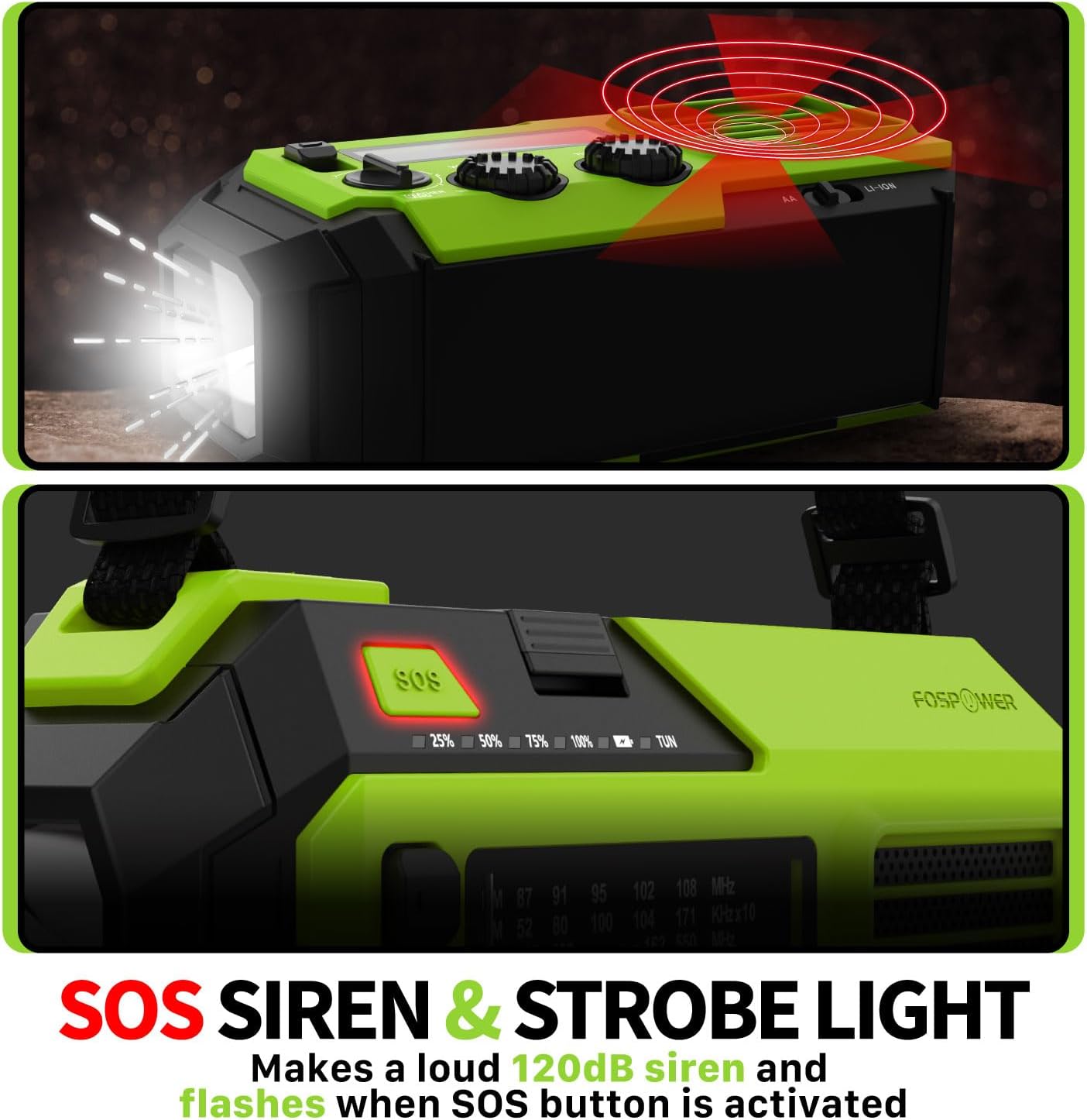
Image 4.2: Close-up of the radio's SOS button and an illustration of the siren and strobe light being activated.
In an emergency, press and hold the 'SOS' button to activate a loud 120dB siren and a flashing strobe light. Press the 'SOS' button again to deactivate.
4.4 Cajin Na'urorin Waje (Bankin Wuta)

Image 4.3: The radio connected via USB to a smartphone, demonstrating its power bank capability for charging small electronics.
Connect your USB-powered device (e.g., smartphone, tablet) to the radio's USB-A output port using your device's charging cable. The radio's internal battery will begin charging your device.
4.5 Cajin Rediyo
- Cajin USB-C: Connect the provided USB-C cable to the radio's USB-C input port and a USB power source. This is the most efficient charging method.
- Cajin Rana: Place the radio with the solar panel facing direct sunlight. The solar panel charges the internal battery, primarily for maintaining charge or slow charging in emergencies.
- Cajin Crank Hand: Rotate the hand crank clockwise or counter-clockwise at a steady pace (approximately 130-150 RPM) for 3-5 minutes to generate power for short-term use or to initiate charging.
5. Kulawa
- Tsaftacewa: Shafa rediyon da taushi, bushe bushe. Kada a yi amfani da masu tsabtace abrasive ko kaushi.
- Ajiya: Store the radio in a cool, dry place away from direct sunlight when not in use for extended periods. For optimal battery health, fully charge the internal battery every 3-6 months.
- Kulawar Baturi: If using AA batteries, remove them if the radio will not be used for a long time to prevent leakage.
6. Shirya matsala
| Matsala | Dalili mai yiwuwa | Magani |
|---|---|---|
| Rediyo ba ta kunnawa. | Internal battery is depleted; AA batteries are depleted or incorrectly installed. | Charge the internal battery via USB-C or hand crank. Check and replace AA batteries if used. |
| Mara kyau liyafar rediyo. | Eriya ba ta faɗaɗa ba; yankin sigina mai rauni; tsangwama. | Fully extend the telescopic antenna. Adjust radio position. Try tuning to a stronger station. |
| External device not charging. | Radio's internal battery is low; incorrect cable; device not compatible. | Ensure the radio's internal battery is sufficiently charged. Use a functional USB charging cable. Verify device compatibility. |
| Hand crank is stiff or not generating power. | Mechanism obstruction; improper cranking speed. | Ensure no obstructions. Crank at a steady, moderate pace (130-150 RPM). |
7. Ƙayyadaddun bayanai
| Siffar | Daki-daki |
|---|---|
| Lambar Samfura | FOSPWB-2419 |
| Girman samfur | 6.76 x 3.52 x 2.59 inci |
| Nauyin Abu | 1.08 fam |
| Batirin ciki | 19240mWh (5200mAh) |
| External Battery Support | 3 x AA baturi (ba a haɗa su ba) |
| Makadan Rediyo | AM, FM, NOAA Weather Band (WB) |
| Hanyoyin Caji | USB-C, Solar, Hand Crank |
| Siffofin Musamman | Built-In Flashlight, Reading Light, SOS Alarm, Power Bank |
| Resistance Ruwa | IPX3 |
8. Garanti da Tallafawa
FosPower provides a limited lifetime warranty for this product. For warranty claims, technical assistance, or customer service inquiries, please contact FosPower's USA-based customer support team. Refer to the official FosPower webshafin ko takaddun siyan ku don bayanan tuntuɓar ku.


