1. Samfurin Ya Ƙareview
The ION Audio Highlander is a high-powered, all-weather portable Bluetooth speaker designed to deliver rich sound and deep bass even at high volumes. Its durable construction makes it suitable for various environments, ensuring your music can accompany you wherever you go.
Mabuɗin fasali:
- High-Power Audio: Delivers 120 Watts of speaker maximum output power for impactful sound.
- Bass Boost: Enhances low frequencies for maximum impact.
- Bluetooth 5.0 Enabled: Allows wireless streaming and control of your music from compatible devices.
- IPX5 Mai jure Ruwa: Designed to withstand splashes and rain, making it safe for outdoor use.
- Rechargeable 50-Hour Battery: Provides extended playtime on a single charge.
- Built-in Handles and Wheels: Facilitates easy transportation.
2. Abubuwan Kunshin
Tabbatar cewa duk abubuwan da aka jera a ƙasa suna cikin kunshin ku:
- ION Audio Highlander Portable Speaker
- Wutar Wuta
3. Jagorar Saita
3.1 Cajin Baturi
Before first use, fully charge the Highlander speaker. The battery life is approximately 50 hours, but initial charging may take several hours.
- Connect the included power cable to the power input on the back of the Highlander speaker.
- Haɗa ɗayan ƙarshen kebul ɗin wutar lantarki zuwa cikin hanyar fita ta bango ta yau da kullun.
- The charging indicator light will illuminate. The light will change or turn off once charging is complete.
3.2 Kunnawa / Kashewa
To power the speaker on or off, locate the power button on the control panel.
- Don Kunnawa: Danna ka riƙe maɓallin Wuta na ɗan lokaci har sai allon ya haskaka.
- Don Kashe: Danna maɓallin Wuta kuma ka sake riƙewa na ɗan lokaci har sai allon ya kashe.
3.3 Haɗin Bluetooth
Follow these steps to connect your Bluetooth device to the Highlander speaker:
- Ensure the Highlander speaker is powered on and in Bluetooth mode. The Bluetooth indicator on the display will flash, indicating it's ready to pair.
- On your Bluetooth device (smartphone, tablet, laptop), go to its Bluetooth settings.
- Bincika available devices. Select "ION Highlander" from the list.
- Once paired, the Bluetooth indicator on the speaker will stop flashing and remain solid. You can now play audio through the speaker.
- To disconnect, turn off Bluetooth on your device or select "Forget This Device" in your device's Bluetooth settings.
4. Umarnin Aiki
4.1 Sarrafa panelview
The top panel of the Highlander speaker features various controls for managing audio playback and settings.

- Maɓallin Wuta: Yana kunna ko kashe lasifikar.
- Ƙarar Ƙarar: Yana daidaita matakin ƙarar gabaɗaya.
- Maballin Bluetooth: Yana fara yanayin haɗa haɗin Bluetooth.
- Maballin Ƙarfafa Bass: Activates or deactivates the bass boost feature.
- Allon Nuni: Shows current mode, battery status, and other information.
4.2 Adjusting Volume and Bass Boost
- Girma: Rotate the main volume knob clockwise to increase volume and counter-clockwise to decrease it.
- Bass Boost: Press the "Bass Boost" button to enhance the bass output. Press it again to return to normal audio.
4.3 Fasalolin iya ɗauka
The Highlander is designed for easy transport:
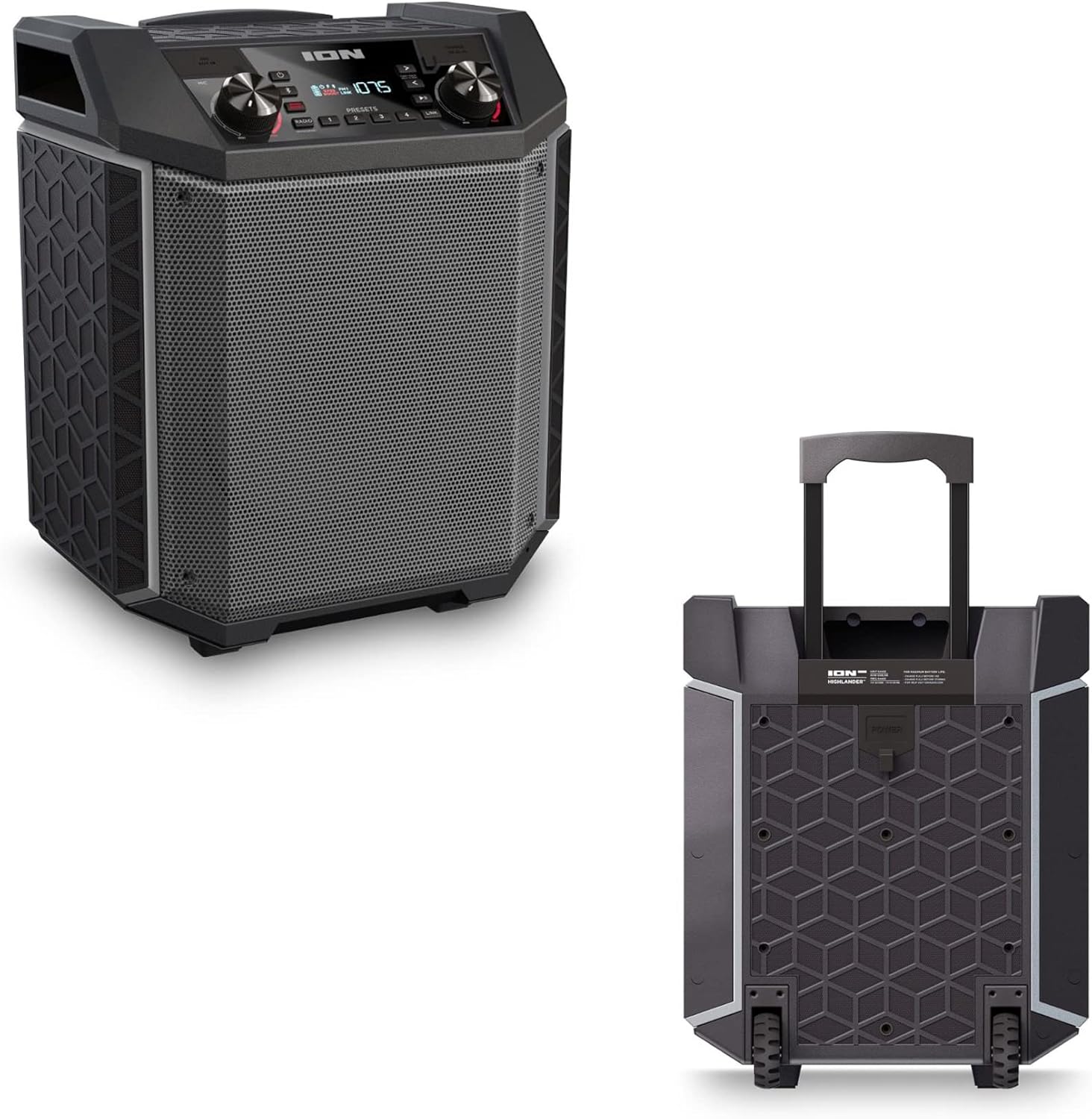

- Hannu Mai Cirewa: Pull up the integrated handle to roll the speaker like luggage.
- Dabarun: Use the built-in wheels for smooth movement across various surfaces.
4.4 Resistance Ruwa (IPX5)
The Highlander speaker is IPX5 water-resistant, meaning it can withstand splashes of water from any direction. It is suitable for use by the pool or in light rain.

Muhimmi: Do not submerge the speaker in water. Ensure all port covers are securely closed when exposed to water.
5. Kulawa
5.1 Tsaftacewa
- Always power off the speaker and disconnect it from the power source before cleaning.
- Yi amfani da busasshiyar kyalle mai laushi don shafe saman saman.
- Don datti mai taurin kai, dampen zane da ruwa. A guji yin amfani da sinadarai masu tsauri, kaushi, ko goge goge.
- Do not spray cleaning liquids directly onto the speaker.
5.2 Adana
- Ajiye lasifikar a wuri mai sanyi, busasshiyar nesa da hasken rana kai tsaye da matsanancin zafi.
- If storing for an extended period, ensure the battery is partially charged (around 50%) to maintain battery health. Recharge every few months if not in use.
5.3 Kula da baturi
- A guji zubar da batirin gaba ɗaya akai-akai.
- Kada ka bijirar da baturin zuwa zafi mai yawa ko sanyi.
- If the battery performance significantly degrades, contact customer support for assistance.
6. Shirya matsala
If you encounter issues with your Highlander speaker, refer to the table below for common problems and solutions.
| Matsala | Magani mai yiwuwa |
|---|---|
| Kakakin ba ya kunna wuta. |
|
| Ba za a iya haɗawa da na'urar Bluetooth ba. |
|
| Babu sauti ko ƙaramin ƙara. |
|
| Saurin murdiya |
|
7. Ƙayyadaddun bayanai
| Siffar | Daki-daki |
|---|---|
| Sunan Samfura | Highlander |
| Alamar | ION |
| Nau'in Kakakin | Waje |
| Fasahar Haɗuwa | Bluetooth 5.0 |
| Tushen wutar lantarki | Ana Karfin Batir |
| Rayuwar Baturi | 50 Awanni |
| Matsayin Juriya na Ruwa | IPX5 (Ruwan Resistant) |
| Matsakaicin Ƙarfin Fitar da Kakakin | 120 Watts |
| Girman samfur | 19.5"D x 19.5"W x 14"H |
| Nauyin Abu | 23.2 fam |
| Kayan abu | Water-resistant plastic or rubber, with a black coating |
| Abubuwan da aka haɗa | Wutar Wuta |
| UPC | 657768542732 |
8. Garanti da Tallafawa
The ION Audio Highlander speaker comes with a Limited Warranty. For specific details regarding warranty coverage, duration, and terms, please refer to the warranty information provided with your purchase or visit the official ION Audio website.
For technical support, troubleshooting assistance beyond this manual, or warranty claims, please contact ION Audio customer support through their official channels. Keep your proof of purchase handy when contacting support.


