Gabatarwa
This user manual provides comprehensive instructions for the safe and effective operation, maintenance, and troubleshooting of your VEGA SmartOne S3 Beard Trimmer. Please read this manual thoroughly before first use and retain it for future reference.
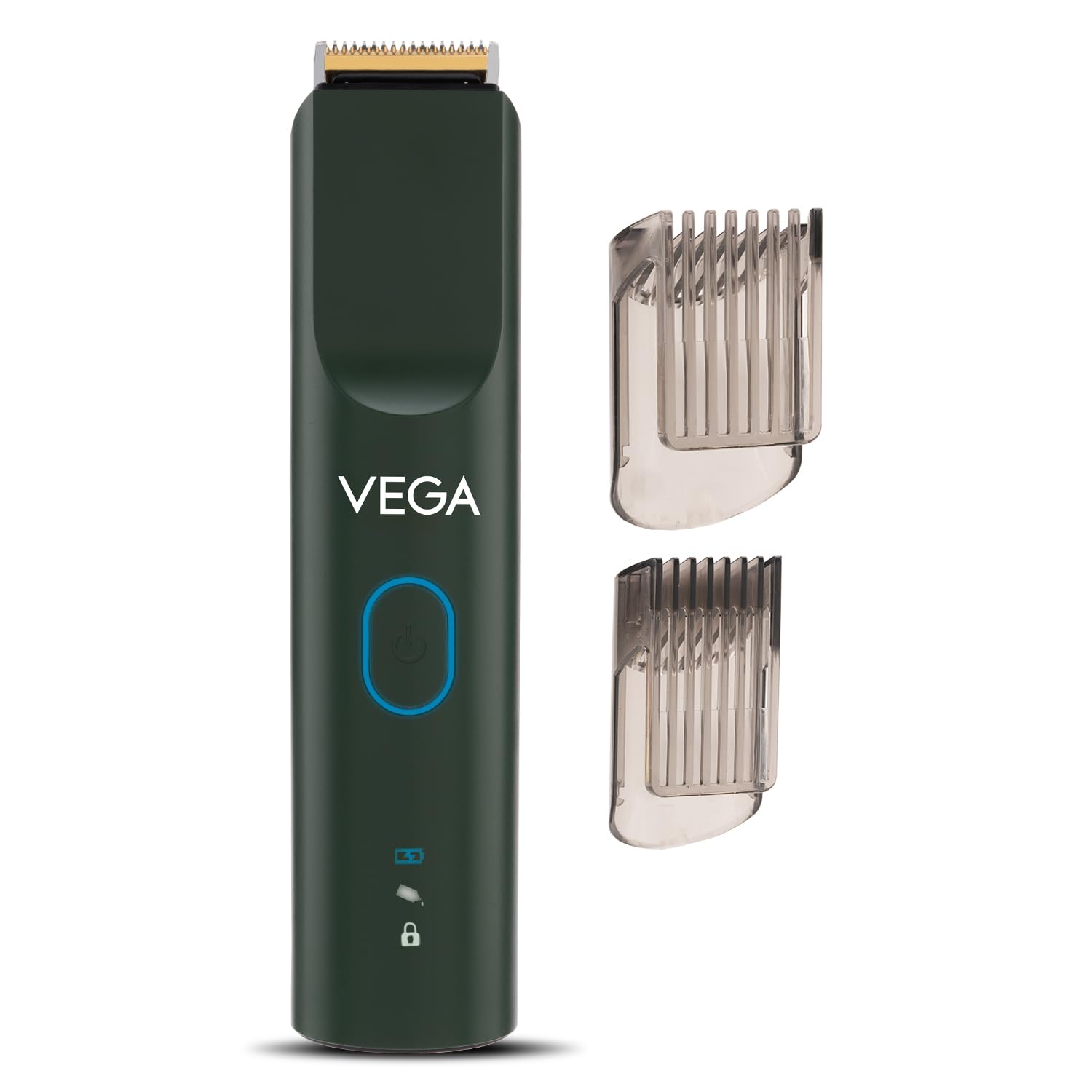
Image: The VEGA SmartOne S3 Beard Trimmer in green, shown with its two transparent comb attachments. The trimmer features a power button with a blue ring and indicator lights for battery and travel lock.
Samfurin Ƙarsheview
The VEGA SmartOne S3 Beard Trimmer is designed for precise beard grooming and styling. It incorporates AI SmartTrim Technology for smart memory function and offers multiple speed settings for a customized experience. Its robust design includes a skin-friendly titanium blade and IPX7 waterproofing for easy cleaning.
Mabuɗin Abubuwan Maɓalli
- Trimmer Body: Ergonomic design with rubberized grip for comfortable handling.
- Titanium Blade: Skin-friendly and durable for efficient trimming.
- Maɓallin Wuta: Controls power and speed modes.
- Fitilar Nuni: Display battery status and travel lock activation.
- Comb Attachments (2): For adjusting trimming length.
- Cable Cajin: USB cable for convenient charging.
- Tsabtace Brush: For removing hair debris from the blade.
- Man shafawa: For maintaining blade performance.

Image: Illustration showing the contents included in the product box: two comb attachments, a small bottle of lubricating oil, a cleaning brush, and a USB charging cable.
Siffofin
- AI SmartTrim Technology with Smart Memory Function: The trimmer remembers your last used speed setting for convenience.

Image: A graphic illustrating the AI SmartTrim Technology, highlighting its ability to remember the last used speed setting, with text "Set. Style. Remember." and a stylized trimmer icon.
- 3 Unique Speed Modes (Eco, Pro, Max): Customize your trimming experience with different power levels.

Image: Visual representation of the three distinct speed modes: Eco (indicated by light blue), Pro (indicated by green), and Max (indicated by dark blue), each with a power button icon.
- 40 Length Settings (0.5mm - 20mm): Achieve precise beard styles with a wide range of length options using the two comb attachments.

Image: A graphic highlighting the 40 length settings available, ranging from 0.5mm to 20mm, for precise trimming.
- 5 Minutes Quick Charge: Provides 10 minutes of runtime after a rapid 5-minute charge, ideal for quick touch-ups.

Image: A visual demonstrating the quick charge capability, indicating 5 minutes of charging provides 10 minutes of runtime.
- 160 Minutes Runtime & 90 Minutes Charging Time: Baturi mai ɗorewa don amfani mai tsawo.

Image: A clock-face graphic illustrating the impressive 160 minutes of runtime and the efficient 90 minutes of charging time for the trimmer.
- IPX7 Mai hana ruwa: Allows for safe use around water and easy cleaning under running water.

Image: The trimmer partially submerged in water with splashes, visually representing its IPX7 waterproof rating.
- Kulle Tafiya: Yana hana kunnawa cikin haɗari yayin tafiya.

Image: A graphic depicting a lock icon with an arrow pointing to the trimmer, indicating the travel lock feature.
Saita
- Na farko Cajin: Before first use, fully charge the trimmer for approximately 90 minutes. Connect the USB charging cable to the trimmer and a compatible USB power adapter (not included). The indicator light will show charging status.

Image: A green battery icon with a lightning bolt, symbolizing the charging process.
- Attach Comb Attachment: Select the desired comb attachment based on your preferred trimming length. Align the comb with the trimmer head and push it firmly until it clicks into place.
- Adjust Length Setting: The trimmer offers 40 length settings. Adjust the integrated length wheel or slide on the comb attachment to your desired length (0.5mm to 20mm).
Umarnin Aiki
- Kunnawa/Kashewa: Press and hold the power button for a few seconds to turn the trimmer on or off.
- Zaɓi Yanayin Sauri: Briefly press the power button to cycle through the three speed modes: Eco (Light Blue), Pro (Green), and Max (Dark Blue). The Smart Memory Function will remember your last selected speed mode when you turn the trimmer off and on again after 5 seconds.

Image: Individual icons representing the Eco, Pro, and Max speed settings, each with a distinct color indicator.
- Gyara:
- Tabbatar gemun ku ya bushe kuma ya bushe.
- Hold the trimmer with the blade flat against your skin.
- Move the trimmer slowly against the direction of hair growth for an even trim.
- For detailing or shaping, remove the comb attachment and use the bare blade carefully.
- Kunna Kulle Balaguro: To activate the travel lock, press and hold the power button for approximately 3 seconds until the lock icon illuminates. To deactivate, repeat the process.
Kulawa
Tsaftacewa da kulawa akai-akai zai tabbatar da kyakkyawan aiki da kuma tsawaita rayuwar trimmer ɗin ku.
- Tsaftace Ruwa: After each use, remove the comb attachment. Use the provided cleaning brush to brush away any loose hairs from the blade and trimmer head. Since the trimmer is IPX7 waterproof, you can rinse the blade head under running water. Ensure the trimmer is turned off before rinsing.

Image: An icon indicating the product's waterproof capability, suitable for rinsing.
- Lubricating Blades: Periodically, apply a small drop of the provided lubricating oil to the blades. Turn on the trimmer for a few seconds to distribute the oil evenly. This helps maintain blade sharpness and smooth operation.
- Ajiya: Store the trimmer in a cool, dry place, away from direct sunlight and moisture. Ensure it is clean and dry before storing.
Shirya matsala
| Matsala | Dalili mai yiwuwa | Magani |
|---|---|---|
| Trimmer baya kunna. | Battery is depleted. Travel lock is activated. | Charge the trimmer. Deactivate the travel lock by pressing and holding the power button for 3 seconds. |
| Rashin aikin datsawa. | Blades are clogged with hair. Blades need lubrication. | A tsaftace ruwan wukake sosai. A shafa man shafawa a kan ruwan wukake. |
| Trimmer yana yin amo mai ban mamaki. | Blades are dry or obstructed. | Clean and lubricate the blades. Ensure no foreign objects are lodged in the blade mechanism. |
| Trimmer does not charge. | Charging cable or adapter faulty. Connection is loose. | Check the charging cable and adapter. Ensure the cable is securely connected to both the trimmer and the power source. |
Ƙayyadaddun bayanai
| Siffar | Daki-daki |
|---|---|
| Lambar Samfura | VHTH-36 |
| Kayan Ruwa | Titanium |
| Tsawon Saituna | 40 (0.5mm zuwa 20mm) |
| Lokacin gudu | Har zuwa minti 160 |
| Lokacin Caji | 90 minutes (Full Charge) |
| Saurin Caji | 5 minutes charge for 10 minutes runtime |
| Kimar hana ruwa | IPX7 |
| Tushen wutar lantarki | Ana Karfin Batir |
| Nauyin Abu | 148g ku |
| Girma (LxWxH) | 15.6 x 3.6 x 3.4 cm |
| Ƙasar Asalin | Indiya |
Garanti da Taimako
Your VEGA SmartOne S3 Beard Trimmer comes with a Garanti na Shekara 1 daga ranar sayan, yana rufe lahani na masana'antu.

Image: A shield icon with "1 YEAR WARRANTY" text, signifying the product's warranty period.
Tallafin Abokin Ciniki
For any product-related queries, service requests, or warranty claims, please contact the manufacturer:
- Mai ƙira: RISE APPLIANCES PVT LTD
- Adireshi: LOT NO. 31, SECTOR-155, 3RD FLR, NOIDA-201310, U.P. (INDIA)
- Lambar Tuntuɓa: 91-080-69496949
Da fatan za a riƙe rasidin sayan ku a matsayin shaidar siyan don dalilai na garanti.


