1. Gabatarwa
This manual provides detailed instructions for the proper use and maintenance of your Arlec Remote SS3136. This remote control is specifically designed to operate the Arlec Wall Fan AWDC001HA, offering convenient and effortless control over your fan's functions. Please read this manual thoroughly before first use to ensure optimal performance and longevity of your device.
2. Kayan Samfura
- Sauƙin Sarrafa: Utilizes Infrared technology for seamless communication with your Arlec Wall Fan AWDC001HA from up to 10 meters away.
- Ƙarfin Dorewa: Requires 3 alkaline batteries for extended use.
- Zane Mai Kyau: Finished in a sophisticated black color.
- Daidaituwar Mahimmanci: Designed to control Arlec Wall Fans, specifically model AWDC001HA.
- Aiki Mai Sauƙi: Features 3 intuitive buttons for easy fan control.
3. Abubuwan Kunshin
Tabbatar cewa duk abubuwa suna nan a cikin kunshin:
- 1 x Arlec Remote SS3136
- 1 x Wall Mount Holder
- 2 x Masu Haɗawa
- 2 x Matakan Bango
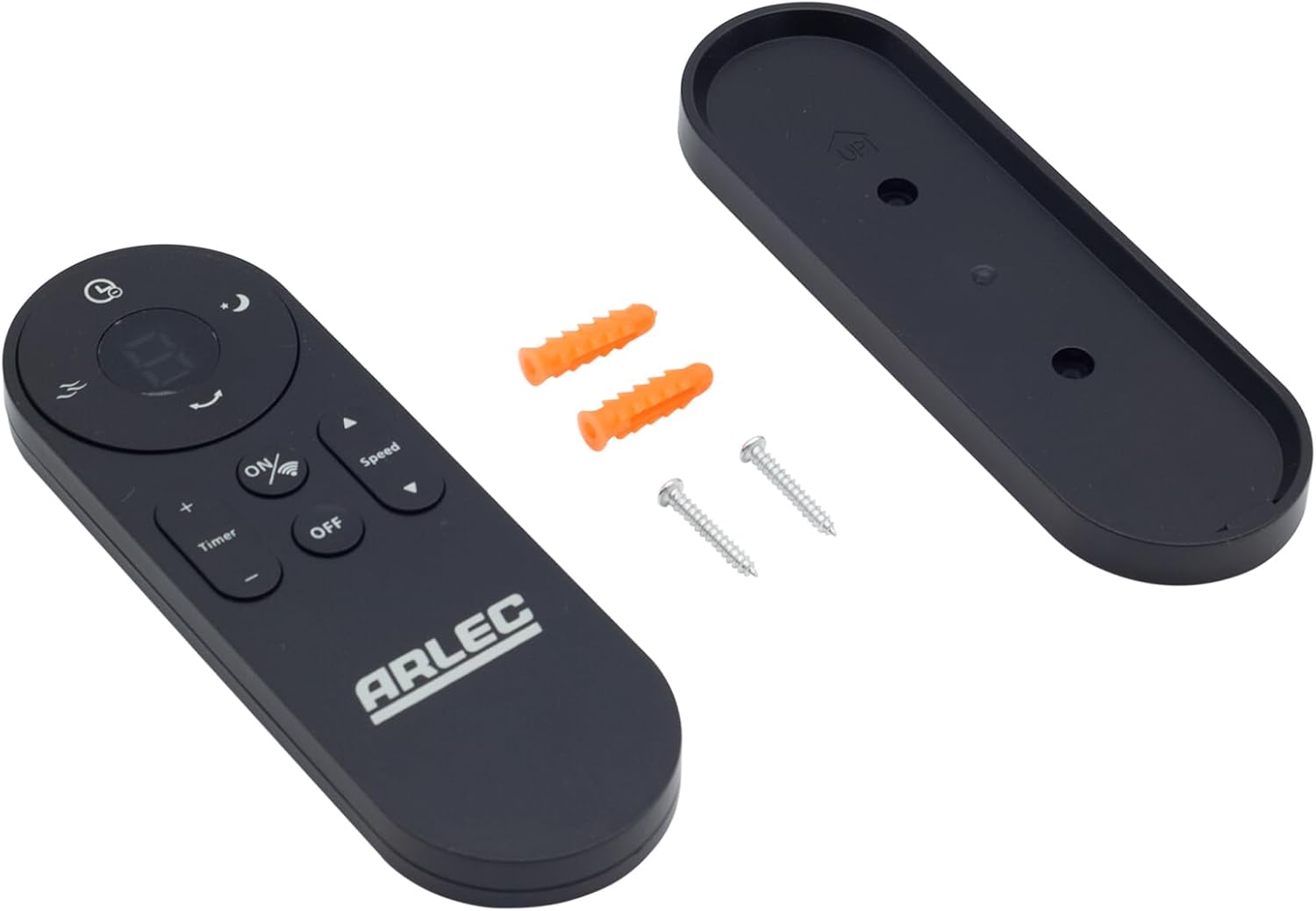
Image: Arlec Remote SS3136 shown with its included wall mount holder, two mounting screws, and two wall plugs, indicating the complete package contents.
4. Saita
4.1 Shigar da Baturi
- Nemo sashin baturi a bayan ramut.
- Bude murfin ɗakin baturi.
- Insert 3 Alkaline batteries (not included) into the compartment, ensuring the correct polarity (+ and -) as indicated inside the compartment. The remote requires 3 Volts (DC).
- Rufe murfin ɗakin baturi amintacce.
4.2 Wall Mount Installation (Optional)
- Choose a suitable location on a wall for the remote holder.
- Mark the positions for the two mounting screws using the holder as a template.
- Drill pilot holes at the marked positions. Insert the wall plugs if drilling into drywall or masonry.
- Secure the wall mount holder to the wall using the provided screws.
- Place the remote control into the installed holder for convenient storage.
5. Umarnin Aiki
The Arlec Remote SS3136 features a simple 3-button layout for controlling your Arlec Wall Fan AWDC001HA. Ensure there is a clear line of sight between the remote and the fan's infrared receiver for optimal performance.

Hoto: Rufewa view of the Arlec Remote SS3136, highlighting its three main control buttons: ON/OFF, Speed, and Timer.
- Maballin KUNNA/KASHE: Danna wannan maɓallin don kunna ko kashe fan.
- Maɓallin Gudu: Use this button to cycle through the available fan speed settings (e.g., Low, Medium, High).
- Maɓallin lokaci: Press this button to set or adjust the fan's timer function. Refer to your Arlec Wall Fan AWDC001HA manual for specific timer intervals.
The remote operates using Infrared (IR) technology. Point the remote directly towards the fan's IR receiver. The effective operating range is up to 10 meters (approximately 33 feet).
6. Kulawa
- Tsaftacewa: Shafa ramut ɗin tare da taushi, bushe bushe. Kada a yi amfani da masu tsabtace abrasive ko kaushi.
- Madadin Baturi: Replace batteries when the remote's performance degrades or it stops responding. Always replace all 3 batteries at the same time with new alkaline batteries.
- Ajiya: Idan ba za a yi amfani da na'urar nesa na tsawon lokaci ba, cire batirin don hana zubewa. A adana a wuri mai sanyi da bushewa.
7. Shirya matsala
| Matsala | Dalili mai yiwuwa | Magani |
|---|---|---|
| Remote not responding to fan. |
|
|
| Maɓalli suna m ko ba sa amsawa. | Datti ko tarkace a ƙarƙashin maɓallan. | Clean the remote surface with a soft, dry cloth. Avoid liquids. |
8. Ƙayyadaddun bayanai
| Siffa | Daki-daki |
|---|---|
| Samfura | SS3136 |
| Mai ƙira | Arlec |
| Na'urori masu jituwa | Arlec Wall Fan AWDC001HA |
| Fasahar Haɗuwa | Infrared (IR) |
| Adadin Maɓalli | 3 |
| Nau'in Mai Gudanarwa | Ikon Maɓalli |
| Nau'in Baturi | Alkaline (3 required) |
| Voltage | 3V (DC) |
| Range Aiki | Har zuwa mita 10 |
9. Garanti da Tallafawa
For warranty information and technical support, please refer to the documentation provided with your Arlec Wall Fan AWDC001HA or contact Arlec customer service directly. Keep your purchase receipt as proof of purchase.
Don ƙarin taimako, da fatan za a ziyarci jami'in masana'anta website ko tuntuɓi layin tallafin abokin ciniki.


