Gabatarwa
This manual provides detailed instructions for the WOLFANG GA300 Action Camera. It covers setup, operation, maintenance, and specifications to ensure optimal performance and user experience. The GA300 is designed to capture high-quality video and photos in various environments, including underwater, with advanced stabilization and versatile features.
Me ke cikin Akwatin
The WOLFANG GA300 Action Camera package includes the following items:
- 1x WOLFANG GA300 Action Camera
- 1 x Ikon nesa
- 2 x 1350mAh baturi
- 1x Matsalar Rashin Kwafi
- 1x Bicycle Stand
- 5x Mount
- 2x 2-sided tape
- 2x Helmet Mount
- 4x Bandages
- 5x Tethers
- 1 x kebul na USB
- 1x Lens Cloth
- 1 x Jagorar Magana mai sauri
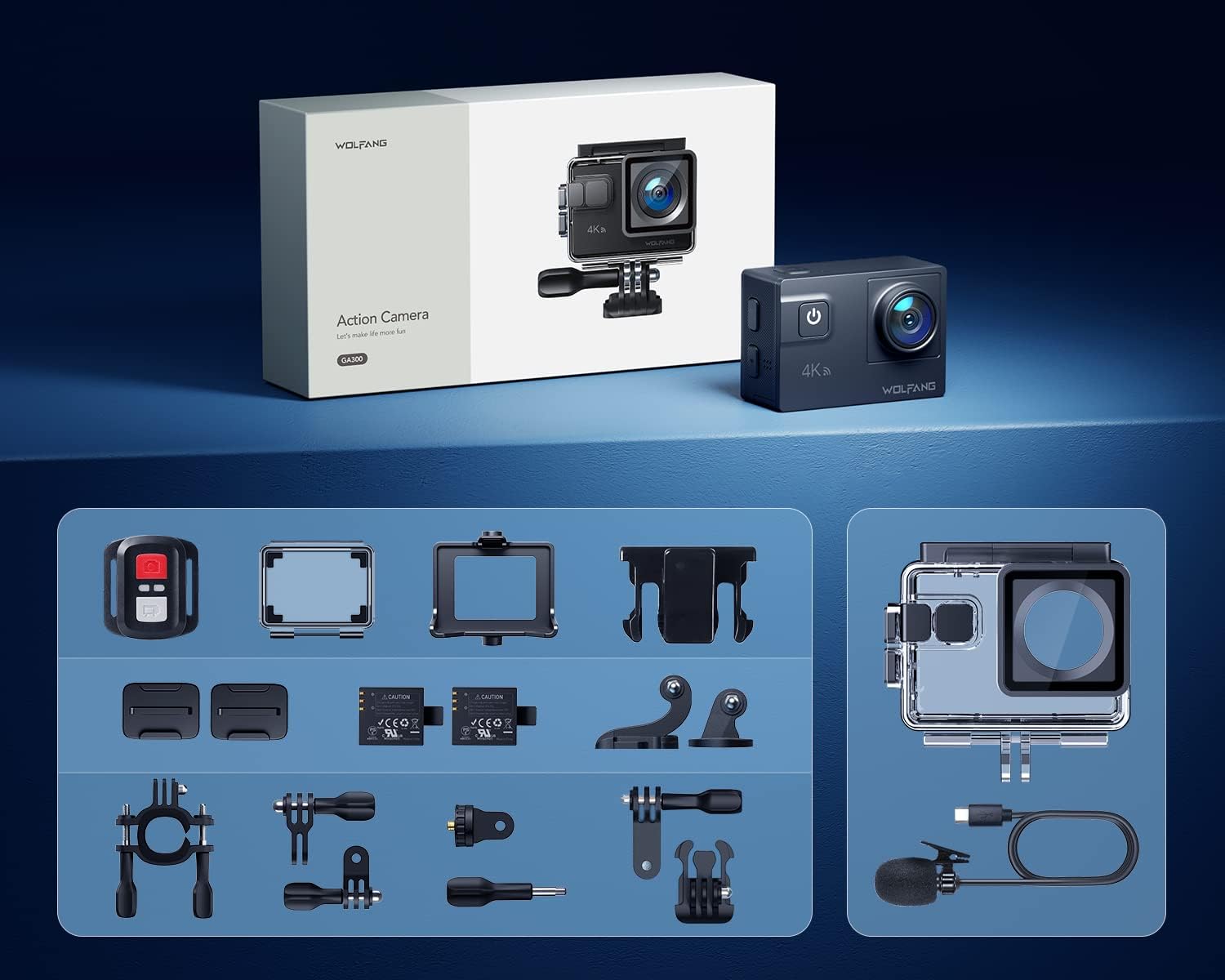
Image: All components included in the WOLFANG GA300 Action Camera kit, neatly laid out.
Samfurin Ƙarsheview
The WOLFANG GA300 Action Camera features a compact design with intuitive controls and multiple connectivity options.
Abubuwan Kamara
- Allon gaba: For live preview and status indicators.
- Rear Touchscreen (2-inch): For menu navigation, settings adjustment, and playback.
- Button Wuta / Yanayi: To power on/off and switch between modes.
- Maɓallin Rufe/Ok: To start/stop recording or take photos.
- Kebul na USB-C: Don caji da canja wurin bayanai.
- Mini HDMI Port: Don fitarwa bidiyo zuwa nunin waje.
- Shigar da makirufo: For connecting the external microphone.
- Ramin katin SD Micro: Supports up to 128GB cards (32GB included).
- Dakin Baturi: Houses the removable 1350mAh battery.

Image: The WOLFANG GA300 camera, showcasing its compact size and key accessories.
Saita
1. Inserting Battery
Open the battery compartment cover located at the bottom of the camera. Insert a fully charged 1350mAh battery, ensuring the contacts align correctly. Close the cover securely.
2. Inserting Micro SD Card
Locate the Micro SD card slot on the side of the camera. Insert a compatible Micro SD card (Class 10 or higher, up to 128GB) with the contacts facing the correct direction until it clicks into place.
3. Cajin Kamara
Connect the camera to a USB power source using the provided USB-C cable. The charging indicator will illuminate. A full charge typically takes a few hours. Two batteries are included, each providing approximately 90 minutes of recording time.
4. Haɗa Akwatin Ruwa Mai Rage Ruwa
For underwater use or protection against dust and impact, place the camera inside the waterproof case. Ensure the case is properly sealed before use. The case allows the camera to be waterproof up to 40 meters.

Image: The WOLFANG GA300 in its waterproof housing, demonstrating its 40M waterproof capability.
5. Attaching Mounts
Utilize the various included mounts (bicycle stand, helmet mounts, general mounts) to secure your camera for different activities. Ensure all mounts are firmly attached to prevent accidental detachment.

Image: A person on a mountain bike with the camera mounted, illustrating helmet mount usage.
Aiki da Kamara
1. Kunnawa / Kashewa
Latsa ka riƙe maɓallin wuta/Yanayin don kunna ko kashe kamara.
2. Amfani da Touchscreen
Navigate through menus and settings by swiping and tapping on the 2-inch rear touchscreen. The responsive touchscreen allows for easy operation.
3. Rikodin Bidiyo
Select video mode from the menu. Press the Shutter/OK button to start recording. Press again to stop. The camera supports 4K at 60FPS, 1080P at 120FPS, and 720P at 240FPS for various recording needs.
4. Ɗaukar Hoto
Switch to photo mode. Press the Shutter/OK button to take a 24MP photo.
5. Amfani da Remote Control
The included remote control allows you to start/stop video recording and take photos from a distance of up to 10 meters.
6. Wi-Fi Connectivity and App
Enable Wi-Fi on the camera and connect it to your smartphone via the IBK Cam app. This allows for live preview, remote control, and easy transfer of media to your device.

Image: The camera's live view displayed on a smartphone, demonstrating Wi-Fi connectivity.
7. Ayyuka na Musamman
- Sannun motsi: Capture fast-paced action in slow motion.
- Lokaci-lokaci: Condense long events into short, dynamic videos.
- Yanayin Fashewa: Take multiple photos in quick succession.
- Yanayin nutse: Enhances underwater footage by correcting color balance.

Hoto: Visual examples of Time Lapse, Loop Recording, Slow Motion, and Long Exposure modes.
8. Daidaitacce View Lens na kusurwa
The camera features an adjustable view angle lens, allowing you to switch between Wide, Medium, and Narrow fields of view to suit your shooting needs.

Image: The adjustable view angle feature, demonstrating different perspectives from Wide to Narrow.
9. 6-Axis EIS Stabilization & 8x Zoom
The advanced 6-axis Electronic Image Stabilization (EIS) ensures your videos remain smooth and stable, even during dynamic activities. The 8x zoom function allows for precise control over shooting distance and capturing distant details.
Kulawa
- Harka Mai hana ruwa: Regularly inspect the waterproof case for any damage or debris on the seal. Clean with fresh water after saltwater use and allow to air dry.
- Kulawar Lens: Use the provided lens cloth to gently clean the camera lens and waterproof case lens. Avoid abrasive materials.
- Adana Baturi: A ajiye batura a wuri mai sanyi da bushewa. Don ajiya na dogon lokaci, a caja batura zuwa kimanin kashi 50%.
- Tsabtace Gabaɗaya: Wipe the camera body with a soft, dry cloth. Avoid using harsh chemicals.
Shirya matsala
- Kamara Baya Kunnawa: Ensure the battery is fully charged and correctly inserted. Try using the second included battery.
- Abubuwan Rikodi: Check if the Micro SD card is properly inserted and has sufficient free space. Ensure the card is Class 10 or higher.
- Rashin ingancin Sauti: If using the external microphone, ensure it is securely plugged into the correct port. Check camera settings to confirm external mic is selected.
- Matsalolin Haɗin Wi-Fi: Restart both the camera and your smartphone. Ensure the IBK Cam app is up to date.
- Zubar Ruwa: Immediately remove the camera from the waterproof case. Inspect the case for cracks or damage to the rubber seal. Do not use the case if damaged.
Ƙayyadaddun bayanai
| Siffar | Ƙayyadaddun bayanai |
|---|---|
| Alamar | WOLFANG |
| Lambar Samfura | GA300 |
| Ƙimar Ɗaukar Bidiyo | 4K 60FPS, 4K 30FPS, 2.7K 30FPS, 1080P 120FPS, 1080P 60FPS, 1080P 30FPS, 720P 240FPS, 720P 120FPS, 720P 60FPS |
| Tsarin Hoto | 24MP |
| Zurfin Mai hana ruwa | 40M (with included case) |
| Tabbatar da Hoto | 6-Axis EIS |
| Zuƙowa | 8x |
| Girman allo | 2 Inches (Touchscreen) |
| Haɗuwa | Wi-Fi, USB-C, Mini HDMI |
| Adana | Micro SD (up to 128GB, 32GB included) |
| Baturi | 2x 1350mAh Lithium Ion (included) |
| Nauyin Abu | 1.19 fam |
| Girman samfur | 2.36 x 1.65 x 0.98 inci |
Bidiyoyin Samfur na hukuma
WOLFANG GA300 Audio Test
Video: An audio test demonstrating the sound recording capabilities of the WOLFANG GA300 Action Camera, including both internal and external microphone performance.
WOLFANG Action Camera 4K 60FPS 24MP Review
Bidiyo: Cikakken bayaniview of the WOLFANG GA300 Action Camera, highlighting its 4K 60FPS video and 24MP photo capabilities, along with other features.


