1. Samfurin Ya Ƙareview
The Vorago BSP-500-V2 is a portable Bluetooth speaker designed for robust performance and durability. It features IPX5 water resistance, making it suitable for various environments, including outdoor adventures and parties. This manual provides detailed instructions for setting up, operating, and maintaining your speaker.
Mabuɗin fasali:
- Haɗin kai na Gaskiya Mara waya (TWS): Connect two BSP-500-V2 speakers for an immersive stereo sound experience.
- Tsawon Rayuwar Baturi: Enjoy up to 7 hours of music playback at 70% volume, thanks to its 2000 mAh battery.
- USB Type-C Cajin: Convenient and modern USB-C port for charging.
- Haɗin kai iri-iri: Supports Bluetooth for wireless streaming and a 3.5mm auxiliary input for wired connections.
- Juriya na Ruwa IPX5: Protected against low-pressure water jets from any direction.
Abubuwan Kunshin:
- Vorago BSP-500-V2 Kakakin Bluetooth
- USB Type-C Cajin caji
- 3.5mm Audio Cable
- Jagorar mai amfani (wannan takaddar)
Tsarin samfur:

Hoto 1.1: Gaba view of the Vorago BSP-500-V2 Bluetooth speaker, showcasing its mesh grille and central Vorago logo.

Hoto 1.2: Angled view of the speaker, highlighting its robust, rectangular design and integrated carrying strap.

Hoto 1.3: Sama view showing the control panel with power, volume down, play/pause, and volume up buttons.
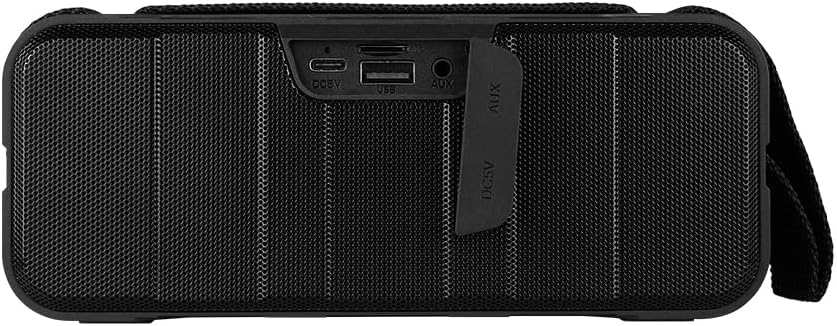
Hoto 1.4: Na baya view of the speaker, showing the protective flap covering the input ports.

Figure 1.5: Close-up of the input ports, including DC 5V (USB-C), USB-A, and AUX (3.5mm) inputs, protected by a rubber cover.
2. Bayanin Tsaro
- Kada a bijirar da lasifikar zuwa matsanancin zafi (zafi ko sanyi).
- Guji faduwa ko ƙaddamar da lasifikar zuwa tasiri mai ƙarfi.
- Keep the speaker away from direct sunlight and heat sources.
- Do not disassemble, repair, or modify the speaker yourself. This will void the warranty.
- Ensure the port cover is securely closed when using the speaker near water to maintain IPX5 water resistance.
- Do not immerse the speaker in water. IPX5 rating protects against splashes and light rain, not submersion.
- Yi amfani da kebul na caji da aka bayar ko kebul na USB Type-C mai takardar shaida kawai don caji.
- A wanke lasifikar da kyalle mai laushi da busasshe. Kar a yi amfani da masu tsaftace kayan gogewa ko kuma masu narkewa.
3. Saita
3.1 Cajin Shugaban Majalisa
- Open the protective rubber cover on the rear of the speaker to access the charging port.
- Connect the USB Type-C end of the charging cable to the speaker's DC 5V port.
- Haɗa dayan ƙarshen kebul na USB zuwa adaftar wutar USB (ba a haɗa ba) ko tashar USB ta kwamfuta.
- Hasken mai nuna caji zai haskaka yayin caji kuma ya kashe lokacin da aka cika cikakke.
- Once charging is complete, securely close the protective rubber cover to maintain water resistance.
3.2 Kunnawa / Kashewa
- Don Kunnawa: Latsa ka riƙe Maɓallin wuta on the top panel for approximately 3 seconds until you hear an audible prompt.
- Don Kashe: Latsa ka riƙe Maɓallin wuta for approximately 3 seconds until you hear an audible prompt.
3.3 Haɗin Bluetooth
- Ensure the speaker is powered on. It will automatically enter Bluetooth pairing mode, indicated by a flashing LED light.
- Akan na'urarka (wayar hannu, kwamfutar hannu, kwamfutar tafi-da-gidanka), kunna Bluetooth kuma bincika samammun na'urori.
- Select "BSP-500-V2" from the list of found devices.
- Once successfully paired, the speaker will emit an audible confirmation, and the LED light will stop flashing and remain solid.
- Mai magana zai sake haɗawa ta atomatik zuwa na'urar da aka haɗa ta ƙarshe lokacin da aka kunna, idan na'urar tana cikin kewayo kuma an kunna Bluetooth.
3.4 Haɗin Sitiriyo Mara waya ta Gaskiya (TWS).
TWS allows you to connect two BSP-500-V2 speakers together for a true stereo sound experience.
- Ensure both BSP-500-V2 speakers are powered on and not connected to any other Bluetooth device.
- On one of the speakers (this will be the primary speaker), double-press the Maɓallin Kunna/Dakata. Mai lasifikar zai shiga yanayin haɗa TWS.
- The two speakers will automatically search for and connect to each other. You will hear an audible confirmation once they are successfully paired.
- Once TWS is established, connect your device to the primary speaker via Bluetooth as described in Section 3.3.
- To disconnect TWS, double-press the Maɓallin Kunna/Dakata akan kowane mai magana.
3.5 Auxiliary (AUX) Connection
For devices without Bluetooth, you can use the 3.5mm audio cable.
- Open the protective rubber cover on the rear of the speaker.
- Connect one end of the 3.5mm audio cable to the speaker's AUX port.
- Haɗa ɗayan ƙarshen kebul ɗin zuwa wurin fitarwa na sauti na na'urarka.
- Mai magana zai canza ta atomatik zuwa yanayin AUX.
- Once disconnected, securely close the protective rubber cover.
4. Umarnin Aiki
4.1 Ayyukan Maɓalli:
| Maɓalli | Aiki (Short Press) | Aiki (Long Press) |
|---|---|---|
| Maɓallin wuta | N/A | Kunna/Kashe Wuta |
| Maɓallin saukar ƙara | Rage girma | Waƙar da ta gabata |
| Maɓallin Kunna/Dakata | Kunna/Dakata Kiɗa, Amsa/Ƙarshen Kira | Reject Call, Double-press for TWS Pairing |
| Maɓallin Ƙara Ƙara | Ƙara Girma | Waƙa ta gaba |
5. Kulawa
- Tsaftacewa: Use a soft, dry, lint-free cloth to clean the speaker's surface. For stubborn dirt, slightly dampA shafa ruwan a cikin zane. Kada a yi amfani da sinadarai masu kauri, abubuwan tsaftacewa, ko sabulun wanke-wanke masu ƙarfi.
- Kulawar Juriya na Ruwa: Always ensure the rubber port cover on the back of the speaker is fully and securely sealed when using the speaker outdoors or near water. This maintains its IPX5 water resistance. After exposure to water, wipe the speaker dry before opening the port cover for charging or auxiliary connections.
- Ajiya: When not in use for extended periods, store the speaker in a cool, dry place, away from direct sunlight and extreme temperatures. It is recommended to charge the speaker fully before storing and to recharge it every few months to maintain battery health.
- Kulawar Baturi: To prolong battery life, avoid fully discharging the battery frequently. Charge the speaker when the low battery indicator is active.
6. Shirya matsala
| Matsala | Dalili mai yiwuwa | Magani |
|---|---|---|
| Kakakin ba ya kunna wuta. | Ƙananan baturi. | Charge the speaker fully using the provided USB Type-C cable. |
| Ba za a iya haɗa ta Bluetooth ba. | Speaker is not in pairing mode; Device's Bluetooth is off; Speaker is already connected to another device; Device is too far from speaker. | Ensure speaker is powered on and flashing (pairing mode). Turn on Bluetooth on your device. Disconnect from other devices. Move device closer to speaker (within 10 meters). |
| Babu sauti ko ƙaramin ƙara. | Volume too low on speaker or device; Incorrect input mode; Speaker not connected. | Increase volume on both speaker and connected device. Ensure correct mode (Bluetooth or AUX) is active. Verify successful Bluetooth pairing or AUX cable connection. |
| Saurin murdiya | Volume too high; Device too far from speaker; Interference. | Reduce volume on speaker and/or device. Move device closer to speaker. Avoid obstacles between speaker and device. |
| Haɗin TWS ya gaza. | Speakers are already paired to a device; Speakers are too far apart. | Ensure both speakers are disconnected from any Bluetooth devices. Place speakers close to each other during TWS pairing. |
7. Ƙayyadaddun bayanai
| Siffar | Daki-daki |
|---|---|
| Sunan Samfura | Saukewa: BSP-500-V2 |
| Nau'in Kakakin | Multimedia |
| Siffa ta Musamman | Bluetooth |
| An Shawarar Amfani | For music players |
| Na'urori masu jituwa | Laptop, MP3 Player, Smartphone, Tablet |
| Nau'in Mai Gudanarwa | Maɓalli |
| Kewaye Sauti Kanfigareshan | 5.0 |
| Rayuwar Baturi | 7 Awanni |
| Abubuwan Haɗe da | Mai magana |
| Girman samfur | 5D x 15W x 18 santimita |
| Nauyin samfur | 1 kilogiram |
| Mai hana ruwa ruwa | Ee (IPX5) |
| Ƙarfin baturi | 2000 mAh |
| AmpNau'in lifier | Mai aiki |
| Tushen wutar lantarki | Baturi |
| Amsa Mitar | 180 Hz |
| Fasahar Haɗuwa | Bluetooth |
| Yanayin Fitarwa na Audio | Sitiriyo |
| Nau'in hawa | Dutsen Tabletop |
8. Garanti da Tallafawa
The Vorago BSP-500-V2 Bluetooth Speaker comes with a limited warranty. Please refer to the warranty card included with your product for specific terms and conditions, or visit the official Vorago webshafin don ƙarin bayani.
For technical support, troubleshooting assistance, or warranty claims, please contact Vorago customer service through their official channels. You can find more information and contact details on the Vorago Brand Store on Amazon ko jami'insu website.
Da fatan za a riƙe shaidar siyan ku don dalilai na garanti.