1. Samfurin Ya Ƙareview
The charmast 20000mAh Portable Charger (Model C2065) is a high-capacity power bank designed to charge multiple devices on the go. It features built-in USB-C, Lightning, and Micro-USB cables, along with additional USB-A and USB-C ports, providing versatile charging options for a wide range of electronic devices. A digital display indicates the remaining battery percentage.

Image 1.1: The charmast 20000mAh Portable Charger (Model C2065) in Navy.
2. Abin da ke cikin Akwatin
Bayan buɗe kunshin, tabbatar da cewa duk abubuwan suna nan:
- 1 x charmast 20000mAh Portable Charger (Model C2065)
- 1 x Manhajar mai amfani
- 1 x Aljihunan Balaguro
3. Ƙayyadaddun bayanai
| Siffar | Daki-daki |
|---|---|
| Lambar Samfura | C2065 |
| Ƙarfin baturi | miliyan 20000amp Awanni (mAh) |
| Girman samfur | 6.3 x 2.85 x 0.75 inci |
| Nauyin Abu | 12 oz |
| Fitar Tashoshi | Built-in USB-C, Lightning, Micro-USB cables; 2x USB-A ports; 1x USB-C port (Input/Output) |
| Saurin Caji | Cajin Sauri na PD 22.5W |
| Siffofin Musamman | Built-in cables, Digital Display, Fast Charging, High Capacity, Slim design |
4. Saita
4.1 Farkon Cajin Bankin Wutar Lantarki
Before first use, fully charge the power bank. The digital display will show the charging progress from 0% to 100%.
- Amfani da Kebul ɗin USB-C da aka gina a ciki: Connect the built-in USB-C cable to a compatible USB wall adapter (not included). Charging time is approximately 6 hours.
- Amfani da Kebul ɗin USB-A da aka gina a ciki: Connect the built-in USB-A cable to a compatible USB wall adapter (not included). Charging time is approximately 12 hours.
- Using an External Cable (USB-C Input): Connect a USB-C cable (not included) to the power bank's USB-C input port and a compatible 18W PD/QC wall adapter. Charging time is approximately 6 hours.
- Using an External Cable (Micro-USB Input): Connect a Micro-USB cable (not included) to the power bank's Micro-USB input port and a compatible 18W PD/QC wall adapter. Charging time is approximately 6 hours.

Image 4.1: Methods for recharging the power bank.
5. Umarnin Aiki
5.1 Na'urorin Caji
The power bank offers multiple ways to charge your devices:
- Amfani da Gina-Ciban igiyoyi: The power bank includes built-in Lightning, USB-C, and Micro-USB cables. Simply pull out the appropriate cable and connect it directly to your device.
- Using USB-A Ports: Connect your device's USB-A charging cable to one of the two USB-A output ports on the power bank.
- Amfani da Tashar USB-C: Connect your device's USB-C charging cable to the USB-C output port on the power bank. This port also supports input for recharging the power bank.

Image 5.1: Built-in cables for various devices.
5.2 Cajin lokaci ɗaya
The power bank can charge up to six devices simultaneously using a combination of its built-in cables and external USB ports.

Image 5.2: Charging multiple devices.
5.3 Saurin Caji
The power bank supports 22.5W PD fast charging. When connected to a compatible device, it can charge up to 50% in approximately 30 minutes. Ensure your device and cable support fast charging for optimal performance.
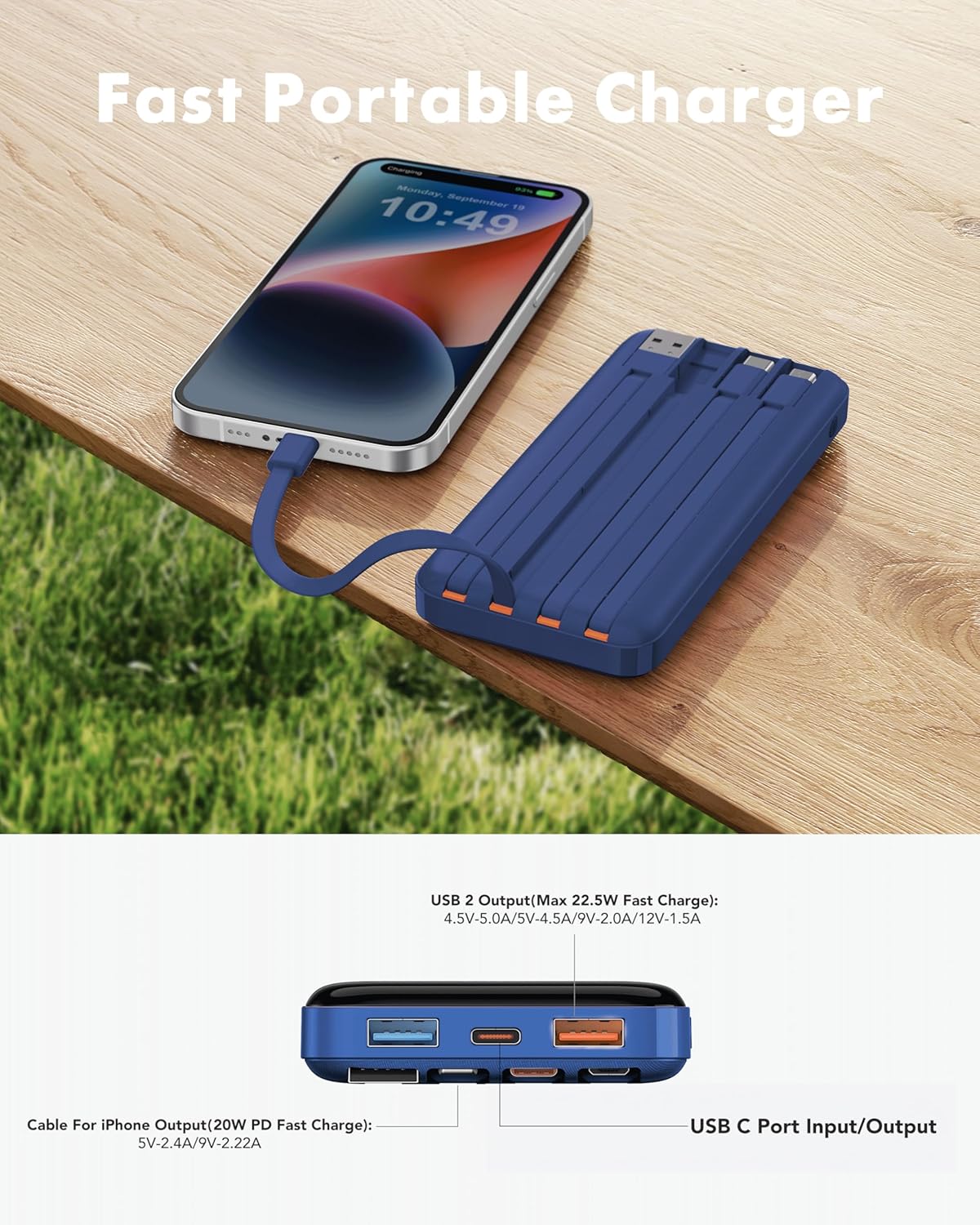
Image 5.3: Fast charging in action.
5.4 Nunin dijital
The integrated digital display shows the precise remaining battery percentage (0-100%) of the power bank. This allows for accurate monitoring of the power bank's charge level.

Image 5.4: Digital display showing battery percentage.
5.5 Low-Current Mode
For charging low-power devices such as Bluetooth earphones, smartwatches, or fitness trackers, activate the low-current mode. Press and hold the power button for 5 seconds to engage this mode, ensuring safe and efficient charging for smaller electronics.
6. Bayanin Tsaro
- Kada a fallasa wurin ajiyar wutar lantarki ga yanayin zafi mai tsanani (zafi ko sanyi), hasken rana kai tsaye, ko wuta.
- A guji faɗuwa, wargazawa, ko gyara na'urar.
- A kiyaye daga ruwa da danshi mai yawa.
- Ajiye a wuri mai sanyi, bushe lokacin da ba a amfani da shi.
- A kiyaye nesa da yara.
- Flight Travel: This power bank meets airline safety standards for carry-on luggage. Always pack it in your carry-on bag; never place it in checked luggage.

Image 6.1: The power bank is flight-friendly.
7. Kulawa
- A wanke bankin wutar lantarki da kyalle mai laushi da busasshe. Kada a yi amfani da sinadarai masu kauri ko kayan gogewa.
- If the power bank will not be used for an extended period, charge it to approximately 50-75% every three months to maintain battery health.
- Avoid storing the power bank in extreme temperatures or direct sunlight.
8. Shirya matsala
8.1 Ba a caji wutar lantarki ba
- Ensure the charging cable is securely connected to both the power bank's input port/built-in cable and the wall adapter.
- Tabbatar cewa adaftar bango tana aiki daidai kuma an haɗa ta da wutar lantarki mai rai.
- Gwada wani kebul na caji ko adaftar bango daban.
8.2 Na'urar Ba Ta Caji Daga Bankin Wuta
- Check if the power bank has sufficient charge (refer to the digital display).
- Ensure the cable connecting the device to the power bank is securely plugged in at both ends.
- Try a different output port or built-in cable on the power bank.
- Verify that your device's charging port is clean and free of debris.
- If charging a low-power device, ensure Low-Current Mode is activated (press and hold power button for 5 seconds).
8.3 Sannun Caji
- Tabbatar cewa duka bankin wuta da na'urarka suna goyan bayan ka'idojin caji da sauri.
- Yi amfani da kebul mai dacewa mai inganci, mai sauri mai sauri.
- A guji caji na'urori da yawa a lokaci guda idan kuna buƙatar matsakaicin gudu ga na'ura ɗaya.
9. Garanti da Tallafawa
The charmast 20000mAh Portable Charger comes with 24 months of support and lifetime technical support. For assistance, please refer to the contact information provided in your product packaging or visit the official charmast website.


