Gabatarwa
This manual provides essential instructions for the installation, operation, and maintenance of your Fermax Sup Milo Digital Intercom System. Please read this manual thoroughly before installation and use to ensure proper function and safety. Keep this manual for future reference.
The Fermax Sup Milo Digital Intercom System is designed to provide clear communication and enhanced security for residential and commercial premises. It integrates advanced technology with a robust design to offer reliable access control and communication solutions.
Bayanin Tsaro
Always follow basic safety precautions to reduce the risk of fire, electric shock, and injury to persons. This product should only be installed and serviced by qualified personnel.
- Cire haɗin wuta kafin shigarwa ko sabis.
- Kada a bijirar da naúrar ga ruwan sama ko danshi.
- Tabbatar cewa duk hanyoyin haɗin waya suna amintacce kuma suna bin lambobin lantarki na gida.
- Kada ka yi ƙoƙarin gyara na'urar da kanka. Ka miƙa duk wani gyara ga ma'aikatan sabis masu ƙwarewa.
Abubuwan Kunshin
Verify that all components are present before beginning installation. The package typically includes:
- Fermax Sup Milo Digital Intercom Unit (Aluminum Plate)
- Kayan aikin hawa
- Connection cables (may vary by kit)
- Jagorar mai amfani (wannan takaddar)
Note: Specific components may vary based on the purchased kit.
Saita da Shigarwa
This section outlines the general steps for installing the Fermax Sup Milo Digital Intercom System. Professional installation is recommended.
1. Shirye-shiryen Yanar Gizo
- Choose a suitable mounting location, typically near an entrance, at an accessible height.
- Tabbatar cewa saman yana lebur kuma ya tsaya.
- Verify access to necessary power and communication wiring.
2. Hawan Unit
- Carefully remove the front panel of the intercom unit to access mounting holes.
- Position the unit and mark the drilling points on the wall.
- A haƙa ramuka sannan a saka anka na bango da suka dace idan ya cancanta.
- Secure the intercom unit to the wall using the provided mounting screws.
3. Haɗin Waya
Refer to the wiring diagram specific to your system configuration. General connections include:
- Tushen wutan lantarki: Connect to a stable 100V power source. Ensure correct polarity.
- Communication Bus: Connect the digital bus lines to the indoor units and central control unit.
- Sakin Ƙofa: Connect the door release mechanism (e.g., electric strike) to the designated terminals.
- Auxiliary Inputs/Outputs: Connect any additional devices such as external cameras or sensors as required.
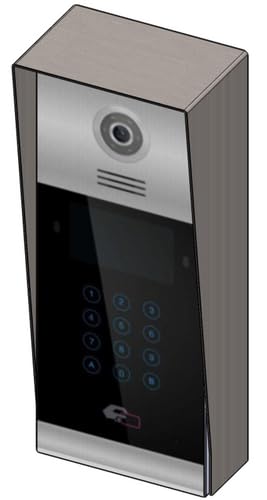 Hoto 1: Gaba view of the Fermax Sup Milo Digital Intercom System, showing the aluminum plate and digital keypad. This image illustrates the exterior design of the main unit.
4. Ƙarfafawa da Saitawa na Farko
- Once all wiring is complete and secure, restore power to the system.
- The unit will perform a self-test. Observe any indicator lights or sounds.
- Follow the system's programming guide (usually provided separately or accessible via a master unit) to configure apartment numbers, access codes, and other settings.
Umarnin Aiki
Making a Call from the Outdoor Panel
- To call an apartment: Enter the apartment number using the digital keypad.
- Press the "Call" button (often represented by a bell icon or similar).
- The indoor unit will ring. Once answered, communication can begin.
Receiving a Call and Opening the Door (Indoor Unit)
- When the indoor unit rings, press the "Answer" button to establish communication with the visitor.
- To open the door, press the "Door Release" button on your indoor unit.
- The door will unlock for a short period.
Using Access Codes
If configured, authorized users can enter a pre-programmed access code on the outdoor digital keypad to unlock the door without needing to call an indoor unit.
- Enter your personal access code using the digital keypad.
- Press the "Enter" or "Door Release" button.
- Ƙofar za ta buɗe.
Kulawa
Regular maintenance ensures the longevity and optimal performance of your Fermax intercom system.
Tsaftacewa
- Tsaftace wajen naúrar da taushi, damp zane.
- Kada a yi amfani da masu tsaftacewa, masu kaushi, ko feshin sinadarai, saboda waɗannan na iya lalata ƙarewar da kayan lantarki.
- Ensure no liquid enters the unit's openings.
Dubawa
- Periodically check for any visible damage to the unit or wiring.
- Tabbatar cewa duk screws masu hawa sun matse.
- Test the communication and door release functions regularly.
Sabunta software
If applicable, consult your installer or Fermax support for information on firmware updates that may improve performance or add new features.
Shirya matsala
Wannan sashe yana magance matsalolin da ka iya tasowa. Don ƙarin matsaloli masu rikitarwa, tuntuɓi tallafin fasaha.
| Matsala | Dalili mai yiwuwa | Magani |
|---|---|---|
| No communication with indoor unit. |
|
|
| Door release not working. |
|
|
| Faifan madannai ba ya amsawa. |
|
|
Ƙayyadaddun bayanai
Technical specifications for the Fermax Sup Milo Digital Intercom System (Model: 8424299951713).
- Samfura: Fermax Sup Milo Digital Intercom System
- Lambar Sashe: 8424299951713
- Mai ƙira: Fermax
- Girma (Kunshin): Kimanin 0.1 x 0.1 x 0.1 cm
- Weight (Unit): 108 Grams
- Abu: Metal, Plastic, Polycarbonate (Aluminum Plate)
- Tushen wutar lantarki: External Power Supply (100V)
- Voltage: 100V
- Watatage: 100W
- Batura da ake buƙata: A'a
- Launi: Multicolored (referring to internal components or subtle design elements, main plate is aluminum)
Bayanin Garanti
Fermax products are manufactured to high-quality standards. For specific warranty terms and conditions, please refer to the warranty card included with your product or visit the official Fermax website. Ajiye shaidar siyan ku don da'awar garanti.
Typically, warranty covers manufacturing defects for a specified period from the date of purchase. Damage due to improper installation, misuse, or unauthorized repairs is generally not covered.
Tallafin Abokin Ciniki
If you require technical assistance, have questions about your product, or need to report a problem, please contact your local Fermax distributor or visit the official Fermax website don albarkatun tallafi.
Website: www.fermax.com
Da fatan za a sami lambar ƙirar ku (8424299951713) kuma a shirya cikakkun bayanai lokacin tuntuɓar tallafi.


