1. Gabatarwa
This manual provides essential instructions for the safe operation, setup, maintenance, and troubleshooting of your CREATE THERA MATIC TOUCH automatic coffee machine. Please read this manual thoroughly before first use and retain it for future reference.
Bayanin Tsaro
Always observe basic safety precautions when using electrical appliances to reduce the risk of fire, electric shock, and injury. Ensure the appliance is placed on a stable, level surface. Do not immerse the appliance, power cord, or plug in water or other liquids. Keep out of reach of children. Unplug the machine before cleaning or when not in use for extended periods.
2. Samfurin Ya Ƙareview
The CREATE THERA MATIC TOUCH is a fully automatic coffee machine designed to deliver fresh coffee from whole beans. It features a 20-bar pressure system, an integrated grinder, a 1.5-liter water tank, and a steam wand for milk frothing and hot water dispensing. The touch control panel allows for easy operation and customization of coffee intensity and volume.
Babban abubuwan da aka gyara
- Coffee Bean Hopper with integrated grinder
- Tankin Ruwa (Iya 1.5 L)
- Taɓa Kwamitin Kulawa
- Kofi Spout
- Steam Wand / Hot Water Dispenser
- Tireshin Digiri da Kwantena Filayen Kofi

Hoto 2.1: Gaba view of the coffee machine, showing the coffee spout, drip tray, and touch control panel.

Hoto 2.2: Angled view of the coffee machine, illustrating the removable water tank.

Hoto 2.3: Samaview of the machine's removable parts for cleaning and maintenance.
3. Saita
3.1 Cire kaya da Tsaftace Farko
- A hankali a cire duk kayan marufi daga injin kofi.
- Wash the water tank, drip tray, and coffee grounds container with warm soapy water, then rinse thoroughly and dry.
- Shafe wajen injin tare da tallaamp zane.
3.2 Cika Tankin Ruwa
- Cire tankin ruwa daga gefen injin.
- Cika tankin da ruwan sha mai sanyi mai sabo har zuwa ma'aunin matakin MAX.
- Sanya tankin ruwa a wurin da yake, don tabbatar da cewa an zauna da shi lafiya.
3.3 Ƙara Wake na Kofi
- Open the lid of the coffee bean hopper located on top of the machine.
- Pour whole coffee beans into the hopper. The hopper has a capacity of 180g.
- A rufe murfin da kyau domin kiyaye sabo da wake.

Figure 3.1: Adding coffee beans to the integrated hopper.
3.4 Amfani na Farko / Farawa
- Toshe na'urar a cikin mashin wutar lantarki.
- Press the power button on the touch control panel. The machine will perform an initial rinse cycle.
- Place a container under the coffee spout and steam wand to collect the water.
- Da zarar an kammala zagayen kurkura, injin ya shirya don amfani.
4. Umarnin Aiki
4.1 Taɓa Control Panel
The touch control panel provides access to all machine functions. Indicators will illuminate to show status or warnings such as 'no beans', 'no water', 'cleaning required', or 'drip tray full'.
4.2 Yin Kofi
- Ensure the water tank is filled and the bean hopper contains enough coffee beans.
- Sanya kofi a ƙarƙashin ruwan kofi.
- Select your desired coffee type (e.g., Espresso, Lungo) from the touch panel.
- You can adjust the coffee intensity and volume via the touch panel before brewing.
- Press the start button. The machine will grind the beans, brew, and dispense the coffee.
4.3 Using the Steam Wand
The steam wand can be adjusted between 0° and 42° for optimal milk frothing or hot water dispensing.
4.3.1 Madara Mai Kumfa
- Fill a milk pitcher with cold milk.
- Sanya sandar tururi a cikin madara, a ƙasa da saman.
- Select the steam function on the touch panel.
- Matsar da tulun sama da ƙasa don ƙirƙirar kumfa.
- Once desired foam is achieved, turn off the steam function.
- Immediately clean the steam wand after use.
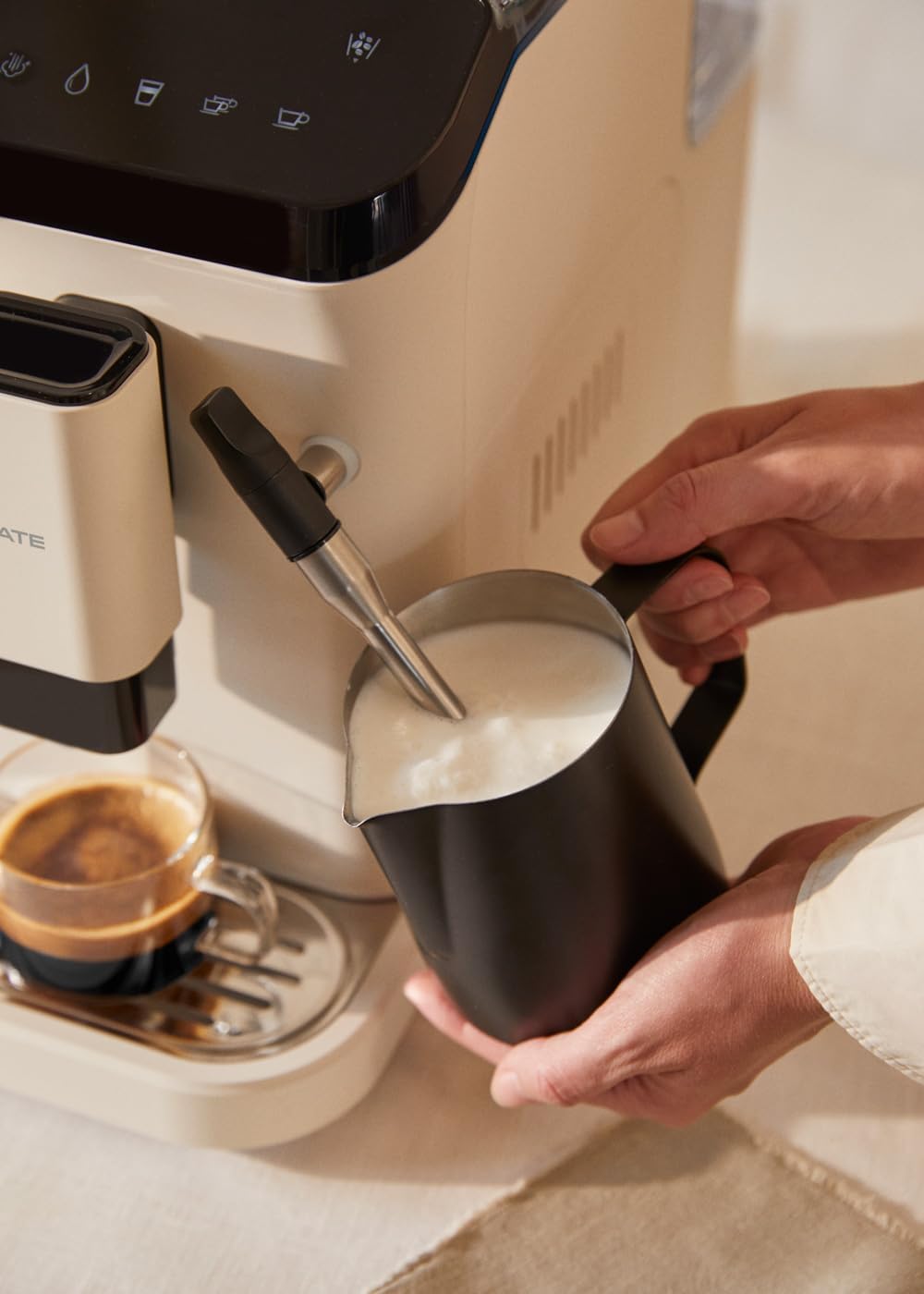
Figure 4.1: Frothing milk using the adjustable steam wand.
4.3.2 Rarraba Ruwan Zafi
- Sanya kofi a ƙarƙashin sandar tururi.
- Select the hot water function on the touch panel.
- The machine will dispense hot water for teas or other infusions.

Figure 4.2: Dispensing hot water for beverages.
5. Kulawa da Tsaftacewa
Tsaftacewa da kulawa na yau da kullun yana tabbatar da kyakkyawan aiki da tsawon rayuwar injin kofi ɗin ku.
5.1 Aikin Tsabtace Kai
The machine is equipped with a self-cleaning function. Follow the prompts on the touch control panel when the cleaning indicator illuminates. This cycle helps maintain internal hygiene.
5.2 Drip Tray and Coffee Grounds Container
- When the 'drip tray full' indicator appears, carefully remove the drip tray.
- Empty the liquid from the drip tray and the used coffee grounds from the container.
- Wash both components with warm soapy water, rinse, and dry before reinserting.
5.3 Cleaning the Steam Wand
Bayan kowane amfani, goge sandar tururi tare da tallaamp cloth to remove any milk residue. Periodically, remove the outer nozzle and rinse it under running water to prevent blockages.
5.4 Zubewar ciki
Over time, mineral deposits can build up in the machine. The machine will indicate when descaling is required. Use a suitable descaling solution designed for coffee machines and follow the instructions provided with the descaling product and the machine's display prompts.
6. Shirya matsala
Koma zuwa wannan sashe don batutuwan gama gari da mafitarsu. Idan matsalar ta ci gaba, tuntuɓi tallafin abokin ciniki.
| Matsala | Dalili mai yiwuwa | Magani |
|---|---|---|
| Ba a bayar da kofi ba | Water tank empty / No coffee beans / Clogged coffee spout | Refill water tank / Add coffee beans / Clean coffee spout |
| Kofi mai rauni | Insufficient coffee quantity / Coarse grind setting | Adjust coffee intensity setting / Adjust grinder to a finer setting |
| Inji baya kunnawa | Not plugged in / Power outage | Check power connection / Check circuit breaker |
| 'No water' indicator | Water tank empty or not properly inserted | Refill water tank and ensure it is correctly seated |
| 'No beans' indicator | Wake hopper fanko | Refill coffee bean hopper |
| 'Cleaning' indicator | Self-cleaning cycle required | Initiate the self-cleaning program as per display instructions |
| 'Drip tray full' indicator | Drip tray or coffee grounds container is full | Empty and clean the drip tray and coffee grounds container |
7. Ƙayyadaddun bayanai
| Siffar | Ƙayyadaddun bayanai |
|---|---|
| Alamar | Ƙirƙiri |
| Sunan Samfura | THERA MATIC TOUCH |
| Lambar Samfura | 161966_361774 |
| Launi | Cream-white |
| Girman samfur (L x W x H) | 32.5 x 19 x 44 cm |
| Nauyi | 9.05 kg |
| Karfin Tankin Ruwa | 1.5 lita |
| Coffee Bean Hopper Capacity | 180g ku |
| Matsin lamba | 20 bar |
| Power/Wattage | 1350 watts |
| Voltage | 240 Volts |
| Kayan abu | AS + ABS |
| Siffofin Musamman | Removable tank, Milk frother, Integrated grinder, Self-cleaning function, Touch control panel |
8. Garanti da Tallafawa
8.1 Bayanin Garanti
Your CREATE THERA MATIC TOUCH coffee machine is covered by a manufacturer's warranty. Please refer to the warranty card included with your purchase for specific terms, conditions, and duration. Retain your proof of purchase for warranty claims.
8.2 Tallafin Abokin Ciniki
For technical assistance, spare parts, or any questions regarding your product, please contact CREATE customer support. Contact details can typically be found on the manufacturer's website ko a kan marufi na samfur.
Note: Specific contact information is not provided in this manual. Please refer to your product packaging or the official CREATE webshafin don cikakkun bayanai na tallafi.


