Gabatarwa
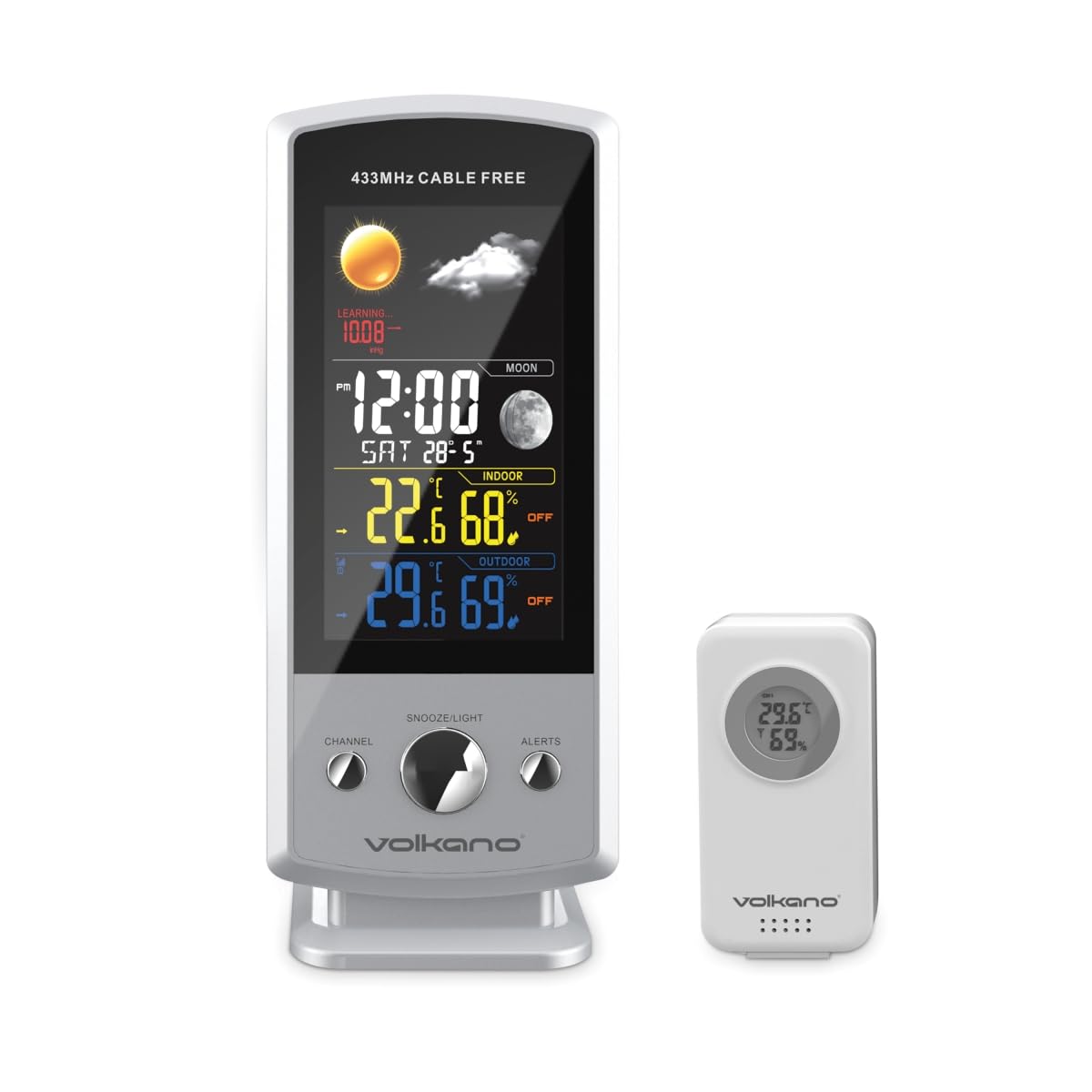
The Volkano VK-6301 Drizzle Series Weather Station is a wireless device designed to provide accurate and up-to-date weather information. It features a large, easy-to-read display that shows indoor and outdoor temperature, humidity, and atmospheric pressure. Additionally, it provides a weather forecast, current time, and date. The system includes an outdoor sensor unit that wirelessly transmits environmental data to the main indoor display unit.
Abubuwan Kunshin
- Volkano Drizzle Series Main Display Unit
- Wireless Outdoor Sensor Unit
- Kebul na USB
- Manual mai amfani
Mabuɗin Siffofin
- Wireless weather station with an outdoor sensor unit.
- Large, easy-to-read display showing indoor and outdoor temperature, humidity, and pressure.
- Displays weather forecast, current time, and date.
- Outdoor sensor unit can be placed up to 100 meters away from the indoor display unit.
Saita Umarnin
1. Main Display Unit Setup
- Haɗin Wuta: Connect the provided USB power cable to the main display unit and plug the other end into a suitable USB power adapter (not included) or a powered USB port. The unit will power on and the display will illuminate.
- Saitunan Farko: Upon first power-up, the unit may prompt you to set the time, date, and measurement units (Celsius/Fahrenheit). Use the control buttons (typically located on the back or side) to adjust these settings. Refer to the 'Operating Instructions' section for detailed button functions.
2. Wireless Outdoor Sensor Unit Setup
- Shigar da Baturi: Open the battery compartment on the back of the outdoor sensor unit. Insert 2x AAA batteries (not included), ensuring correct polarity (+/-). Close the compartment securely.
- Wuri: Position the outdoor sensor in a shaded area, protected from direct sunlight and rain, to ensure accurate temperature and humidity readings. Ensure it is within 100 meters of the main display unit and free from major obstructions that could interfere with the wireless signal.
- Haɗin kai: The outdoor sensor should automatically pair with the main display unit within a few minutes. If the outdoor readings do not appear, press the 'SYNC' or 'CHANNEL' button on the main unit (refer to specific button layout) to initiate a manual search for the sensor.

Umarnin Aiki
Nuna Samaview
The main display unit provides a comprehensive overview of current weather conditions and time information:
- Lokaci da Kwanan wata: Displays the current time (12/24-hour format) and date.
- Zafin Jiki da Danshi na Cikin Gida: Shows the temperature and relative humidity measured by the main unit.
- Zafin Jiki da Danshi na Waje: Shows the temperature and relative humidity transmitted from the wireless outdoor sensor.
- Matsalar Yanayi: Displays the current barometric pressure.
- Hasashen Yanayi: An icon-based forecast (e.g., sunny, cloudy, rainy) predicts upcoming weather conditions based on pressure changes.
- Matakin Wata: Yana nuna yanayin da wata ke ciki a yanzu.
Button Functions (General)
While specific button labels may vary, most weather stations include the following common functions:
- MALA'I/SATA: Used to enter settings mode and confirm selections.
- UP/DOWN (or +/-): Used to adjust values during settings or to toggle between display modes (e.g., min/max temperature).
- ADAM: To set or activate/deactivate alarms.
- SNOOZE / haske: To temporarily silence an alarm or activate the backlight.
- CHANNEL/SYNC: To switch between multiple outdoor sensors (if supported) or manually initiate sensor pairing.
- C/F: To switch between Celsius and Fahrenheit temperature units.
Refer to the specific button layout on your device for exact functions and sequences.
Kulawa
- Tsaftacewa: Wipe the display unit and outdoor sensor with a soft, damp zane. Kada a yi amfani da masu tsabtace abrasive ko kaushi, saboda waɗannan na iya lalata saman.
- Battery Replacement (Outdoor Sensor): When the battery indicator on the main display shows low battery for the outdoor sensor, replace the batteries promptly to ensure continuous data transmission. Use fresh AAA batteries.
- Placement Check: Periodically check the outdoor sensor's placement to ensure it remains protected from extreme weather and maintains a clear signal path to the main unit.
Shirya matsala
| Matsala | Dalili mai yiwuwa | Magani |
|---|---|---|
| Babu nuni a kan babban na'urar. | Power cable not connected or faulty. | Ensure USB power cable is securely connected and power adapter is working. |
| Ba a nuna zafin jiki/danshi a waje ba. | Outdoor sensor batteries low or dead; sensor out of range; interference; sensor not paired. | Replace sensor batteries. Move sensor closer to main unit. Reduce interference sources. Manually re-pair sensor (refer to 'Setup Instructions'). |
| Inaccurate outdoor readings. | Sensor exposed to direct sunlight or rain. | Relocate sensor to a shaded, protected area. |
| Weather forecast seems incorrect. | Forecast is based on local atmospheric pressure changes, not satellite data. | Understand that the forecast is a local prediction and may not always match official forecasts. Allow time for the unit to calibrate. |
Ƙayyadaddun bayanai
- Samfura: VK-6301-WT
- Alamar: Volkano
- Kewayon Mara waya: Up to 100 meters (open air)
- Power (Main Unit): Kebul na USB
- Power (Outdoor Sensor): 2 x AAA Baturi (ba a haɗa su ba)
- Nunawa: Large, easy-to-read color display
- Ayyuka: Indoor/Outdoor Temperature, Indoor/Outdoor Humidity, Atmospheric Pressure, Weather Forecast, Time, Date, Moon Phase
- Girma (Kunshin): Kimanin 24.2 x 20.4 x 12.2 cm
- Nauyin Abu: Kusan 540 g
Garanti da Taimako
All Volkano products are covered by a 1-shekara iyaka ɗaukar hoto and lifetime customer support. You can extend your coverage by registering your product to receive an additional 12-month extension, totaling 24 months of coverage by Volkano.
For support with products or services, please message us via the official Volkano Page or visit the Volkano website don bayanin lamba.


