1. Gabatarwa
This instruction manual provides essential information for the proper installation, operation, and maintenance of your CONTIA replacement HEPA filter, designed for the Xiaomi Roborock S552-00 robotic vacuum cleaner. Regular replacement of the HEPA filter is crucial for maintaining optimal air quality and the cleaning efficiency of your robotic vacuum.
The HEPA filter effectively captures fine dust particles, allergens, and other airborne contaminants, contributing to a cleaner home environment. Please read this manual thoroughly before proceeding with installation or maintenance.
2. Samfurin Ya Ƙareview
The CONTIA HEPA filter is a high-efficiency particulate air filter component for your Xiaomi Roborock S552-00 robotic vacuum. It is designed to fit precisely and function as the original filter, ensuring consistent performance.
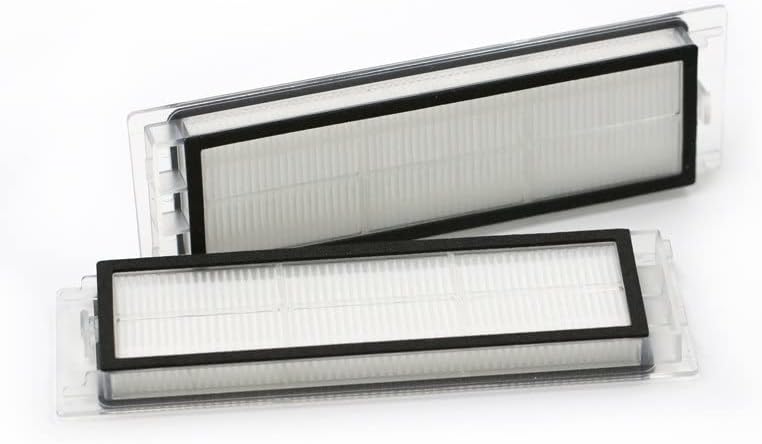
Figure 2.1: CONTIA HEPA filters. These filters are essential for trapping fine dust and allergens, ensuring cleaner air during vacuum operation.
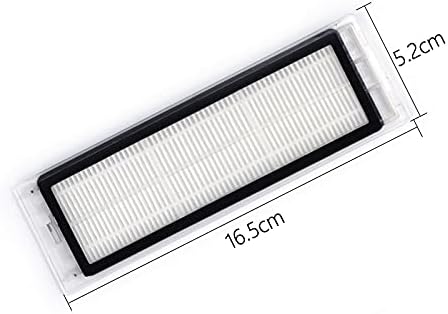
Figure 2.2: Dimensions of the CONTIA HEPA filter. The filter measures approximately 16.5 cm in length and 5.2 cm in width, designed for a precise fit.
3. Saita da Shigarwa
Before installing the new HEPA filter, ensure your robotic vacuum cleaner is powered off and disconnected from its charging dock.
- Locate the Dust Bin: Open the top cover of your Xiaomi Roborock S552-00 vacuum cleaner to access the dust bin compartment.
- Remove the Dust Bin: Carefully lift and remove the dust bin from its housing.
- Cire Tsohon Matatar: The old HEPA filter is typically located on the side or top of the dust bin. Grasp the filter by its designated tabs or frame and pull it out. Dispose of the old filter responsibly.
- Tsaftace Kurar Kura: Empty any debris from the dust bin and wipe it clean with a dry cloth to remove residual dust.
- Install the New Filter: Take your new CONTIA HEPA filter. Align it with the filter slot on the dust bin and gently push it into place until it sits securely. Ensure there are no gaps.
- Reinstall the Dust Bin: Place the dust bin back into the vacuum cleaner, ensuring it clicks firmly into position.
- Rufe Rufin: Close the top cover of the robotic vacuum.
Your robotic vacuum is now ready for operation with the new HEPA filter.
4. Ka'idojin Aiki
The HEPA filter is a passive component that works in conjunction with your robotic vacuum's suction system. As air is drawn into the vacuum, it passes through the multi-layered HEPA filter material. This material is designed with microscopic fibers that trap particles as small as 0.3 microns with high efficiency, including:
- Dust mites and their debris
- Pet dander
- Pollen
- Mold spores
- Other fine airborne particles
The filter ensures that the air expelled back into your room is cleaner, reducing indoor air pollutants. No specific operational steps are required for the filter itself beyond proper installation.
5. Kulawa da Sauyawa
Regular maintenance of your HEPA filter is essential for optimal performance and longevity of your robotic vacuum.
5.1. Tsabtace Tace
- It is recommended to gently tap the filter against a trash can to dislodge accumulated dust after each few cleaning cycles, or as needed.
- You may use a small brush or a handheld vacuum to carefully clean the pleated surface of the filter.
- Do not wash the HEPA filter with water, as this can damage the filter material and reduce its effectiveness.
5.2. Jadawalin Sauyawa
The HEPA filter should be replaced regularly to ensure maximum filtration efficiency and prevent strain on the vacuum's motor. The exact replacement frequency depends on usage and environmental factors (e.g., presence of pets, allergies).
- For average household use, replace the HEPA filter every Watanni 3 zuwa 6.
- If you notice a decrease in suction power, increased dust in the air after cleaning, or a visibly clogged filter, replace it sooner.
- Refer to your Xiaomi Roborock S552-00 user manual for specific recommendations on filter replacement intervals.
6. Shirya matsala
If you encounter issues after installing your new CONTIA HEPA filter, consider the following:
- Rage ƙarfin tsotsa:
- Ensure the filter is installed correctly and seated firmly in the dust bin.
- Check if the filter is clogged with excessive dust. Clean or replace if necessary.
- Verify that the dust bin is empty and properly reinstalled.
- Matatar Ba Ta Dace Ba:
- Double-check that you have the correct filter model for your Xiaomi Roborock S552-00. Refer to the product images and dimensions in Section 2.
- Ensure no debris is obstructing the filter slot in the dust bin.
- Hayaniyar da ba a saba gani ba:
- Ensure the filter is securely installed and not loose, which could cause vibrations.
- If noises persist, it may indicate an issue with another component of the vacuum cleaner, not the filter.
For further troubleshooting, consult the original user manual for your Xiaomi Roborock S552-00 robotic vacuum cleaner or contact CONTIA customer support.
7. Ƙayyadaddun bayanai
- Alamar: KONTIA
- Samfurin Mai jituwa: Xiaomi Roborock S552-00 Robotic Vacuum Cleaner
- Abu: HEPA
- Nauyin Abu: Kimanin oz 1.76 (gram 50)
- Filter Dimensions (Approximate): 16.5 cm (tsawo) x 5.2 cm (Nisa)
- Adadin Yankuna: 1 (kowace fakiti)
8. Garanti da Tallafawa
For specific warranty information regarding your CONTIA replacement HEPA filter, please refer to the product packaging or contact the seller directly. Keep your proof of purchase for any warranty claims.
If you require further assistance or have questions not covered in this manual, please reach out to CONTIA customer support through the retailer's platform or the contact information provided with your purchase.


