1. Gabatarwa
This manual provides essential information for the safe and efficient operation of your Leica Disto D5 professional laser distance meter. The Leica Disto D5 is a high-precision measuring device equipped with Bluetooth connectivity, a viewfinder camera, and an inclinometer, designed for both indoor and outdoor applications. It supports various measurement functions including height tracking, profile measurement, and angle measurement.
Please read this manual thoroughly before using the device to ensure proper handling and to maximize its capabilities.
2. Bayanin Tsaro
Tsaron Laser: The Leica Disto D5 emits a Class 2 laser. Do not stare directly into the laser beam or direct it at other people. Avoid pointing the laser at reflective surfaces that could redirect the beam into eyes.
Gabaɗaya Tsaro:
- Ajiye na'urar daga yara.
- Do not attempt to disassemble or modify the device. This will void the warranty and could result in injury.
- Use only specified batteries and charging accessories.
- Protect the device from extreme temperatures, moisture, and strong impacts.
3. Abubuwan Kunshin
Tabbatar cewa duk abubuwa suna nan a cikin kunshin ku:
- Leica DIST D5 Laser Distance Mitar
- madaurin wuyan hannu
- jakar kariya
- Kebul na USB
- Takaddun shaida

Image 3.1: Leica Disto D5 with included accessories: the device, a protective pouch, and a USB charging cable.
4. Kayan Samfura
The Leica Disto D5 incorporates advanced features for precise and versatile measurement tasks:
- Haɗe-haɗe Viewfinder Camera: Enables target identification on the IPS display, even when the laser dot is not visible, ideal for outdoor use.
- Non-Contact Measurement Activation: Allows measurement initiation by briefly interrupting the laser path with your hand, preventing device movement and ensuring high accuracy.
- Flexible Data Transfer (Keyboard Mode): Connect the device to a computer to send measured values as keyboard input to various applications, such as Excel.
- Ayyukan Ma'auni da yawa: Includes Smart Horizontal Mode for measuring over obstacles, height tracking, profile measurement, and angle measurement.
- Haɗin Bluetooth: Facilitates seamless data transfer to the DISTO Plan App for documentation, creating floor plans, and sketches.
- Zane Mai Dorewa: IP54 protection against dust and splash water, suitable for construction site environments.
- Rechargeable Li-Po Battery: Integrated lithium-polymer battery for extended use.
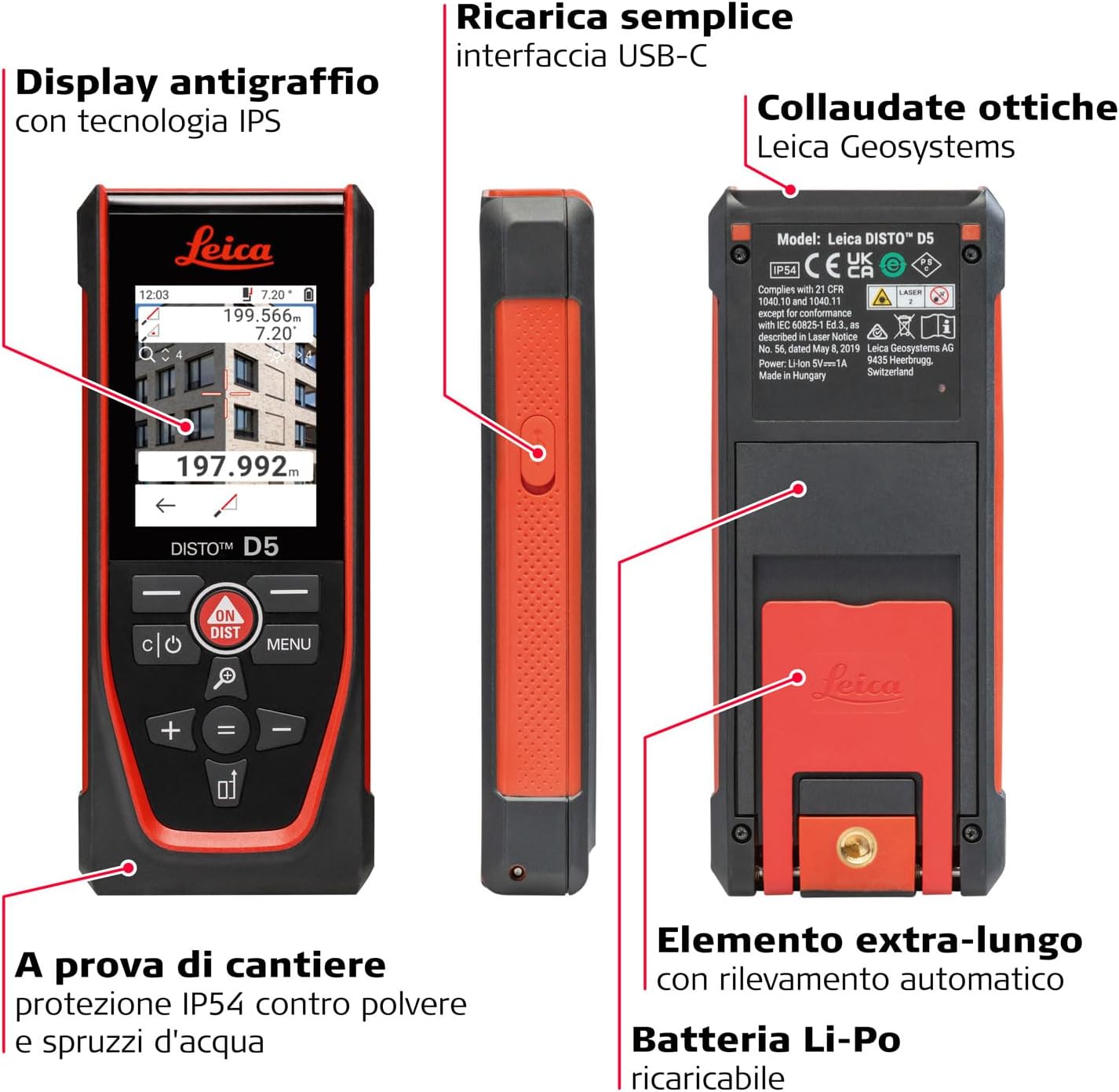
Image 4.1: Key features of the Leica Disto D5, highlighting its anti-scratch IPS display, USB-C interface for charging, IP54 protection, and rechargeable Li-Po battery.
5. Saita
5.1. Cajin Baturi
The Leica Disto D5 is powered by an integrated rechargeable Lithium-Polymer battery. Before first use, fully charge the device.
- Connect the provided USB cable to the USB-C port on the side of the device.
- Haɗa sauran ƙarshen kebul na USB zuwa adaftar wutar USB mai dacewa (ba a haɗa shi ba) ko tashar USB ta kwamfuta.
- The charging indicator on the display will show the charging status.
- Da zarar an yi caji sosai, cire kebul na USB ɗin.
5.2. Ƙarfin Farko Kunna
Danna maɓallin ON/DIST button to power on the device. The display will illuminate, and the device will be ready for use.
6. Umarnin Aiki
6.1. Basic Distance Measurement
- Point the laser beam at the desired target.
- Danna maɓallin ON/DIST button once to activate the laser.
- Danna maɓallin ON/DIST button again to take a measurement. The measured distance will be displayed on the screen.

Image 6.1: Performing a basic distance measurement with the Leica Disto D5, showing the device held against a surface.
6.2. Amfani da Viewfinder Camera for Outdoor Measurements
For outdoor measurements or when the laser dot is difficult to see, the integrated viewfinder camera assists in targeting.
- Activate the device. The display will show the camera view.
- Aim the device so the target appears within the reticle on the IPS display.
- Danna maɓallin ON/DIST button to take the measurement.

Image 6.2: The Leica Disto D5 in use outdoors, demonstrating the viewfinder camera's ability to locate the laser point even in bright sunlight.
6.3. Ayyukan Aunawa Masu Ci Gaba
The Leica Disto D5 offers several advanced functions accessible via the MENU maballin.
- Smart Horizontal Mode: Measures horizontal distances even when obstacles are present.
- Height Tracking: Determines heights by taking multiple measurements.
- Profile Aunawa: Captures a series of measurements to define a profile.
- Ma'aunin kusurwa: Utilizes the inclinometer to measure angles.
Refer to the on-screen prompts and the full digital manual for detailed instructions on each function.
6.4. Data Transfer via Bluetooth and DISTO Plan App
The device can transfer measurement data wirelessly to the Leica DISTO Plan App on your smartphone or tablet.
- Ensure Bluetooth is enabled on your mobile device and the Disto D5.
- Download and install the Leica DISTO Plan App from your device's app store.
- Open the app and follow the instructions to pair with your Disto D5.
- Once connected, measurements can be sent directly to the app for documentation, creating floor plans, and sketches.
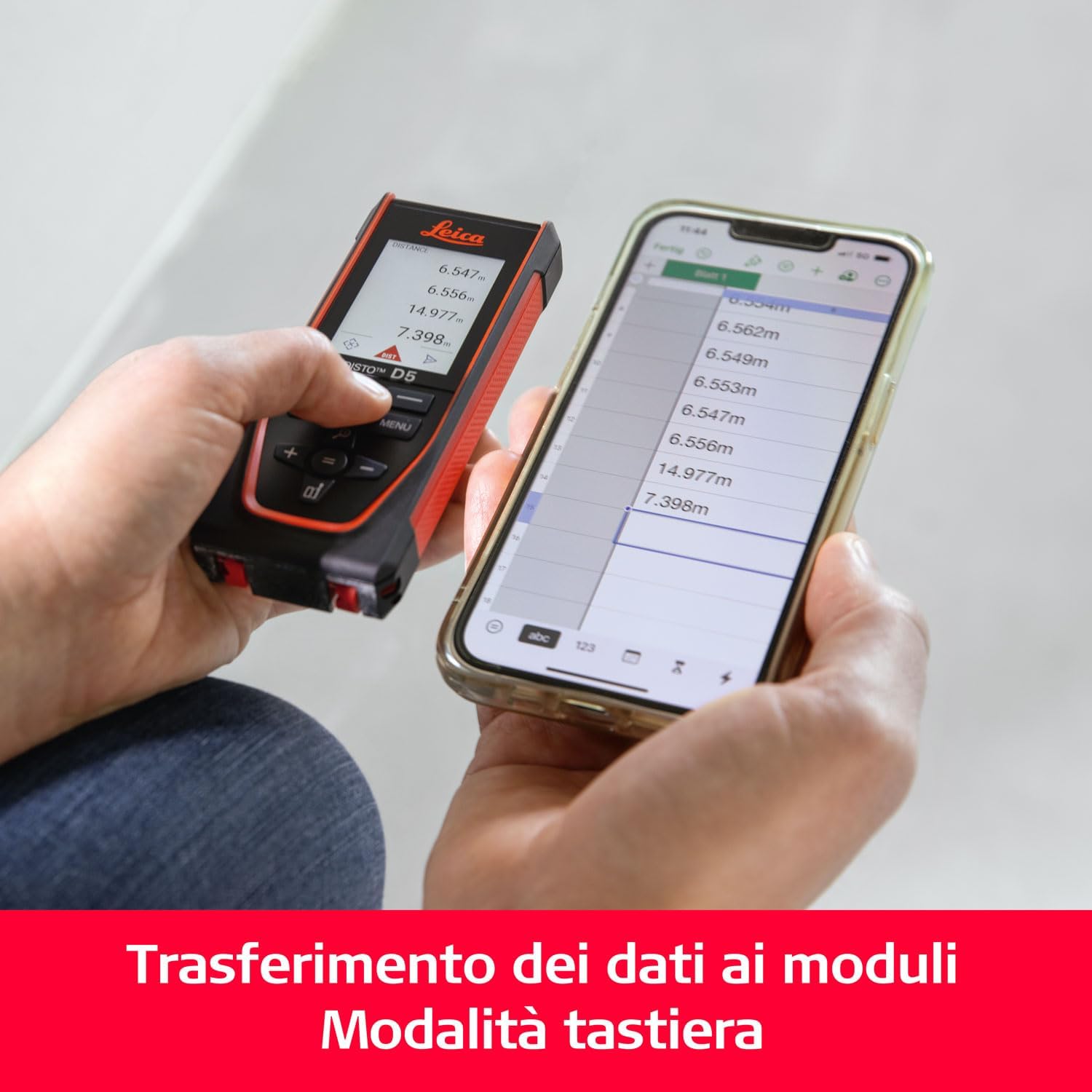
Image 6.3: Data transfer from the Leica Disto D5 to a smartphone using Bluetooth, showing measurements appearing in a digital form.
6.5. Keyboard Mode for Data Transfer
For direct integration with computer applications, use the keyboard mode:
- Connect the Disto D5 to your computer using the USB cable.
- Activate keyboard mode on the device (refer to the device's menu for this option).
- Open any application on your computer (e.g., Excel, Notepad) where you want to input data.
- Take a measurement with the Disto D5. The measured value will be automatically entered into the active field on your computer as if typed.
6.6. Non-Contact Measurement for Enhanced Precision
To minimize device movement during measurement and ensure maximum precision, utilize the non-contact activation feature.
- Mount the Disto D5 on a stable surface or tripod.
- Aim the laser at the target.
- Briefly pass your hand through the laser path to trigger the measurement without touching the device.

Image 6.4: Demonstrating non-contact measurement activation with the Leica Disto D5 on a tripod, ensuring high precision by avoiding physical contact during measurement.
7. Kulawa
7.1. Tsaftacewa
- Yi amfani da tsabta, taushi, damp cloth to wipe the device. Do not use harsh chemicals or abrasive cleaners.
- For the lens and display, use a lint-free cloth specifically designed for optical surfaces.
7.2. Adana
When not in use, store the Leica Disto D5 in its protective pouch in a cool, dry place, away from direct sunlight and extreme temperatures.
8. Shirya matsala
| Matsala | Dalili mai yiwuwa | Magani |
|---|---|---|
| Na'urar baya kunna | Low battery; device malfunction | Charge the battery; if problem persists, contact support. |
| Ma'auni mara kyau | Unstable device; incorrect measurement reference point; environmental factors (e.g., strong sunlight, highly reflective surfaces) | Ensure device is stable; check reference point settings; use viewfinder camera for outdoor use; avoid highly reflective targets. |
| Matsalolin haɗin Bluetooth | Bluetooth off on device/phone; device not paired; app issues | Ensure Bluetooth is on; re-pair devices; restart app/device. |
9. Ƙayyadaddun bayanai
| Ƙayyadaddun bayanai | Daki-daki |
|---|---|
| Lambar Samfura | D5 |
| Girma | 14.38 x 5.99 x 2.39 cm |
| Nauyi | 176.9g ku |
| Tushen wutar lantarki | 1 Lithium Polymer baturi (an haɗa) |
| Voltage | 1.5 Volts |
| Kayan abu | Filastik |
| Launi | Ja |
| Class Kariya | IP54 (an kare ƙura da ruwan feshi) |
| Haɗuwa | Bluetooth |
| Ma'auni Range | Har zuwa mita 200 (kimanin ƙafa 656) |
| Daidaito | ± 1 mm |
| Inclinometer Range | 360° (± 0.2°) |

Image 9.1: Visual summary of Leica Disto D5 specifications, including range, accuracy, inclinometer, Bluetooth, and weight.
10. Garanti da Tallafawa
Leica Geosystems products are manufactured to the highest quality standards. For warranty information and technical support, please refer to the official Leica Geosystems website ko tuntuɓi mai rarrabawa na gida.
Albarkatun Kan layi: For additional information, FAQs, and software updates, visit the official Leica Geosystems support page: Leica Geosystems Support


