Gabatarwa
Thank you for choosing the RAINPOINT Digital Sprinkler Timer, Model ITV105. This programmable 1-outlet automatic hose water timer is designed to provide convenient and precise control over your watering schedule, ensuring optimal moisture levels for your lawn and garden. This manual provides detailed instructions for setup, operation, maintenance, and troubleshooting to help you get the most out of your new device.
Samfurin Ƙarsheview da Key Features
The RAINPOINT ITV105 Sprinkler Timer is engineered for durability and ease of use, offering a reliable solution for automated garden irrigation.
- Daidaitaccen Daidaitawa: Features a 3/4" inlet and outlet thread, compatible with most standard garden hoses.
- Juriya na Yanayi: IP54 waterproof rating and heavy-duty weather-resistant ABS housing ensure durability for outdoor use.
- Shirye-shiryen da za a iya daidaitawa: Easy-to-use interface allows customization of start time, watering frequency, and duration for automated irrigation.
- Built-in Filter: Includes a built-in metal filter to improve water quality and protect plants from debris.
- Rigakafin Zubar da Ruwa: Upgraded strong and durable ABS material and water inlet thread, paired with Teflon tape and rubber washer to prevent water leakage.
- Babban allo LCD: Displays detailed information such as watering time, frequency, power, and battery life for easy readability.
- Ƙananan Sanarwa na Baturi: Powered by 2 AAA batteries (not included), with a low battery notification and automatic valve shut-off to prevent water waste.
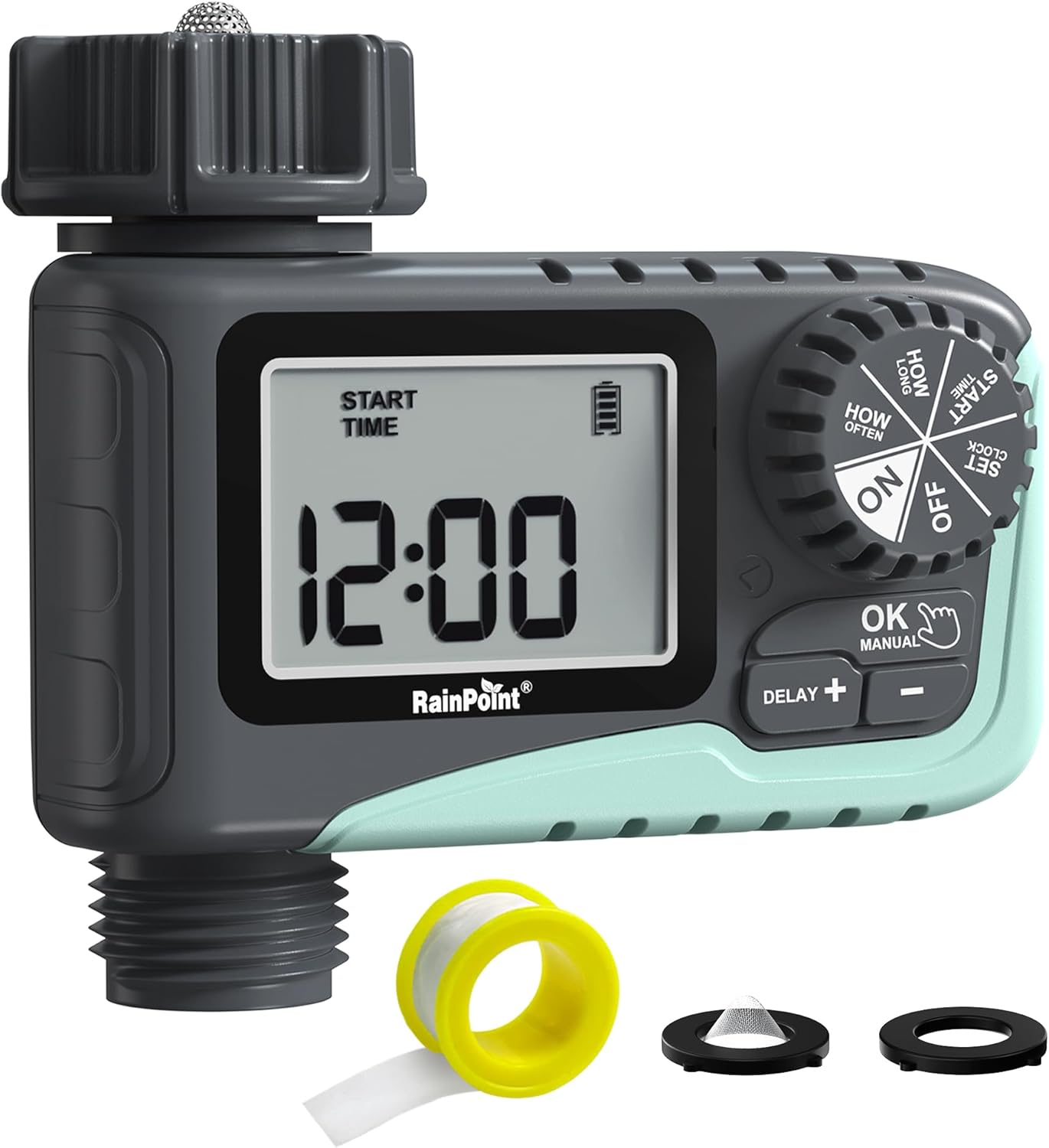
Hoto 1: Gaba view of the RAINPOINT Digital Sprinkler Timer (ITV105) showing the large LCD screen, control dial, and buttons.
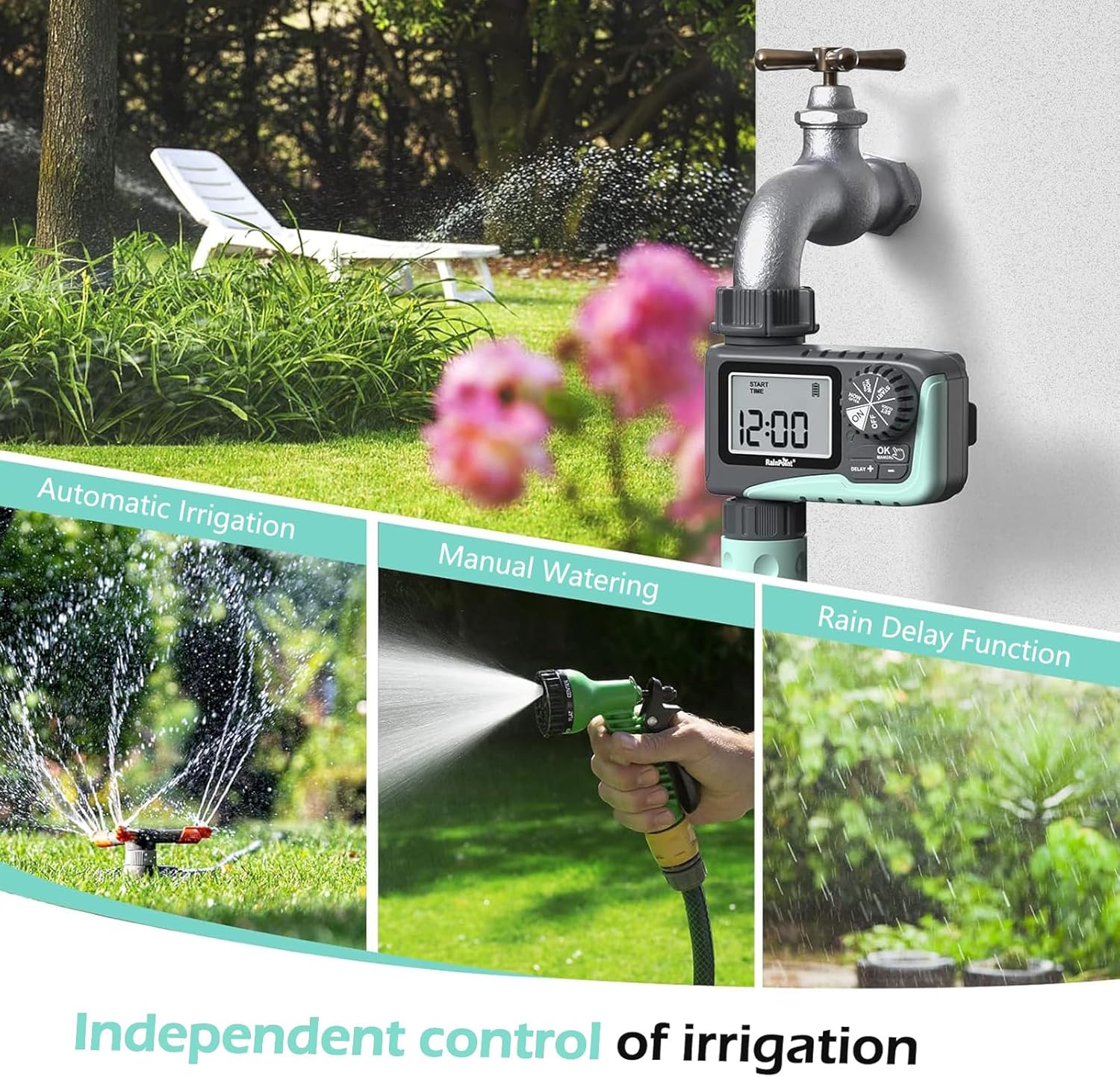
Figure 2: Illustration of the timer's three main functions: automatic irrigation, manual watering, and rain delay.
Abubuwan Kunshin
Da fatan za a duba abubuwan da ke cikin fakitin lokacin buɗewa don tabbatar da cewa duk abubuwan suna nan:
- 1 x RAINPOINT Digital Sprinkler Timer (ITV105)
- 1 x Manual mai amfani (wannan takarda)
- 1 x Teflon tef
- 1 x Rubber washer
- 1 x Spare filter
Saita da Shigarwa
Follow these steps to properly set up your sprinkler timer:
- Shigar da Batura:
Locate the battery compartment on the back of the timer. Insert 2 new AAA (1.5V) alkaline batteries, ensuring correct polarity. Close the battery compartment securely. The LCD screen will power on.
- Prepare Faucet:
Ensure your outdoor hose faucet is clean and free of debris. If necessary, apply the included Teflon tape to the faucet threads for a watertight seal.
- Attach Timer to Faucet:
Screw the timer's inlet (top connector) onto your 3/4" outdoor hose faucet. Hand-tighten firmly. Ensure the rubber washer is properly seated inside the timer's inlet to prevent leaks. The timer features a 360° rotating connector for easy positioning.
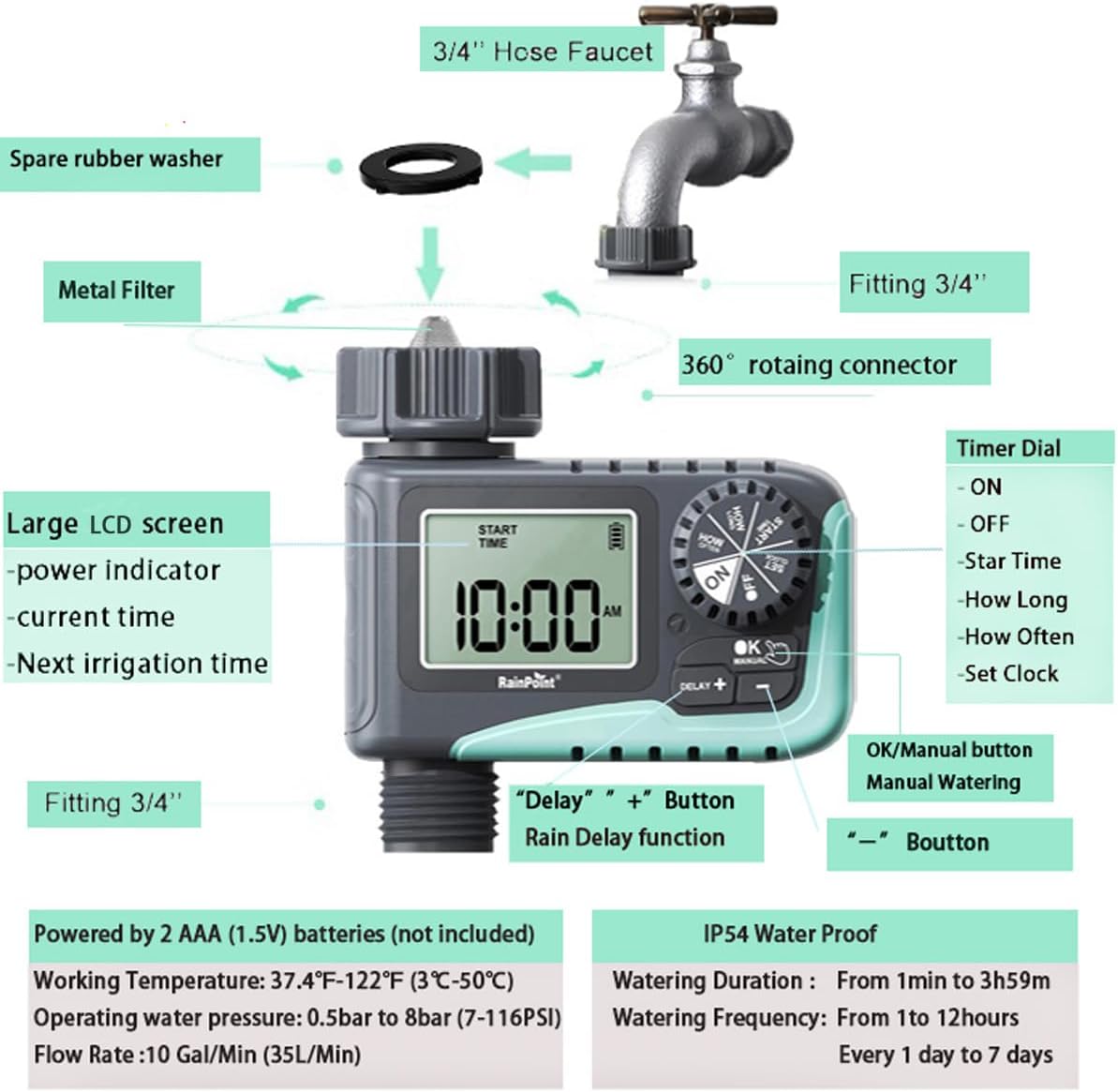
Figure 3: Diagram illustrating the components of the sprinkler timer, including the 3/4" hose faucet connection, metal filter, and LCD screen.
- Haɗa Hose:
Attach your garden hose to the timer's outlet (bottom connector). Hand-tighten securely. Ensure a proper washer is in place at the hose connection point.
- Open Faucet:
Fully open your outdoor hose faucet. The timer is designed to withstand water pressure from 0.5 bar to 8 bar (7-116 PSI). The timer will control the water flow, not the faucet.
Umarnin Aiki
The RAINPOINT ITV105 timer features a large dial and intuitive buttons for easy programming.
Matsayin bugun kira na sarrafawa:
- A: Activates the timer for automatic watering.
- KASHE: Deactivates the timer, stopping all watering.
- SATA Agogo: Saita lokacin yanzu.
- LOKACI: Set the desired start time for watering cycles.
- HAR YAUSHE: Set the duration of each watering cycle.
- SAU NAWA: Set the frequency of watering cycles.
Maɓalli:
- OK/MANUAL: Confirms settings or initiates manual watering.
- DELAY +: Increases values during setting or activates/adjusts rain delay.
- -: Yana rage ƙima yayin saitawa.
Setting the Current Time (SET CLOCK):
- Juya bugun kira zuwa SATA Agogo.
- Yi amfani da + kuma - maɓalli don daidaita sa'a. Latsa OK don tabbatarwa.
- Yi amfani da + kuma - maɓalli don daidaita minti. Latsa OK don tabbatarwa.
- Juya bugun kira zuwa ON to save the time and return to normal operation.
Setting Automatic Watering Program:
This timer allows you to set a start time, duration, and frequency for automated watering.
- Set Start Time (START TIME):
Juya bugun kira zuwa FARA LOKACI. Amfani + kuma - to set the desired watering start hour and minute. Press OK don tabbatar da kowane saiti.
- Set Watering Duration (HOW LONG):
Juya bugun kira zuwa HAR YAUSHE. Amfani + kuma - to set the watering duration from 1 minute to 3 hours and 59 minutes. Press OK don tabbatarwa.

Figure 4: Screen showing settings for "HOW OFTEN" (frequency) and "HOW LONG" (duration) for automatic watering.
- Set Watering Frequency (HOW OFTEN):
Juya bugun kira zuwa SAU NAWA. Amfani + kuma - to set the frequency:
- Every 1 hour to 12 hours.
- Every 1 day to 7 days.
Latsa OK don tabbatarwa.
- Kunna Shirin:
Juya bugun kira zuwa ON. The timer will now operate according to your programmed schedule.
Watering da hannu:
To water immediately without affecting your programmed schedule:
- Ensure the dial is in the ON matsayi.
- Danna maɓallin OK/MANUAL button. The display will show the default manual watering duration (e.g., 10 minutes).
- Yi amfani da + kuma - buttons to adjust the manual watering duration from 1 minute to 8 hours.
- Latsa OK again to start manual watering. The timer will count down the set duration.
- To stop manual watering early, press OK/MANUAL sake.

Figure 5: Display showing the manual watering duration setting, adjustable from 1 minute to 8 hours.
Aikin Jinkirin Ruwa:
The rain delay function allows you to pause your watering schedule for a set period due to rain or other reasons, preventing overwatering.
- Ensure the dial is in the ON matsayi.
- Danna maɓallin DELAY + button. The display will show a default delay time (e.g., 24H).
- Latsa DELAY + repeatedly to cycle through delay options (e.g., 24H, 48H, 72H).
- Once you select the desired delay, the timer will enter rain delay mode. The display will show the remaining delay time.
- After the delay period ends, the timer will automatically resume its programmed watering schedule.
- To cancel the rain delay, press the DELAY + button until the delay time disappears, or rotate the dial to OFF and then back to ON.

Figure 6: The timer displaying the rain delay countdown, highlighting its IP54 waterproof rating.
Kulawa
Proper maintenance ensures the longevity and optimal performance of your RAINPOINT Sprinkler Timer.
- Tsaftace Tace: Periodically check and clean the metal filter located at the timer's inlet. Remove the timer from the faucet, unscrew the filter, rinse it under running water to remove any debris, and reinsert it.
- Madadin Baturi: When the low battery indicator appears on the LCD screen, replace the 2 AAA batteries promptly. Always use new alkaline batteries.
- Lokacin hunturu: Before the first frost, remove the timer from the faucet and store it indoors in a dry, frost-free location. Remove the batteries before storage.
- Duba ga Leaks: Regularly inspect all connections (faucet to timer, timer to hose) for any signs of leakage. Ensure all connections are hand-tightened and that rubber washers are properly seated.

Figure 7: Visual representation of the built-in metal filter and durable plastic material designed for anti-leakage and longer service life.
Shirya matsala
If you encounter issues with your RAINPOINT Sprinkler Timer, refer to the following common problems and solutions:
| Matsala | Dalili mai yiwuwa | Magani |
|---|---|---|
| Timer not turning on / LCD blank. | Matattu ko shigar batura ba daidai ba. | Replace with 2 new AAA alkaline batteries, ensuring correct polarity. |
| Babu kwararar ruwa. |
|
|
| Zubar da ruwa daga hanyoyin sadarwa. |
|
|
| Timer not following schedule. |
|
|
Ƙayyadaddun bayanai
| Siffar | Ƙayyadaddun bayanai |
|---|---|
| Samfura | ITV105 |
| Girman samfur | 10.5 x 10.3 x 5 cm (4 x 4 x 2 inci) |
| Kayan abu | Acrylonitrile Butadiene Styrene (ABS) |
| Watering Duration (Automatic) | Minti 1 zuwa awanni 3 mintuna 59 |
| Watering Frequency (Automatic) | Every 1 hour to 12 hours, or every 1 day to 7 days |
| Watering Duration (Manual) | 1 minute to 8 hours (Default: 10 minutes) |
| Matsakaicin Matsakaicin Ruwa | 10 Gal/Min (35 L/Min) |
| Rage Ruwan Ruwa | Sanduna 0.5 zuwa sanduna 8 (7-116 PSI) |
| Yanayin Aiki | 3 ℃-50 ℃ (37.4℉-122℉) |
| Tushen wutar lantarki | 2 x AAA (1.5V) batteries (not included) |
| Kimar hana ruwa | IP54 |
Garanti da Taimako
RAINPOINT products are manufactured to high-quality standards. For specific warranty details, please refer to the warranty card included with your product or visit the official RAINPOINT website. If you encounter any issues or have questions not covered in this manual, please contact RAINPOINT customer support through their official webshafin ko dillalin da kuka sayi samfurin.
Don ƙarin bayani da tallafi, zaku iya ziyartar shafin Shagon RAINPOINT akan Amazon.


