1. Gabatarwa
This manual provides detailed instructions for the setup, operation, and maintenance of your Pisichen 16-inch 1920x1200P Touch Panel Portable Monitor. Please read this manual thoroughly before using the product to ensure proper functionality and to prevent damage.

Image 1.1: The Pisichen 16-inch Portable Monitor, showcasing its vibrant display and slim design.
2. Bayanin Tsaro
- Do not expose the monitor to rain or moisture to avoid electric shock or fire hazards.
- Kar a bude mai duba casing. Koma duk hidima ga ƙwararrun ma'aikata.
- Ka guji sanya na'urar a cikin hasken rana kai tsaye ko kusa da wuraren zafi.
- Use only the power adapter and cables provided or approved by the manufacturer.
- Clean the screen with a soft, lint-free cloth. Do not use liquid cleaners or aerosol sprays directly on the screen.
3. Abubuwan Kunshin
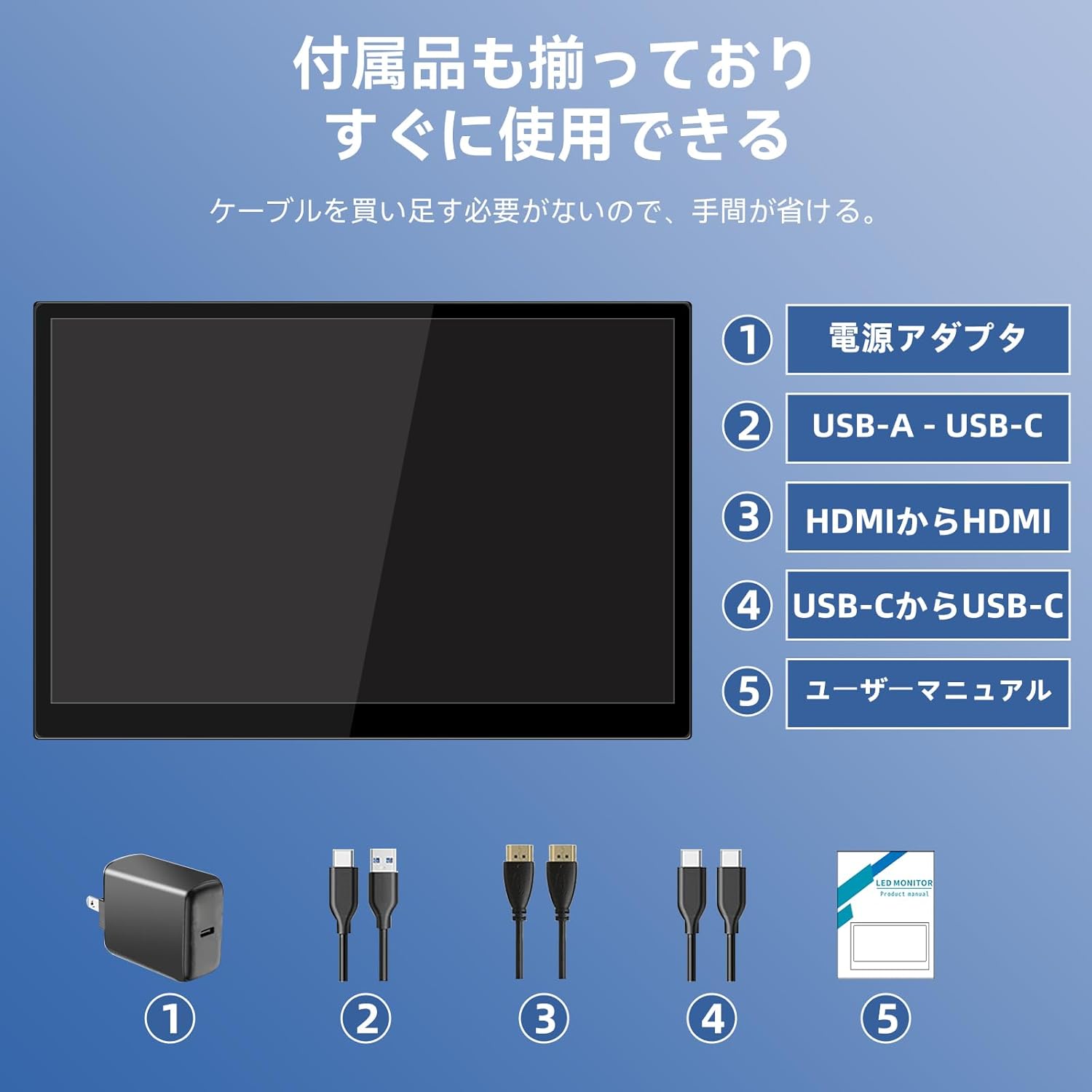
Da fatan za a duba kunshin don abubuwa masu zuwa:
- Pisichen 16-inch Portable Monitor
- Adaftar Wuta
- USB-A zuwa kebul na USB-C
- HDMI zuwa HDMI Cable
- USB-C zuwa kebul na USB-C
- Jagorar mai amfani (wannan takaddar)

Image 3.1: All items included in the product package, ready for immediate use.
4. Samfurin Ya Ƙareview
The monitor features multiple ports for versatile connectivity and control buttons for easy navigation of settings.
4.1. Tashoshi da Buttons
Hoto 4.1: Cikakken bayani view of the monitor's interfaces, including audio port, USB-C ports, HDMI port, brightness controls, menu/OK button, volume/down button, and USB-A port.
- 3.5mm Audio Port: Don haɗa belun kunne ko lasifikan waje.
- USB-C Port 1 (Full-function): Supports power, video, and touch signal transmission.
- USB-C Port 2 (Full-function): Supports power, video, and touch signal transmission.
- HDMI Port: For video signal input from devices.
- Brightness Up / Power Button: Short press to increase brightness, long press to power on/off.
- Menu / OK Button: Press to open OSD menu, press again to confirm selection.
- Volume Down / Back Button: Short press to decrease volume, long press to go back in OSD menu.
- USB-A Port (OTG): Don haɗa linzamin kwamfuta ko madannai.
5. Saita
Follow these steps to connect your portable monitor to various devices.
5.1. Single Cable Connection (USB-C)
For devices with a full-function USB-C port (supporting DisplayPort Alternate Mode and power delivery), a single USB-C to USB-C cable can transmit video, audio, touch signals, and power.
- Connect one end of the USB-C to USB-C cable to a full-function USB-C port on your device (e.g., laptop, smartphone).
- Connect the other end to either USB-C Port 1 or USB-C Port 2 on the monitor.
- The monitor should automatically power on and display the content. Touch functionality will also be active.
5.2. Dual Cable Connection (HDMI + USB-C for Power/Touch)
For devices with an HDMI output, or if your USB-C port does not support power delivery, you will need two cables.
- Connect one end of the HDMI to HDMI cable to your device's HDMI output.
- Connect the other end to the HDMI Port on the monitor.
- Connect the power adapter to one of the monitor's USB-C ports (Port 1 or Port 2) for power.
- For touch functionality, connect the USB-A end of the USB-A to USB-C cable to your device's USB-A port, and the USB-C end to the other available USB-C port on the monitor.

Image 5.1: Illustration of different connection methods: single USB-C cable for power, video, and touch, and dual cable setup using HDMI for video and USB-C for power and touch.
6. Umarnin Aiki
6.1. Kunnawa / Kashewa
Long press the Brightness Up / Power Button (5) for approximately 3 seconds to power the monitor on or off.
6.2. Allon Nuni (OSD) Menu
Press the Menu / OK Button (6) to access the OSD menu. Use the Brightness Up / Power Button (5) and Volume Down / Back Button (7) to navigate through options. Press the Menu / OK Button (6) to confirm selections. Long press the Volume Down / Back Button (7) to exit the menu.
6.3. Taɓa Ayyuka
The monitor supports 10-point capacitive multi-touch. Ensure a USB connection (via full-function USB-C or USB-A to USB-C cable) is established for touch input to work. The touch screen allows for intuitive interaction, including swiping, writing, and annotating.
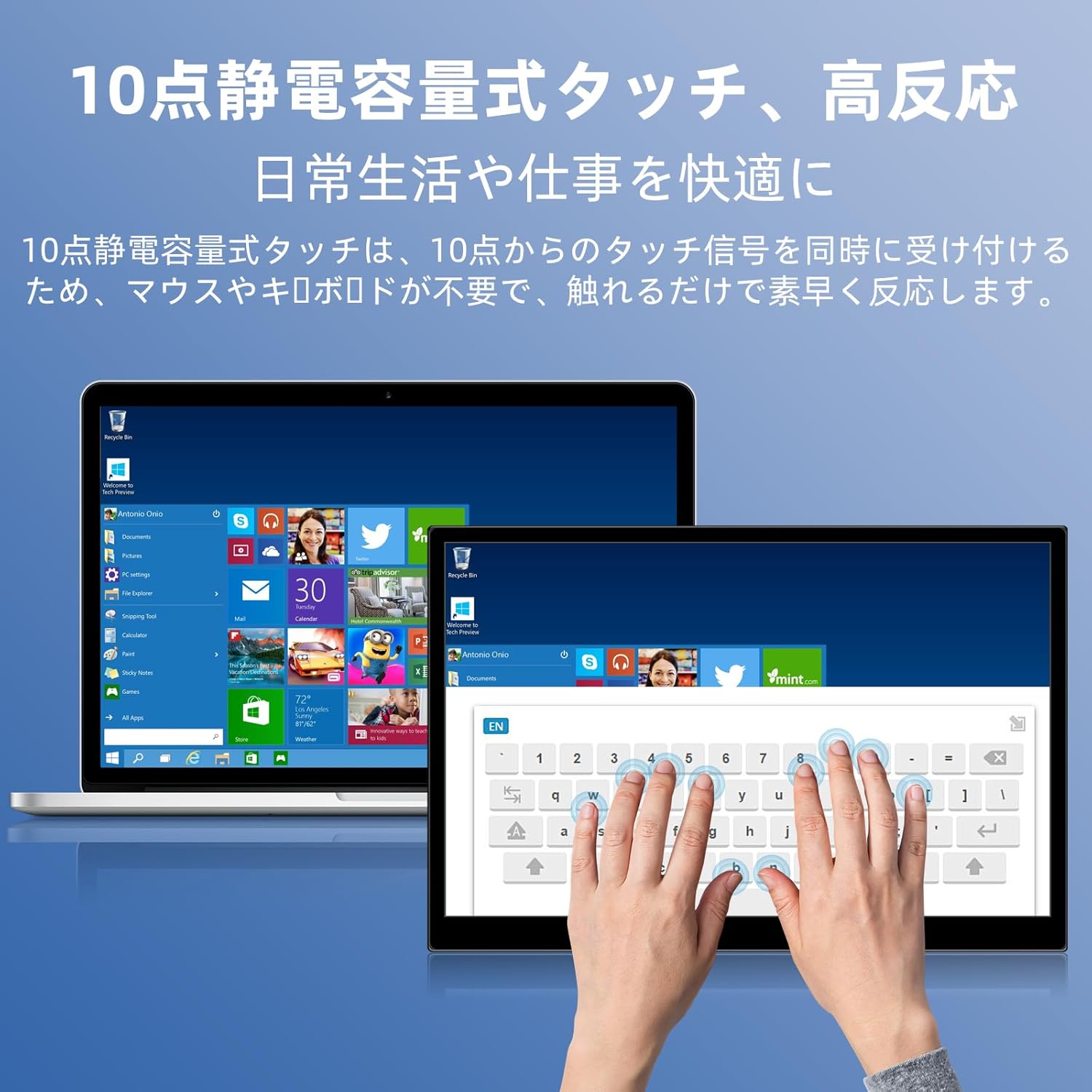
Image 6.1: A user demonstrating the responsive 10-point capacitive touch functionality on the portable monitor, enabling smooth interaction with on-screen content.
6.4. Yanayin Nuni
The monitor supports various display modes when connected to a computer:
- Yanayin Kwafi: Mirrors the content of your primary screen.
- Tsawaita Yanayin: Extends your desktop, providing more screen real estate for multitasking.
- Second Screen Mode: Yana amfani da na'urar duba allo mai ɗaukuwa kawai azaman nuni.
6.5. Screen Orientation
The monitor supports both landscape and portrait orientations. You can adjust the display settings on your connected device (e.g., Windows Display Settings, macOS Display Preferences) to change the orientation as needed for different tasks like document viewing or design work.
6.6. HDR Technology
The monitor features HDR (High Dynamic Range) mode, which provides deeper and more realistic colors for an enhanced visual experience. This setting can typically be toggled within the OSD menu or your device's display settings.

Hoto 6.2: Examples of the monitor's versatility, showing its use for entertainment, mobile productivity, and as an extended display for a home office.
7. Kulawa
- Share Allon: A hankali shafa allon tare da laushi, bushe, yadi mara laushi. Don alamun taurin kai, ɗan dampen the cloth with water or a screen-specific cleaner (apply to cloth, not directly to screen).
- Tsaftace Casing: Yi amfani da busasshiyar kyalle mai laushi don goge abin dubawa casing. Kauce wa masu tsabtace abrasive.
- Ajiya: When not in use for extended periods, store the monitor in a cool, dry place, preferably in its original packaging or a protective sleeve.
- Na'urar USB: Avoid bending or twisting cables excessively to prevent damage.
8. Shirya matsala
| Matsala | Dalili mai yiwuwa | Magani |
|---|---|---|
| No display / "No Signal" message | Incorrect cable connection, insufficient power, incorrect input source. | Ensure cables are securely connected. Verify the device's USB-C port supports video output. Connect the power adapter if using HDMI or if USB-C power is insufficient. Check OSD menu for correct input source. |
| Ayyukan taɓawa baya aiki | No USB connection for touch, driver issue (rare). | Ensure the USB-C cable is full-function or that the USB-A to USB-C cable is connected for touch data. Restart the monitor and connected device. |
| Fitowar allo | Unstable power, faulty cable, refresh rate mismatch. | Use the provided power adapter. Try a different cable. Adjust the refresh rate in your device's display settings. |
| Image is distorted or stretched | Incorrect aspect ratio settings. | Adjust the aspect ratio in the OSD menu or your device's display settings to match the monitor's native resolution (1920x1200). |

Image 8.1: Demonstrating the importance of correct aspect ratio settings to avoid image distortion.
9. Ƙayyadaddun bayanai
| Siffar | Ƙayyadaddun bayanai |
|---|---|
| Alamar | Pisichen |
| Lambar Samfura | 16QTHCM-1200P |
| Girman allo | 16 inci |
| Ƙaddamarwa | 1920 x 1200 pixels (FHD) |
| Nau'in panel | IPS |
| Viewcikin Angle | 178° |
| Matsakaicin Sassauta | 60 Hz |
| Adadin Kwatance | 1000:1 |
| Haske | 300 cd/m² |
| Launi Gamut | 100% sRGB |
| Zurfin Launi | Launuka Miliyan 16.7 |
| Kariyar tabawa | 10-maki Capacitive Touch |
| Haɗuwa | 2x Full-function USB-C 3.1, 1x HDMI, 1x USB-A (OTG), 1x 3.5mm Audio Jack |
| Taimakon HDR | Ee |
| VESA Dutsen Daidaitawa | Ee |
| Girman Samfura (W x H x D) | 350 x 230 x 10 mm |
| Nauyi | 1.62 kg |
10. Garanti da Tallafawa
For warranty information and technical support, please refer to the warranty card included in your product package or contact Pisichen customer service through their official website or the retailer where the product was purchased. Please have your model number (16QTHCM-1200P) and purchase details ready when contacting support.


