Gabatarwa
Welcome to the VTech Genius XL Interactive Video Binoculars. This device is designed for children aged 5 and above to explore the world around them through observation, interactive videos, images, and educational games. This manual provides essential information for setup, operation, and maintenance to ensure optimal use and longevity of your product.

Image: The VTech Genius XL Interactive Video Binoculars, showing the main unit with its flip-up color screen and binocular lenses.
Muhimman Bayanan Tsaro
WARNING: Not suitable for children under 36 months due to small parts.
- Koyaushe kula da yara yayin amfani.
- Do not look directly at the sun through the binoculars, as this can cause serious eye damage.
- Tabbatar an saka batura daidai.
- Kar a haxa tsofaffi da sababbin batura ko nau'ikan batura daban-daban.
- Cire batura da suka ƙare da sauri.
- Zubar da batura mai daɗi.
Me ke cikin Akwatin
- 1 Pair of VTech Genius XL Interactive Video Binoculars
- Batteries (4 x LR6-AA)
- Wuyan wuya
Saita
1. Shigar da Baturi
- Nemo sashin baturi akan na'urar.
- Amfani da sukudireba, buɗe murfin ɗakin baturi.
- Insert 4 new LR6-AA batteries, ensuring correct polarity (+/-).
- Sauya murfin kuma ƙara ja dunƙule.
2. Haɗe Wuyan Wuyan
Thread the provided neck strap through the designated loops on the binoculars. Adjust the strap length for comfortable and secure wearing.

Image: A child wearing the VTech Genius XL Interactive Video Binoculars with the neck strap, demonstrating how it can be worn for outdoor exploration.
Umarnin Aiki
1. Kunnawa / Kashewa
Press and hold the power button to turn the device on or off. The device features an automatic shut-off function to preserve battery life.
2. Viewcikin Modes
The binoculars offer two primary viewing methods:
- Through the Binoculars: Look directly through the eyepieces (binocular lenses) for traditional observation. The interpupillary distance is adjustable for optimal comfort.
- On the LCD Screen: Flip up the 2.4-inch color LCD screen to view observations digitally.

Image: A child looking through the VTech Genius XL Interactive Video Binoculars, demonstrating the traditional viewhanyar ing.
3. Magnification and Focus
- The binoculars provide up to 10x girma.
- Use the focus wheel to adjust the image clarity for both binocular and screen viewing.
4. Yanayin Ganin Dare
Activate the integrated infrared system for night vision. This mode is exclusively available on the LCD screen, allowing observation in low-light or dark conditions.

Image: The VTech Genius XL Interactive Video Binoculars displaying a night vision image of a hedgehog on its screen, highlighting the night vision feature.
5. Photo and Video Capture
The integrated camera allows you to capture images of flora and fauna. The internal memory can store up to 50 photos. A micro-SD card slot (card not included) is available to expand storage capacity and save photos for printing.

Image: The VTech Genius XL Interactive Video Binoculars with multiple captured images of animals and nature displayed around it, illustrating the photo capture function.
6. Interactive Content (BBC Videos & Images)
Explore over 340 official videos and images from the BBC, providing more than 700 educational facts categorized into 9 groups:
- Amphibian
- Arthropods
- Terrestrial Birds
- Flying Birds
- Terrestrial Mammals
- Marine Mammals
- Dabbobi masu rarrafe
- Tsire-tsire masu fure
- Other Plants and Fungi

Image: The VTech Genius XL Interactive Video Binoculars displaying an image of a mushroom on its screen, with a speech bubble indicating educational information, showcasing the BBC content.
7. Games and Quizzes
- Adventure Game: Navigate through 5 natural environments, encountering over 100 animals and exploring 25 levels.
- Tambayoyin Ilimi: Test scientific knowledge through a 3-stage quiz (Training, Time Challenge, Clue Game).
- Use the joystick and 12 buttons to navigate through games and features.
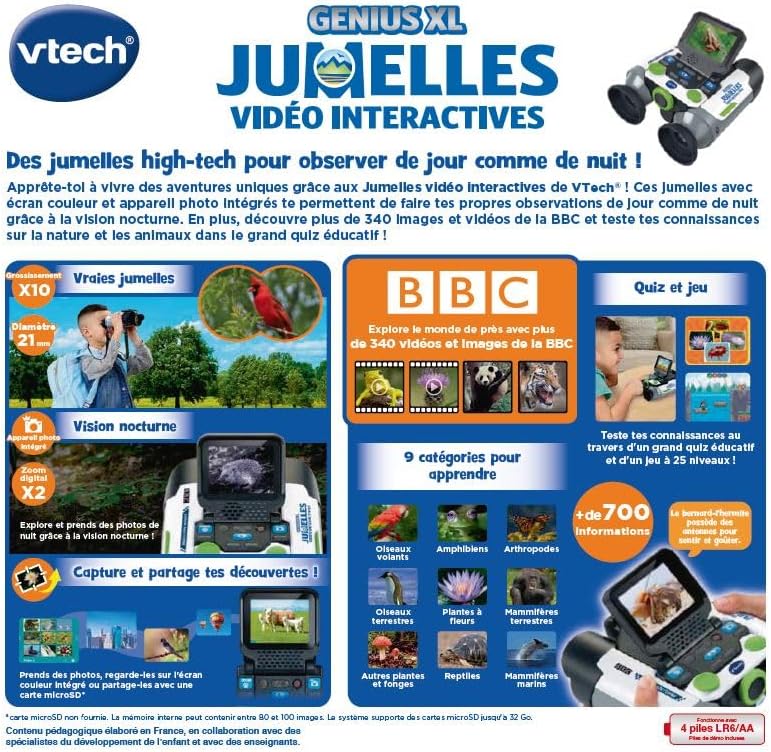
Image: A child holding the VTech Genius XL Interactive Video Binoculars, playing an adventure game on its screen, demonstrating the interactive game feature.
8. Sarrafa ƙara
Adjust the sound volume using the dedicated controls on the device.
Haɗin Kafafen Yaɗa Labarai
Bidiyoyin Samfur na hukuma
The following video demonstrates the key features and interactive capabilities of the VTech Genius XL Interactive Video Binoculars.
Bidiyo: A takaice preview nunin bidiyoasing children using the VTech Genius XL Interactive Video Binoculars to observe nature, take photos, play games, and utilize the night vision mode. It highlights the educational BBC content and interactive features.
This video provides a broader overview of the Genius XL range, including the Interactive Video Binoculars and the Interactive Video Globe.
Video: A preview video demonstrating both the VTech Genius XL Interactive Video Binoculars and the Interactive Video Globe. It shows children engaging with both products, highlighting their educational and interactive aspects, including exploring animals and geography.
Kulawa
Tsaftacewa
Goge na'urar da ɗan damp zane. Kada a yi amfani da sinadarai masu ƙarfi ko masu tsaftace muhalli. A tabbatar na'urar ta bushe kafin a ajiye ta.
Adana
Store the binoculars in a cool, dry place away from direct sunlight. Remove batteries if the device will not be used for an extended period.
Shirya matsala
- Na'urar baya kunna: Check battery installation and ensure batteries are not depleted. Replace with new batteries if necessary.
- Screen is blank or frozen: Try turning the device off and on again. If the issue persists, remove and reinsert the batteries.
- Sound not working: Check the volume settings. If the issue persists after checking volume and restarting, contact customer support.
- Photos lost or unable to access gallery: Ensure a micro-SD card is properly inserted if you are relying on external storage. If using internal storage and experiencing issues, a factory reset might be necessary, but this will erase all stored photos. It is recommended to regularly transfer important photos to an external micro-SD card.
- Image blurry: Adjust the focus wheel until the image is clear.
Ƙayyadaddun bayanai
| Siffar | Daki-daki |
|---|---|
| Girman samfur | 12.1 x 6.9 x 16.2 cm |
| Nauyi | 170g ku |
| Shawarar Shekaru | shekaru 5 da sama |
| Darajar Ilimi | Learning, Creativity, Animal Discoveries, Interaction |
| Harshe | French (Note: Product content is in French as per specifications) |
| Maganar Mai ƙira | 618605 |
| Adadin Yankuna | 1 |
| Ana Bukata Batura | Yes (4 x LR6-AA) |
| Batura Sun Haɗe | Ee |
| Babban Material | Filastik |
| Launi | Grey |
| Siffa ta Musamman | Hangen Dare |
| Maƙasudin Diamita na Lens | 21 millimeters |
| Matsakaicin Girmamawa | 10x ku |
| Nau'in hawa | Collar (Neck Strap) |
| Sunan Samfura | X 21 |
| Binocular Prism Description | Porro Prism |
Garanti da Taimako
For warranty information and customer support, please refer to the documentation included with your purchase or visit the official VTech website. Ajiye shaidar siyan ku don kowane da'awar garanti.
Product support and spare parts availability may vary by region. The manufacturer states that spare parts are unavailable for this product.


