1. Gabatarwa da Ƙarsheview
The Idatalink Maestro HRN-SR-VW2 T-Harness is designed to facilitate the replacement of a factory radio with an aftermarket head unit in select Volkswagen vehicles manufactured between 2016 and 2020. This harness works in conjunction with the Idatalink Maestro ADS-MSR module (sold separately) to retain essential factory features such as steering wheel controls and the use of the factory ampmai sanyaya wuta.
This manual provides detailed instructions for the proper installation and understanding of the HRN-SR-VW2 T-Harness, ensuring seamless integration with your vehicle's existing systems.
2. Kayan Samfura
- Sauƙaƙe Shigarwa: Designed to simplify radio replacement in compatible Volkswagen vehicles when used with the iDatalink Maestro ADS-MSR module.
- Steering Wheel Control Retention: Retains original steering wheel controls for functions like volume adjustment and track seeking with an aftermarket radio.
- Masana'anta Amplifier Retention: Maintains functionality of the factory amplifier, including turn-on, fader, and gain control.
- Backup Camera Retention: Retains the factory backup camera with parking guidelines.
- Retained Accessory Power (RAP): The vehicle's Retained Accessory Power feature is maintained.
- Navigation Outputs: Provides outputs for Parking Brake, Reverse Light, and Vehicle Speed Sense (VSS) for aftermarket navigation systems.
- Accessory Power Output: Offers a 12V/15A accessory power output.
- Illumination Output: Provides an illumination output for aftermarket head units.
3. Daidaituwa
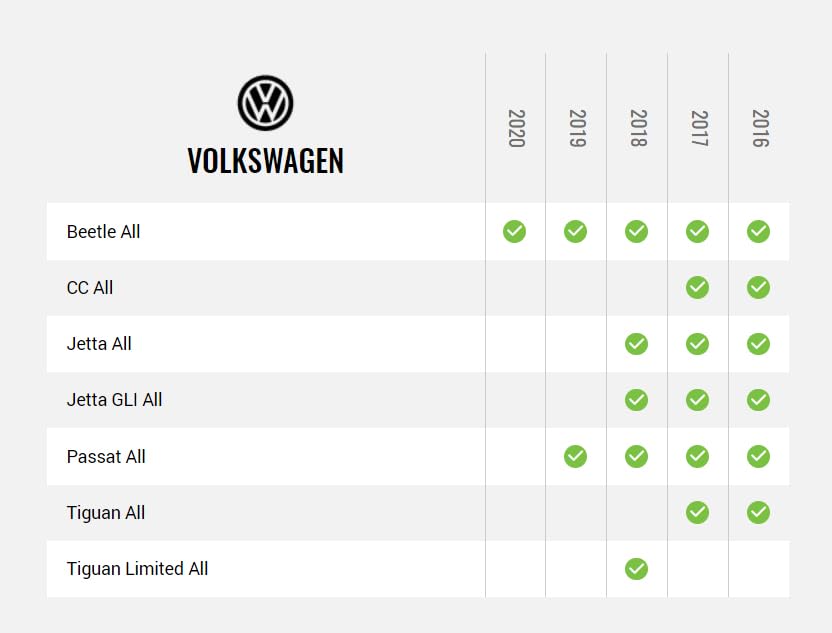
The HRN-SR-VW2 T-Harness is compatible with the following Volkswagen vehicles when used in conjunction with the iDatalink Maestro ADS-MSR module:

Hoto 3.1: Compatibility chart showing supported Volkswagen models and years (2016-2020) for the HRN-SR-VW2 T-Harness. Models include Beetle, CC, Jetta, Jetta GLI, Passat, Tiguan, and Tiguan Limited.
Please refer to the chart above for specific model and year compatibility. An iDatalink Maestro ADS-MSR module is required for full functionality.
4. Bukatun Shigarwa
Successful installation of the HRN-SR-VW2 T-Harness requires the following components (sold separately):
- iDatalink Maestro ADS-MSR Module: This interface module is essential for retaining factory features and communicating with the vehicle's systems.
- Corresponding Idatalink Maestro Car Stereo Head-Unit ACC-HU Series T-Harness: A specific head-unit harness is required to connect the Maestro module to your aftermarket radio. Exampsun hada da:
- ACC-HU-ALP1 (Alpine)
- ACC-HU-PIO1 (Pioneer)
- ACC-HU-SON1 (Sony)
- ACC-HU-KEN1 (Kenwood/JVC with 22-Pin Connector)
- ACC-HU-KEN2 (Kenwood/JVC with 16-Pin Connector)
- ACC-HU-KEN3 (2024 & Newer Kenwood/JVC with 22-Pin Connector)
- ACC-HU-BOS1 (BOSS Radio)
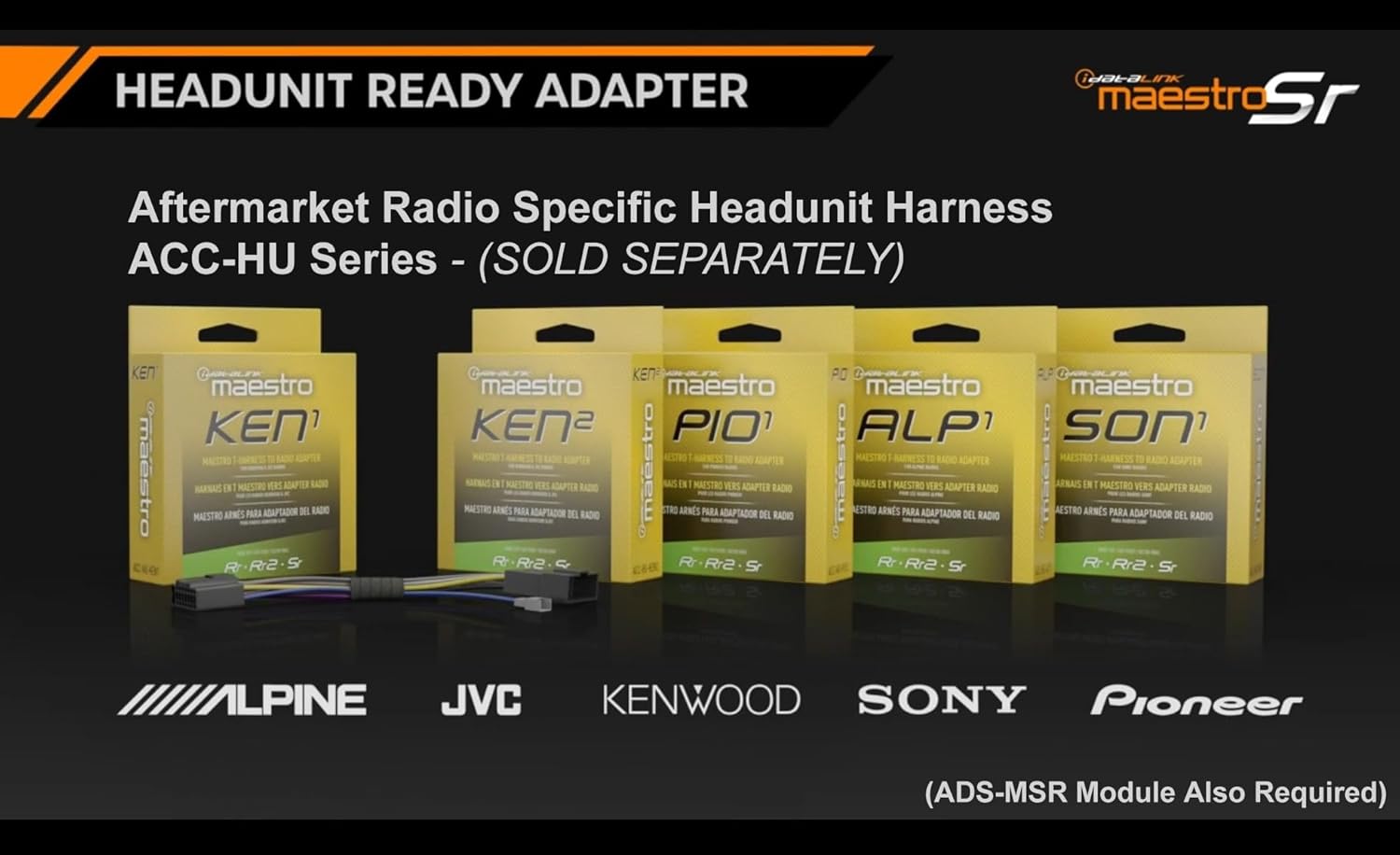
Hoto 4.1: Display of various Idatalink Maestro ACC-HU series head unit specific harnesses, which are required to connect the Maestro module to different brands of aftermarket radios.

Hoto 4.2: An wuceview of Idatalink Maestro vehicle-specific T-harnesses, illustrating how they simplify the installation process. The HRN-SR-VW2 is part of this series.
5. Jagorar Saitawa da Shigarwa
Muhimmi: Before beginning installation, ensure your iDatalink Maestro ADS-MSR module is flashed with the correct firmware using the Weblink Desktop application. Refer to the ADS-MSR module's instruction manual for detailed flashing procedures.

Hoto 5.1: The Idatalink Maestro HRN-SR-VW2 T-Harness, shown with its packaging, illustrating the main components of the product.
Hoto 5.2: A daki-daki view of the HRN-SR-VW2 T-Harness, highlighting the various connectors and labeled wires for proper connection.
Matakan Shigarwa:
- Disconnect Vehicle Battery: Always disconnect the negative terminal of your vehicle's battery before starting any electrical work to prevent short circuits or damage.
- Cire Rediyon Factory: Carefully remove the factory radio from the dashboard. Refer to your vehicle's service manual for specific instructions on radio removal.
- Connect HRN-SR-VW2 T-Harness:
- Connect the vehicle-specific connector of the HRN-SR-VW2 T-Harness to the corresponding harness in your Volkswagen vehicle.
- Connect the other end of the HRN-SR-VW2 T-Harness to the iDatalink Maestro ADS-MSR module.
- Connect Head-Unit Specific Harness: Connect the appropriate ACC-HU series harness (e.g., ACC-HU-ALP1 for Alpine) to the iDatalink Maestro ADS-MSR module.
- Haɗa Gidan Rediyon Bayan Kasuwa: Connect the head-unit specific harness to your aftermarket radio. Ensure all connections are secure.
- Wire Connections (if applicable): If your aftermarket radio requires additional connections not covered by the plug-and-play harnesses (e.g., parking brake, reverse, VSS for navigation), utilize the labeled wires on the HRN-SR-VW2 T-Harness.
- Gwaji Haɗin: Before reassembling the dashboard, temporarily reconnect the vehicle battery and test the functionality of the aftermarket radio, steering wheel controls, factory amplifier, and backup camera.
- Amintaccen Waya da Sake Haɗa: Once all functions are verified, neatly secure all wiring to prevent rattles or interference. Reassemble the dashboard components.
- Duban Ƙarshe: Perform a final check of all retained features and radio functions.
For detailed wiring diagrams and specific vehicle integration instructions, please visit the official iDatalink Maestro website: iDatalink Maestro Support
6. Operating Retained Features
Once the HRN-SR-VW2 T-Harness and ADS-MSR module are correctly installed and configured, the following factory features will operate with your aftermarket radio:
- Sarrafa Tuƙi: The buttons on your steering wheel will control basic functions of your aftermarket radio, such as volume up/down, track forward/back, and mode selection. Specific button assignments may be configurable through the aftermarket radio's settings or the Maestro module's programming.
- Masana'anta Amplififi: Ma'aikata amplifier will power your vehicle's speakers. Fader and gain controls will typically be managed through the aftermarket radio's audio settings.
- Kamara Ajiyayyen: When the vehicle is shifted into reverse, the factory backup camera image will display on your aftermarket radio screen, complete with parking guidelines.
- Retained Accessory Power (RAP): The aftermarket radio will remain powered for a short period after the ignition is turned off, similar to the factory radio's behavior, until a door is opened.
7. Shirya matsala
Idan kun fuskanci matsala bayan shigarwa, yi la'akari da matakan gyara matsala masu zuwa:
- Babu Ikon Radiyo:
- Check all power connections to the aftermarket radio and the Maestro module.
- Ensure the vehicle battery is fully charged and properly connected.
- Verify that the ADS-MSR module is correctly flashed and powered.
- Sarrafar Tuƙi Ba Ya Aiki:
- Confirm the ADS-MSR module is flashed with the correct firmware for your vehicle and aftermarket radio.
- Check the connection between the HRN-SR-VW2, ADS-MSR module, and the head-unit specific harness.
- Consult the aftermarket radio's manual for steering wheel control setup options.
- Babu Sauti ko Sauti Mai Ruɗi:
- Verify all speaker connections are secure and correctly polarized.
- Tabbatar da masana'anta amplifier is receiving power and turn-on signal from the Maestro module.
- Check the audio output settings on your aftermarket radio.
- Kyamarar Ajiyayyen Ba Ta Nunawa:
- Confirm the camera input is correctly connected to the aftermarket radio.
- Ensure the reverse trigger wire from the HRN-SR-VW2 is connected to the aftermarket radio's reverse input.
- Verify the ADS-MSR module is configured to retain the factory camera.
For further assistance, refer to the iDatalink Maestro support resources or contact their technical support.
8. Ƙayyadaddun bayanai
| Lambar Samfura | HRN-SR-VW2 |
| Alamar | Idatalink Maestro |
| Daidaituwa | Select Volkswagen Vehicles (2016-2020) |
| Required Module | iDatalink Maestro ADS-MSR (Sold Separately) |
| Kayan abu | Acrylonitrile Butadiene Styrene |
| Girman samfur | 7 x 4.75 x 1.5 inci |
| Nauyin Abu | 0.13 Kilogram (4.59 oz) |
| Nau'in Haɗawa | OBD-II, Volkswagen-specific Connectors |
9. Abin da ke cikin Akwatin
The HRN-SR-VW2 package includes:
- 1x Idatalink Maestro HRN-SR-VW2 T-Harness
Please ensure all components are present upon opening the package.
10. Taimako da Garanti
For technical support, detailed wiring diagrams, or additional information regarding the iDatalink Maestro HRN-SR-VW2 T-Harness, please visit the official iDatalink Maestro website ko tuntuɓi sashen sabis na abokin ciniki.
Warranty information is typically provided with the product packaging or available on the manufacturer's official website. Da fatan za a riƙe shaidar siyan ku don da'awar garanti.


