Gabatarwa
This manual provides detailed instructions for the installation, operation, and maintenance of your CNBINGO M1-202W Double Touch Rocker Switch. This product features a sleek glass panel, touch control, and 2-way switching capability, allowing a single light to be controlled from two different locations. Please read this manual thoroughly before installation and use to ensure safe and correct operation.
Muhimman Bayanan Tsaro
Please observe the following safety precautions to prevent electric shock, fire, or damage to the product:
- Shigar da Wutar Lantarki: All electrical work should be performed by a qualified electrician and in accordance with local electrical codes and regulations. Always disconnect power at the circuit breaker before installation or maintenance.
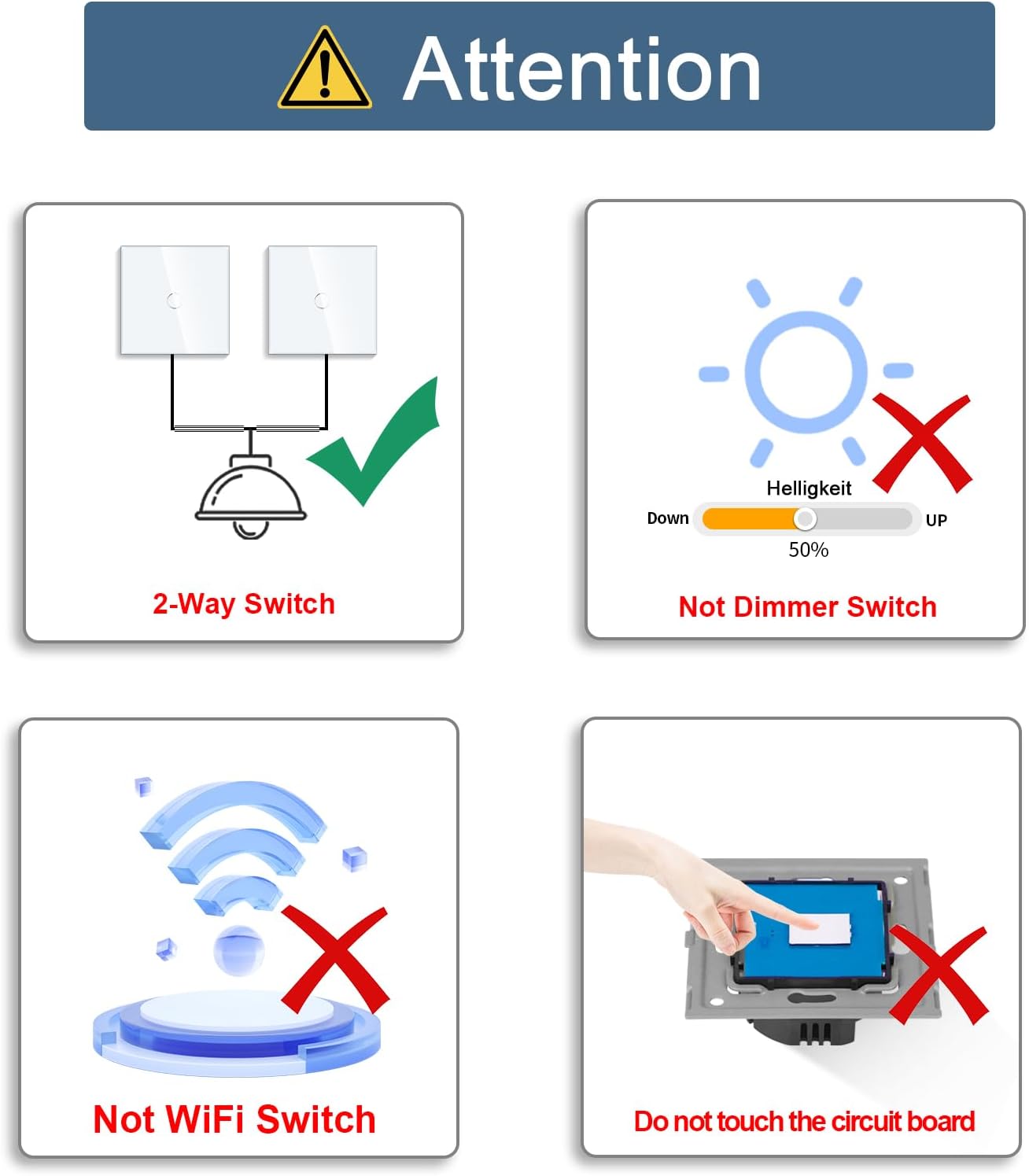
- Nau'in Samfur: This is a standard 2-way rocker switch. It is ba a dimmer switch and is ba compatible with smart home systems like Alexa or Wi-Fi.
- Hukumar Zagaye: Do not touch the internal circuit board before the glass panel is securely installed. Touching the circuit board prematurely may cause malfunction.
- Secure Touch System: The switch features a high-speed 40ms touch system with tempered glass, designed to be resistant to fire, scratches, and electric shock. It is safe to touch even with wet hands, but caution is always advised when dealing with electricity.
Samfurin Ƙarsheview
The CNBINGO M1-202W Double Touch Rocker Switch is designed for modern interiors, offering reliable functionality and a sleek aesthetic.
Dimensions and Installation Requirements
- Canja Girma: 86 mm (Length) x 86 mm (Width) x 26 mm (Depth).
- Wall Box Compatibility: Requires a standard wall box with a minimum depth of 30 mm and a diameter of 60 mm.

Alamar LED Matsayi
Each touch button on the switch is equipped with a backlight. A strong or weak blue light indicates the ON/OFF status of the connected light. This feature ensures visibility in the dark without disturbing sleep.

Saita da Shigarwa
The CNBINGO M1-202W switch is designed for easy installation. No neutral wire is required for its operation.
Wiring Diagram for 2-Way Switching
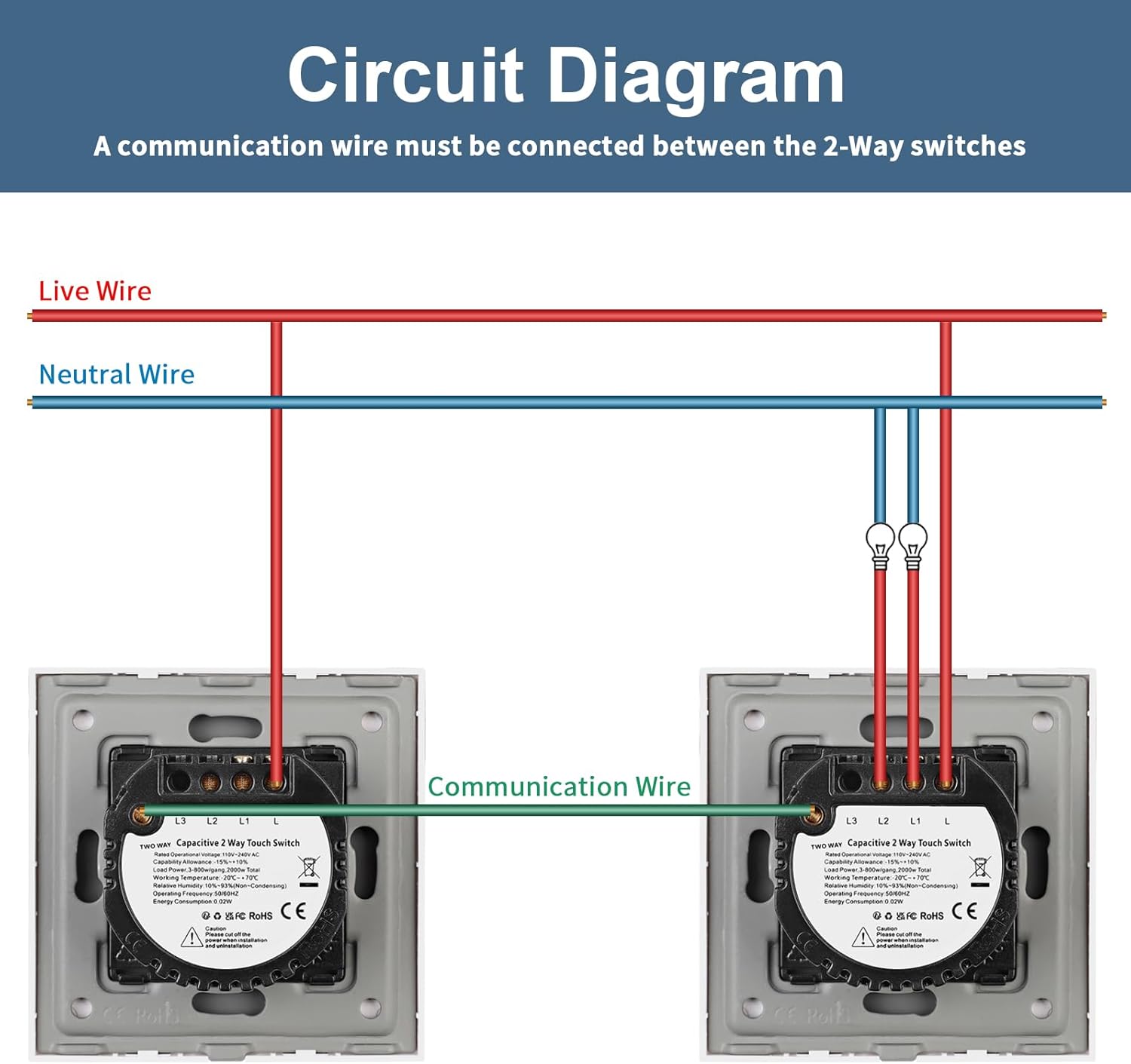
For 2-way switching, a communication wire must be connected between the two switches. Refer to the diagram below for correct wiring.
Matakan Shigarwa
- Cire haɗin Wuta: Kafin fara duk wani aikin lantarki, tabbatar da cewa an kashe babban wutar lantarki zuwa da'irar a wurin na'urar yanke wutar lantarki.
- Prepare Wall Box: Ensure your wall box meets the minimum depth of 30mm and a diameter of 60mm.
- Haɗin Waya: Connect the live wire, neutral wire (if applicable, though not required for basic operation), and the communication wire (for 2-way setup) to the corresponding terminals on the switch. Refer to the circuit diagram.
- Maɓallin Ɗaurawa: Secure the switch module into the wall box using screws.
- Install Glass Panel: Carefully attach the glass panel to the switch module. Ensure it clicks into place securely. Important: Do not touch the switch buttons before the glass panel is installed.
- Dawo da Power: Turn the main power supply back on at the circuit breaker.
Umarnin Aiki
Basic ON/OFF Operation
Simply touch the designated area on the glass panel to turn the connected light ON or OFF. The blue LED indicator will change intensity to reflect the current status.
2-Way Switching Functionality
This switch supports 2-way control, allowing you to operate a single light fixture from two different switch locations. To pair two switches for 2-way functionality:
- Ensure both switches are from the same series.
- Long press the touch button on one of the switches until you hear a beep or see a specific indicator change (refer to specific product instructions if provided with the physical product).
- Within a few seconds, operate the other switch (e.g., touch it once). The switches should now be paired for 2-way control.

Kulawa
To ensure the longevity and optimal performance of your CNBINGO touch switch, follow these simple maintenance guidelines:
- Tsaftacewa: Goge gilashin gilashin da taushi, damp cloth. Avoid abrasive cleaners, solvents, or harsh chemicals that could damage the glass or internal components.
- Dubawa: Periodically check the switch for any signs of damage or loose connections. If any issues are found, disconnect power and consult a qualified electrician.
- Guji Tasiri: While the tempered glass is durable, avoid strong impacts that could crack or shatter the panel.
Shirya matsala
If you encounter issues with your CNBINGO M1-202W switch, refer to the following common problems and solutions:
- Switch Not Responding After Installation:
- Ensure the glass panel was installed kafin touching any switch buttons. If not, disconnect power, remove the glass panel, re-attach it, and then restore power.
- Try cutting the main power to the circuit for a few minutes and then restarting it. This can often resolve minor electronic glitches.
- Light Flickers or Does Not Turn Off Completely:
- This switch is not a dimmer. Ensure you are not attempting to use it with dimmable lights or in a circuit designed for dimming.
- Verify that the connected load (light bulb) is compatible with a standard ON/OFF switch.
- 2-Way Pairing Fails:
- Ensure both switches are from the same CNBINGO series and are designed for 2-way operation.
- Re-attempt the pairing process carefully, ensuring the long press and subsequent touch on the second switch are performed correctly and within the specified timeframe.
- Check the communication wire connection between the two switches as per the wiring diagram.
- No Power to Switch:
- Check the circuit breaker to ensure power is supplied to the switch's circuit.
- Verify all wire connections (Live, Neutral, Load) are secure and correctly wired according to the diagram.
Idan matsaloli suka ci gaba bayan an gwada waɗannan hanyoyin magance su, tuntuɓi tallafin abokin ciniki.
Ƙayyadaddun bayanai
| Siffar | Ƙayyadaddun bayanai |
|---|---|
| Alamar | CNBINGO |
| Lambar Samfura | M1-202 |
| Girman samfur (L x W x H) | 8.6 x 8.6 x 3.6 cm |
| Nauyi | 200g ku |
| Launi | Fari |
| Kayan abu | Gilashin |
| Nau'in Wuta | AC |
| Voltage | 240V (AC) |
| Nau'in Canjawa | Touch, 2-Way Rocker Switch |
| Electrical Outlet Type | Dutsen bango |
| Yanayin Aiki | ON-KASHE-ON |
| Takaddun shaida | IP67 |
| Ana Bukata Batura | A'a |
Garanti da Taimako
CNBINGO products are manufactured to high-quality standards. For warranty information or technical support, please refer to the documentation included with your purchase or contact CNBINGO customer service through their official channels. Please have your model number (M1-202W) and purchase details ready when contacting support.


