1. Gabatarwa
This manual provides detailed instructions for the MESWAO 15.6 Inch Android 14 Tablet, model MES-B3. It covers essential information regarding product features, setup, operation, maintenance, and troubleshooting to ensure optimal performance and user experience. Please read this manual thoroughly before using your device.
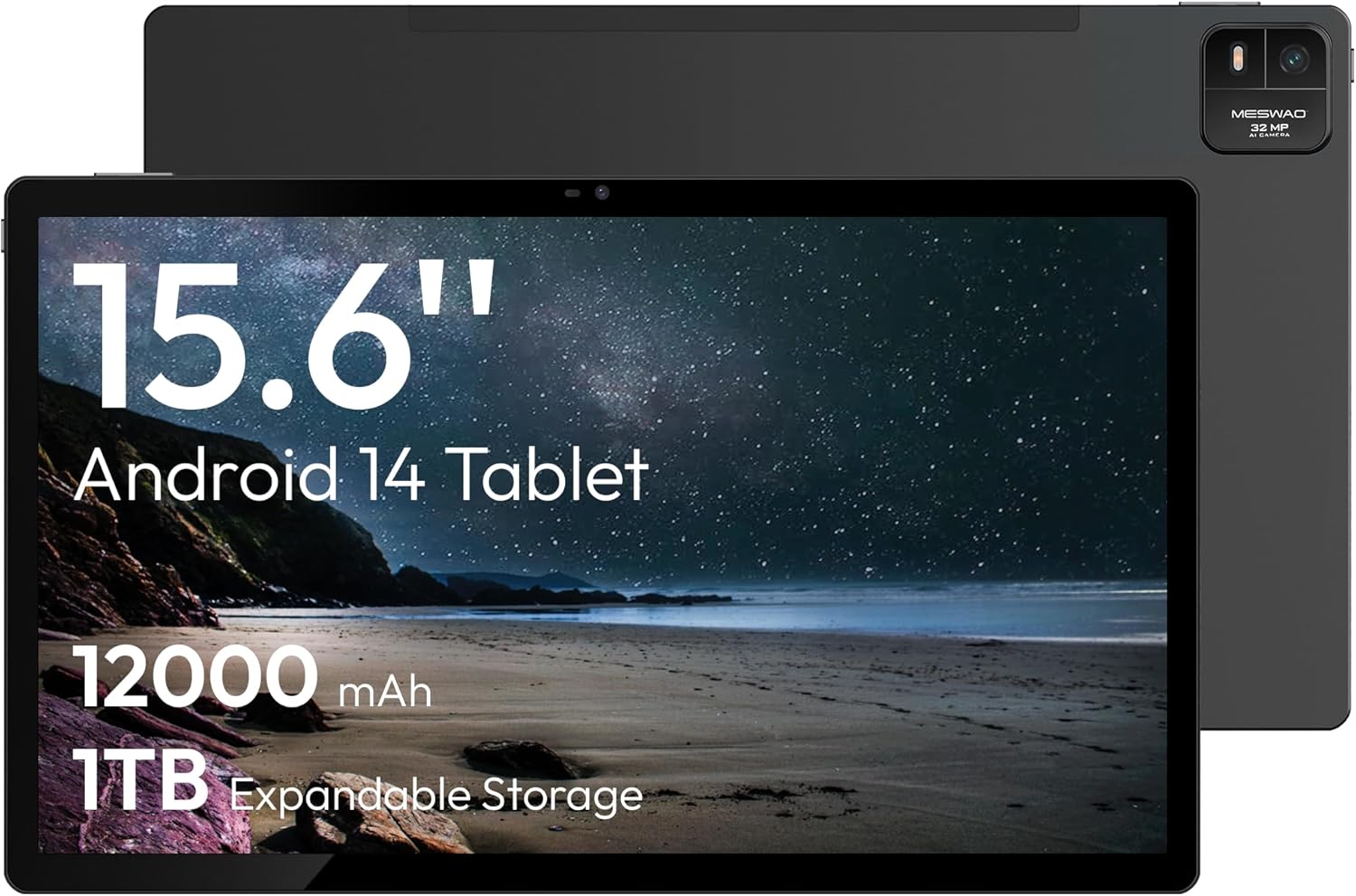
Figure 1.1: MESWAO 15.6 Inch Android 14 Tablet. This image displays the front and back view of the tablet, highlighting its large screen and rear camera module.
2. Bayanin Tsaro
To prevent damage to your device or injury to yourself or others, please observe the following precautions:
- Do not expose the tablet to extreme temperatures, direct sunlight, or high humidity.
- A guji zubar da ko kuma sanya wa kwamfutar hannu mummunan rauni.
- Yi amfani da caja da na'urorin haɗi kawai da aka amince dasu.
- Do not attempt to disassemble or repair the tablet yourself.
- Keep the tablet away from water and other liquids.
- Observe all local regulations regarding the use of electronic devices.
3. Abubuwan Kunshin
Tabbatar cewa duk abubuwa suna nan a cikin kunshin:
- 15.6-inch Tablet x1
- 15W Charger x1
- Type-C to 3.5mm Adapter x1
- USB-A to Type-C Adapter x1
- Stuck Pin x1 (for SIM/TF card tray)
4. Na'ura Ta Kareview
Familiarize yourself with the physical components of your MESWAO tablet.
4.1. Siffofin Jiki
- Kamara ta Gaba: Located at the top center of the screen when held horizontally.
- Kamara ta baya tare da Flash: Located on the back, typically in a corner.
- Maɓallin Wuta: Usually on the side, used to power on/off or wake/sleep the device.
- Maɓallan ƙara: Daidaita matakan sauti.
- Kebul na USB-C: Don caji da canja wurin bayanai.
- Katin Katin TF: Don ajiyar da za a iya faɗaɗawa.
- Masu magana: Quad speakers with 8 sound chambers for audio output.

Hoto 4.1: Samaview of MESWAO Tablet's physical features. This image illustrates the location of stereo speakers, power and volume buttons, front camera, rear camera with flashlight, Type-C port, and TF card slot.
5. Saita
5.1. Cajin Farko
Before first use, fully charge the tablet using the provided 15W charger and USB-C cable. Connect the charger to the USB-C port on the tablet and plug it into a power outlet. The battery indicator on the screen will show charging progress.

Figure 5.1: Tablet charging illustration. This image shows the tablet connected to a charger, displaying a charging icon and indicating 100% charge in 3.5 hours.
5.2. Kunnawa / Kashewa
- Don Kunnawa: Press and hold the Power button until the MESWAO logo appears.
- Don Kashe: Danna ka riƙe maɓallin Wuta har sai menu na zaɓuɓɓukan Wuta ya bayyana, sannan ka zaɓi "Kashe Wuta."
- Don Barci/Farkawa: A taƙaice danna maɓallin wuta.
5.3. Kanfigareshan Farko
Upon first power-on, follow the on-screen prompts to set up your tablet:
- Zaɓi harshen da kuka fi so.
- Haɗa zuwa cibiyar sadarwar Wi-Fi.
- Shiga tare da asusun Google ko ƙirƙirar sabo.
- Review kuma yarda da sharuɗɗan.
- Saita makullin allo (PIN, alamu, ko kalmar sirri).
5.4. Inserting a TF Card
To expand storage, insert a TF (microSD) card:
- Locate the TF card slot on the side of the tablet.
- Use the provided stuck pin to gently eject the card tray.
- Place the TF card into the tray with the gold contacts facing down.
- Carefully reinsert the tray into the tablet.

Figure 5.2: Tablet storage capabilities. This image highlights the 128GB ROM and support for up to 1TB expandable storage via TF card.
6. Umarnin Aiki
6.1. Navigation na asali
The MESWAO tablet uses Android 14, offering intuitive touch-based navigation:
- Taɓa: Zaɓi abu ko buɗe aikace-aikace.
- Doke shi gefe: Gungura ta cikin allo ko jerin.
- Tsoka-zuwa Zuƙowa: Enlarge or reduce content on the screen.
- Dogon Latsa: Samun dama ga menu na mahallin ko matsar da gumaka.

Figure 6.1: Android 14 operating system interface. This image displays various application icons and highlights features like smooth multitasking, parental control, and enhanced privacy.
6.2. Haɗa zuwa Wi-Fi
- Je zuwa Saituna > Network & internet > Wi-Fi.
- Juya Wi-Fi On.
- Zaɓi hanyar sadarwar da kuke so daga lissafin.
- Shigar da kalmar wucewa idan an buƙata, sannan danna Haɗa.
6.3. Managing Applications
- Sanya Apps: Download from the Google Play Store.
- Cire Apps: Long-press an app icon, then drag it to "Uninstall" or go to Saituna > Aikace-aikace.
- Rufe Manhajoji: Swipe up from the bottom of the screen and swipe away the app card.
6.4. Amfanin Kamara
The tablet features a 32MP rear camera with flash and a 5MP front camera.
- Bude Kamara aikace-aikace.
- Matsa maɓallin rufewa don ɗaukar hoto.
- Canja tsakanin kyamarorin gaba da na baya ta amfani da gunkin makullin kyamara.
- Access settings for flash, modes, and other options.
6.5. Gudanar da Baturi
Batirin 12000mAh yana ba da ƙarin amfani. Don inganta rayuwar baturi:
- Daidaita hasken allo.
- Rufe aikace-aikacen da ba a yi amfani da su ba.
- Kunna yanayin adana batir a cikin Saituna > Baturi.
6.6. Haɗuwa
- Bluetooth: Pair with wireless headphones, speakers, or other devices via Saituna > Na'urorin haɗi > Bluetooth.
- USB-C: Connect to a computer for file transfer or use with compatible USB-C accessories.
- Wireless Screen Casting: Share your tablet's screen to a compatible smart TV or monitor. Access this feature from the Quick Settings panel or Saituna > Na'urorin haɗi > Yin wasan kwaikwayo.
6.7. Saitunan Sauti
Adjust volume and audio output options:
- Use the physical volume buttons on the side of the tablet.
- Access detailed settings in Saituna > Sauti & girgiza.
- The tablet supports multiple audio options, including USB-C audio and 3.5mm via the provided adapter.
7. Kulawa
7.1. Tsabtace kwamfutar hannu
To clean the tablet, use a soft, lint-free cloth. For stubborn smudges, slightly dampen zane mai ruwa ko mai tsabtace allo wanda aka tsara don kayan lantarki. Kauce wa sinadarai masu tsauri ko kayan goge baki.
7.2. Sabunta software
Bincika akai-akai don shigar da sabunta software don tabbatar da ingantaccen aiki, tsaro, da samun dama ga sabbin abubuwa. Je zuwa Saituna > Tsari > Sabunta tsarin.
7.3. Gudanar da Adanawa
To maintain performance, periodically manage your tablet's storage:
- Share aikace-aikacen da ba dole ba kuma files.
- Matsar da girma files to the TF card or cloud storage.
- Clear cache data for apps in Saituna > Aikace-aikace > [App Name] > Adana & cache.
8. Shirya matsala
Koma zuwa ga batutuwa gama gari da mafita:
| Matsala | Magani |
|---|---|
| Tablet baya kunnawa. | Tabbatar da cajin baturi. Haɗa caja kuma jira ƴan mintuna kafin sake kunna wuta. |
| Ba za a iya haɗi zuwa Wi-Fi ba. | Check if Wi-Fi is enabled. Verify the Wi-Fi password. Restart your router and the tablet. |
| Manhajoji suna faɗuwa ko daskarewa. | Close background apps. Clear the app's cache. Restart the tablet. Ensure the app is updated. |
| A hankali aiki. | Free up storage space. Close unused apps. Restart the tablet. |
| Baturi yana gudu da sauri. | Reduce screen brightness. Disable unused features like Bluetooth or GPS. Close background apps. Check battery usage in settings. |
9. Ƙayyadaddun bayanai
Key technical specifications for the MESWAO 15.6 Inch Android 14 Tablet (MES-B3):
| Siffar | Daki-daki |
|---|---|
| Alamar | MESWAO |
| Sunan Samfura | MES-B3 |
| Tsarin Aiki | Android 14 |
| Girman allo | Inci 15.6 |
| Tsarin allo | 1920 x 1080 pixels (IPS HD) |
| Mai sarrafawa | Octa-Core (MediaTek Helio G99, up to 2.2 GHz) |
| Mai sarrafa Graphics | Mali-G57 |
| RAM (Memory Storage Capacity) | 6GB (DDR3 SDRAM) |
| Internal Storage (Flash Memory Size) | 128 GB |
| Ma'ajiyar Faɗawa | Up to 1TB via TF Card |
| Rear Kamara Resolution | 32 MP |
| Tsarin Kyamara na gaba | 5 MP |
| Ƙarfin baturi | 12000mAh |
| Matsakaicin Rayuwar Baturi | 12 Awanni |
| Nau'in Mara waya | 802.11a/b/g/n/ac (Wi-Fi 5) |
| Launi | Grey |
| Nauyin Abu | 2.35 fam |
| Girman Samfura (LxWxH) | 14.53 x 8.78 x 0.43 inci |

Figure 9.1: Processor and performance details. This image highlights the Helio G99 Octa-Core chipset, 6nm process, 950MHz GPU, and smooth gaming/streaming capabilities.
10. Garanti da Tallafawa
10.1. Garanti Bayani
The MESWAO 15.6 Inch Android 14 Tablet comes with a Garanti na watanni 12 covering manufacturing defects. Please retain your proof of purchase for warranty claims.
10.2. Tallafin Abokin Ciniki
For technical assistance, troubleshooting, or warranty inquiries, please contact MESWAO customer support. They offer 24-hour abokin ciniki goyon bayan kuma da local service centers in the US, EU, and Japan.
- Hanyar Hulɗa: Refer to the contact information provided with your product packaging or visit the official MESWAO website.
- Ƙimar Batun: Issues reported are typically responded to within 24 hours, with problems resolved or replaced according to policy.

Figure 10.1: MESWAO customer support and warranty details. This image highlights the 12-month warranty, 24-hour customer support, local after-sales centers, and quick response flow.