1. Gabatarwa da Ƙarsheview
The Infinity Smart Watch for Women is designed to seamlessly integrate into your daily life, offering a blend of elegance and advanced functionality. Featuring a vibrant AMOLED 1.1" screen, this smartwatch provides comprehensive health and fitness tracking, communication features, and smart notifications. It is compatible with both iOS and Android phones.

Hoto 1: Gaba view of the Infinity Smart Watch for Women, showcasing its elegant design and vibrant AMOLED display.
2. Abin da ke cikin Akwatin
- Infinity Smart Watch (Model WS_BLK)
- Cajin Cable
- Manual mai amfani
3. Saita
3.1 Fara Cajin
Before first use, fully charge your smartwatch. Connect the magnetic charging cable to the charging points on the back of the watch and plug the USB end into a compatible power adapter (not included) or computer USB port. The watch display will indicate charging status.

Figure 2: The smartwatch connected to its magnetic charging cable, showing the battery charging indicator.
3.2 Shigar App da Haɗin kai
- Scan the QR code provided in the manual or on the watch screen (if available) to download the companion app. Alternatively, search for the app name (e.g., 'VeryFit' or 'FitCloudPro' as seen in related videos) in your smartphone's app store (iOS App Store or Google Play Store).
- Shigar da app a kan wayoyin hannu.
- Open the app and follow the on-screen instructions to create an account and set up your profile.
- Tabbatar cewa an kunna Bluetooth akan wayoyin ku.
- In the app, navigate to the device pairing section and select your Infinity Smart Watch from the list of available devices.
- Tabbatar da buƙatar haɗin kai akan wayoyin hannu biyu da smartwatch.
Video 1: Official product video demonstrating the Infinity Smart Watch for Women, including its features and design. This video provides a visual guide to the watch's capabilities.
4. Umarnin Aiki
4.1 Navigation na asali
- Doke sama: View recent notifications/messages.
- Doke ƙasa: Access quick settings (brightness, Do Not Disturb, flashlight, phone finder, settings).
- Doke Hagu/Dama: Scroll through main features like activity data, heart rate, sleep tracking, and weather.
- Danna Maɓallin Gefe: Return to the watch face or access the main menu.
4.2 Yin Kira da Amsa
Once paired with your smartphone, you can make and answer calls directly from your smartwatch.
- Don Yi Kira: Access the phone function from the main menu, use the dial pad or select a contact from your synced phonebook.
- Don Amsa Kira: Idan kira ya shigo, agogon zai nuna lambar mai kiran. Danna alamar kore don amsawa ko kuma alamar ja don ƙin amsawa.
4.3 Smart Fadakarwa
Receive alerts for incoming calls, text messages, and app notifications directly on your wrist. Configure notification preferences within the companion app.

Figure 3: The smartwatch interface showing options for Bluetooth calls, smart notifications, and voice assistant.
4.4 Keɓance Fuskokin Kallon
The smartwatch offers a variety of customizable watch faces to suit your style. You can change them directly on the watch or through the companion app, which provides over 200 options.
5. Siffofin Kula da Lafiya
The Infinity Smart Watch is equipped with a comprehensive suite of health and fitness tracking features:
- Kula da Ƙimar Zuciya: Ci gaba da bin diddigin bugun zuciyarka a duk tsawon yini.
- Kula da Hawan Jini: Provides on-demand blood pressure readings.
- Kula da Barci: Yana nazarin yanayin barcinka, gami da barci mai zurfi, barci mai sauƙi, da lokutan farkawa.
- Tsinkaya: Counts your steps, distance traveled, and calories burned.
- Hanyoyin wasanni da yawa: Supports over 100 sports modes, allowing you to track specific workouts like walking, running, cycling, and swimming.
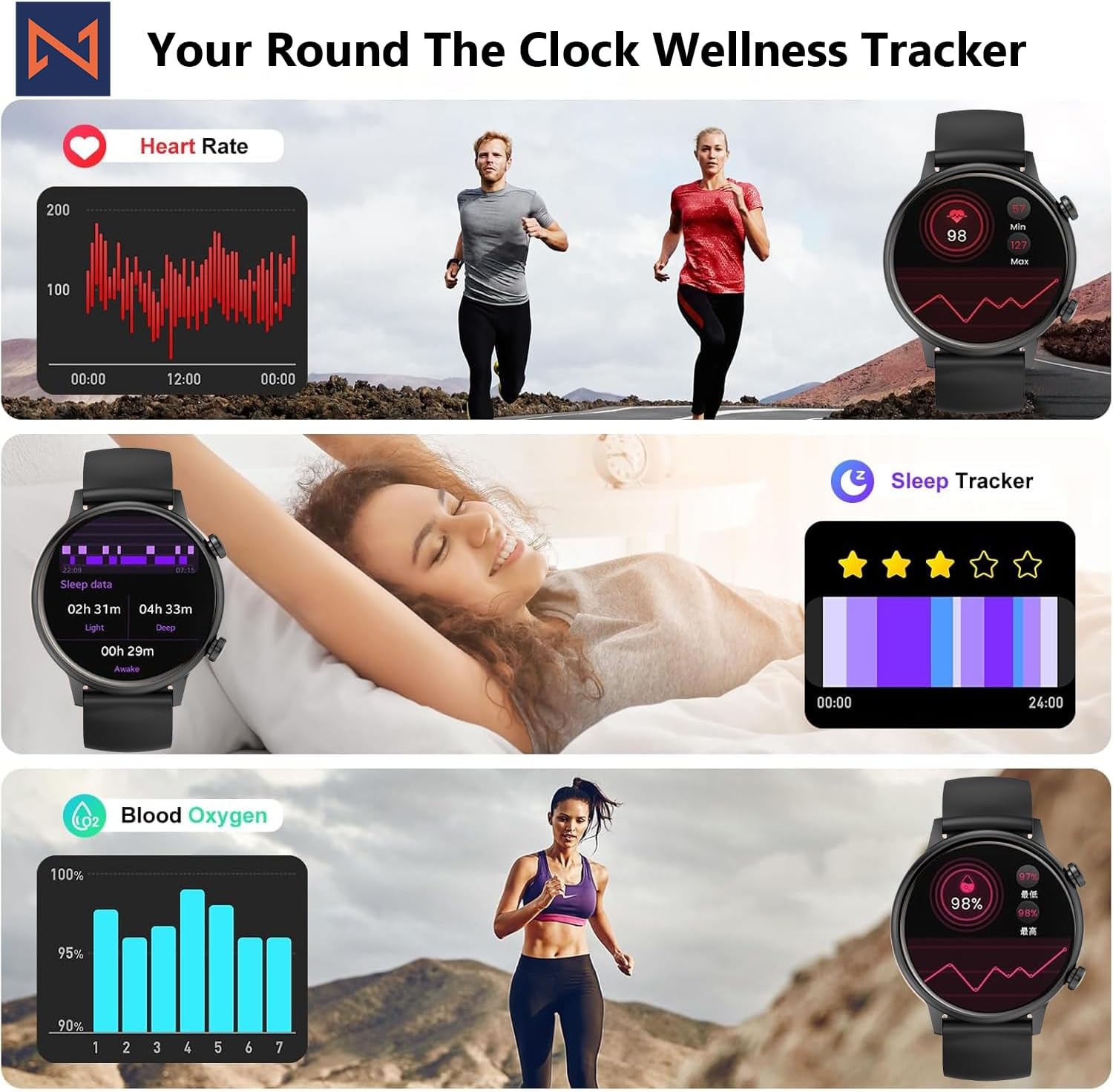
Figure 4: The smartwatch interface showing real-time heart rate, sleep tracking, and blood oxygen levels.

Figure 5: The smartwatch showing a selection of its multiple sports tracking modes.
6. Ruwa Resistance
The Infinity Smart Watch has an IP68 waterproof rating, making it resistant to dust, sweat, and water. It is suitable for daily wear, including hand washing, face washing, and swimming. Lura: Avoid using the watch in hot water (e.g., hot showers, saunas) or for deep-sea diving, as extreme temperatures or high-pressure water may compromise its water resistance.

Figure 6: The smartwatch demonstrating its IP68 waterproof capability during water exposure.
7. Baturi da Caji
The smartwatch features a 200 mAh Lithium Polymer battery. A full charge typically takes approximately 2 hours, providing 3-5 days of working time and up to 30 days of standby time, depending on usage.
8. Ƙayyadaddun bayanai
| Siffar | Daki-daki |
|---|---|
| Lambar Samfura | WS_BLK |
| Girman allo | 1.1 Inci AMOLED |
| Kimar hana ruwa | IP68 |
| Ƙarfin baturi | miliyan 200amp Awa (Lithium Polymer) |
| Haɗuwa | Bluetooth |
| Tsarin Aiki | Android (compatible with iOS) |
| Ƙarfin Ajiye Ƙwaƙwalwar Ƙwaƙwalwa | 128 MB |
| Nauyin Abu | 5 oz |
| Mai ƙira | Kizzy Enterprises Inc |
9. Shirya matsala
- Duba baya kunnawa: Ensure the watch is fully charged. Long-press the side button to power on.
- Ba za a iya haɗa shi da waya ba: Tabbatar cewa Bluetooth yana kunne a wayarka kuma agogon yana cikin kewayon. Sake kunna na'urorin biyu kuma gwada sake haɗawa ta hanyar app ɗin.
- Ba a karɓi sanarwar ba: Check app settings on your phone to ensure notification permissions are granted for the smartwatch app. Also, verify that 'Do Not Disturb' mode is not active on the watch.
- Karatun lafiya mara inganci: Ensure the watch is worn snugly on your wrist, not too tight or too loose. Clean the sensors regularly. Note that the blood pressure monitor may not be medically accurate and is for reference only.
- Daskarewar allo: Restart the smartwatch by long-pressing the side button until it powers off, then power it back on. If the issue persists, check for app updates.
10. Garanti da Tallafawa
For warranty information, technical support, or service inquiries, please refer to the contact details provided on the product packaging or the manufacturer's official website. Ajiye rasidin siyan ku azaman shaidar siyan don da'awar garanti.


