Gabatarwa
The Xtorm FS405 Fuel Series Solar Powerbank 20W – 10.000 mAh is designed to provide portable power for your electronic devices, offering the flexibility to charge via USB-C or its integrated solar panel. This power bank is built for outdoor adventures, featuring a durable, splash-resistant design and a powerful LED flashlight.
Bayanin Tsaro
- Kada a bijirar da bankin wutar lantarki zuwa matsanancin zafi (sama da 45°C ko ƙasa da -10°C).
- Guji faduwa, tarwatsa, ko ƙoƙarin gyara na'urar da kanku.
- Keep away from water, except for the specified splash resistance (IPX4). Do not submerge.
- Yi amfani da ingantattun igiyoyin caji da adaftar kawai.
- A kiyaye nesa da yara.
- Zubar da samfur bisa ga ka'idojin gida.
Abubuwan Kunshin
Da fatan za a duba kunshin don abubuwa masu zuwa:
- Xtorm FS405 Solar Powerbank
- Kebul na Caji na USB-C (0.30m)
- Manual mai amfani
Samfurin Ƙarsheview

Gaba View: Shows the main solar charging panel and the Xtorm logo. The robust casing is visible around the edges.

Baya View (LED Off): Displays the textured back casing and the integrated LED light panel in its off state.
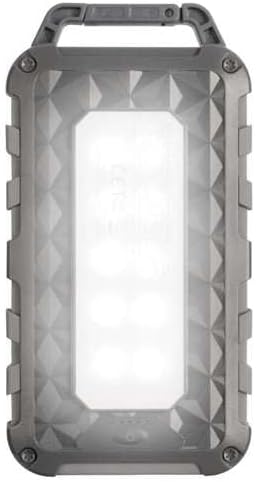
Baya View (LED On): Shows the powerful LED light panel fully illuminated, indicating the flashlight function is active.

Sama View: Highlights the sturdy integrated carabiner handle, designed for easy attachment to bags or gear.
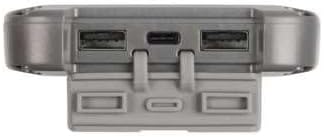
Kasa View: Displays the USB-C PD input/output port and two USB-A Quick Charge 3.0 output ports, protected by a cover.
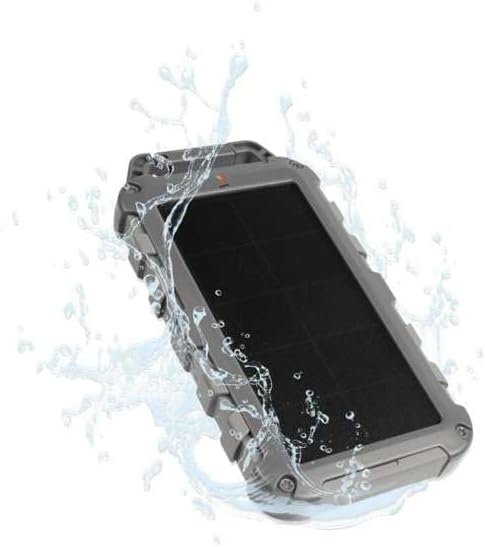
Durability Feature: Illustrates the power bank's splash-resistant design, suitable for outdoor conditions (IPX4 rated).
Saita
Cajin Farko
Before first use, it is recommended to fully charge the Xtorm FS405 Solar Powerbank via the USB-C port for optimal performance.
- Haɗa kebul na USB-C da aka bayar zuwa tashar USB-C akan bankin wuta.
- Haɗa ɗayan ƙarshen kebul na USB-C zuwa adaftar bango ta USB mai jituwa (ba a haɗa ta ba) ko tashar USB ta kwamfuta.
- The LED indicators on the power bank will show the charging status. A full charge via USB-C typically takes approximately 2 hours.
Umarnin Aiki
Cajin Bankin Wutar Lantarki
The Xtorm FS405 can be charged using two methods:
1. Via USB-C (Recommended for Fast Charging)
- Connect the power bank to a USB-C power source using the included cable.
- The power bank will begin charging. This method provides the fastest charging speed for the power bank itself.
2. Via Solar Panel
The integrated solar panel allows for convenient charging when outdoors. For best results, place the power bank directly under strong sunlight.
- Place the solar panel facing direct sunlight.
- A small indicator light (usually green) will illuminate when solar charging is active.
- Note on Solar Charging Speed: Solar charging is a supplementary method and is significantly slower than USB-C charging. Factors like season, location, time of day, and cloud cover heavily influence charging speed.
Approximate solar charging times for a full charge:
- Spring/Summer (mostly sunny day): Kimanin kwanaki 10
- Autumn/Winter (mostly sunny day): Kimanin kwanaki 20
Solar charging is not effective on mostly cloudy days.
Cajin Na'urorin Waje
The power bank features one USB-C PD (Power Delivery) output and two USB-A Quick Charge 3.0 outputs.

Iyawar Cajin Saurin: The power bank can charge compatible smartphones, such as an iPhone 14 or 12/13, up to 50% in approximately 30 minutes using the 20W USB-C PD output.
- Haɗa kebul na caji na na'urarka zuwa ɗaya daga cikin tashoshin fitarwa (USB-C ko USB-A) akan bankin wutar lantarki.
- Haɗa ɗayan ƙarshen kebul ɗin zuwa na'urarka.
- Bankin wuta zai fara caji ta atomatik na na'urarka.
- The LED indicators on the power bank will show the remaining battery level.
The 10,000mAh capacity is sufficient to charge most smartphones at least 2 times.
Yin amfani da tocilan LED
The Xtorm FS405 includes a powerful integrated LED flashlight on its back.
- Locate the power button (usually on the side or near the ports).
- Press and hold the power button for a few seconds to turn the flashlight ON.
- Press and hold the power button again to turn the flashlight OFF.
Kulawa
- A wanke bankin wutar lantarki da kyalle mai laushi da busasshe. Kada a yi amfani da sinadarai masu kauri ko kayan gogewa.
- Ajiye bankin wutar lantarki a wuri mai sanyi, bushe lokacin da ba a amfani da shi.
- For long-term storage, charge the power bank to about 50-70% every 3-6 months to preserve battery health.
- Ensure the port covers are properly sealed when exposed to water splashes.
Shirya matsala
Bankin Wutar Lantarki Ba Ya Caja
- Duba Cable: Ensure the USB-C cable is securely connected to both the power bank and the power source. Try a different cable.
- Duba Tushen Wuta: Verify that the wall adapter or USB port is functioning correctly.
- Cajin Rana: For solar charging, ensure the panel is in direct, strong sunlight. Remember solar charging is slow and not effective in low light or cloudy conditions.
Na'urar Ba Ta Caji Daga Bankin Wuta
- Check Power Bank Charge: Tabbatar cewa bankin wutar lantarki yana da isasshen caji.
- Duba igiyoyi: Use the original charging cable for your device and ensure it's properly connected to both the power bank and your device. Try a different cable.
- Daidaituwa: Verify that your device is compatible with USB charging.
- Sake farawa: Cire haɗin kuma sake haɗa na'urar.
Tocila Ba Ya Aiki
- Check Power Bank Charge: Ensure the power bank has some charge remaining.
- Daidaitaccen Aiki: Ensure you are pressing and holding the power button correctly to activate the flashlight.
Ƙayyadaddun bayanai
| Siffar | Daki-daki |
|---|---|
| Samfura | FS405 |
| Alamar | Xtorm |
| Jerin | Fuel Series 4 |
| Ƙarfin baturi | 10,000mAh (Lithium Polymer) |
| Matsakaicin Fitar Wuta | 20 W |
| Output 1 (USB-C PD) | 20 W |
| Output 2 (USB-A QC 3.0) | 18 W |
| Output 3 (USB-A QC 3.0) | 18 W |
| Adadin abubuwan da aka fitar | 3 |
| Nau'in shigarwa | USB-C PD |
| Panelarfin Wutar Lantarki | 1 W (SunPower cells) |
| Girma (L x W x H) | 17 cm x 9 cm x 2 cm |
| Nauyi | 289g ku |
| Kayan abu | PC, ABS |
| Resistance Ruwa | IPX4 (Mai tsayayya da Fasa) |
| Haɗe-haɗen walƙiya | Ee |
| Battery Charge Time (USB-C) | Kimanin 2 hours |
Garanti da Taimako
For warranty information and customer support, please refer to the Xtorm official website or contact your local retailer. Keep your proof of purchase for any warranty claims.
Taimako kan layi: www.sadarinza.u


