Gabatarwa
This manual provides essential information for setting up, operating, maintaining, and troubleshooting your HP Envy 17-DA000 Laptop. Please read this guide thoroughly to ensure proper use and to maximize the performance and longevity of your device.

Image: The HP Envy 17-DA000 Laptop with its 17.3-inch display open, showing the Windows 11 operating system desktop.
Saita
1. Unboxing da farko dubawa
Carefully remove the laptop and all accessories from the packaging. Inspect the laptop for any physical damage. The manufacturer box may have been opened for professional customization and testing.
2. Haɗa zuwa Wuta
- Haɗa adaftar AC zuwa mahaɗin wutar lantarki da ke kan kwamfutar tafi-da-gidanka.
- Toshe igiyar wutar lantarki cikin mashin wutar lantarki.
- Allow the battery to charge for at least 30 minutes before initial use, or until the battery indicator shows a sufficient charge.
3. Initial Power On and Windows 11 Setup
- Danna maɓallin wuta don kunna kwamfutar tafi-da-gidanka.
- Bi umarnin kan allo don kammala tsarin saitin gida na Windows 11. Wannan ya haɗa da zaɓin yankinku, harshe, haɗa zuwa cibiyar sadarwar Wi-Fi, da ƙirƙirar asusun mai amfani.
4. Haɗa Abubuwan Haɗawa
Connect external devices such as a mouse, external keyboard, or monitor to the available ports on your laptop. Refer to the 'Ports and Connectors' section for port identification.
Umarnin Aiki
1. Keyboard and Touchscreen
- Allon madannai na baya: The keyboard features backlighting for use in low-light conditions. Adjust brightness settings through the function keys or Windows settings.
- Lambobin lamba: An haɗa faifan maɓalli na ƙididdiga don ingantaccen shigarwar bayanai.
- Kariyar tabawa: The 17.3-inch FHD display supports touch input. Use gestures for navigation and interaction within Windows 11.
2. Tashoshi da Haɗawa
Your HP Envy 17-DA000 laptop is equipped with various ports for connectivity:
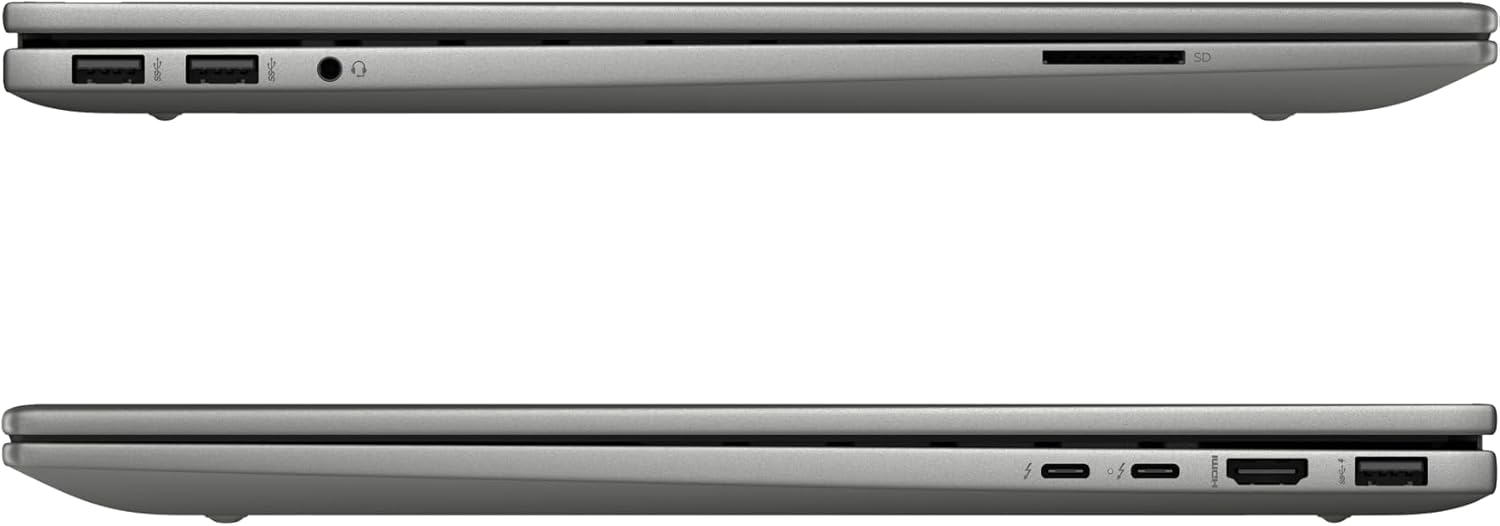
Image: Left side of the laptop, featuring two USB 3.2 Gen 2 ports, a headphone/microphone combo jack, and an SD card reader.
- Gefen Hagu:
- 2 x USB 3.2 Gen 2 (10Gbps)
- 1 x Jakar kunne/makirofi mai haɗawa
- 1x Mai Karatun Katin SD

Image: Right side of the laptop, featuring two USB-C Thunderbolt 4 ports, an HDMI 2.1 port, and one USB 3.2 Gen 2 port.
- Gefen Dama:
- 2x USB-C Thunderbolt 4 / USB4 40Gbps (with Power Delivery and DisplayPort 1.4, Power-off Charging)
- 1x USB 3.2 Gen 2 (10Gbps, with Power-off Charging)
- 1x HDMI v2.1
3. Haɗin Wireless
- Wi-Fi 6E AX211 (2x2): Haɗa zuwa cibiyoyin sadarwa mara waya don shiga intanet.
- Bluetooth 5.3: Pair with compatible Bluetooth devices such as headphones, speakers, or mice.
4. Webkama
The HP Wide Vision 5MP IR camera includes a privacy shutter. Slide the shutter to cover the camera lens when not in use to ensure privacy.
Kulawa
1. Share Laptop
- Yi amfani da taushi, yadi mara lint dampan haɗa shi da ruwa ko mai tsabtace allo don tsaftace nuni.
- For the keyboard and chassis, use a soft, dry cloth. Avoid harsh chemicals or abrasive materials.
- Periodically use compressed air to clear dust from vents and ports.
2. Sabunta software
Regularly check for and install updates for Windows 11 and HP drivers to ensure optimal performance and security. Access Windows Update through the Settings menu.
3. Kula da baturi
- Guji cikar cajin baturin akai-akai.
- Ajiye kwamfutar tafi-da-gidanka a wuri mai sanyi, bushe idan ba a yi amfani da shi na tsawon lokaci ba.
- Use only the provided 100W AC adapter for charging.
4. Gudanar da Adanawa
The 1TB NVMe M.2 SSD provides fast storage. Regularly back up important data and manage files to maintain sufficient free space for system performance.
Shirya matsala
Matsalolin gama gari da Mafita
- Laptop ba ya kunna: Ensure the AC adapter is securely connected and the battery has sufficient charge. Try a different power outlet.
- Abubuwan nuni: If the screen is blank, try connecting an external monitor to check if the issue is with the laptop's display. Adjust display settings in Windows.
- Babu haɗin Wi-Fi: Check if Wi-Fi is enabled in Windows settings. Restart the laptop and your wireless router. Ensure drivers are up to date.
- Ayyukan aiki a hankali: Close unnecessary applications, check for malware, ensure sufficient free storage space, and update drivers.
Don ƙarin matsaloli masu rikitarwa, duba tallafin HP website ko tuntuɓi goyon bayan abokin ciniki.
Ƙayyadaddun bayanai
| Siffar | Daki-daki |
|---|---|
| Samfura | HP Envy 17-DA000 |
| Mai sarrafawa | Intel Core Ultra 7 155U (Up to 4.8 GHz, 12 Cores, 14 Threads) |
| Nunawa | 17.3-inch FHD (1920 x 1080) LED-backlit Touchscreen, 60Hz, 300 nits, 45% NTSC |
| Zane-zane | NVIDIA GeForce RTX 3050 4GB GDDR6 |
| Ƙwaƙwalwar ajiya | 32GB DDR5 SDRAM 5600 MHz |
| Adana | 1TB SSD NVMe M.2 |
| Tsarin Aiki | Windows 11 Gida |
| Allon madannai | Allon Madannai Mai Hasken Baya tare da Numbad |
| Haɗin mara waya | Intel Wi-Fi 6E AX211 (2x2), Bluetooth 5.3 |
| Tashoshi | 2x USB-C Thunderbolt 4, 3x USB 3.2 Gen 2, 1x HDMI v2.1, 1x Headphone/microphone combo, 1x SD Card Reader |
| Webkama | HP Wide Vision 5MP IR camera with Privacy Shutter |
| Baturi | 55Wh Lithium-ion Baturi |
| Girma (LxWxH) | 15.59 x 10.18 x 0.77 inci |
| Nauyi | 5.55 lbs |
| Launi | Platinum Azurfa |
Bayanin Garanti
Wannan samfurin ya zo tare da a Garanti na watanni 12. This warranty covers manufacturing defects and issues arising from normal use. Please retain your proof of purchase for warranty claims. The warranty does not cover damage caused by misuse, accidents, or unauthorized modifications.
Taimako
If you require technical assistance, have questions about your laptop, or need to make a warranty claim, please contact our support team. You can find contact information on the official HP support website or through the documentation included with your product.
Don albarkatun kan layi, ziyarci HP Support Website.