1. Gabatarwa
This user manual provides detailed instructions for the operation and maintenance of the Temtop PMD371 and Airing2000 Professional Air Quality Monitoring Bundle. This bundle offers a comprehensive solution for precise particle and air quality monitoring in various environments, including laboratories, cleanrooms, and field applications. The PMD371 is designed for detailed particle detection and environmental monitoring, while the Airing2000 extends capabilities with advanced particulate and formaldehyde detection. Please read this manual thoroughly before using the devices to ensure proper function and safety.
2. Bayanin Tsaro
- Do not expose the devices to extreme temperatures, humidity, or direct sunlight.
- A guji faɗuwa ko sanya na'urorin su yi rauni mai ƙarfi.
- Do not attempt to disassemble or modify the devices. Refer all servicing to qualified personnel.
- Keep the devices away from water and other liquids.
- Ensure proper ventilation when operating in enclosed spaces.
- Use only the specified power adapters and accessories provided by Temtop.
3. Abubuwan Kunshin
Tabbatar cewa duk abubuwa suna nan a cikin kunshin:
- Temtop PMD371 Particle Counter
- Temtop Airing2000 Particulate Monitor
- USB Charging Cables (x2)
- Adaftar Wuta (x2)
- Jagorar mai amfani (wannan takaddar)
- Calibration Certificate (if applicable)
4. Samfurin Ya Ƙareview

Image: The Temtop PMD371 (right) and Airing2000 (left) air quality monitors, showcasing their distinct designs and displays.
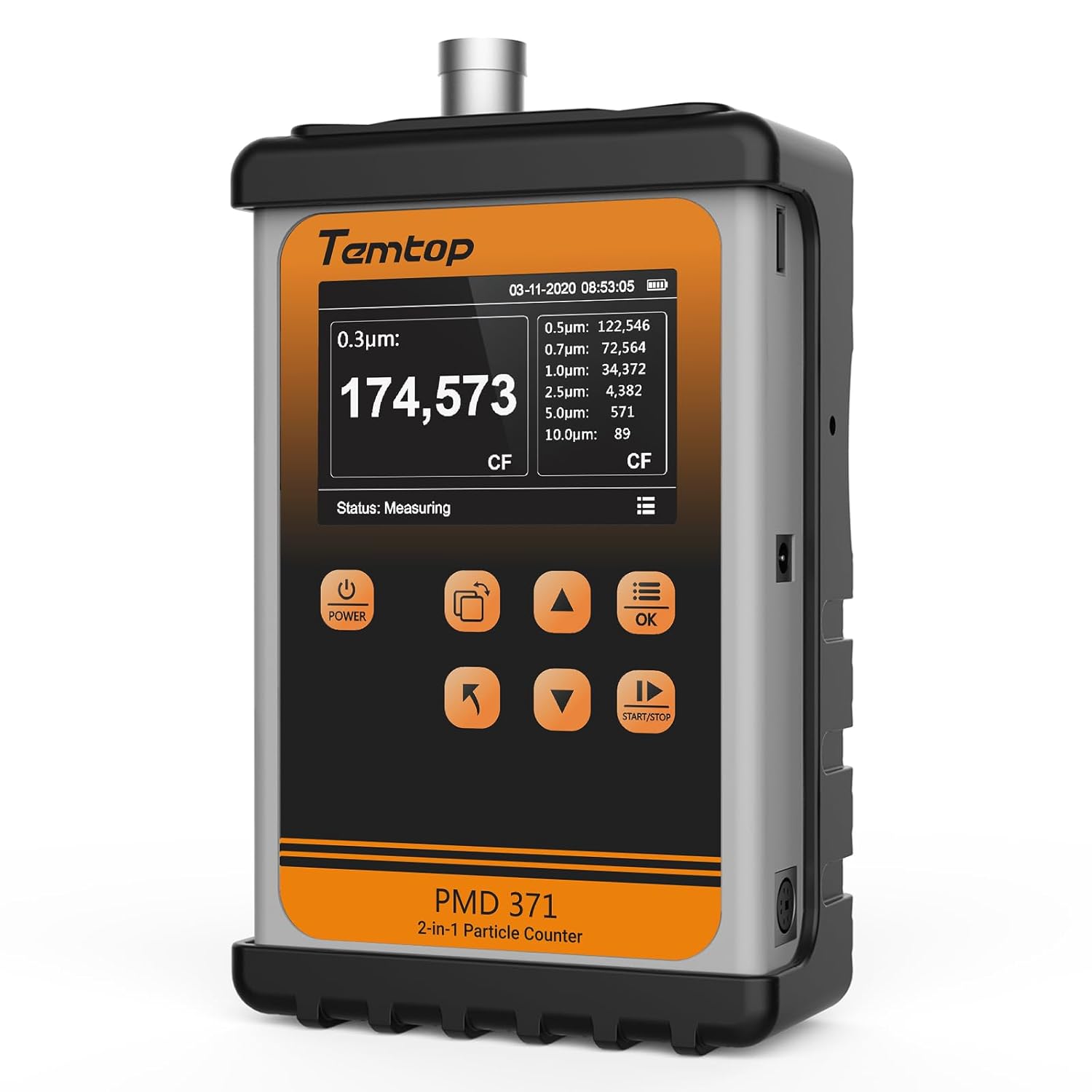
Hoto: Gaba view of the Temtop PMD371 Particle Counter, highlighting its display and control buttons.

Hoto: Gaba view of the Temtop Airing2000 Particulate Monitor, showing its ergonomic design and display.
4.1 Temtop PMD371 Particle Counter
The PMD371 is a precision instrument designed for multi-size particle detection and environmental monitoring. It features a robust all-metal construction for durability and reliable data collection.
- Allon Nuni: Shows real-time particle counts (0.3µm, 0.5µm, 1.0µm, 2.5µm, 5.0µm, 10.0µm), PM2.5, PM10, temperature, and humidity.
- Maɓallin Wuta: Yana kunna/kashe na'urar.
- Maɓallan Ayyuka: Navigation and selection for various modes and settings.
- Port Port: Where air samples are drawn in for analysis.
- Tashar USB: Don caji da canja wurin bayanai.

Image: The Temtop PMD371 highlighting its durable all-metal casing, ensuring robust performance.

Image: The Temtop PMD371 illustrating its compact size (170 x 110 x 48 mm) and lightweight design (1.76 lbs), emphasizing its portability.
4.2 Temtop Airing2000 Particulate Monitor
The Airing2000 is designed for comprehensive field monitoring, providing accurate measurements of PM2.5, PM10, TSP, temperature, humidity, and formaldehyde.
- Allon Nuni: Shows real-time readings for PM2.5, PM10, TSP, temperature, humidity, and HCHO.
- Maɓallin Wuta: For turning the device on/off.
- Maɓallan kewayawa: For menu navigation and setting adjustments.
- Mai Shigar Jirgin Sama: Ports for air sampling.
- Tashar Caji: Don yin cajin baturin ciki.

Image: The Temtop Airing2000 showcasing its enterprise-grade precision, industrial-grade pumping sensor, comprehensive monitoring, instant data access, user-friendly operation, and portable design.

Image: The Temtop Airing2000 demonstrating its comprehensive monitoring capabilities, including particulate concentration (PM2.5, PM10, TSP), particle count (0.3µm, 0.5µm, 1.0µm), and environmental conditions (temperature, humidity).

Hoto: cikakken bayani view of the Temtop Airing2000's internal pump-suction sensor, highlighting its advanced optics and wide particle size detection capabilities.
5. Saita
5.1 Fara Cajin
Before first use, fully charge both the PMD371 and Airing2000 devices. Connect the provided USB charging cables to the respective devices and plug them into the power adapters. A full charge typically takes 3-4 hours. The battery indicator on the screen will show charging status.
5.2 Kunnawa / Kashewa
- Don kunnawa: Latsa ka riƙe Ƙarfi button until the screen illuminates.
- Don kashe wuta: Latsa ka riƙe Ƙarfi maɓalli har sai allon ya kashe.
5.3 Saitunan asali
Upon first power-on, you may need to set the date, time, and preferred units. Navigate through the menu using the arrow buttons and confirm selections with the OK maballin.
- Kwanan Wata & Lokaci: Set current date and time for accurate data logging.
- Raka'a: Select preferred units for temperature (°C/°F) and particulate matter (µg/m³).
6. Umarnin Aiki
6.1 Taking Measurements with PMD371
- Wuri: Position the PMD371 in the area you wish to monitor. Ensure the air inlet is unobstructed.
- Fara Aunawa: Danna maɓallin FARA/TSAYA button to begin continuous monitoring. The screen will display real-time particle counts and environmental data.
- Interpreting Readings:
- Particle Counts: Displays the number of particles per liter for various sizes (0.3µm, 0.5µm, 1.0µm, 2.5µm, 5.0µm, 10.0µm).
- PM2.5/PM10: Shows the concentration of particulate matter in micrograms per cubic meter (µg/m³).
- Zazzabi/danshi: Displays ambient temperature and relative humidity.
- Stop Measurement: Danna maɓallin FARA/TSAYA button again to pause or stop monitoring.
- Shigar Bayanai: The device automatically logs data. You can access historical data through the menu.

Image: The Temtop PMD371's screen displaying detailed particle count data for various sizes (0.3µm, 0.5µm, 0.7µm, 1.0µm, 2.5µm, 5.0µm, 10.0µm) and PM2.5/PM10 concentrations.
6.2 Taking Measurements with Airing2000
- Wuri: Hold the Airing2000 or place it in the desired monitoring location. Ensure the air inlet is clear.
- Fara Aunawa: The device typically starts measuring automatically upon power-on. Observe the real-time readings on the display.
- Interpreting Readings:
- PM2.5/PM10/TSP: Displays concentrations of various particulate matters.
- HCHO: Shows formaldehyde concentration.
- Zazzabi/danshi: Displays ambient temperature and relative humidity.
- Gudanar da Bayanai: Use the navigation buttons to review historical data or adjust settings.
6.3 Data Transfer and Analysis
Both devices support data export. Connect the devices to a computer using the provided USB cables. The devices will appear as a removable storage device, allowing you to access logged data files (e.g., CSV format) for further analysis using spreadsheet software.
7. Kulawa
7.1 Tsaftacewa
- Goge wajen na'urorin da kyalle mai laushi da busasshe.
- Kada a yi amfani da masu tsaftace goge-goge, masu narkewa, ko sinadarai masu ƙarfi.
- Ensure the air inlet and outlet ports are free from dust and debris. Use a soft brush or compressed air if necessary, but avoid forcing anything into the ports.
7.2 Adana
- Ajiye na'urorin a wuri mai sanyi da bushewa, nesa da hasken rana kai tsaye da kuma yanayin zafi mai tsanani.
- If storing for an extended period, ensure the batteries are partially charged (around 50%) to prolong battery life. Recharge every 3-6 months.
7.3 Calibration
The devices are factory calibrated. For professional applications requiring high accuracy, periodic re-calibration by authorized service centers is recommended. Refer to Temtop's official website or contact customer support for calibration services.
8. Shirya matsala
| Matsala | Dalili mai yiwuwa | Magani |
|---|---|---|
| Na'urar baya kunnawa. | Batir ya yi ƙasa; matsalar na'urar. | Charge the device fully. If problem persists, contact support. |
| Karatuttuka mara inganci. | Sensor obstruction; environmental interference; need for calibration. | Ensure air inlets are clear. Move away from strong air currents or dust sources. Consider professional calibration. |
| Allon babu komai ko kuma ya daskare. | Software error; low battery. | Recharge the device. Perform a hard reset (refer to specific device manual for button combination, usually holding power for 10+ seconds). |
| Ba za a iya haɗi zuwa kwamfuta ba. | Faulty USB cable; driver issue; device not in data transfer mode. | Try a different USB cable or port. Ensure the device is powered on and in data transfer mode if applicable. |
9. Ƙayyadaddun bayanai
9.1 Temtop PMD371 Particle Counter
- Particle Size Channels: 0.3µm, 0.5µm, 1.0µm, 2.5µm, 5.0µm, 10.0µm
- Measurement Range (PM2.5/PM10): 0-999 µg/m³
- Matsayin Zazzabi: -10°C zuwa 50°C (14°F zuwa 122°F)
- Tashin hankali: 0-99% RH
- Baturi: Lithium-ion mai caji
- Girma: Kimanin 170 x 110 x 48 mm (6.7 x 4.3 x 1.9 a)
- Nauyi: Kimanin kilogiram 0.8 (1.76 lbs)
- Adana Bayanai: Up to 5000 sets of data
9.2 Temtop Airing2000 Particulate Monitor
- Particulate Measurement: PM2.5, PM10, TSP
- Formaldehyde (HCHO) Range: 0-1.0 mg/m³
- Matsayin Zazzabi: -10°C zuwa 50°C (14°F zuwa 122°F)
- Tashin hankali: 0-99% RH
- Baturi: Rechargeable Lithium-ion (Extended battery life)
- Adana Bayanai: Ample storage for continuous logging
- Nau'in Sensor: Industrial-grade pumping sensor
10. Garanti da Tallafawa
10.1 Bayanin Garanti
Temtop products typically come with a standard manufacturer's warranty covering defects in materials and workmanship. Please refer to the warranty card included with your product or visit the official Temtop webshafin don takamaiman sharuɗɗa da sharuɗɗan garanti. Ajiye rasidin siyan ku azaman shaidar siyan.
10.2 Tallafin Abokin Ciniki
For technical assistance, troubleshooting, or service inquiries, please contact Temtop customer support:
- Website: www.temtop.com
- Imel: Koma zuwa sashin tuntuɓar kan hukuma website.
- Waya: Koma zuwa sashin tuntuɓar kan hukuma website.
When contacting support, please have your product model number (PMD371 & Airing2000) and purchase date ready.


