1. Gabatarwa
Welcome to the NexFoto 21.5 Inch Touchscreen Digital Picture Frame. This manual provides detailed instructions for setting up, operating, and maintaining your new digital photo frame. Designed for ease of use, this frame allows you to effortlessly share and display your cherished memories in vibrant Full HD.

Figure 1: NexFoto 21.5 Inch Digital Picture Frame
2. Kayan Samfura
- 21.5-inch FHD Glossy Touch Screen: Features 1920 x 1080 resolution with a 16:9 aspect ratio and IPS display technology for wide viewing angles and sharp details.
- Ƙwaƙwalwar Cikin Gida ta 64GB: Stores up to 160,000 pictures, with support for Micro SD card extended storage (up to 64GB, not included).
- Haɗin Wi-Fi: Compatible with 2.4GHz and 5Ghz networks for easy photo and video sharing.
- Matsakaicin Matsayi: Can be freestanding or wall-mounted in both landscape and portrait orientations with auto-rotation.
- Multifunctional Custom Settings: Includes options for captions, weather display, calendar, clock, alarm, and sleep mode.
- Cloud-Based Storage: Offers convenient, private, and secure cloud storage.
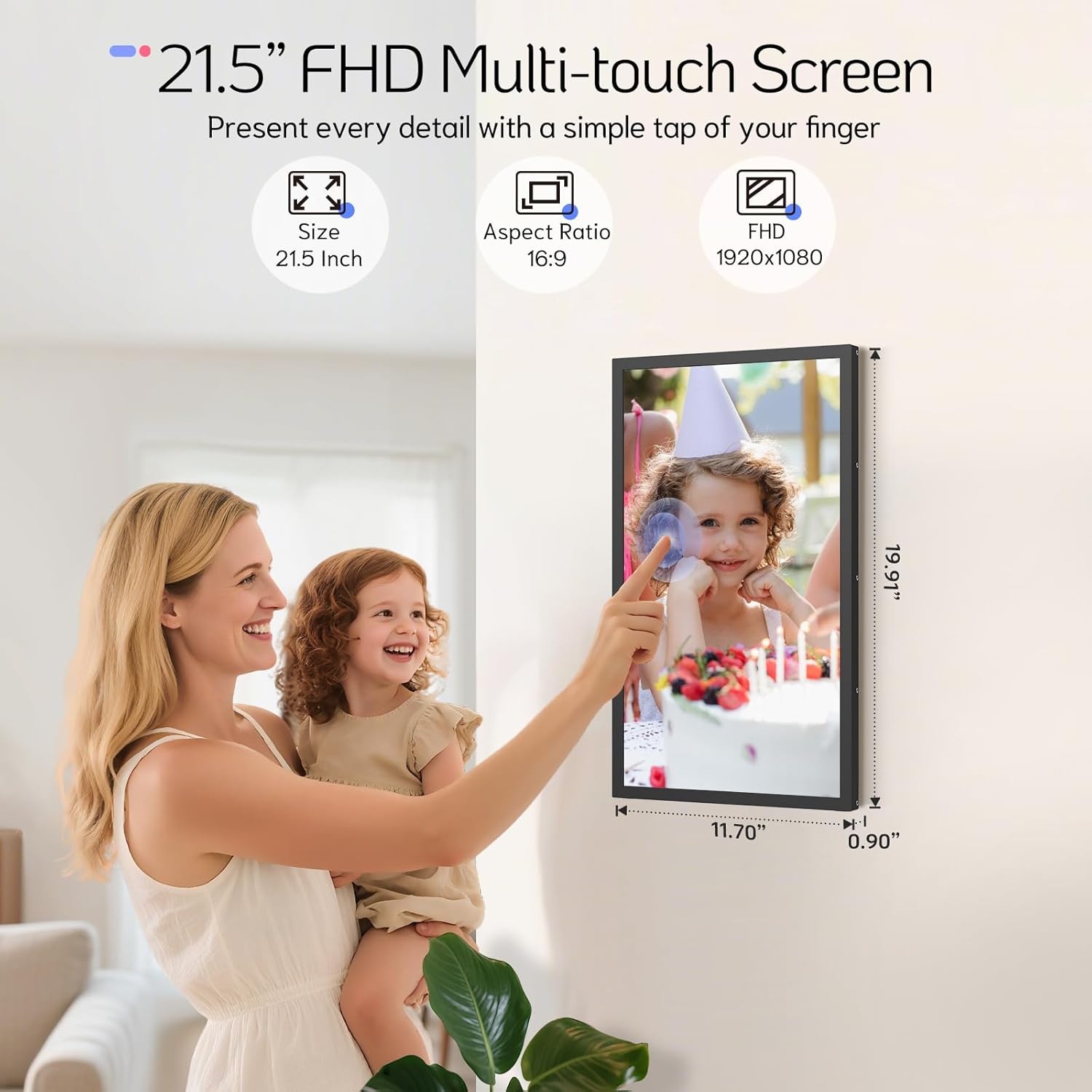
Figure 2: 21.5 Inch FHD Multi-touch Screen Details

Figure 3: Effortless Photo and Video Sharing

Figure 4: Built-In Bluetooth Speakers & Art Gallery
3. Abubuwan Kunshin
Da fatan za a duba akwatin don abubuwa masu zuwa:
- NexFoto 21.5 Inch Digital Picture Frame
- Wall Adaptor with US plug
- 64GB USB drive
- Jagorar Mai amfani & Jagorar Farawa Mai Sauri
- Screwdriver
- Rotatable Wall Mount (100x100 VESA Compatible)
- Bango Anchors & Sukurori
- Tsaya

Hoto na 5: Abubuwan da ke cikin Kunshin da aka haɗa
4. Jagorar Saita
4.1 Saitin Farko
- Kunna Wuta: Haɗa adaftar wutar lantarki zuwa firam ɗin sannan ka haɗa shi da wurin fitar da wutar lantarki. Firam ɗin zai kunna ta atomatik.
- Zaɓin Harshe: Bi faɗakarwar kan allo don zaɓar yaren da kuka fi so.
- Haɗin Wi-Fi: Connect the frame to your Wi-Fi network (supports 2.4GHz and 5GHz). Ensure a stable connection for optimal performance.
- Download NexFoto App: Scan the QR code displayed on the screen or search for "NexFoto" in your mobile app store (iOS/Android) to download the companion app.
- Pair Your Frame: Open the NexFoto app, create an account, and follow the in-app instructions to pair your mobile device with the digital frame via Bluetooth and Wi-Fi.

Hoto na 6: Matakan Saita Cikin Sauri
Bidiyo 1: Wannan bidiyon yana ba da taƙaitaccen bayaniview of the NexFoto Digital Picture Frames, showcasing their features and ease of use for sharing memories.
5. Umarnin Aiki
5.1 Raba Hotuna da Bidiyo
Once your frame is paired with the NexFoto app, you can easily upload photos and videos from your smartphone. The app allows you to select media from your gallery, add captions, and choose which album to send them to. You can also invite family and friends to join your private social circle to share their own memories directly to your frame.
The frame also supports direct upload via USB drive or Micro SD card (not included) for added convenience.

Figure 7: Interact and Connect with Shared Memories
5.2 Saitunan Musamman
The NexFoto frame offers various customizable settings accessible through the touchscreen interface or the app:
- Bayani: Add personalized captions to your photos.
- Bayanin Nuni: Enable or disable the display of weather, calendar, and clock.
- Alarm & Sleep Mode: Set alarms or schedule sleep mode to conserve energy and manage display times.
5.3 Nuni Nuni
The frame can be used in both landscape and portrait orientations. Its auto-rotation feature adjusts the display content automatically. For wall mounting, use the included rotatable wall mount for easy adjustment.

Figure 8: Rotatable Wall Mount for Flexible Display
6. Kulawa da Kulawa
- Share Allon: Yi amfani da laushi mai laushi mara laushi don goge allon a hankali. Don masu taurin kai, dampA shafa ruwan da aka yi da auduga ko kuma maganin tsaftace fuska. A guji amfani da sinadarai masu tsauri.
- Tsaftace Firam: Wipe the frame with a dry, soft cloth.
- Wuri: Avoid placing the frame in direct sunlight or in areas with extreme temperatures or high humidity.
- Gudanarwa: Handle the frame with care to prevent damage to the screen or internal components.
7. Shirya matsala
| Matsala | Magani |
|---|---|
| Frame baya kunnawa. | Tabbatar cewa adaftar wutar tana da haɗin kai sosai zuwa firam ɗin da kuma wurin fitar da wutar lantarki mai aiki. Gwada wata hanyar fitar da wutar lantarki daban. |
| Ba za a iya haɗi zuwa Wi-Fi ba. | Check if your Wi-Fi network is 2.4GHz or 5GHz compatible. Ensure the Wi-Fi password is correct. Restart your router and the frame. |
| Photos are not appearing on the frame. | Verify that photos have been successfully uploaded via the NexFoto app or inserted USB/Micro SD card. Ensure the frame is connected to Wi-Fi if using the app. |
| Allon baya amsa. | Restart the frame by unplugging and re-plugging the power adapter. Ensure the screen is clean and free of debris. |
| Frame is displaying incorrect time/weather. | Ensure the frame is connected to Wi-Fi and location services are enabled (if applicable) for accurate data synchronization. |
8. Bayanan fasaha
| Siffar | Daki-daki |
|---|---|
| Girman allo | Inci 21.5 |
| Ƙaddamarwa | 1920 * 1080 FHD |
| Halayen Rabo | 16:9 |
| Ƙwaƙwalwar Ciki | 64GB |
| Na'urori masu jituwa | IOS, Android |
| Daidaituwar Wi-Fi | 2.4GHz, 5GHz |
| Girman samfur | 19.91 x 11.7 x 0.99 inci |
| Nauyin Abu | 8.67 fam |
| Launi | Baki |
| Lambar Samfura | NF-W215BN-T-BT-U-US |
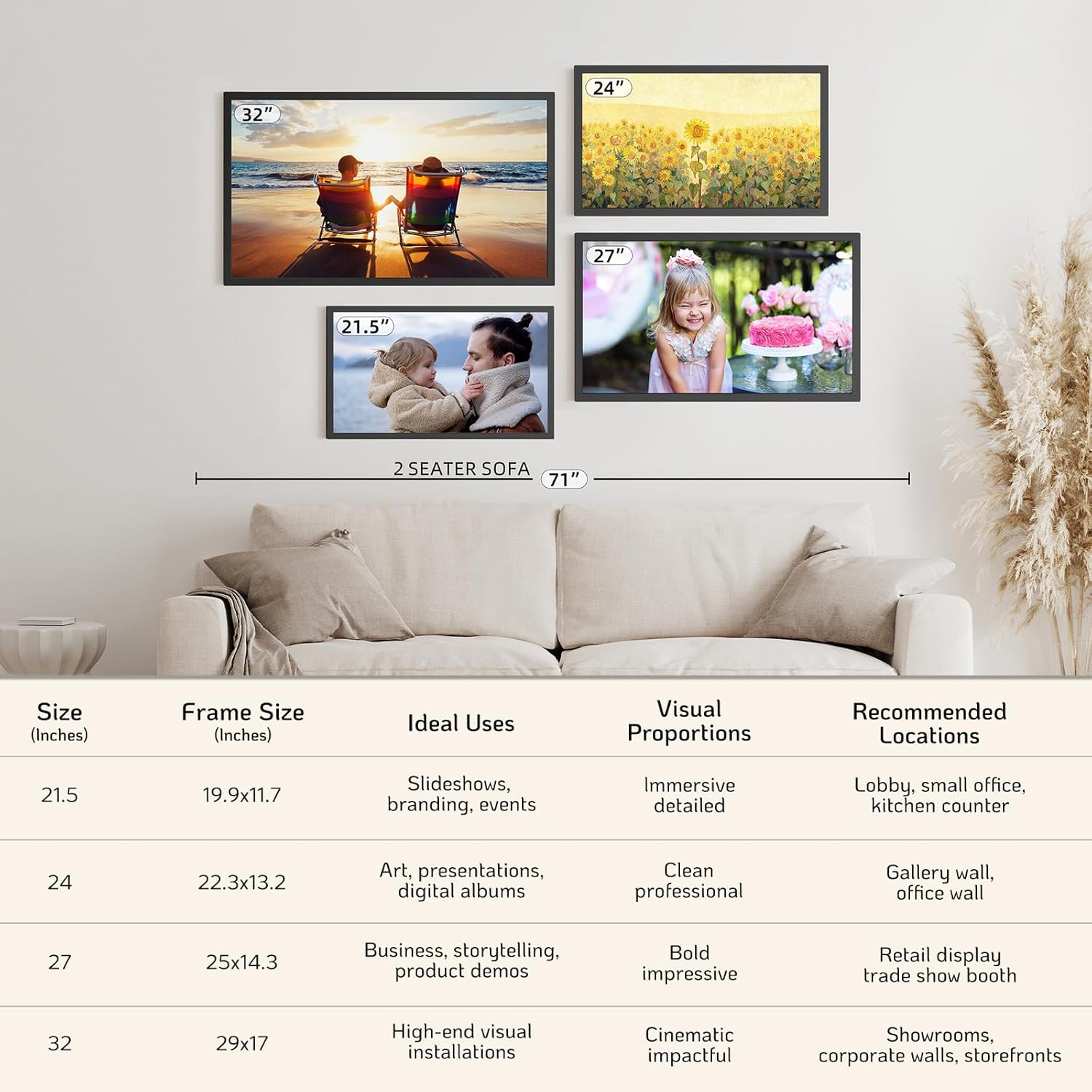
Figure 9: NexFoto Frame Sizes and Placement Examples
9. Garanti da Tallafawa
9.1 Garanti na Shekara ɗaya
NexFoto is committed to delivering top-quality digital photo frames. This product comes with a one-year warranty from the date of purchase, covering manufacturing defects and malfunctions under normal use. Please retain your proof of purchase for warranty claims.
9.2 Tallafin Abokin Ciniki
If you have any questions, require technical assistance, or need to make a warranty claim, please contact NexFoto customer support. Our team is available to provide satisfactory responses within 12 hours.
For the most up-to-date contact information, please refer to the official NexFoto website or the contact details provided in your Quick Start Guide.


