Gabatarwa
The SUUNTO Aqua Light Open-Ear Swimming Bone Conduction Headphone is designed for active individuals, offering a unique audio experience while maintaining environmental awareness. Featuring bone conduction technology, a 32GB MP3 player for offline music, Bluetooth 5.4 connectivity, and IP68 waterproofing, these headphones are suitable for various sports, including swimming, running, and cycling.
This manual provides comprehensive instructions for setting up, operating, maintaining, and troubleshooting your SUUNTO Aqua Light headphones.

Image: SUUNTO Aqua Light headphones in Tidal Black, showcasing zane-zanen kunne.

Image: SUUNTO Aqua Light headphones highlighting Bluetooth 5.4 for running and 32GB MP3 storage for swimming, with the headphones partially submerged in water.
Me ke cikin Akwatin
Bayan buɗe kunshin, tabbatar da duk abubuwan da ke biyowa sun kasance:
- SUUNTO Aqua Light belun kunne
- Kebul na Caji
- Kunnen kunne na iyo
- Jakar Ajiya
- Jagorar mai amfani (wannan takaddar)
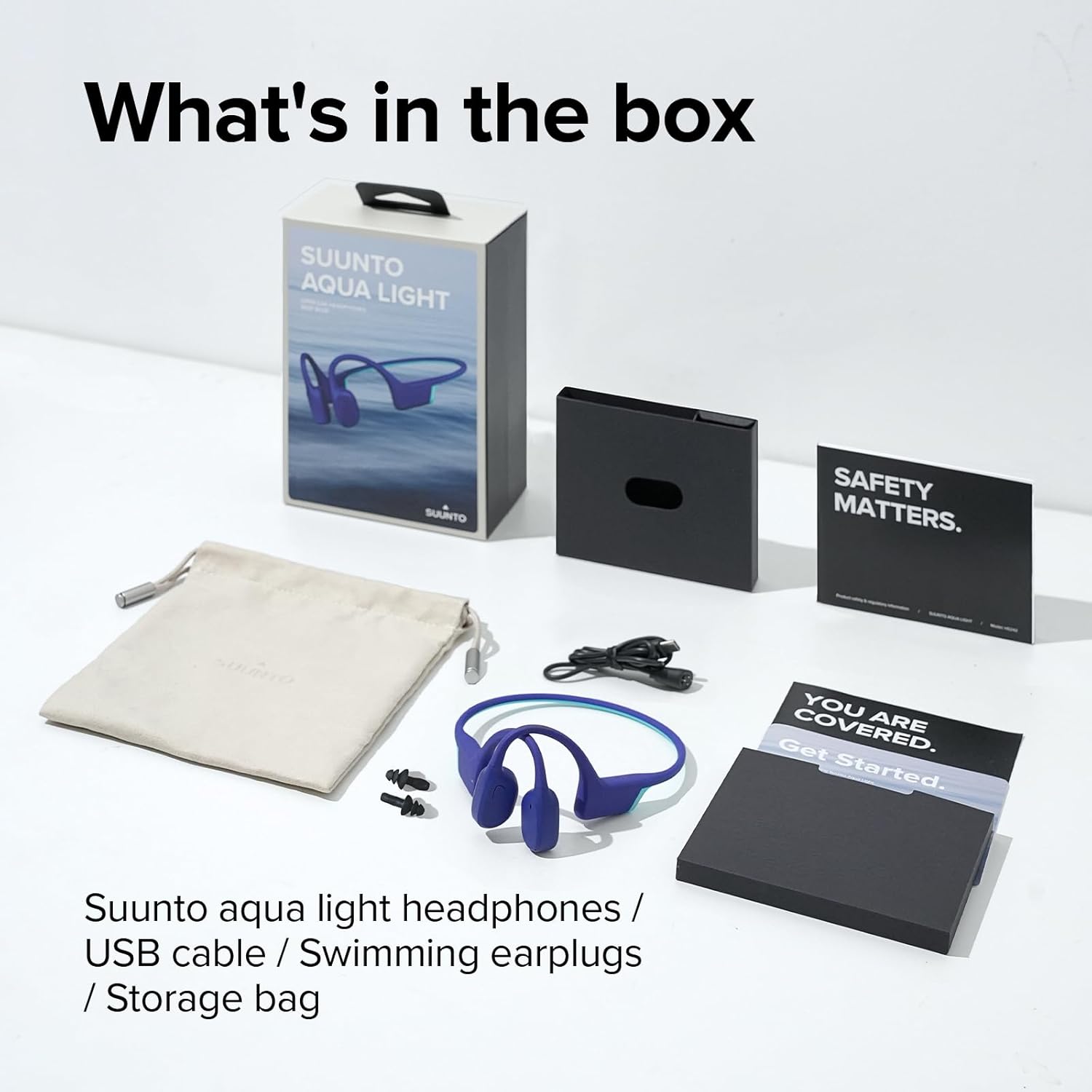
Image: All items included in the SUUNTO Aqua Light package: headphones, USB cable, swimming earplugs, and documentation.
Saita
Cajin belun kunne
Before first use, fully charge your SUUNTO Aqua Light headphones. Use the provided USB charging cable. Connect the magnetic end of the cable to the charging port on the headphones and the USB-A end to a compatible USB power source (e.g., computer USB port, wall adapter).
- Cikakken caji yana ɗaukar awanni 1.
- A 10-minute fast charge provides up to 3 hours of playtime.
- The LED indicator will show charging status (e.g., red for charging, blue for fully charged).

Image: SUUNTO Aqua Light headphones connected to a laptop via the USB charging cable, illustrating the charging process.
Haɗa Bluetooth
Don haɗa belun kunne zuwa na'urar da ta kunna Bluetooth:
- Tabbatar an kashe belun kunne.
- Press and hold the Power/Multi-function button until the LED indicator flashes red and blue, indicating pairing mode.
- A kan na'urarka (wayar hannu, kwamfutar hannu, kwamfuta), kunna Bluetooth kuma bincika samammun na'urori.
- Select "SUUNTO Aqua Light" from the list of found devices.
- Da zarar an haɗa, alamar LED za ta zama shuɗi mai ƙarfi.
The headphones support dual-device connection, allowing seamless switching between two paired Bluetooth devices.
Umarnin Aiki
Kunna/Kashe Wuta
- Kunna Wuta: Latsa ka riƙe maɓallin wuta/multi-aiki na tsawon daƙiƙa 2.
- Kashe Wuta: Latsa ka riƙe maɓallin wuta/multi-aiki na tsawon daƙiƙa 3.
Controls (Touch Method)
| Aiki | Aiki |
|---|---|
| Kunna/Dakata | Single tap on the Multi-function button. |
| Ƙara girma | Tap the Volume Up button. |
| Saukar da ƙara | Tap the Volume Down button. |
| Waƙa ta gaba | Double tap on the Multi-function button. |
| Waƙar da ta gabata | Triple tap on the Multi-function button. |
| Amsa/Ƙarshen Kira | Single tap on the Multi-function button during a call. |
| Karɓi Kira | Danna ka riƙe maɓallin ayyuka da yawa na tsawon daƙiƙa 2 yayin kira mai shigowa. |
| Kunna Mataimakin Murya | Press and hold the Multi-function button for 2 seconds (when not on a call). |
| Switch between Bluetooth/MP3 Mode | Press and hold the Volume Up and Volume Down buttons simultaneously for 2 seconds. |
Using the 32GB MP3 Player
The SUUNTO Aqua Light headphones feature an integrated 32GB MP3 player, ideal for use in environments where Bluetooth connectivity may be limited or unavailable, such as underwater. The player supports MP3, FLAC, WAV, AAC, M4A, APE, and WMA formats.
- To transfer music, connect the headphones to a computer using the USB cable. The headphones will appear as a removable storage device. Drag and drop your audio files into the device's storage.
- Switch to MP3 mode using the control table above.
- The headphones can store up to 8000 songs (assuming 4MB per song).
Sound Modes and Underwater EQ
The headphones offer different sound modes optimized for various activities, including an "Underwater EQ" mode for superior audio quality while swimming.

Image: A user interacting with the SUUNTO Aqua Light mobile application, which allows switching to an optimized Underwater EQ for swimming.
For optimal underwater performance, ensure the headphones are in MP3 mode and the Underwater EQ is activated, typically through the SUUNTO app or specific button combination (refer to app instructions for details).

Image: A swimmer wearing SUUNTO Aqua Light headphones, illustrating their IP68 waterproof capability for submersion up to 2 meters for 2 hours.
Open-Ear Safety and Comfort
The open-ear bone conduction design allows you to hear your surroundings while enjoying audio, enhancing safety during outdoor activities like cycling or running.

Image: A person wearing SUUNTO Aqua Light headphones while cycling, highlighting the open-ear design that maintains awareness of surroundings.
Dual Microphone & Noise Cancellation
Equipped with dual microphones and Environmental Noise Cancellation (ENC) technology, the headphones ensure clear voice quality during phone calls, even in noisy environments.

Image: A person wearing SUUNTO Aqua Light headphones by a swimming pool, demonstrating the effectiveness of the dual microphone and environmental noise cancellation for clear communication.
Kulawa
Tsaftacewa
Regular cleaning helps maintain the performance and longevity of your headphones:
- Shafa belun kunne da taushi, damp cloth after each use, especially after exposure to sweat, chlorine, or saltwater.
- Kada a yi amfani da masu tsabtace abrasive ko sauran ƙarfi.
- Tabbatar cewa tashar caji ta bushe kafin haɗa kebul ɗin caji.
Adana
When not in use, store your headphones in the provided storage bag in a cool, dry place, away from direct sunlight and extreme temperatures.
Shirya matsala
| Matsala | Magani mai yiwuwa |
|---|---|
| belun kunne ba sa kunnawa. | Ensure the headphones are fully charged. Connect to the charger and check the LED indicator. |
| Ba za a iya haɗawa da na'urar Bluetooth ba. |
|
| Babu sauti a yanayin MP3. |
|
| Sound quality is poor underwater. | Ensure you are in MP3 mode and the Underwater EQ setting is activated (if applicable via app). Use the provided swimming earplugs for optimal sound. |
| Headphones are unresponsive. | Perform a soft reset by connecting the headphones to the charger for a few seconds, then disconnecting and attempting to power on. |
Ƙayyadaddun bayanai
| Siffar | Daki-daki |
|---|---|
| Sunan Samfura | HASKEN SUUNTO AQUA |
| Lambar Samfura | SS051124000 |
| Fasahar Haɗuwa | Mara waya (Bluetooth 5.4) |
| Ma'ajiyar Ciki | 32GB MP3 Player |
| Resistance Ruwa | IP68 (Submersible up to 2 meters for 2 hours) |
| Lokacin wasa | Up to 10 hours (Bluetooth mode), Up to 6 hours (MP3 mode underwater) |
| Lokacin Caji | Approx. 1 hour (full charge), 10 minutes for 3 hours playtime |
| Nauyi | 1.06 oz (kimanin 28g) |
| Girma | 4.92 x 4.02 x 1.77 inci |
| Makirifo | Dual-Mic with Environmental Noise Cancellation (ENC) |
| Hanyar sarrafawa | Taɓa |
| Nau'in Baturi | Lithium Polymer (an haɗa) |
Garanti da Taimako
For detailed warranty information and customer support, please refer to the official SUUNTO website or the included warranty card. You can also access the official user guide PDF for additional information:
Zazzage Jagoran Mai Amfani (PDF)
For further assistance, contact SUUNTO customer service through their official channels.


