Gabatarwa
The PNI P16UV is a portable dual-band VHF/UHF radio station designed for reliable communication across various environments. It features 999 programmable channels, dual-band transmission, and 6-band reception, along with functions like VOX, scanning, FM radio, and weather channels. This manual provides detailed instructions for the proper setup, operation, and maintenance of your PNI P16UV radio.
Abubuwan Kunshin
Tabbatar cewa duk abubuwan da aka jera a ƙasa suna cikin kunshin ku:
- Portable UHF/VHF Radio (PNI P16UV)
- Eriya
- Li-Ion Battery (2600mAh)
- Cajin tebur
- Na'urar kai tare da Makirifo
- Lanyard
- Manual mai amfani
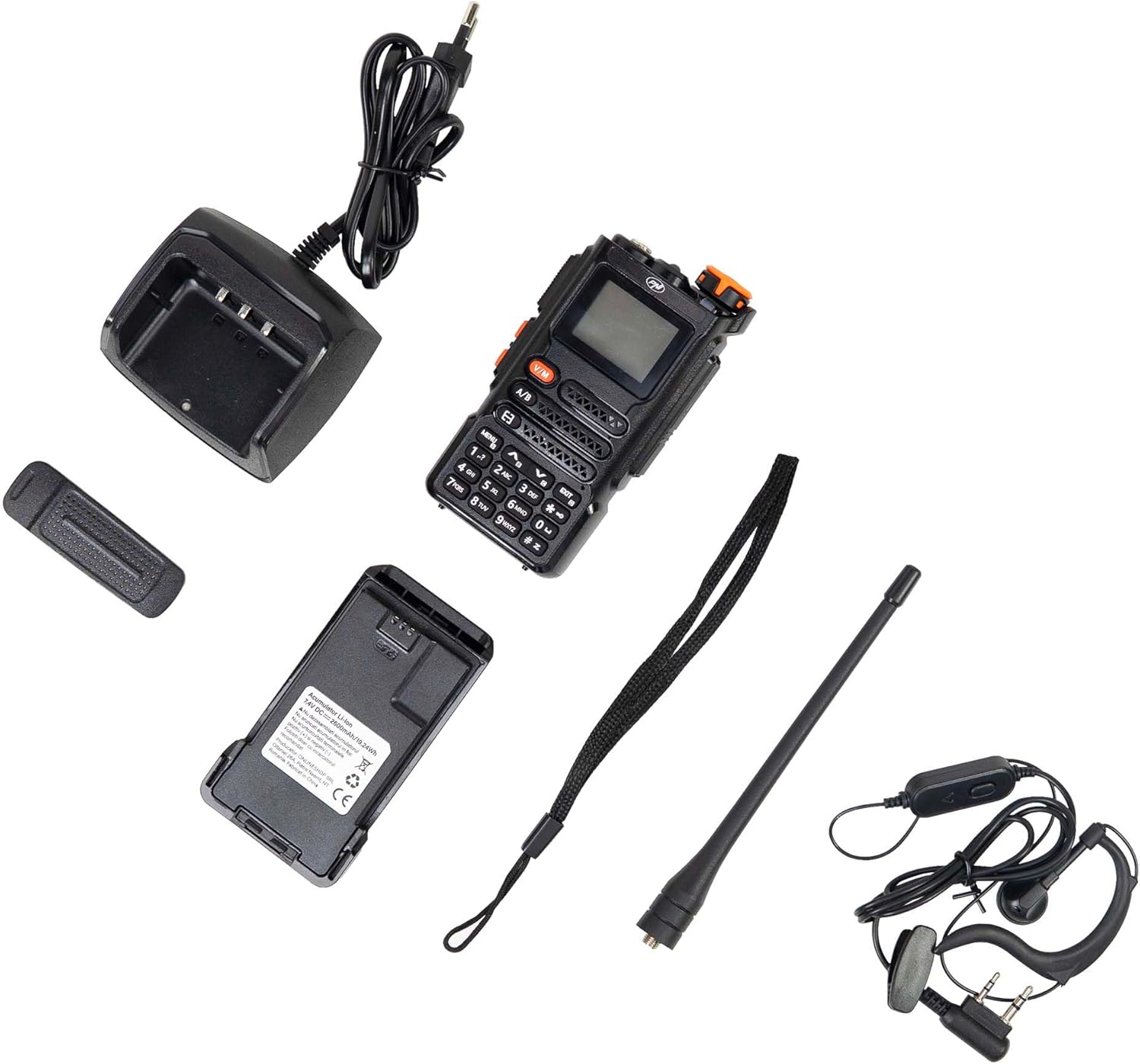
Figure 1: PNI P16UV Package Contents. This image displays the radio unit, antenna, 2600mAh Li-Ion battery, desk charger, headset with microphone, and lanyard, which are all included in the product package.
Samfurin Ƙarsheview
The PNI P16UV radio is equipped with a range of features to enhance your communication experience. Key features include:
- Dual-Band Transmission: Operates on both VHF (136-174 MHz) and UHF (400-470 MHz) frequencies.
- 6-Band Reception: Extends listening capabilities beyond standard transmission bands.
- Tashoshi 999: Ample storage for various frequencies and settings.
- Ƙarfin da za a iya daidaitawa: Selectable transmission power (5W High, 1W Low) for efficiency.
- Ayyukan VOX: Watsawa ta hanyar murya don aiki ba tare da hannu ba.
- Ayyukan dubawa: Automatically scans channels for activity.
- Rediyon FM: Built-in FM radio receiver (87.5-108 MHz).
- Tashoshin Yanayi: Access to weather information.
- Batirin Li-Ion: High-capacity 2600mAh battery for extended use.
- Hasken walƙiya: Integrated LED flashlight for convenience.
- Kulle maɓalli: Yana hana danna maɓalli ba da gangan ba.
- Kiran gaggawa: Dedicated function for urgent situations.
- DTMF: Dual-Tone Multi-Frequency signaling.
- Squelch: Adjustable noise reduction.
- Dual Watch: Monitors two channels simultaneously.
- BCL (Busy Channel Lockout): Yana hana yaɗuwa a kan hanyar da aka mamaye.
Figure 2: Main Features of PNI P16UV. This graphic highlights key functionalities such as FM Radio (87.5-108 MHz), 10 Preset Weather Channels, 1750Hz Tone Burst, Repeater Function, Type-C charging, VOX, DW (Dual Watch), TOT (Time Out Timer), CTCSS/DCS, BCL (Busy Channel Lockout), Keypad lock, SQ (Squelch), Scan, and DTMF.
Saita
1. Shigar da Baturi
To install the Li-Ion battery:
- Tabbatar cewa an kashe rediyon.
- Daidaita fakitin batirin tare da ramukan da ke bayan rediyon.
- Slide the battery upwards until it clicks into place securely.
- To remove, press the release latch (if present) and slide the battery downwards.

Figure 3: Battery Installation. This image shows the radio and its battery pack separated, demonstrating how the battery slides into the back of the unit.
2. Maƙalar Eriya
Mayar da eriya a kusa da agogo a cikin mahaɗin da ke saman rediyon har sai ya kasance mai yatsa. Kada ku wuce gona da iri.
3. Cajin Baturi
Before first use, fully charge the battery. Place the radio (with battery installed) into the desk charger. The charger indicator light will typically show red during charging and turn green when fully charged. A full charge can take several hours.

Figure 4: PNI P16UV Radio Ready for Use. This image shows the complete radio unit with the antenna attached and battery installed, displaying its front panel and screen.
Umarnin Aiki
1. Kunnawa / Kashewa da Sarrafa ƙara
Rotate the top-right knob clockwise to power on the radio and increase volume. Rotate counter-clockwise to decrease volume and power off.
2. Zabin Channel
Use the up/down arrow buttons on the keypad to navigate through the 999 available channels. Alternatively, you can directly input channel numbers using the numeric keypad.
3. Dual-Band Operation (VHF/UHF)
The PNI P16UV supports both VHF and UHF bands. Use the A/B button to switch between the primary (A) and secondary (B) frequency displays. The radio can transmit on one band while monitoring another (Dual Watch).
4. Watsawar VOX
The Voice Operated Exchange (VOX) function allows for hands-free transmission. When VOX is enabled, the radio will automatically transmit when it detects your voice. Adjust VOX sensitivity in the menu to prevent accidental transmissions or missed voice activation.
5. Aikin Scan
Activate the scan function to automatically search for active signals across programmed channels. The radio will pause on an active channel and resume scanning after a set period of inactivity.
6. FM Radio and Weather Channels
The radio includes an FM broadcast receiver and dedicated weather channels. Consult the full user manual for specific instructions on accessing and tuning these features.
7. Kulle Mabuɗi
To prevent accidental changes to settings or transmissions, activate the keypad lock function. Refer to the radio's on-screen menu or dedicated button for this feature.
8. Emergency Call
The emergency call function, typically activated by a dedicated button, transmits an alert signal on a pre-programmed emergency frequency. Familiarize yourself with its operation for critical situations.
Kulawa
1. Kula da baturi
- Cajin baturi cikakke kafin fara amfani dashi.
- A guji yin caji da yawa ko zubar da baturin gaba ɗaya don tsawaita rayuwarsa.
- Ajiye baturin a wuri mai sanyi, busasshen lokacin da ba'a amfani dashi na tsawon lokaci.
2. Tsaftacewa
Goge wajen rediyon da wani abu mai laushi, damp Zane. Kada a yi amfani da sinadarai masu ƙarfi ko masu tsaftace iska. A tabbatar an kashe rediyon kuma ya bushe kafin a yi amfani da shi.
3. Adana
When storing the radio for a long time, remove the battery. Store the radio and battery in a dry, temperature-controlled environment, away from direct sunlight and extreme temperatures.
Shirya matsala
| Matsala | Dalili mai yiwuwa | Magani |
|---|---|---|
| Rediyo baya kunnawa. | Battery is not installed correctly or is discharged. | Ensure battery is properly installed. Charge the battery fully. |
| Ba za a iya aikawa ko karɓa ba. | Mita/tashar da ba daidai ba, eriya ba a haɗa ta ba, ƙarancin baturi, ko kuma yawan matsewa. | Verify frequency/channel. Attach antenna securely. Charge battery. Adjust squelch level. |
| Rashin ingancin sauti. | Weak signal, antenna issue, or squelch setting. | Move to an area with better signal. Check antenna connection. Adjust squelch. |
| Faifan madannai ba ya amsawa. | Aikin kulle maɓalli yana aiki. | Deactivate the key lock function (refer to your radio's specific key lock combination). |
Ƙayyadaddun bayanai
| Siffar | Daki-daki |
|---|---|
| Samfura | PNI-P16UV |
| Ƙwaƙwalwar Mita | VHF (136-174 MHz), UHF (400-470 MHz), Commercial FM |
| Tashoshi | 999 tashoshi |
| Ikon watsawa | 5W (Hi), 1W (Lo) |
| Baturi | 2600mAh Li-Ion |
| Mulkin kai | Har zuwa awanni 22 |
| Girma (tare da eriya) | 60 x 40 x 110 mm (radio body), 265 mm (with antenna) |
| Nauyi | 250 gr (radio body), 439 g (packaged) |
| Yanayin Aiki | -26°C ~ +80°C |
| Mai haɗaɗar eriya | SMA |
| Audio Accessory Pins | 2 PNI-K pins |
| Siffofin Musamman | VOX, Scan, FM Radio, Weather Channels, Flashlight, Key Lock, Emergency Call, DTMF, Dual Watch, Squelch, Time out Timer (TOT), Talk Around, BCL (Busy Channel Lockout) |
Garanti da Taimako
For warranty information, technical support, or service inquiries, please contact the manufacturer:
- Mai ƙira: SHAFIN INTANET SRL
- Adireshi: Olteniei 26A, Piatra Neamt, Neamt, 610206, Romania
- Imel: comenzi@pni.ro
- Website: www.pni.ro
Da fatan za a riƙe shaidar siyan ku don kowane da'awar garanti.

Figure 5: Manufacturer Information. This image displays the back of the product packaging, detailing the manufacturer (ONLINESHOP SRL), address, email (comenzi@pni.ro), and website (pni.ro).


