Gabatarwa
Welcome to the user manual for your new VAIO SX-R Laptop. This document provides essential information to help you set up, operate, maintain, and troubleshoot your device. Please read this manual thoroughly to ensure optimal performance and longevity of your laptop.
Samfurin Ƙarsheview
The VAIO SX-R is a high-performance laptop designed for productivity and creative tasks. It features an Intel Core Ultra 7 processor, a vibrant 14-inch WQXGA Touch Display, ample memory, and fast storage.
Mabuɗin Siffofin
- Mai sarrafawa: Intel Core Ultra 7 (16-Core, AI-Boosted) for enhanced speed and responsiveness.
- Nunawa: 14-inch WQXGA Touch Display (2560x1600) offering high resolution and wide color gamut.
- Ƙwaƙwalwar ajiya: 32GB LPDDR5 RAM for superior multitasking.
- Ajiya: 1TB PCIe NVMe SSD for fast data access and ampda ajiya.
- Tsarin Aiki: Windows 11 Pro with enterprise-grade security and productivity features.
- Tsaro: Integrated IR Camera and Fingerprint Reader for secure login.
- Burbushin: Durable Carbon Fiber construction.
Laptop Components and Ports

Figure 1: VAIO SX-R Laptop, illustrating the overall design.
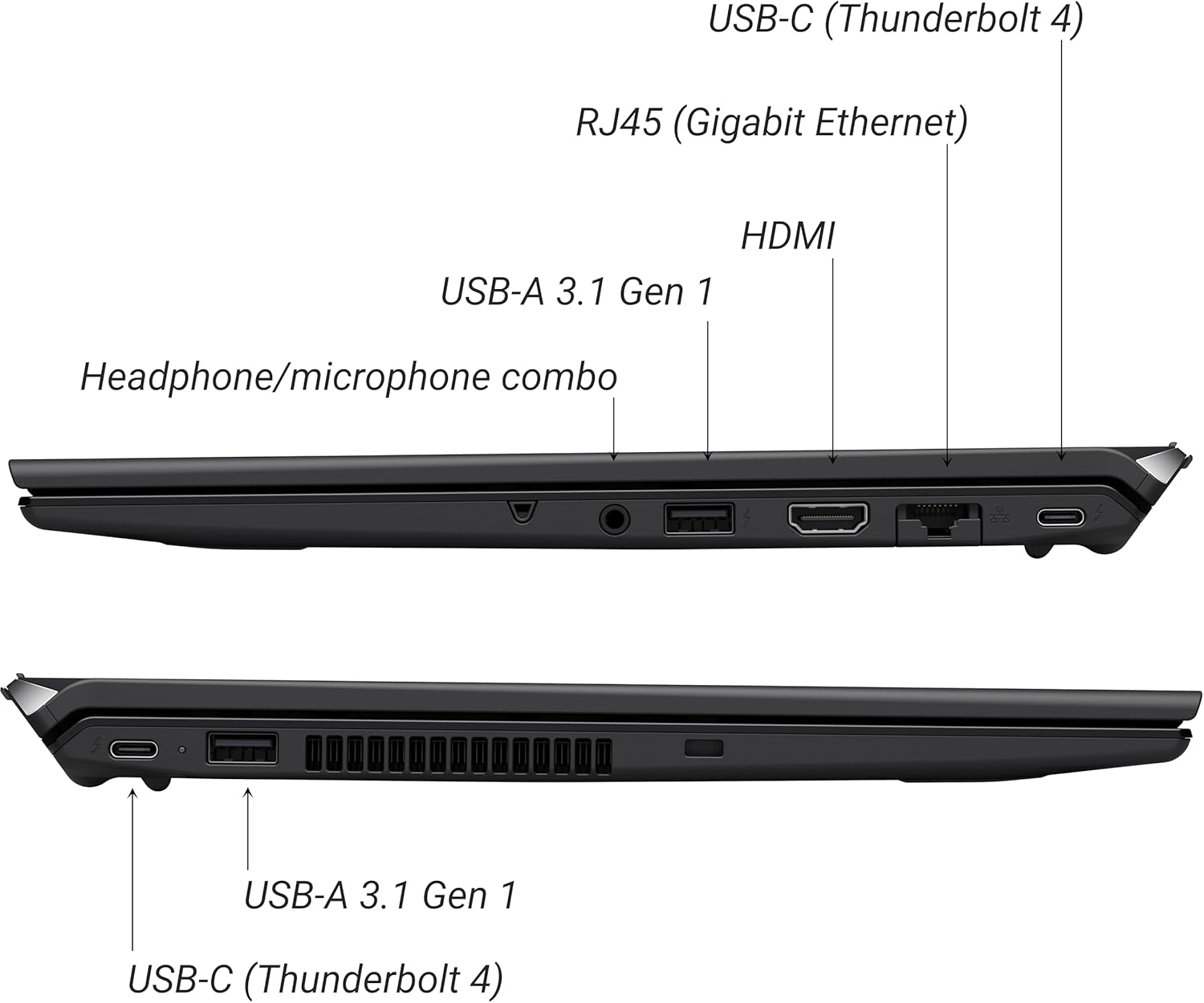
Figure 2: Port layout of the VAIO SX-R Laptop. The left side includes a headphone/microphone combo jack, USB-A 3.1 Gen 1, HDMI, RJ45 (Gigabit Ethernet), and USB-C (Thunderbolt 4). The right side features another USB-C (Thunderbolt 4) and USB-A 3.1 Gen 1 port.
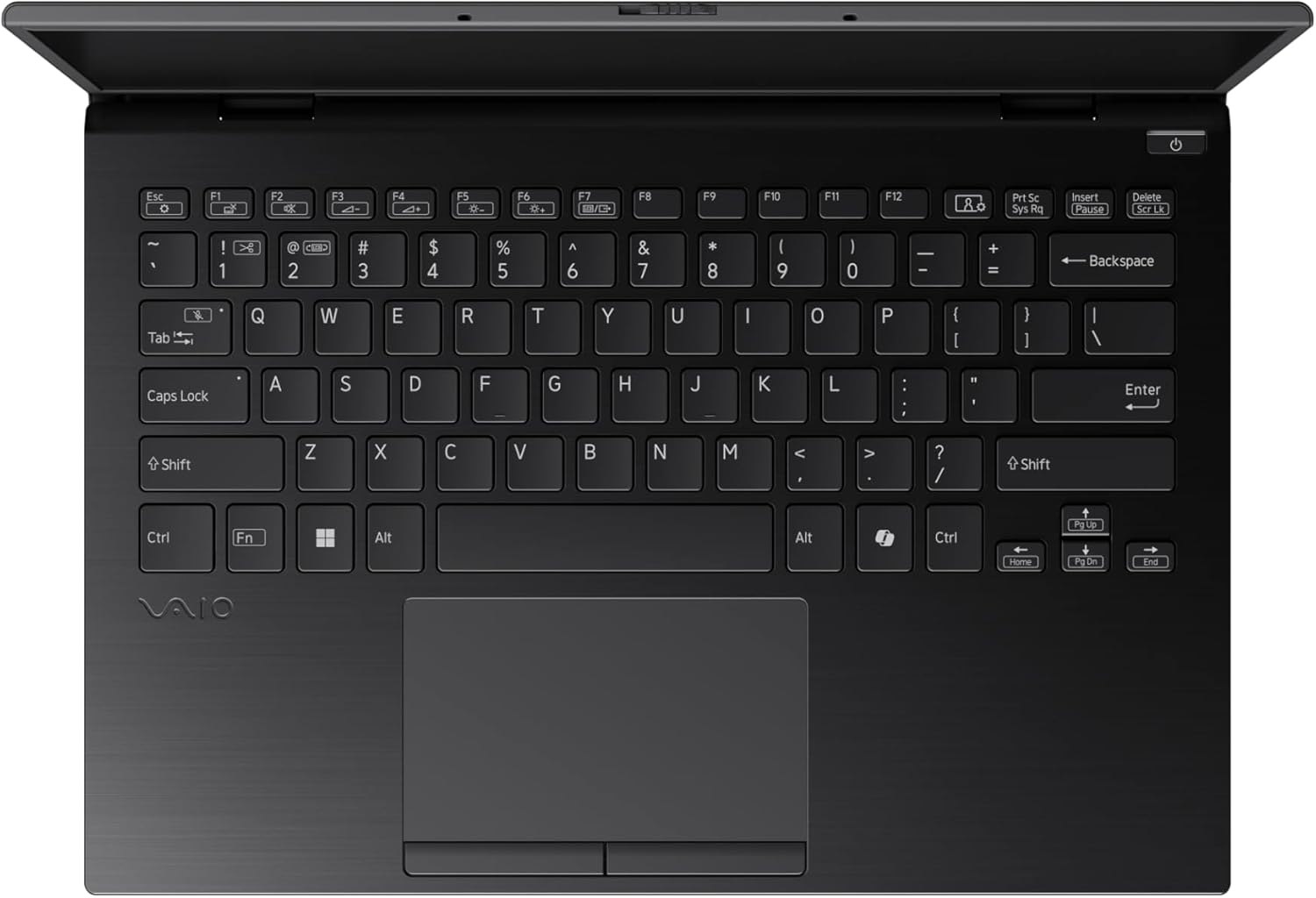
Figure 3: The VAIO SX-R Laptop keyboard and touchpad, featuring a backlit keyboard and integrated fingerprint sensor.
Saita
1. Ƙarfin Farko Kunna
- Haɗa Ikon: Haɗa adaftar AC ɗin a cikin tashar wutar lantarki ta kwamfutar tafi-da-gidanka sannan a cikin tashar wuta ta bango.
- Buɗe kwamfutar tafi-da-gidanka: A hankali a buɗe murfin kwamfutar tafi-da-gidanka.
- Kunna Wuta: Press the power button, typically located on the top right of the keyboard deck. The power indicator light will illuminate.
2. Saitin Windows 11 Pro
Follow the on-screen instructions to complete the initial Windows 11 Pro setup. This includes:
- Zaɓar yankinka da tsarin madannai.
- Haɗa zuwa cibiyar sadarwar Wi-Fi.
- Karɓar yarjejeniyar lasisi.
- Creating or logging in with a Microsoft account.
- Setting up your PIN, fingerprint, or facial recognition (IR Camera).
3. Haɗa Abubuwan Haɗawa
You can connect external devices such as mice, keyboards, external monitors, and USB drives to the available ports as shown in Figure 2.
Aiki
1. Asalin Amfani
- Allon madannai: Use the integrated backlit keyboard for typing. Function keys (F1-F12) often have secondary functions accessible via the 'Fn' key.
- faifan taɓawa: The precision touchpad supports multi-touch gestures for navigation.
- Kariyar tabawa: Interact directly with the 14-inch WQXGA display using touch gestures.
2. Siffofin Tsaro
- Mai Karatun Sawun yatsa: Enroll your fingerprints through Windows Settings > Accounts > Sign-in options for quick and secure login.
- IR Camera: Utilize Windows Hello facial recognition for convenient and secure access. Set this up in Windows Settings > Accounts > Sign-in options.
3. Gudanar da Wutar Lantarki
- Yanayin Barci: Close the lid or press the power button briefly to put the laptop to sleep.
- Rufe: Go to Start > Power > Shut down to turn off the laptop completely.
- Sake farawa: Go to Start > Power > Restart to reboot the system.
Kulawa
1. Tsaftacewa
- Allon: Yi amfani da laushi mai laushi mara laushi dampan rufe shi da ruwa ko mai tsabtace allo. Guji munanan sinadarai.
- Allon madannai da Chassis: Yi amfani da zane mai laushi. Don ƙura mai tauri, ɗan damp Ana iya amfani da zane mai laushin sabulu, don tabbatar da cewa babu ruwa da zai shiga ramuka.
- Tashoshi: Yi amfani da matsewar iska don share ƙura a hankali daga tashar jiragen ruwa.

Figure 4: The VAIO SX-R features a water-resistant keyboard, designed to withstand minor spills.
2. Sabunta software
Regularly update your Windows operating system and device drivers to ensure optimal performance, security, and compatibility. Access updates via Windows Settings > Windows Update.
3. Kula da baturi
- Ka guji matsanancin zafi.
- Kada ka cika fitar da batirin akai-akai.
- Don ajiya na dogon lokaci, yi cajin baturin zuwa kusan 50-60%.
Shirya matsala
Wannan sashe yana magance batutuwan gama gari da zaku iya fuskanta.
1. Laptop Ba Ya Kunnawa
- Tabbatar cewa an haɗa adaftar AC amintacce zuwa duka kwamfutar tafi-da-gidanka da tashar wutar lantarki mai aiki.
- Bincika idan tashar wutar lantarki na aiki ta hanyar toshe a wata na'ura.
- Idan batirin ya lalace gaba ɗaya, a bar shi ya yi caji na akalla mintuna 30 kafin a yi ƙoƙarin kunna shi.
2. Abubuwan Nuni
- Babu Nuni: Connect an external monitor to the HDMI port to check if the issue is with the laptop's internal display.
- Flickering/Distorted Display: Update your graphics drivers. Adjust display resolution and refresh rate in Windows Settings > System > Display.
3. Wi-Fi Connectivity Problems
- Ensure Wi-Fi is enabled in Windows Settings > Network & internet > Wi-Fi.
- Sake kunna na'ura mai ba da hanya tsakanin hanyoyin sadarwa da modem.
- Run the Windows Network Troubleshooter.
4. Slow Performance
- Rufe aikace-aikacen da ba dole ba suna gudana a bango.
- Check Task Manager (Ctrl+Shift+Esc) for resource-intensive processes.
- Ensure your system is up to date and free from malware.
Ƙayyadaddun bayanai
Below are the detailed specifications for the VAIO SX-R Laptop (Model: VJS4R1X0511B).
| Siffar | Ƙayyadaddun bayanai |
|---|---|
| Alamar | VAIO |
| Sunan Samfura | VAIO SX-R |
| Lambar Samfurin Abu | VJS4R1X0511B |
| Tsarin Aiki | Windows 11 Pro |
| Mai sarrafawa | Intel Core Ultra 7 (1.4 GHz) |
| RAM Memory | 32 GB LPDDR5 |
| Hard Drive | 1 TB PCIe NVMe SSD |
| Girman allo | Inci 14 |
| Tsarin allo | 2560 x 1600 pixels (WQXGA) |
| Katin Zane | Hadakar Intel Graphics |
| Nau'in Mara waya | 802.11bgn |
| USB 3.0 Ports | 3 |
| Matsakaicin Rayuwar Baturi | 10 Awanni |
| Nauyin Abu | 3.1 fam |
| Girman samfur | 14.2 x 15 x 3.3 inci |
| Siffofin Musamman | Backlit Keyboard, Fingerprint Reader, HD Audio, Memory Card Slot, Webkama |
Garanti da Taimako
1. Garanti Bayani
Your VAIO SX-R Laptop is covered by a manufacturer's warranty. Please refer to the warranty card included with your product packaging for specific terms, conditions, and duration. Keep your proof of purchase for warranty claims.
2. Tallafin Fasaha
For technical assistance, troubleshooting beyond this manual, or service inquiries, please contact VAIO customer support. You can typically find contact information on the official VAIO website or in the documentation provided with your laptop.
- Taimako kan layi: Visit the official VAIO support webshafin yanar gizo don Tambayoyin da ake yawan yi, saukar da direbobi, da zaɓuɓɓukan tuntuɓar.
- Tallafin Waya: Refer to your product documentation for regional support phone numbers.


