Gabatarwa
Thank you for choosing the Infinity X1 Solar Path & Motion Security Lights. These outdoor LED stake lights are designed to provide both ambient path illumination and enhanced security through motion activation. Featuring a durable, weatherproof design and solar-powered operation, they offer a convenient and energy-efficient lighting solution for your yard, walkway, or garden.
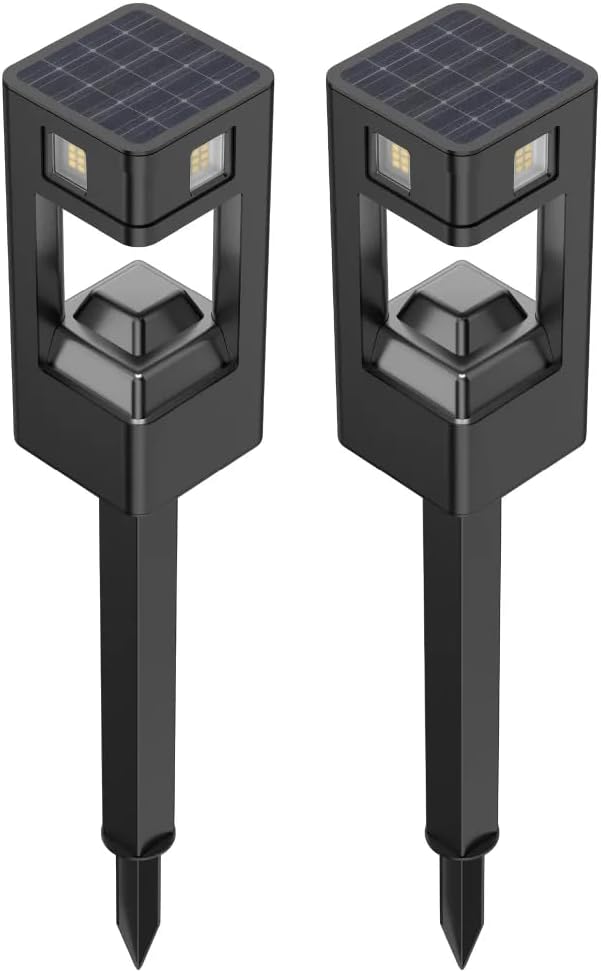
This image displays two Infinity X1 solar path and motion security lights. Each light features a square design with a solar panel integrated into the top surface and an LED light source below, mounted on a stake for ground installation.
Siffofin Samfur
- Hanyoyin Haske Biyu: Offers 50 lumens for continuous dusk-to-dawn path lighting and up to 500 lumens for motion-activated security lighting.
- Mai Amfani da Rana: Equipped with a 2.8Wh (5.5V/500mA) monocrystalline silicon solar panel for efficient charging.
- Sensor Motsi: Integrated microwave motion sensor with 360-degree detection range.
- Daidaitacce Haske: Motion-activated mode features selectable brightness levels of 150, 250, or 500 lumens.
- Zane mai hana yanayi: IPX4 water resistance rating ensures durability in outdoor conditions.
- Long Operation: Yana ba da haske har zuwa awanni 8 akan cikakken caji.
- Sauƙin Shigarwa: Stake mount design for simple placement in ground.

The product packaging shows two lights, emphasizing their dual functionality: 50 lumens for dusk-to-dawn path lighting and 500 lumens for motion-activated security lighting. The box indicates a 2-pack.
Abubuwan Kunshin
Tabbatar cewa duk abubuwan da aka gyara suna nan a cikin kunshin ku:
- 2 x Infinity X1 Solar Path & Motion Security Lights
- 2 x Ƙarfin ƙasa
- 1 x Manual mai amfani (wannan takarda)
Taruwa da Shigarwa
Follow these steps to assemble and install your solar lights:
- Cire kayan aiki: A hankali cire duk abubuwa daga marufi.
- Assemble Stake: Attach the ground stake to the bottom of the light unit. Ensure it is securely fastened.
- Na farko Cajin: Before first use, place the solar lights in direct sunlight for at least 8 hours to allow the internal battery to fully charge. Ensure the solar panel is clean and unobstructed.
- Zaɓi Wuri: Zaɓi wurin waje wanda ke karɓa ample direct sunlight throughout the day. Avoid areas under eaves, trees, or other obstructions that may block sunlight or cast shadows on the solar panel.
- Saka cikin Ƙasa: Gently push the assembled light, with the stake, into soft ground. Do not force the light into hard soil, as this may damage the stake or the unit. If the ground is too hard, moisten it or use a tool to create a pilot hole.
- Daidaita Shugaban Haske: The light head can be rotated 360 degrees to direct the light and optimize motion detection coverage.

A detailed image of the light's upper section, featuring the solar panel and light housing. An arrow illustrates the 360-degree detection and rotational capability of the light head, allowing for adjustable coverage.

A technical drawing providing the physical dimensions of the light, including its total height (24 inches / 61.21 cm), the height of the light head (7 inches / 18 cm), and the stake length (12 inches / 30.48 cm, with a 5-inch / 12.7 cm ground insertion).
Umarnin Aiki
The Infinity X1 Solar Lights offer two primary operating modes: Dusk-to-Dawn Path Light and Motion-Activated Security Light. These modes are typically selected via switches located on the underside of the light head.
Zaɓin Yanayin
Locate the control switches on the underside of the light's top section. These switches allow you to configure the light's behavior.

This close-up reveals the control interface on the underside of the light's top section. Two small switches are visible: one for adjusting the motion detection delay (e.g., 10 or 15 seconds) and another for selecting motion-activated brightness levels (150, 250, or 500 lumens).
- Dusk-to-Dawn Path Light (50 Lumens): In this mode, the light will automatically turn on at dusk at a constant 50-lumen brightness and remain on until dawn or until the battery is depleted. This mode is ideal for continuous ambient lighting.
- Motion-Activated Security Light (Up to 500 Lumens): In this mode, the light remains off or at a very low standby level until motion is detected within its 360-degree range. Upon detection, the light will illuminate at a higher brightness (selectable) for a set duration.
Adjusting Motion-Activated Brightness and Delay
Use the switches to customize the motion-activated mode:
- Zaɓin Haske: One switch allows you to choose the brightness level when motion is detected: 150 lumens, 250 lumens, or 500 lumens. Select the desired intensity based on your security needs.
- Jinkirin Ganewa: Another switch controls the duration the light stays on after motion is no longer detected. Common settings include 10 seconds or 15 seconds.
The light will automatically charge during the day and operate according to the selected mode at night.

A graphic representation of the light's two primary illumination modes: a constant 50 lumens for path lighting and a brighter 500 lumens when motion is detected, highlighting the difference in output.
Kulawa
Regular maintenance ensures optimal performance and longevity of your solar lights:
- Tsaftace Tashoshin Rana: Lokaci-lokaci ana goge hasken rana da taushi, damp cloth to remove dust, dirt, and debris. A clean panel ensures maximum sunlight absorption and efficient charging.
- Share Abubuwan Hani: Ensure that no leaves, snow, or other objects are covering the solar panel or the light sensor.
- Kulawar Baturi: While the internal battery is designed for long life, consistent exposure to direct sunlight is crucial for its health. Avoid prolonged storage in a discharged state.
- Duba Lalacewar: Regularly check the light unit and stake for any signs of physical damage.
Shirya matsala
If your Infinity X1 Solar Light is not functioning as expected, consider the following:
- Light Does Not Turn On at Night:
- Ensure the light has received at least 8 hours of direct sunlight for initial charging.
- Verify the solar panel is clean and free from obstructions.
- Check if the light is placed in an area with sufficient direct sunlight during the day.
- Confirm that the light is not positioned near other strong light sources (e.g., streetlights), which might prevent the dusk-to-dawn sensor from activating.
- Light is Dim or Only Stays On for a Short Time:
- The battery may not be fully charged. Ensure the light receives adequate direct sunlight for a full day.
- Tsaftace sashin hasken rana don inganta aikin caji.
- Abubuwan muhalli kamar yanayin girgije ko gajeriyar kwanakin hunturu na iya rage ƙarfin caji.
- Firikwensin Motsi Ba Ya Kunnawa:
- Ensure the light head is rotated to cover the desired detection area.
- Verify that the motion sensor is not obstructed.
- Check the selected brightness and delay settings on the control switches.
Ƙayyadaddun bayanai
| Alamar | Infinity X1 |
| Lambar Samfura | 1806287 |
| Tushen wutar lantarki | Mai Amfani da Rana |
| Nau'in Tushen Haske | LED |
| Brightness (Dusk-to-Dawn) | 50 Lumen |
| Brightness (Motion Activated) | 150 / 250 / 500 Lumens (Selectable) |
| Gano Motsi | 360° Microwave Motion Sensor |
| Solar Panel | 2.8Wh (5.5V/500mA) Monocrystalline Silicon |
| Voltage | 5.5V (DC) |
| Matsayin Juriya na Ruwa | IPX4 (Ruwan Resistant) |
| Nau'in Shigarwa | Tudun Dutsen |
| Girman samfur | 3 x 3 x 24 inci (7.62 x 7.62 x 60.96 cm) |
| Nauyin Abu | 2.72 fam (1.23 kg) |
| Ana Bukatar Taro | Ee |
Bayanin Tsaro
Da fatan za a karanta kuma ku bi ƙa'idodin aminci masu zuwa:
- Kada kayi ƙoƙarin ƙwace ko gyara samfurin. Wannan na iya ɓata garanti kuma ya haifar da haɗarin aminci.
- Keep the solar panel clean to ensure proper charging.
- Avoid placing the light in areas where it may be submerged in water, despite its water-resistant rating.
- Ensure the ground stake is firmly inserted to prevent the light from falling over.
- Do not stare directly into the LED light source when illuminated, as it may cause temporary vision impairment.
Garanti da Taimako
For warranty information or technical support, please refer to the product packaging or contact Infinity X1 customer service directly. Keep your purchase receipt for warranty claims.