Gabatarwa
This user manual provides comprehensive instructions for the setup, operation, maintenance, and troubleshooting of your Pisichen 21.5-Inch Touchscreen Monitor. Please read this manual thoroughly before using the product to ensure proper functionality and to prevent damage.
The Pisichen 21.5-inch touch monitor is designed to enhance your work efficiency and provide an interactive experience with its responsive 10-point capacitive touchscreen. It features a Full HD 1920x1080 resolution display, built-in speakers, and versatile connectivity options including HDMI, VGA, and USB for touch functionality.
Mabuɗin Siffofin
- Sensitive 10-Point Capacitive Touchscreen: Offers seamless and responsive interaction, allowing direct engagement with content and simultaneous multi-finger input.
- Stunning FHD 1080P Display: A 21.5-inch Full HD (1920x1080) resolution screen with a 1000:1 contrast ratio, 250cd/㎡ brightness, 170° viewing angle, and 60Hz refresh rate for clear and smooth visuals. Includes low-blue-light and eye-care technology.
- Daidaituwar Na'urar Faɗi: Equipped with USB2.0 (for touch), HDMI, VGA, and DC ports for easy connection to PCs, laptops, PS3/4, and gaming consoles.
- Hanyoyin Nuni iri-iri: Supports duplicate, extend, and second-screen modes to enhance productivity and workspace.
- Built-in Speakers and VESA Mounting: Integrated speakers provide audio, and the 75x75mm VESA mount allows for flexible installation options.
Abubuwan Kunshin
Please verify that all items are present in the package before proceeding with the setup.

The package includes the Pisichen 21.5-inch touchscreen monitor, a user manual, an HDMI cable, a USB cable, and a power adapter, ensuring it is ready for immediate use.
- Pisichen 21.5-Inch Touchscreen Monitor
- Adaftar Wuta
- HDMI Cable
- USB Cable (for touch function)
- Manual mai amfani
Saita Umarnin
1. Haɗa Monitor
The monitor offers various connection options to suit your needs. Ensure all connections are secure before powering on the device.

Dalla-dalla view of the monitor's input/output ports, including HDMI, VGA, headphone, DC power, and USB 2.0 touch ports.
- Haɗin Wuta: Connect the provided power adapter to the DC power port on the monitor and then plug it into a wall outlet.
- Haɗin Bidiyo (HDMI): Use the HDMI cable to connect the monitor's HDMI port to the HDMI output port on your computer, laptop, or gaming console.
- Haɗin Bidiyo (VGA): Alternatively, use a VGA cable to connect the monitor's VGA port to the VGA output port on your computer or laptop.
- Touch Function Connection: To enable the touch function, connect the included USB cable from the monitor's USB 2.0 touch port to an available USB port on your computer. This step is crucial for touch signal transmission.
- Audio Output (Optional): If you prefer external audio, you can connect headphones or external speakers to the headphone jack. The monitor also has built-in speakers.
2. Zaɓuɓɓukan hawa
The Pisichen monitor supports both desktop placement and VESA wall mounting for flexible setup.
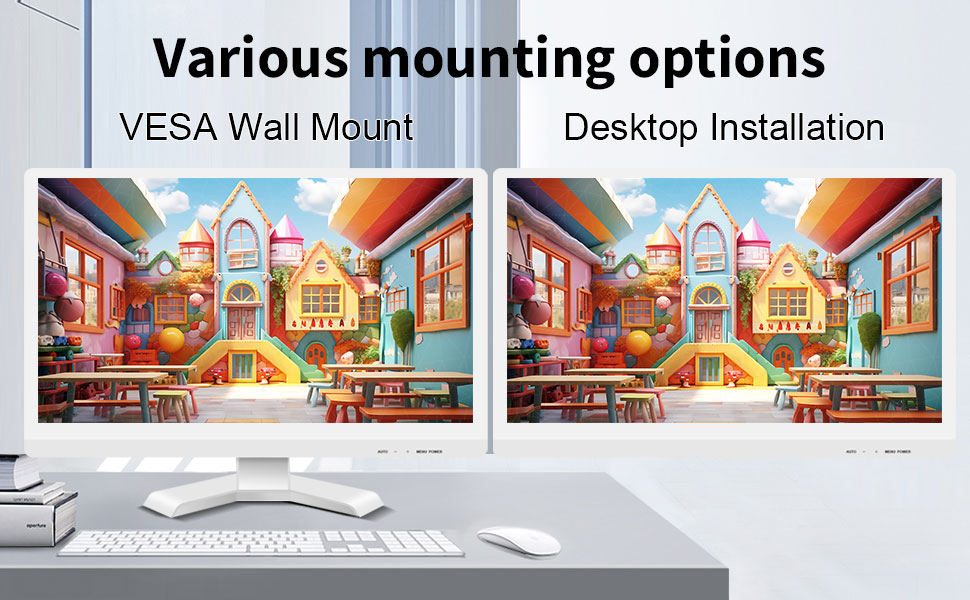
The monitor can be set up on a desktop stand or mounted on a wall using a VESA compatible bracket.
- Shigar da Desktop: Attach the provided stand to the monitor base and place it on a stable, flat surface.
- VESA Wall Dutsen: The monitor features a 75x75mm VESA mounting pattern. Use a compatible VESA bracket (not included) to mount the monitor on a wall or an adjustable arm. Ensure the mount can support the monitor's weight (9.88 pounds).

Na baya view of the monitor highlighting the VESA 75x75mm mounting pattern and overall dimensions.
Umarnin Aiki
1. Kunnawa / Kashewa
Locate the power button on the monitor. Press it to turn the monitor on or off. The power indicator light will illuminate when the monitor is on.
2. Using the Touchscreen Function
Once the USB cable is connected to your computer, the 10-point capacitive touch function will be active. You can interact with the screen using your fingers or a passive capacitive stylus.

The monitor supports direct touch interaction for intuitive control.
- Taɓa Shi kaɗai: Daidai da danna linzamin kwamfuta.
- Matsa Ka riƙe: Daidai da danna dama.
- Ja: Move items by touching and dragging.
- Tsoka-zuwa Zuƙowa: Yi amfani da yatsu biyu don ƙara girman ko rage girman abun ciki.
- Multi Touch: The monitor supports up to 10 simultaneous touch points, enabling collaborative work or complex gestures.

The 10-point multi-touch feature allows for multiple users or complex interactions simultaneously.
Muhimmiyar Bayani: The touch functionality is disabled on Mac OS, iPad OS, and iOS. This monitor only supports passive capacitive styluses.
3. Yanayin Nuni
The monitor supports various display modes when connected to a computer:
- Yanayin Kwafi: Displays the same content on both your primary screen and the Pisichen monitor.
- Tsawaita Yanayin: Yana faɗaɗa teburinka a duk faɗin allo biyu, yana samar da ƙarin wurin aiki.
- Second Screen Only Mode: Displays content only on the Pisichen monitor, turning off your primary screen.
You can typically switch between these modes through your operating system's display settings (e.g., Windows Display Settings).
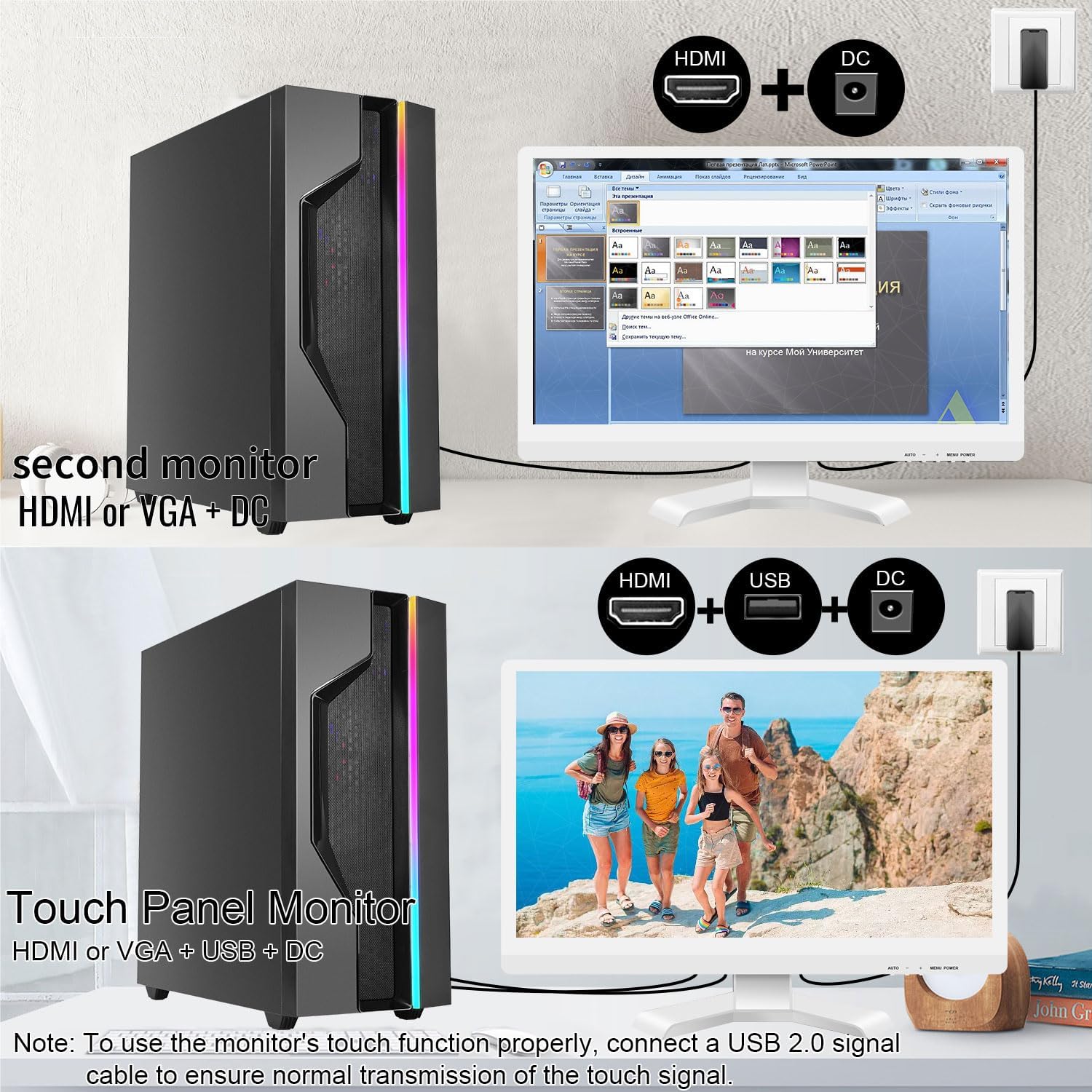
Illustrations of connecting the monitor as a secondary display or as a touch-enabled display.
4. Allon Nuni (OSD) Menu
The monitor features an OSD menu for adjusting display settings. Use the buttons located on the monitor's frame (usually on the bottom right) to navigate and select options.
- Maballin Menu: Yana buɗe menu na OSD.
- Buttons sama/ƙasa: Kewaya ta cikin zaɓuɓɓukan menu.
- Enter/Select Button: Yana tabbatar da zaɓi ko kuma yana shiga ƙaramin menu.
- Maɓallin Fita: Yana fita daga menu na yanzu ko OSD.
Common OSD settings include brightness, contrast, color temperature, input source selection, and aspect ratio.
Kulawa da Kulawa
- Share Allon:
Always power off the monitor and unplug it before cleaning. Use a soft, lint-free cloth lightly dampened with water or a non-abrasive, monitor-specific cleaning solution. Do not spray liquid directly onto the screen. Avoid using alcohol, ammonia, or abrasive cleaners, as they can damage the screen surface.
- Tsaftace Casing:
Goge mai duba casing with a soft, dry cloth. If necessary, a slightly damp Za a iya amfani da zane, amma tabbatar da cewa babu danshi da ya shiga mashigin ruwa ko tashoshi.
- Ajiya:
Idan ba a amfani da na'urar a cikin dogon lokaci, a ajiye na'urar a wuri mai sanyi da bushewa, nesa da hasken rana kai tsaye da kuma yanayin zafi mai tsanani. Idan zai yiwu, a yi amfani da marufin asali don kariya.
- Samun iska:
Ensure the monitor's ventilation openings are not blocked. Proper airflow is essential to prevent overheating.
- Gudanarwa:
Handle the monitor with care. Avoid dropping it or subjecting it to strong impacts. Do not place heavy objects on top of the monitor.
Shirya matsala
| Matsala | Dalili mai yiwuwa | Magani |
|---|---|---|
| Babu hoto akan allo |
|
|
| Allon taɓawa baya amsawa |
|
|
| Hoton ba ya da kyau ko ya karkace |
|
|
| Babu sauti daga ginanniyar lasifika |
|
|
Ƙayyadaddun bayanai
| Lambar Samfura | 21.5INTS-White-NEW |
| Girman allo | Inci 21.5 |
| Ƙaddamarwa | 1920 x 1080 pixels (FHD 1080p) |
| Halayen Rabo | 16:9 |
| Haske | 250 Candela (cd/㎡) |
| Adadin Kwatance | 1000:1 |
| Viewcikin Angle | 170° |
| Matsakaicin Sassauta | 60Hz |
| Fasahar taɓawa | 10-Point Capacitive Touch |
| Mashigai na shigarwa | HDMI, VGA, USB 2.0 (for touch), DC Power |
| Audio | Built-in Speakers, Headphone Jack |
| Daidaita Dutsen VESA | 75 x 75 mm |
| Girman samfur (L x W x H) | 0.78 x 20.4 x 14.9 inci |
| Nauyin Abu | 9.88 fam |
| Mai ƙira | Shenzhen Konowa Electronics Co., LTD |
| Ƙasar Asalin | China |
Garanti da Taimako
For warranty information and technical support, please refer to the official Pisichen website or contact their customer service directly. Details are typically provided on the product packaging or the manufacturer's official support channels.
Kuna iya ziyarci Pisichen Store on Amazon for more product information and potential support contacts.


