Gabatarwa
The COLMI R12 Smart Ring is a wearable device designed to monitor various health metrics and provide convenient smart features. This manual provides instructions for setting up, operating, and maintaining your smart ring.

Image: The COLMI R12 Smart Ring, available in different finishes, showcasing tsarin sa mai santsi da nunin hadedde.
1. Saita
1.1 Choosing the Correct Size
Kafin sayaasing or using your COLMI R12 Smart Ring, it is recommended to determine your correct ring size for optimal comfort and accurate data collection. A sizing kit can assist in this process.
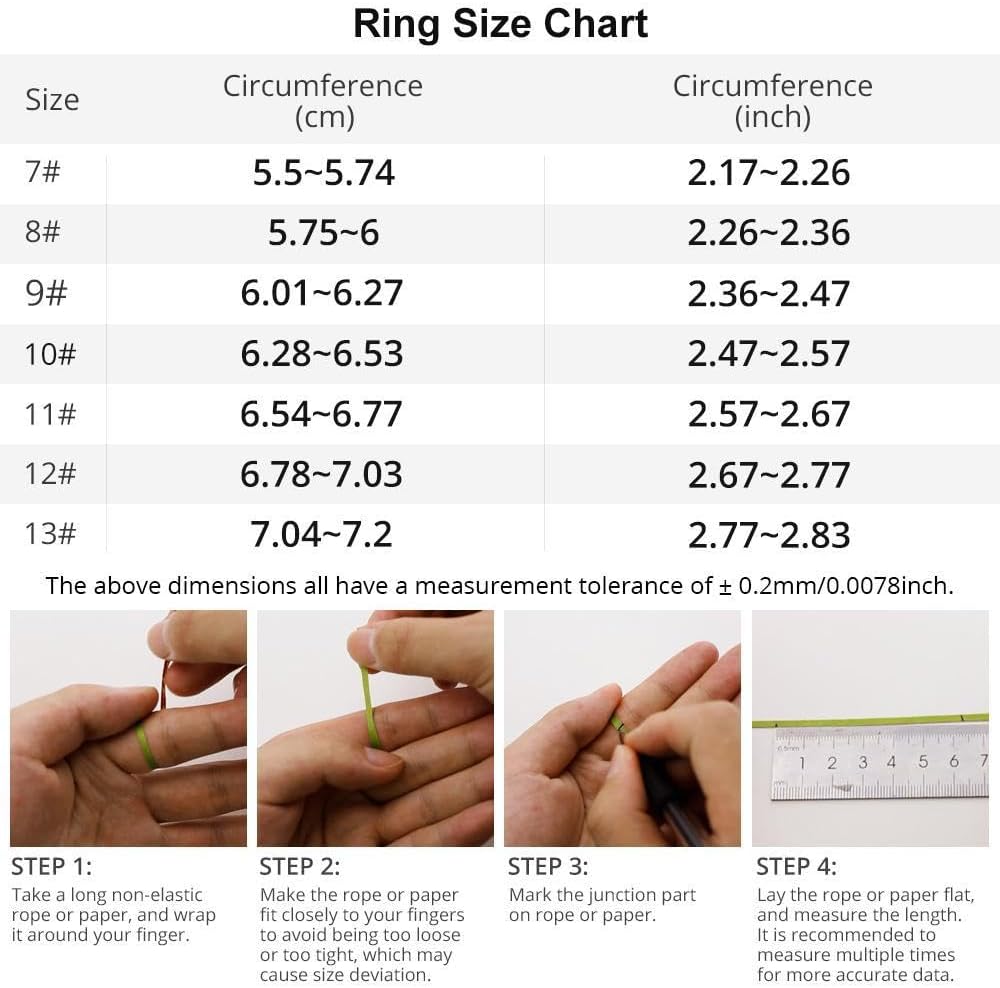
Image: A ring size chart displaying circumference measurements in centimeters and inches, along with a four-step guide on how to measure your finger using a rope or paper.
1.2 Sauke App da Haɗawa
To utilize all features of the COLMI R12 Smart Ring, download the companion application, typically referred to as the "Q Ring" app, from your smartphone's app store (compatible with Android and iOS). Follow the in-app instructions to pair your smart ring with your mobile device via Bluetooth.

Image: A visual guide illustrating the four steps for setting up the COLMI R12 Smart Ring, including purchasing a sizing kit, selecting the ring, downloading the 'Q Ring' app, and pairing the device.
2. Umarnin Aiki
2.1 Multi-functional Display
The COLMI R12 Smart Ring features a touch-sensitive display that allows you to quickly check essential information without needing your phone or watch. You can view the current time, daily steps, and battery level directly on the ring.

Image: The COLMI R12 Smart Ring displaying various metrics such as steps, power, and time on its integrated screen.
2.2 Kula da Lafiya
The smart ring supports continuous health monitoring through its integrated sensors. Data is recorded and can be viewed in detail within the companion app.
- Yawan Zuciya: Monitors your heart rate throughout the day. You can manually check your heart rate at any time via the app.
- Oxygen jini: Yana auna matakan jikewar iskar oxygen na jinin ku.
- Bibiyar Barci: Analyzes your sleep patterns, including awake time, light sleep, and deep sleep duration, to help you understand and improve your sleep quality.

Image: Visual representations of health data, including heart rate trends, sleep stages (wake up, REM, light, deep sleep), and blood oxygen levels, as displayed in the companion app.

Image: A screenshot of the app's heart rate monitoring feature, showing real-time heart rate data and historical trends.

Image: The sleep monitoring screen within the app, displaying total awake time, light sleep duration, and deep sleep duration.
Yanayin Wasanni 2.3
When connected to the app, the COLMI R12 Smart Ring supports multiple sports modes. It can record various exercise data, including exercise time, steps, distance, and calories burned, providing a comprehensive overview of your physical activity.

Image: The app's activity statistics interface, visualizing daily, weekly, and monthly data for total steps, distance, and calories consumed.
2.4 Remote Camera Control
When the smart ring is connected to your mobile phone, you can use a hand gesture to remotely control your phone's camera, allowing you to capture photos conveniently.

Image: A person demonstrating the smart fingertip control feature, using the ring to remotely trigger a smartphone camera.
3. Kulawa
3.1 Yin caji
The COLMI R12 Smart Ring is equipped with wireless charging capabilities. Use the dedicated charging stand and charging cable provided to power your device. Ensure the ring is correctly placed on the stand for efficient charging.

Image: The COLMI R12 Smart Ring placed on its dedicated wireless charging stand, indicating the charging process.
3.2 Juriya na Ruwa
The COLMI R12 Smart Ring features 1ATM water resistance. While it can withstand splashes and brief exposure to water, it is not recommended to expose the product to water for extended periods or during activities like swimming or showering. If the device comes into contact with water, dry it immediately.
4. Shirya matsala
- Gajeren Rayuwar Baturi: If the ring's battery drains quickly (e.g., within one day), ensure it is fully charged using the provided charging stand. Minimize continuous background app usage if not needed.
- Inaccurate Readings or Malfunctions: If the ring provides inconsistent data or stops functioning correctly after a period, try restarting the device by placing it on the charger. Ensure the app is updated to the latest version. If issues persist, contact customer support.
- Abubuwan Haɗuwa: Ensure Bluetooth is enabled on your smartphone and the ring is within range. Try unpairing and re-pairing the device if connection problems occur.
5. Ƙayyadaddun bayanai
| Siffar | Daki-daki |
|---|---|
| Lambar Samfura | COLMI R12 |
| Nauyin Abu | 100 Grams (3.53 oz) |
| Ƙarfin baturi | miliyan 18amp Awanni |
| Nau'in Baturi | Lithium Polymer (Nonstandard Battery) |
| Fasahar Haɗuwa | Bluetooth |
| Tsarin Sadarwa mara waya | Bluetooth |
| Daidaituwar Tsarin Aiki | Android, iOS |
| Ƙarfin Ajiye Ƙwaƙwalwar Ƙwaƙwalwa | 1 MB |
| Siffofin Musamman | Control photography, Multiple sports modes, Record exercise data |
| GPS | Babu GPS |
| Siffar | Zagaye |
6. Garanti da Tallafawa
6.1 Bayanin Garanti
The COLMI R12 Smart Ring comes with a manufacturer's warranty. Please refer to the packaging or the official COLMI webshafin don takamaiman sharuɗɗan garanti da sharuɗɗa.
6.2 Tallafin Abokin Ciniki
For any usage questions, quality problems, or technical assistance, please contact COLMI's professional after-sales service. Contact details can typically be found on the product packaging, the official COLMI website, ko ta hanyar dillalin ku.
Jerin Na'urorin haɗi:
- 1 x COLMI R12 Smart Ring
- 1 x Portable Charging Stand
- 1 x Kebul na Caji
- 1 x Littafin Jagora


