1. Gabatarwa
Thank you for choosing Bluedee BD-SK900 Computer Speakers. This manual provides essential information for the proper setup, operation, and maintenance of your new speakers. Please read this guide thoroughly before use to ensure optimal performance and longevity of your device. These speakers are designed to deliver high-fidelity audio with versatile connectivity and dynamic RGB lighting for an enhanced audio-visual experience.
2. Abubuwan Kunshin
Da fatan za a tabbatar cewa duk abubuwan da aka jera a ƙasa suna cikin kunshin ku:
- 1x Bluedee Computer Speaker (Pair)
- 1x USB/USB-C Cable
- 1x Jagorar farawa da sauri
3. Kayan Samfura
The Bluedee BD-SK900 speakers are equipped with advanced features for a superior audio experience:
- Sautin Sitiriyo Mai Girma: Features 2 tweeters, 2 full-range drivers, and 2 passive radiators for clear highs, rich mids, and powerful bass with a 20W output.
- All-in-One Control Knob: A single, intuitive knob allows for play/pause, volume adjustment, lighting control, and switching between connection modes.
- Haɗin Bluetooth 5.4: Ensures a stable, low-latency wireless connection for seamless audio streaming. (Note: Requires USB power supply for operation).
- Toshe & Wasa Tsara: Connects easily via the included USB/USB-C cable for both audio and power, requiring no additional drivers or software.
- Hasken RGB mai ƙarfi: Offers 5 distinct RGB lighting modes, including dynamic color-shifting and static single-color glows, controllable via the knob.
- Unique Egg-shaped Acoustic Design: A minimalist and space-saving design (5.1"D x 5"W x 7.2"H) that enhances sound projection.
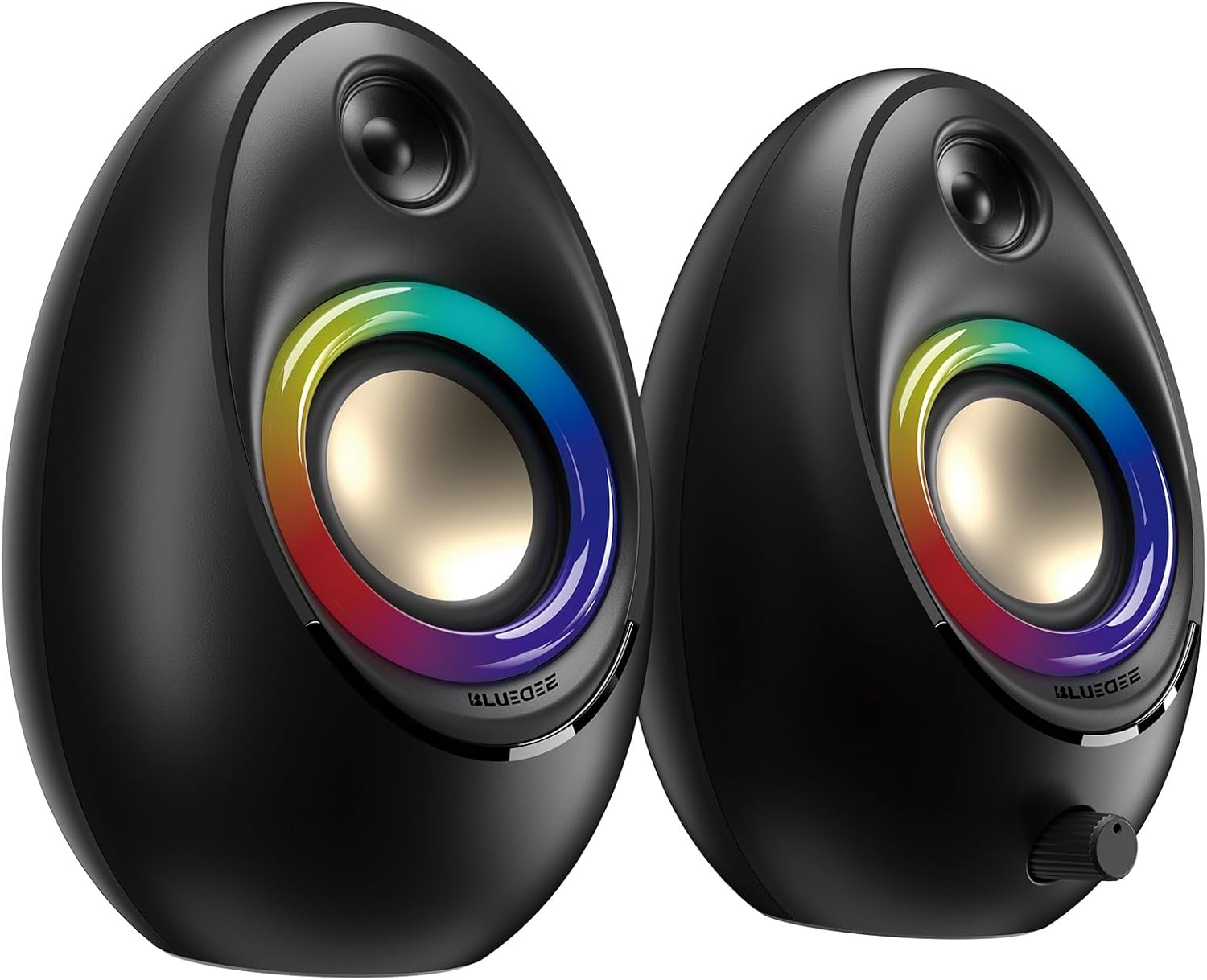
Figure 3.1: Bluedee BD-SK900 Computer Speakers, showcasing their design and RGB lighting.

Figure 3.2: Internal acoustic architecture of the Bluedee BD-SK900 speakers.

Figure 3.3: The multi-functional control knob for easy operation.
4. Saita Umarnin
Follow these steps to set up your Bluedee BD-SK900 speakers:
- Wuri: Position the two speakers on your desktop or desired surface, ensuring they are spaced appropriately for optimal stereo sound.
- Connect Power and Audio: Use the provided all-in-one USB/USB-C cable. Connect the USB-A or USB-C end to an available port on your computer (desktop, laptop) or a compatible USB power adapter (not included). The speakers will power on automatically.
- Haɗin farko: Upon connecting, the speakers will typically default to USB audio mode. If your computer recognizes the speakers, audio will play directly through them.
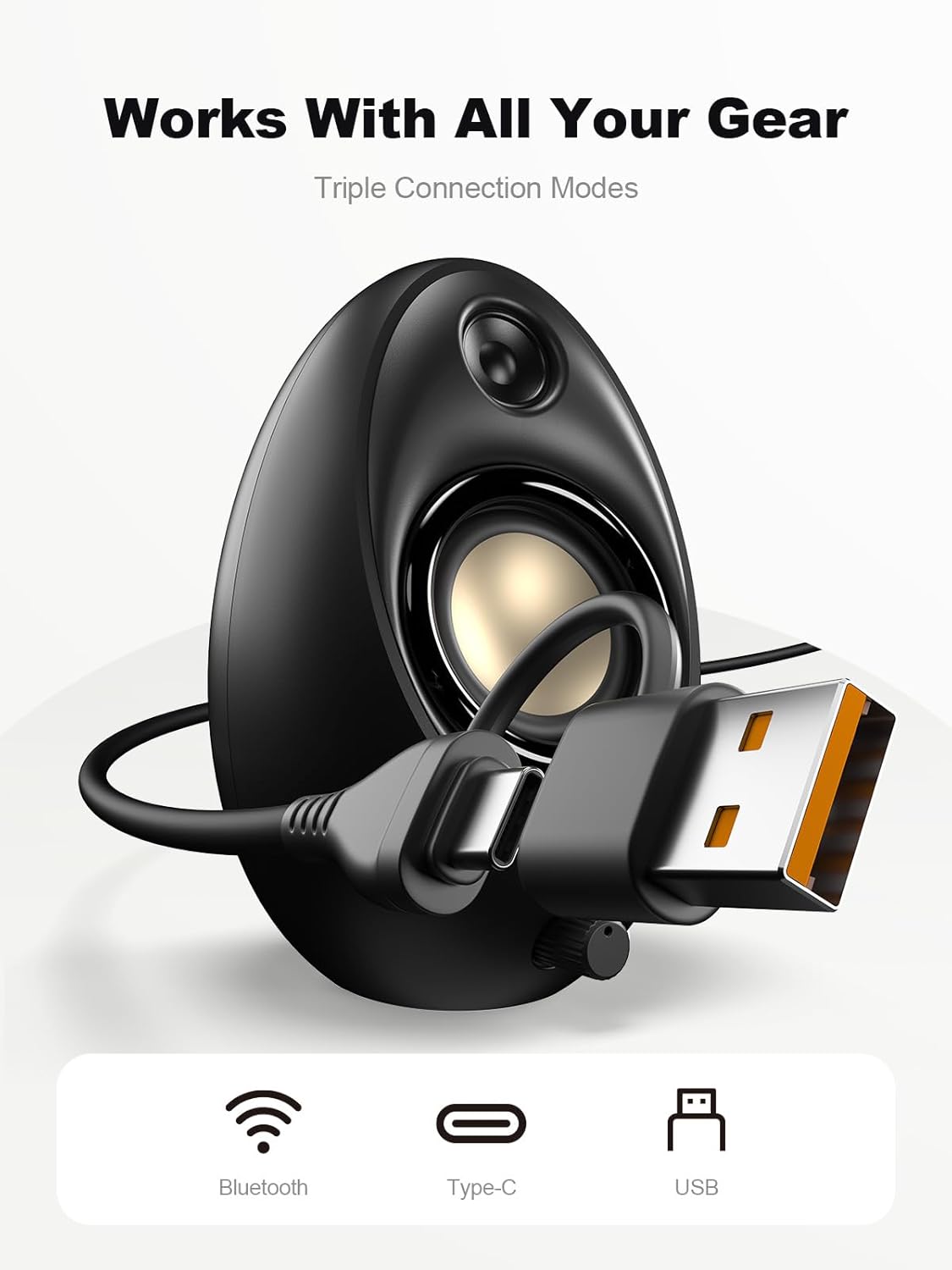
Figure 4.1: Connecting the speakers via USB/USB-C cable.
5. Umarnin Aiki
5.1 Kunnawa / Kashewa
The speakers power on automatically when connected to a USB power source. To power off, disconnect the USB cable.
5.2 Sarrafa ƙara
Rotate the multi-functional knob clockwise to increase volume and counter-clockwise to decrease volume.
5.3 Haɗin Bluetooth
- Canja zuwa Yanayin Bluetooth: Press and hold the multi-functional knob for approximately 2-3 seconds until the speaker indicates Bluetooth mode (e.g., a specific light pattern or audio prompt).
- Kunna Bluetooth akan Na'ura: A kan wayar salula, kwamfutar hannu, ko kwamfutar tafi-da-gidanka, kunna Bluetooth sannan ka nemi na'urori da ake da su.
- Biyu: Select "Bluedee BD-SK900" from the list of devices. Once paired, the speakers will confirm the connection.
5.4 USB/Type-C Connection
When connected via the USB/USB-C cable, the speakers will automatically function as an audio output device for your computer. To switch back to USB mode from Bluetooth, press and hold the multi-functional knob again.
5.5 RGB Lighting Control
The speakers feature 5 dynamic RGB lighting effects. Briefly press the multi-functional knob to cycle through the available lighting modes. This allows you to customize the ambiance to your preference.

Figure 5.1: Dynamic RGB lighting effects.
6. Shirya matsala
If you encounter issues with your Bluedee BD-SK900 speakers, please refer to the following common solutions:
- Babu Sauti:
- Ensure the USB/USB-C cable is securely connected to both the speakers and your device/power source.
- Check the volume level on both the speakers (using the knob) and your connected device.
- Tabbatar cewa an zaɓi na'urar fitarwa ta sauti daidai a cikin saitunan sauti na kwamfutarka.
- If using Bluetooth, ensure the speakers are in Bluetooth mode and successfully paired.
- Bluetooth Disconnection/Pairing Issues:
- Ensure the speakers are within the 10-meter Bluetooth range of your device.
- Kashe Bluetooth kuma kunna shi a na'urarka, sannan sake gwada haɗawa.
- Forget the device from your Bluetooth list and re-pair.
- Ensure the speakers are not connected to another device.
- Fitilar RGB Ba Sa Aiki:
- Tabbatar cewa an kunna masu lasifika.
- Briefly press the multi-functional knob to cycle through lighting modes; the lights might be off or in a static mode.
- Karkataccen Sauti:
- Reduce the volume on both the speakers and your connected device.
- Tabbatar cewa tushen sautin yana da inganci mai kyau.
- Check for any interference if using Bluetooth.
7. Ƙayyadaddun bayanai
| Sunan Samfura | BD-SK900 |
| Nau'in Kakakin | Mai Magana da Kwamfuta |
| Fasahar Haɗuwa | Bluetooth, USB |
| Sigar Bluetooth | 5.4 |
| Bluetooth Range | Mita 10 |
| Fitar wutar lantarki | 20W |
| Alamar sigina-zuwa-Noise Ratio | 70db ku |
| Amsa Mitar | 20 KHz (Upper limit, typical for full-range) |
| Hanyoyin Hasken RGB | 5 |
| Na'urori masu jituwa | Desktop, Laptop, Smartphone, Tablet |
| Girman Samfura (kowane mai magana) | 5.1"D x 5"W x 7.2"H |
| Nauyin Abu | 2.88 fam |
| Tushen wutar lantarki | Corded Electric (USB/Type-C) |

Figure 7.1: Speaker dimensions and design.
8. Kulawa
To ensure the longevity and optimal performance of your speakers, follow these maintenance guidelines:
- Tsaftacewa: Use a soft, dry cloth to clean the speaker surfaces. Avoid using abrasive cleaners, solvents, or strong chemicals, as they may damage the finish.
- Ajiya: Idan ba a amfani da lasifikar na tsawon lokaci, a ajiye lasifikar a wuri mai sanyi da bushewa, nesa da hasken rana kai tsaye da kuma yanayin zafi mai tsanani.
- Gudanarwa: Handle the speakers with care. Avoid dropping them or subjecting them to strong impacts.
- Samun iska: Ensure proper ventilation around the speakers to prevent overheating. Do not block any vents.
9. Bayanin Tsaro
Da fatan za a kiyaye matakan tsaro masu zuwa:
- Kada a fallasa lasifika ga ruwa, danshi, ko yanayin zafi mai tsanani.
- Do not attempt to disassemble or modify the speakers. This will void the warranty and may cause damage or injury.
- Keep the speakers away from heat sources, open flames, and direct sunlight.
- Use only the provided USB/USB-C cable for connection.
- Avoid listening at excessively high volumes for prolonged periods to prevent hearing damage.
10. Garanti da Tallafawa
Bluedee provides comprehensive support for your BD-SK900 Computer Speakers:
- Garanti mai inganci: Your speakers are covered by a 540-day quality warranty from the date of purchase.
- Tallafin Rayuwa: Bluedee offers lifetime customer support for this product.
- Tuntuɓar: For any questions, technical assistance, or warranty claims, please contact us via Amazon Messages or refer to the contact details provided in your Quick Start Guide.


