1. Muhimman Umarnin Tsaro
Da fatan za a karanta duk umarnin a hankali kafin amfani da wannan na'urar. Ajiye wannan littafin don tunani na gaba.
- Tabbatar da voltage specified on the rating label matches your mains voltage.
- Kada a nutsar da fanka, toshe, ko igiya cikin ruwa ko wasu ruwaye.
- Unplug the fan from the outlet when not in use, before cleaning, or before moving.
- Do not operate the fan with a damaged cord or plug. Contact authorized service personnel for repair.
- Keep fingers and other objects away from the fan blades and openings.
- Do not use the fan near windows, in bathrooms, or in wet environments.
- Wannan na'urar ba a yi niyya don amfani da mutane ba (ciki har da yara) tare da raguwar ƙarfin jiki, hankali, ko tunani, ko rashin ƙwarewa da ilimi, sai dai idan wani wanda ke da alhakin kare lafiyarsu ya ba su kulawa ko umarni game da amfani da na'urar. .
- Ya kamata a kula da yara don tabbatar da cewa ba sa wasa da na'urar.
2. Samfurin Ya Ƙareview
The Mistral MFD4389DRW is a 43-inch DC Turbo Tower Fan designed for efficient air circulation. It features a DC brushless motor, 12 speed settings, and multiple operating modes. Control options include a full touch screen, remote control, and Wi-Fi with online voice control capabilities. The fan also offers a unique height conversion feature and 60-degree left-right oscillation.

Hoto 2.1: Gaba view of the Mistral MFD4389DRW DC Turbo Tower Fan, showcasing its sleek design and touch control panel.

Hoto 2.2: Gefe view of the Mistral MFD4389DRW DC Turbo Tower Fan, highlighting its slim profile.

Hoto na 2.3: Baya view of the Mistral MFD4389DRW DC Turbo Tower Fan, showing the air intake grille.
3. Abubuwan Kunshin
Tabbatar cewa duk abubuwan da aka gyara suna nan a cikin marufi:
- Mistral MFD4389DRW DC Turbo Tower Fan Unit
- Ikon nesa
- Jagorar mai amfani (wannan takaddar)
- Base components (if not pre-assembled)
- Height extension component (for convertible height models)
4. Majalisa
The Mistral MFD4389DRW fan features simple assembly. Typically, this involves attaching the base to the main fan unit. For models with height conversion, an additional extension piece may need to be secured.
- A hankali cire duk abubuwan da aka gyara daga marufi.
- Place the main fan unit upside down on a soft, flat surface to avoid scratching.
- Align the base with the bottom of the fan unit. Ensure the power cord passes through the designated opening in the base.
- Secure the base to the fan unit using the provided screws (if applicable).
- For height conversion, insert the extension component between the base and the main unit, ensuring it clicks securely into place or is fastened as per instructions.
- Place the fan upright on a stable, level surface.
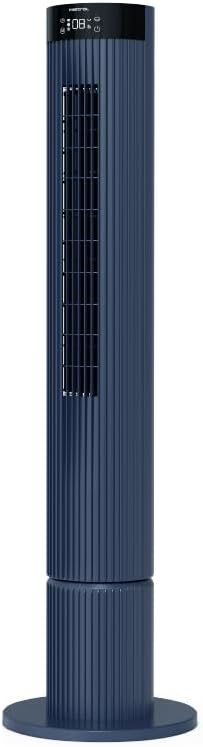
Figure 4.1: The fan demonstrating its convertible height feature, allowing adjustment between two different heights.
5. Saita da Amfani na Farko
After assembly, position the fan in your desired location. Ensure it is on a stable, flat surface and away from curtains or objects that could obstruct airflow.
- Plug the power cord into a suitable electrical outlet (220-240V~, 50-60Hz).
- The fan will enter standby mode. The touch screen display may illuminate briefly.
- To power on, touch the power icon on the control panel or press the power button on the remote control.
6. Umarnin Aiki
The fan can be operated via the full touch screen control panel on the unit or the included remote control.
6.1 Ayyukan Gudanarwa
The touch screen control panel provides access to all fan functions:
- Maɓallin Wuta: Turns the fan On or Off.
- Daidaita Sauri: Cycles through 12 fan speeds.
- Zaɓin Yanayin: Switches between Turbo, One-key Cycle, and Baby modes.
- Caddamarwa: Activates or deactivates 60-degree left-right oscillation.
- Mai ƙidayar lokaci: Sets the pre-set On/Off timer for up to 12 hours.
- Alamar Wi-Fi: Yana nuna halin haɗin Wi-Fi.
6.2 Ikon Nesa
The remote control duplicates all functions available on the touch screen panel for convenient operation from a distance.
- Tabbatar cewa ramut yana da batura masu aiki.
- Point the remote control towards the fan's control panel for optimal signal reception.
6.3 Hanyoyin Aiki
- Yanayin Turbo: Yana ba da iyakar iska don saurin sanyaya.
- One-key Cycle Mode: Automatically cycles through different fan speeds to simulate natural breeze.
- Yanayin Baby: Operates at a gentle, quiet speed suitable for nurseries or light sleeping.
7. Wi-Fi and Online Voice Control
The Mistral MFD4389DRW fan can be connected to your home Wi-Fi network for smart control via a mobile application and online voice commands.
7.1 Haɗin Wi-Fi
- Download the official Mistral smart home application from your device's app store.
- Yi rijista ko shiga cikin asusun ku a cikin app.
- Tabbatar cewa na'urar tafi da gidanka tana haɗe zuwa cibiyar sadarwar Wi-Fi 2.4GHz.
- Follow the in-app instructions to add a new device. This typically involves putting the fan into pairing mode (refer to the app or fan display for specific instructions, often by holding a Wi-Fi button).
- Once connected, the Wi-Fi indicator on the fan's control panel will illuminate steadily.
7.2 Online Voice Control
After successful Wi-Fi connection, you can link your fan to compatible smart home voice assistants (e.g., Google Assistant, Amazon Alexa) through the Mistral app settings.
- Open the Mistral app and navigate to the 'Integrations' or 'Voice Control' section.
- Select your preferred voice assistant and follow the prompts to link your Mistral account.
- Da zarar an haɗa, zaku iya amfani da umarnin murya kamar:
- "Turn on the fan."
- "Set fan speed to 5."
- "Turn off oscillation."
- "Change fan mode to Baby."
8. Kulawa
Tsaftacewa akai-akai yana taimakawa wajen kiyaye aikin fanka da kuma tsawaita rayuwarsa.
8.1 Tsaftacewa
- Koyaushe cire fulogin fan daga kan wutar lantarki kafin tsaftacewa.
- Yi amfani da taushi, damp zane don goge filaye na waje na fan. Kada a yi amfani da masu tsabtace abrasive ko kaushi.
- Use a vacuum cleaner with a brush attachment to remove dust from the air intake and outlet grilles.
- Tabbatar cewa fankar ta bushe gaba ɗaya kafin a sake haɗa ta da kuma aiki.
8.2 Adana
If storing the fan for an extended period, unplug it, clean it thoroughly, and store it in its original packaging or a dust-free environment.
9. Shirya matsala
Idan kun ci karo da al'amura tare da mai son ku, koma ga matsalolin gama gari da mafita:
| Matsala | Dalili mai yiwuwa | Magani |
|---|---|---|
| Fan ba ya kunna. | Babu wutar lantarki. | Bincika idan igiyar wutar lantarki ta toshe amintacce a cikin wurin aiki. |
| Rashin iskar iska. | Air intake/outlet blocked; Fan speed too low. | Clean grilles to remove dust. Increase fan speed. |
| Fan yana yin surutu da ba a saba gani ba. | Obstruction; Loose parts. | Unplug and check for any foreign objects. Ensure base is securely attached. |
| Ikon nesa baya aiki. | Dead batteries; Obstruction. | Sauya batirin sarrafawa ta nesa. Tabbatar babu wani abu da ke toshe hanyar siginar. |
| Haɗin Wi-Fi ya gaza. | Incorrect Wi-Fi password; Router issues; Fan too far from router. | Verify Wi-Fi password. Ensure fan is within range of a 2.4GHz Wi-Fi network. Restart router and fan. |
Idan matsalar ta ci gaba bayan ƙoƙarin waɗannan mafita, tuntuɓi tallafin abokin ciniki.
10. Ƙayyadaddun bayanai
| Siffar | Ƙayyadaddun bayanai |
|---|---|
| Samfura | MFD4389DRW |
| Voltage | 220-240V~, 50-60Hz 1.3A |
| Watatage | 40W |
| Girman Iska | 29.54 m³ / min |
| Max Air Flow | 4.26 m / s |
| Noise Level (Lowest Speed) | 33.2dB ku |
| Noise Level (Highest Speed) | 68.3dB ku |
| Girman Samfura (L*W*H) | 168 * 300 * 900 OR 1104 mm |
| Cikakken nauyi | 4.46 kg |
| Alamar Tsaro | 250467-11 |
| Siffofin Musamman | Remote Controlled, Timer, Wi-Fi Enabled |
| Yawan Gudu | 12 |
11. Garanti da Tallafawa
This Mistral MFD4389DRW DC Turbo Tower Fan comes with a comprehensive warranty:
- Garanti na Gabaɗaya: Shekara 1 daga ranar siyan.
- Garanti na Motoci: An additional 3 Years for the motor only, totaling 4 years for the motor.
For warranty claims, technical support, or service inquiries, please contact your local Mistral authorized service center or refer to the contact information provided on the official Mistral website.


