Muhimman Bayanan Tsaro
- Karanta kuma ku bi waɗannan umarnin.
- Kada kayi amfani da wannan samfurin kusa da ruwa.
- Tsaftace kawai da bushe bushe.
- Duba voltage na samar da mains na gida.
- Do not block any ventilation openings. Install under the manufacturer's instructions.
- Kada a shigar kusa da kowane tushen zafi kamar radiators, rajistan zafi, murhu, ko wasu na'urori (ciki har da amplifiers) masu samar da zafi.
- Yi amfani da haɗe-haɗe masu cancanta/na'urorin haɗi da mai ƙira ya ƙayyade.
- Cire wannan samfurin yayin guguwar walƙiya da rashin amfani na dogon lokaci.
- Koma duk hidima ga ƙwararrun ma'aikatan sabis.
Abubuwan Kunshin
The Donner MAMP4 5.1 Channel Audio AmpKunshin lififier ya haɗa da:
- Donner MAMP4 Mai karɓar Sitiriyo
- Ikon nesa
- FM Antenna
- Manual mai amfani
Jagorar Saita
1. Connecting Speakers and Subwoofer
MAMP4 amplifier supports a 5.1 channel setup, allowing connection of 5 speakers and 1 subwoofer. Ensure correct polarity (+/-) when connecting speakers.

Image: Diagram showing the 5.1 channel speaker and subwoofer connections on the rear panel of the Donner MAMP4 ampmai sanyaya wuta.

Hoto: Dalla-dalla view of the rear panel of the Donner MAMP4 amplifier, highlighting speaker terminals and various input/output ports.
2. Haɗa Mabuɗin Sauti
The amplifier offers multiple input options for various audio sources:
- Bluetooth 5.3: Don yaɗa sauti mara waya daga na'urori masu jituwa.
- USB: Connect a USB drive (up to 64 GB) for direct music playback.
- RCA: Connect devices like CD/DVD players or other audio equipment.
- AC-3: For surround sound input.
- Na gani/Coaxial: Digital audio inputs for smart TVs and other digital sources.
- AUX A: General auxiliary input.
- Rediyon FM: Connect the included FM antenna for radio reception.
- Microphone Inputs (2x 1/4''): For karaoke or public address.

Image: Front panel of the Donner MAMP4 amplifier showing various input options including USB, AUX, and microphone jacks, along with Bluetooth and FM indicators.
3. Haɗin Wuta
Connect the power cord to a wall outlet. Ensure the unit is turned off before making any connections.
4. Ƙarfin Farko Kunna
Press the Power button on the front panel to turn the amplifier on. The LED display will illuminate.

Image: The Donner MAMP4 amplifier integrated into a home theater setup, demonstrating its role in enhancing stereo and surround sound.
Umarnin Aiki
1. Zaɓin Input
Use the 'MODE' button on the front panel or the 'INPUT' button on the remote control to cycle through available input modes: Bluetooth, USB, FM, RCA, AC-3, Optical, Coaxial, and AUX.
2. Volume and EQ Control
Adjust the master volume using the large knob on the front panel or the 'VOL+/-' buttons on the remote. The amplifier features independent controls for Treble, Midrange, and Bass on both the unit and the remote, allowing for customized sound profiles. The MAMP4 automatically saves your mode selection, volume, and EQ settings for convenience.
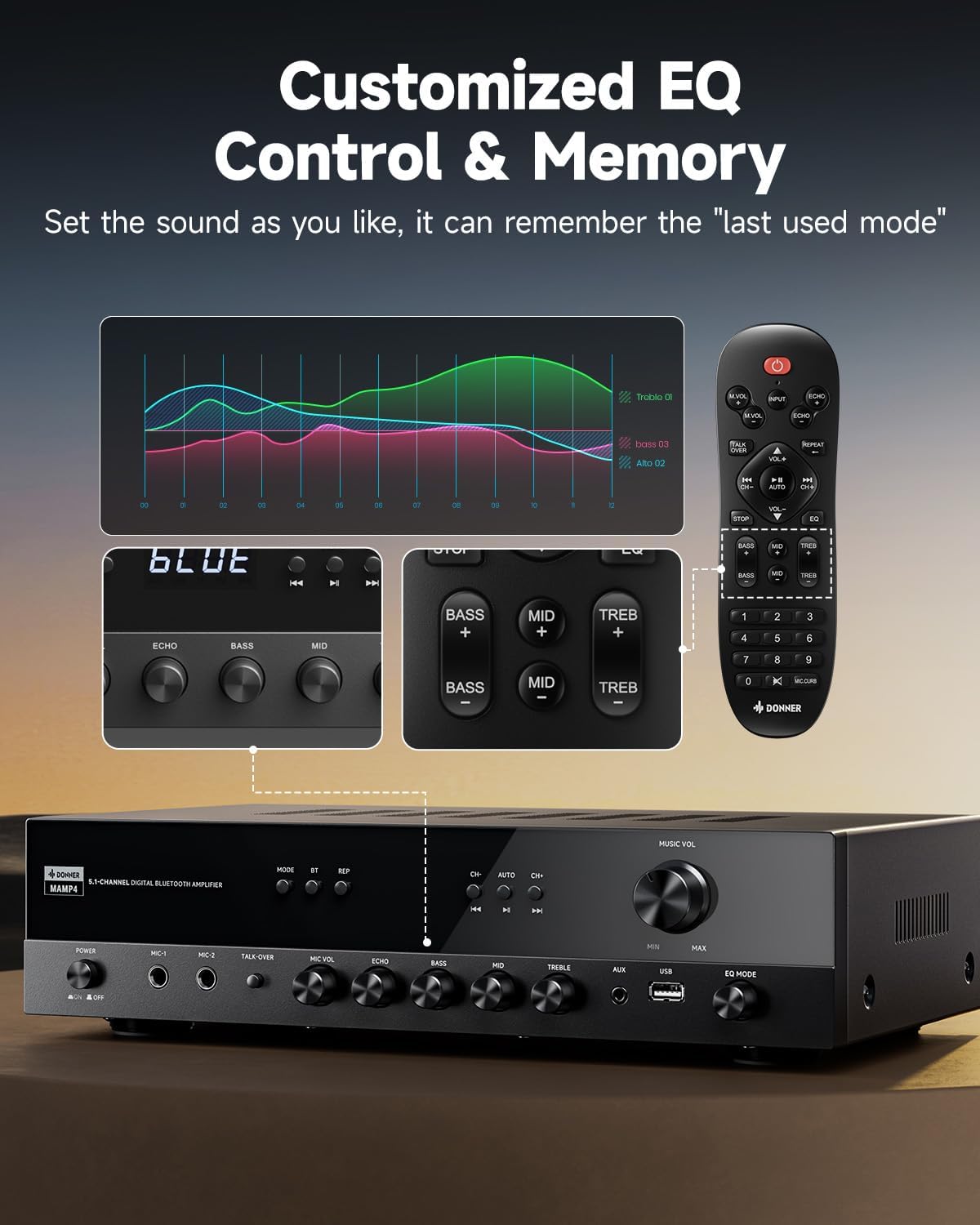
Image: Close-up of the Donner MAMP4 amplifier's front panel and remote control, illustrating the customizable EQ settings for bass, mid, and treble, and the memory function.
3. Haɗa Bluetooth
Select 'Bluetooth' mode. On your device, search for 'DONNER MAMP4' and pair. Use the Play/Pause button or Prev/Next buttons on the remote to control playback.
4. Aikin Rediyon FM
In FM mode, you can quickly select your preferred FM frequency by entering the numbers directly using the remote control. Use the 'CH+/-' buttons for automatic channel search.

Image: The Donner MAMP4 amplifier with its remote control, demonstrating the ease of selecting FM frequencies by direct numerical input.
5. Microphone Functions
The amplifier includes dual 1/4'' microphone jacks. Adjust microphone volume and echo effect using dedicated knobs. The 'Talk Over' function lowers background music for clearer voice output during events or speeches.
6. Ikon nesa
The upgraded remote control provides full functionality, including treble, midrange, bass, echo, and Talkover settings in any input mode.

Image: Comparison of the new and old style remote controls for the Donner amplifier, highlighting the expanded functionality of the upgraded remote for input selection, EQ, echo, and Talkover.
7. Bidiyon Takaitaccen Bayani Kan Samfuri
Video: A product summary video for the Donner amplifi, showcasing its features and functionalities.
8. Donner 5.1 Channel Stereo Receiver Overview
Bidiyo: An gama aiki a hukumanceview video from DonnerDirect, detailing the features and benefits of the Donner 5.1 Channel Stereo Receiver.
Kulawa
To ensure the longevity and optimal performance of your Donner MAMP4 amplifier, bi waɗannan jagororin kulawa:
- Tsaftacewa: Use a soft, dry cloth to clean the exterior of the unit. Avoid liquid cleaners or abrasive materials.
- Samun iska: Ensure that all ventilation openings on the amplifier are clear and unobstructed to prevent overheating.
- Ajiya: If the unit will not be used for an extended period, unplug the power cord from the outlet.
- Baturi Mai Nisa: Replace batteries in the remote control as needed. Dispose of used batteries properly according to local regulations.
Shirya matsala
If you encounter issues with your Donner MAMP4 amplifier, koma zuwa hanyoyin gama gari masu zuwa:
- Babu Ƙarfi: Tabbatar cewa an haɗa igiyar wutar lantarki da kyau a duka biyun amplifier and a working wall outlet. Check the power switch on the front panel.
- Babu Sauti: Verify that the correct input source is selected. Check all speaker and audio source connections for proper seating and polarity. Adjust volume levels.
- Hissing Sound in Standby: MAMP4 has optimized noise reduction with added relays. If a persistent hissing sound occurs, ensure all connections are secure and try unplugging the unit for a few minutes before reconnecting.
- Matsalolin Haɗin Bluetooth: Tabbatar da amplifier is in Bluetooth mode and your device's Bluetooth is enabled and discoverable. Try restarting both devices.
- Ɗaukar Rediyon FM Ba shi da kyau: Ensure the FM antenna is properly connected and extended. Try repositioning the antenna for better signal.
- Makarufo Ba Ya Aiki: Ensure microphones are securely plugged into the correct jacks. Adjust 'MIC VOL' and 'ECHO' knobs.
For persistent issues, please contact Donner customer support or refer to qualified service personnel.
Ƙayyadaddun bayanai
| Siffar | Bayani |
|---|---|
| Samfura | MAMP4 |
| Ƙarfin fitarwa (RMS) | L/R Speakers: 60W/4R; Surround & Center Speakers: 25W × 3 |
| Tashoshi | 5.1 Channel |
| Sigar Bluetooth | 5.3 |
| USB Support | Har zuwa 64 GB |
| Abubuwan shigar da sauti | 1 RCA, 1 AC-3, 2 Mic-in, AUX IN, Optical, Coaxial |
| Yanayin Rediyon FM | 76-108 MHz |
| Ikon EQ | Treble, Midrange, Bass (independent adjustment) |
| Siffofin Musamman | Talk Over function, Settings Memory, Low Noise Design |
| Girman samfur | 9.76 x 14.96 x 3.86 inci |
| Nauyin Abu | 13.2 fam |
Garanti & Taimako
For warranty information, technical support, or any inquiries regarding your Donner MAMP4 amplifier, please contact Donner customer service.
- Mai ƙira: Donner
- Sabis na bayan-tallace-tallace imel: service@donnermusic.com
- Taimakon Ƙwararru: Koma duk hidima ga ƙwararrun ma'aikatan sabis.


