1. Gabatarwa
This manual provides essential information for the safe and efficient use of your Fujitsu FMVF75K1BA FMV Desktop F 23.8-inch PC. Please read this manual thoroughly before operating the device and retain it for future reference. This desktop PC is designed for general computing tasks, featuring a 23.8-inch Full HD display, an Intel Core i7 processor, 16GB of RAM, and a 512GB storage drive, running Windows 11 Home.
2. Bayanin Tsaro
Kula da matakan tsaro masu zuwa don hana lalacewa ga samfurin kuma tabbatar da amincin mai amfani:
- Tushen wutan lantarki: Use only the power adapter supplied with the device. Ensure the power outlet is properly grounded.
- Samun iska: Do not block ventilation openings. Maintain adequate space around the PC for proper airflow to prevent overheating.
- Muhalli: Avoid exposing the PC to extreme temperatures, humidity, dust, or direct sunlight. Operate in a stable, dry environment.
- Liquid and Foreign Objects: Keep liquids and foreign objects away from the PC. If liquid enters the device, immediately disconnect power and contact support.
- Hidima: Kada kayi ƙoƙarin yin hidimar PC da kanka. Koma duk hidima ga ƙwararrun ma'aikatan sabis.
- Tsaftacewa: Cire haɗin wutar lantarki kafin tsaftacewa. Yi amfani da laushi, bushe bushe. Kada a yi amfani da masu tsabtace ruwa ko iska.
3. Abubuwan Kunshin
Tabbatar cewa duk abubuwa suna nan a cikin kunshin:
- Fujitsu FMVF75K1BA FMV Desktop F 23.8-inch PC
- Adaftar Wuta da Igiyar Wuta
- Allon madannai
- Mouse
- Jagoran Farawa Mai sauri (idan an haɗa)
- Katin Garanti (idan an haɗa)
4. Samfurin Ya Ƙareview
The Fujitsu FMVF75K1BA is an all-in-one desktop PC featuring a 23.8-inch display. Key components include the integrated display, CPU, memory, storage, and various input/output ports.
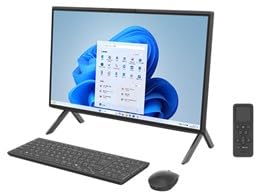
Hoto 4.1: Gaba view of the Fujitsu FMVF75K1BA FMV Desktop F PC. This image shows the integrated display and the sleek design of the all-in-one unit.
4.1 Gaban gaba
- Nunawa: 23.8-inch Full HD (1920x1080) screen.
- Maɓallin Wuta: Located typically on the bottom right or side of the display bezel.
- Webkamara: Integrated at the top center of the display.
4.2 Rear/Side Panels
- Tashoshin USB: For connecting peripherals like keyboard, mouse, external drives.
- HDMI Port: For connecting an external monitor or TV.
- LAN Port: Don haɗin yanar gizo mai waya.
- Audio Jacks: For headphones, microphone, or external speakers.
- Shigar da Wuta: Don haɗa adaftar wutar lantarki.
5. Saita
Bi waɗannan matakan don saitin farko:
- Shirya: Carefully remove the PC and all accessories from the packaging.
- Matsayi: Place the PC on a stable, flat surface with adequate ventilation space around it.
- Haɗa Allon madannai da linzamin kwamfuta: Plug the USB keyboard and mouse into the available USB ports on the PC.
- Haɗa Ikon: Connect the power adapter to the power input port on the PC, then plug the power cord into a grounded electrical outlet.
- Kunna Wuta: Danna maɓallin wuta don kunna PC.
- Saitin Windows na farko: Follow the on-screen instructions to complete the Windows 11 Home initial setup, including language, region, network connection, and user account creation.
6. Umarnin Aiki
6.1 Kunna/Kashe
- Don Kunnawa: Danna maɓallin wuta.
- Don Rufewa: Click the Start button, then Power, and select "Shut down".
- Don Sake farawa: Click the Start button, then Power, and select "Restart".
- Don Barci: Click the Start button, then Power, and select "Sleep".
6.2 Haɗa zuwa hanyar sadarwa
- Haɗin Waya: Connect an Ethernet cable from your router/modem to the LAN port on the PC.
- Haɗin mara waya (Wi-Fi):
- Danna gunkin Wi-Fi a cikin taskbar.
- Zaɓi hanyar sadarwar Wi-Fi da kuke so daga lissafin.
- Shigar da maɓallin tsaro na cibiyar sadarwa (kalmar sirri) idan an buƙata.
- Click "Connect". The PC supports IEEE802.11ax (Wi-Fi 6E) for high-speed wireless connectivity.
6.3 Using Microsoft Office + 365
Your PC comes with Microsoft Office + 365. Follow the on-screen instructions upon first launch of any Office application (e.g., Word, Excel) to activate your subscription. An internet connection and a Microsoft account are typically required for activation.
7. Kulawa
7.1 Tsaftacewa
- Allon: Yi amfani da zane mai laushi, wanda ba shi da lint wanda aka tsara musamman don kayan lantarki. Don tabo masu tauri, a ɗan rage girmansa.ampen the cloth with water or a screen cleaner. Do not spray cleaner directly onto the screen.
- Burbushin: Wipe the exterior surfaces with a soft, dry cloth. Avoid abrasive materials or harsh chemicals.
- Samun iska: Periodically check and gently clean the ventilation openings to prevent dust buildup, which can impede airflow.
7.2 Sabunta software
Regularly update your Windows operating system and drivers to ensure optimal performance and security. Windows Update typically handles this automatically, but you can manually check by going to Saituna > Sabuntawar Windows.
7.3 Ajiyayyen Data
It is highly recommended to regularly back up your important data to an external drive or cloud storage to prevent data loss.
8. Shirya matsala
| Matsala | Dalili mai yiwuwa | Magani |
|---|---|---|
| PC baya kunnawa. | Power cable loose, power outlet issue, power adapter fault. | Check all power connections. Try a different power outlet. Ensure the power adapter is functioning. |
| Babu nuni akan allo. | PC is off, display brightness too low, external monitor not connected (if applicable). | Ensure PC is on. Adjust display brightness. If using an external monitor, check its power and cable connection. |
| Ba za a iya haɗi zuwa Wi-Fi ba. | Incorrect password, Wi-Fi adapter off, router issue, out of range. | Verify Wi-Fi password. Check if Wi-Fi is enabled in Windows settings. Restart your router. Move closer to the router. |
| PC is running slow. | Too many programs open, low disk space, malware, outdated drivers. | Close unnecessary applications. Free up disk space. Run a virus scan. Update Windows and drivers. |
9. Ƙayyadaddun bayanai
| Sunan Samfura | FMVF75K1BA |
| Alamar | Fujitsu |
| Nunawa | 23.8-inch, 1920x1080 resolution |
| Mai sarrafawa | Intel Core i7 |
| RAM | 16GB |
| Adana | 512GB |
| Tsarin Aiki | Windows 11 Gida |
| Mara waya ta LAN | IEEE802.11ax (Wi-Fi 6E compatible)/ac/a/b/g/n |
| Tashoshi | USB, HDMI, LAN, Audio Jacks (specific number and type may vary) |
10. Garanti da Tallafawa
Your Fujitsu FMVF75K1BA PC is covered by a manufacturer's warranty. Please refer to the warranty card included in your package for specific terms and conditions, including the warranty period and coverage details.
For technical support, service, or warranty claims, please contact Fujitsu customer support through their official website or the contact information provided in your warranty documentation. Have your model number (FMVF75K1BA) and serial number ready when contacting support.
Taimako kan layi: Visit the official Fujitsu support website for drivers, FAQs, and further assistance.


