Gabatarwa
This manual provides essential information for setting up, operating, maintaining, and troubleshooting your Samsung Galaxy A07 4G smartphone (Model SM-A075/DS). Please read this manual thoroughly to ensure proper use and to maximize the device's features.
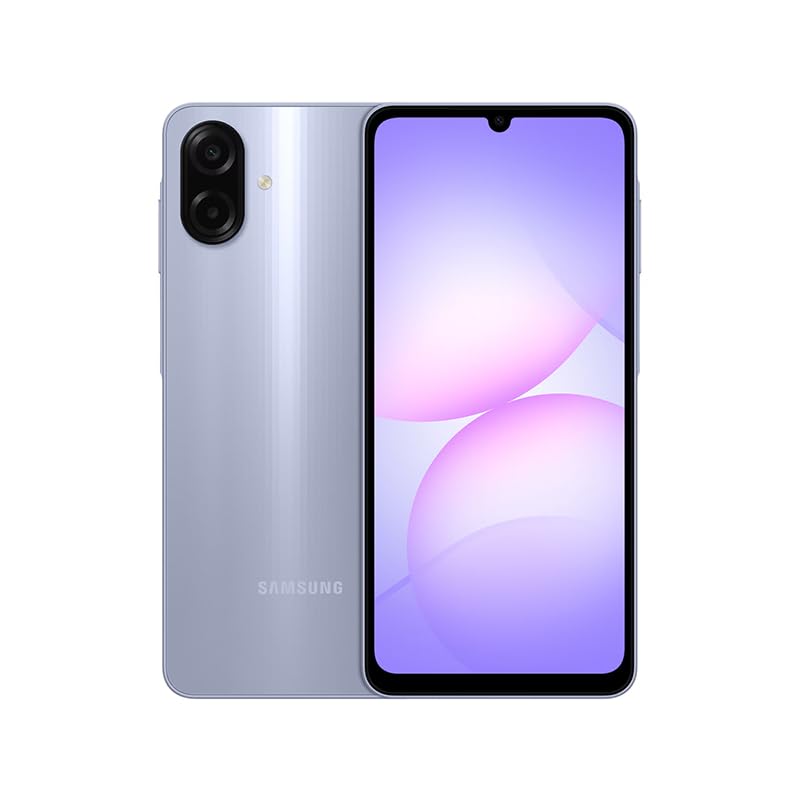
Figure 1: Samsung Galaxy A07 4G Front View
1. Saita
1.1 Unboxing da Farko dubawa
Carefully remove all items from the packaging. Verify that all components are present. The box should contain the Samsung Galaxy A07 4G smartphone and a USB Cable. A charger is not included.

Figure 2: Device in packaging
1.2 Saka Katin SIM(s) da Katin MicroSD
- Nemo tiren SIM a gefen na'urar.
- Use the provided SIM ejector tool (if included, otherwise a small paperclip) to open the SIM tray.
- Carefully place your SIM card(s) and/or MicroSD card into the designated slots on the tray. This device supports Dual SIM and MicroSD up to 1TB.
- Gently push the SIM tray back into the device until it is flush.

Hoto 3: Gefe view tare da wurin tire SIM
1.3 Kunnawa da Saita Wutar Lantarki ta Farko
- Danna maɓallin Wuta (wanda yake a gefe) kuma riƙe har sai tambarin Samsung ya bayyana.
- Bi saƙon kan allo don kammala saitin farko, gami da zaɓin harshe, haɗin Wi-Fi, saitin asusun Google, da saitunan tsaro.
2. Umarnin Aiki
2.1 Nuni da Kewayawa
The Samsung Galaxy A07 features a 6.7-inch PLS LCD display with a 90 Hz refresh rate for smooth visuals.
- Alamar taɓawa: Matsa don zaɓar, swipe don gungurawa, tsunkule don zuƙowa.
- Allon Gida: Keɓance tare da widgets da gajerun hanyoyin app.
- Kwamitin Fadakarwa: Doke ƙasa daga saman allon don samun damar saituna masu sauri da sanarwa.
2.2 Amfanin Kamara
The device is equipped with a 50 MP Pro-Grade main camera and an 8 MP front camera.
- Bude aikace-aikacen kamara daga allon gida ko aljihunan app.
- Zaɓi yanayin da kake so (Hoto, Bidiyo, Hoto, da sauransu).
- Danna maɓallin rufewa don ɗaukar hoto ko fara/dakatar da rikodin bidiyo.
- Use the zoom controls on the screen to adjust magnification.
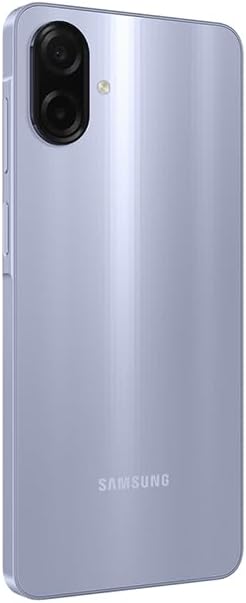
Figure 4: Rear Camera System
2.3 Haɗuwa
- Wi-Fi: Connect to wireless networks via Settings > Connections > Wi-Fi. Supports 802.11a/b/g/n/ac 2.4GHz+5GHz.
- Bluetooth: Pair with other Bluetooth devices via Settings > Connections > Bluetooth.
- Bayanan Waya: Ensure your SIM card is active for 4G LTE connectivity. Compatible with T-Mobile, Mint, Tello, and Global GSM networks.
- GPS: Location services are supported via GPS, Glonass, Beidou, Galileo, QZSS.
3. Kulawa
3.1 Sabunta software
Regularly check for and install software updates to ensure optimal performance, security, and access to new features. Your device is designed to receive 6 major OS upgrades and 6 years of security updates.
- Go to Settings > Software update > Download and install.
3.2 Tsabtace Na'urar ku
To clean your device, use a soft, lint-free cloth. Avoid abrasive materials or harsh chemicals. The device has an IP54 rating, providing protection against dust and water splashes.
- Wipe the screen and back panel gently.
- Kada ka nutsar da na'urar cikin ruwa.
3.3 Kula da baturi
The device is equipped with a 5000 mAh battery. To prolong battery life:
- Ka guji matsanancin zafi.
- Yi amfani da kebul na USB da aka bayar don yin caji.
- Kada ka bari baturin ya zube gaba daya akai-akai.
4. Shirya matsala
4.1 Na'urar Ba Ya Kunnawa
- Tabbatar da cajin baturi. Haɗa na'urar zuwa caja na akalla mintuna 10.
- Latsa ka riƙe maɓallin wuta na tsawon daƙiƙa 10-15 don sake kunnawa dole.
4.2 Matsalolin Haɗuwa da hanyar sadarwa
- Duba ko an saka katin SIM ɗinka yadda ya kamata.
- Verify that mobile data is enabled in Settings > Connections > Data usage.
- Sake kunna na'urar.
- Ensure your device is compatible with your carrier's network (T-Mobile, Mint, Tello, Global GSM).
4.3 Apps Masu Ceto ko Daskarewa
- Rufe kuma sake buɗe app ɗin.
- Clear the app's cache (Settings > Apps > [App Name] > Storage > Clear cache).
- Tabbatar cewa software na na'urarka ta zamani.
5. Ƙayyadaddun bayanai
| Siffar | Daki-daki |
|---|---|
| Sunan Samfura | Samsung Galaxy A07 4G (SM-A075/DS) |
| Nunawa | 6.7 inches PLS LCD, 720 x 1600 (HD+), 90 Hz Refresh Rate |
| Mai sarrafawa | Octa-core (2x2.2 GHz Cortex-A76 & 6x2.0 GHz Cortex-A55) |
| RAM | 4 GB |
| Adana | 64 GB (expandable via MicroSD up to 1TB) |
| Kamara ta baya | 50 MP (wide, PDAF), 2 MP (depth) |
| Kamara ta gaba | 8 MP (fadi) |
| Baturi | 5000 mAh |
| Tsarin Aiki | Android |
| Haɗuwa | 4G LTE, Wi-Fi 802.11a/b/g/n/ac (2.4GHz+5GHz), Bluetooth, GPS, Glonass, Beidou, Galileo, QZSS |
| Tashoshi | USB Type-C, 3.5mm Stereo Earjack |
| Girma | Approx. 2 x 2 x 2 inches (Product Dimensions), 7.6 mm thickness |
| Nauyi | 9.2 oz |
| Dorewa | IP54 Ƙura da Kariyar Ruwa |
| Hade a Akwatin | USB Cable (Charger NOT Included) |
6. Garanti & Tallafi
6.1 Bayanin Garanti
This Samsung Galaxy A07 4G (Model SM-A075/DS) is a Latin American Version and comes with a Garanti na Shekara 1 valid in South, Central, Latin America, and the Caribbean. Please ensure your device model is SM-A075/DS for local warranty coverage in Latin America.
For warranty claims or service, please contact Samsung customer support in your region. Proof of purchase may be required.
6.2 Tallafin Abokin Ciniki
For further assistance, technical support, or to find service centers, please visit the official Samsung support website for your region or refer to the contact information provided in your product packaging.


