Gabatarwa
This manual provides detailed instructions for the setup, operation, maintenance, and troubleshooting of your KOSPET Tank T4 Smartwatch. Please read this manual thoroughly before using the device to ensure proper functionality and longevity.
Me ke cikin Akwatin
Upon opening the KOSPET Tank T4 Smartwatch package, you should find the following items:
- 1 x KOSPET Tank T4 Smartwatch
- 1 x caja
- 1 x Silicone madaurin
- 1 x Manhajar mai amfani
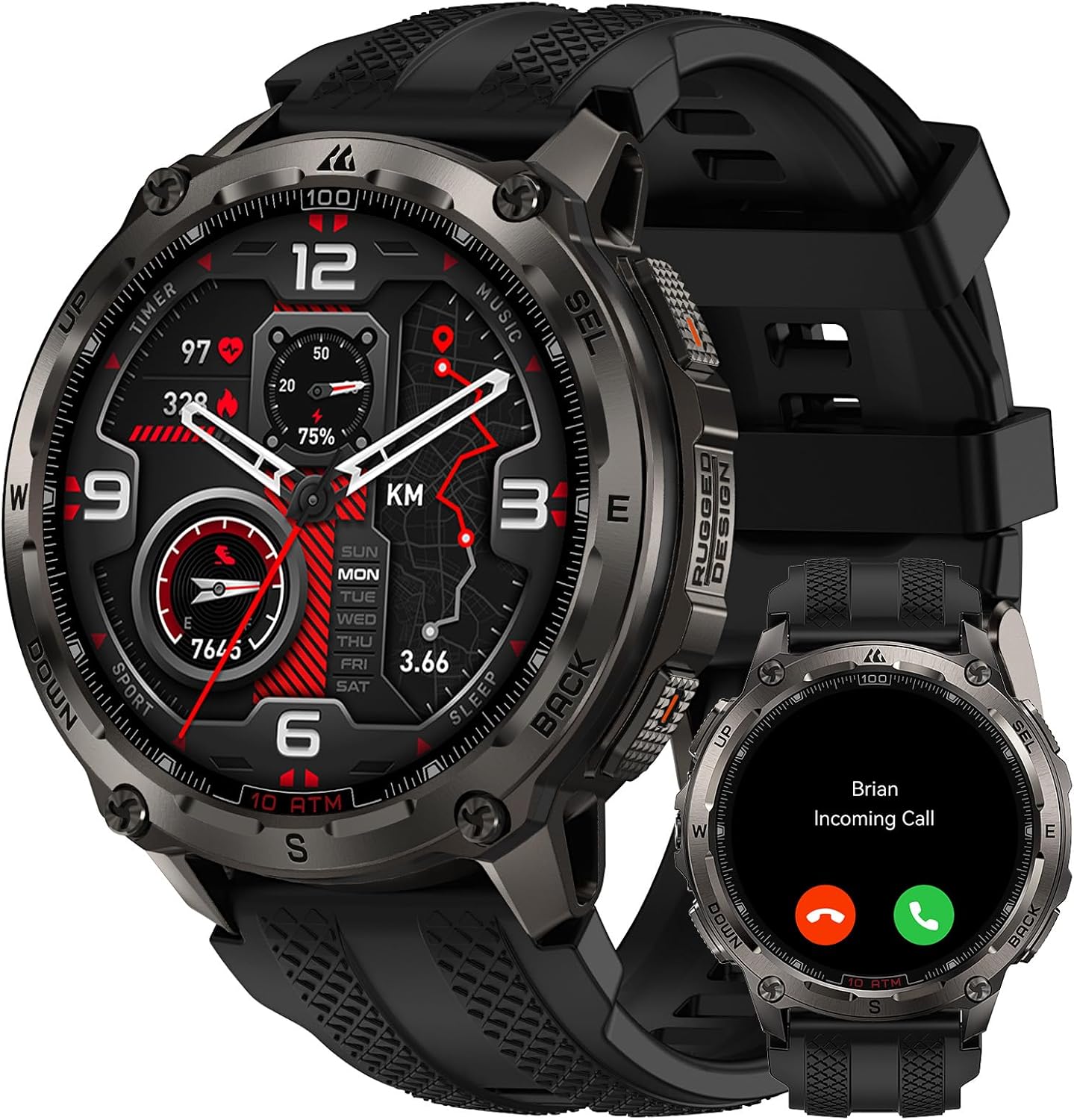
Image: KOSPET Tank T4 Smartwatch with its charger, silicone strap, and user manual.
Saita
1. Cajin Smartwatch
Before initial use, fully charge your KOSPET Tank T4 Smartwatch. Connect the provided charger to a power source and attach the magnetic charging pins to the back of the smartwatch. The watch display will indicate charging status.

Image: The KOSPET Tank T4 Smartwatch connected to its magnetic charging base, illustrating the charging process and battery life infographic.
2. Shigar App da Haɗawa
To unlock the full functionality of your KOSPET Tank T4, you need to install the "APEXMOVE" app on your smartphone and pair the devices.
Don na'urorin iOS:
- Install the APEXMOVE app from the Apple App Store.
- Open the app and navigate to "My Device".
- Click on "My Device" and select the "+" icon to add a new device.
- Select "KOSPET TANK T4" from the list and connect.
- Tap "Pair" when prompted and grant the watch permission to receive notifications from your phone.
Video: Instructions on how to connect the KOSPET Tank T4 Smartwatch to an iOS smartphone, showing the steps within the APEXMOVE app.
Don Na'urorin Android:
- Install the APEXMOVE app from the Google Play Store.
- Open the app and navigate to "My Device".
- Click on "My Device" and select the "+" icon to add a new device.
- Select "KOSPET TANK T4" from the list and connect.
- Tap "Pair" when prompted and grant the watch permission to receive notifications from your phone.
Video: Instructions on how to connect the KOSPET Tank T4 Smartwatch to an Android smartphone, demonstrating the pairing process within the APEXMOVE app.
Umarnin Aiki
1. Navigation na asali
The KOSPET Tank T4 features a 1.43" AMOLED touchscreen display and physical buttons for navigation. Swipe across the screen to access different functions and menus. The side buttons provide quick access to specific features or can be customized.
Hoto: Kusanci view of the KOSPET Tank T4 Smartwatch, highlighting its display and physical buttons for user interaction.
2. Yin Kira da Karɓar Kira
The smartwatch supports Bluetooth calling. Once paired with your smartphone, you can answer incoming calls directly from your watch or dial numbers using the on-screen keypad.

Image: A person interacting with the KOSPET Tank T4 Smartwatch to answer an incoming call, demonstrating the call function.
3. Sanarwa
Receive notifications from your smartphone apps directly on your KOSPET Tank T4. Ensure the APEXMOVE app has the necessary permissions enabled on your phone for notifications to function correctly.

Image: The KOSPET Tank T4 Smartwatch screen showing notifications from various social media and messaging applications.
4. Kula da Lafiya
The KOSPET Tank T4 features an advanced 4PD sensor for 24/7 health monitoring, including heart rate, blood oxygen (SpO2), sleep patterns, and stress levels. Access these metrics through the watch interface or the APEXMOVE app for detailed analysis.
- Yawan Zuciya: Continuous monitoring of your heart rate.
- Iskar Oxygen ta Jini (SpO2): Yana auna cikar iskar oxygen a cikin jininka.
- Bibiyar Barci: Analyzes sleep stages (deep, light, awake) to provide insights into sleep quality.
- Kula da Damuwa: Helps you understand your stress levels throughout the day.

Image: Displays the KOSPET Tank T4 Smartwatch showing heart rate, blood oxygen, and sleep tracking data on its screen.
5. Sports Modes and GPS
The smartwatch offers 23 ApexMotion sports modes and over 160 free training modes. It features dual-band GNSS positioning with 6 satellite systems for accurate outdoor activity tracking and offline map support.
- Bibiyar Ayyuka: Records calories burned, heart rate, distance, and pace for various sports.
- Kewayawa GPS: Utilizes dual-band GNSS for precise location tracking.
- Taswirorin Wajen Layi: Download maps to your watch for navigation without a network connection.
- Tsarin Hanya: Plan and follow routes directly from your watch.

Image: The KOSPET Tank T4 Smartwatch displaying an offline map with a planned route, demonstrating its navigation capabilities.
Video: Demonstrates the KOSPET Tank T4 Smartwatch's GPS and offline map features, showing route tracking during outdoor activities.
6. Walkie-Talkie Function
The integrated walkie-talkie function allows for instant communication with a simple touch-and-hold, useful for outdoor group activities.
Image: A person using the KOSPET Tank T4 Smartwatch's walkie-talkie feature in an outdoor setting.
7. Daidaitawa
Personalize your KOSPET Tank T4 with various watch faces, icon themes, and customizable quick-access cards through the APEXMOVE app.

Image: A collage of different watch faces and icon themes available for customization on the KOSPET Tank T4 Smartwatch.
Kulawa
1. Tsaftacewa
Tsabtace agogon smart da madauri akai-akai tare da taushi, damp zane. A guji amfani da sinadarai masu ƙarfi ko kayan gogewa waɗanda za su iya lalata na'urar.
2. Ruwa Resistance
The KOSPET Tank T4 is rated 10 ATM and IP69K, making it suitable for swimming, snorkeling, and free diving up to 45 meters. Rinse the watch with fresh water after exposure to salt water or chlorine and dry thoroughly.

Image: A diver wearing the KOSPET Tank T4 Smartwatch underwater, demonstrating its 10 ATM water resistance for diving activities.
Video: The KOSPET Tank T4 Smartwatch being exposed to water, illustrating its IP69K and 10 ATM water resistance.
3. Rayuwar Baturi
The KOSPET Tank T4 features a 500 mAh battery. Typical usage provides up to 18 days of battery life, while continuous GPS use offers up to 22 hours. Actual battery performance may vary based on settings and usage.

Image: An infographic detailing the battery life of the KOSPET Tank T4 Smartwatch under different usage scenarios, including typical use, continuous GPS, intense use, and Always-On Display mode.
Shirya matsala
- Na'urar bata haɗawa ba: Ensure Bluetooth is enabled on your smartphone and the smartwatch is discoverable. Restart both devices and try pairing again.
- Ba a karɓi sanarwar ba: Verify that the APEXMOVE app has notification permissions enabled in your phone's settings. Disable "Do Not Disturb" mode on your phone.
- Rashin daidaiton GPS: Tabbatar cewa kuna cikin buɗaɗɗen wuri tare da bayyananne view of the sky for optimal GPS signal reception. Allow the watch sufficient time to acquire a GPS signal before starting an activity.
- Allon baya amsa: Try restarting the smartwatch. If the issue persists, ensure the screen is clean and dry.
- Baturi yana zubar da sauri: Review your usage patterns. Frequent use of GPS, Always-On Display, and continuous health monitoring can reduce battery life. Adjust settings as needed.
- Matsalolin software: Ensure your APEXMOVE app and smartwatch firmware are updated to the latest versions. Check the app for available updates.
Ƙayyadaddun bayanai
| Siffar | Daki-daki |
|---|---|
| Alamar | KOSPET |
| Samfura | TANKO T4 |
| Nunawa | 1.43-inch AMOLED |
| Kayan Jiki | 360 Bakin Karfe |
| Gilashin allo | Corning Gorilla Glass 3rd Generation 9H |
| Resistance Ruwa | 10 ATM, IP69K (up to 45m for free diving) |
| GPS | Dual-band GNSS (6 satellite systems), Offline Maps |
| Ƙarfin baturi | 500mAh Lithium Polymer |
| Rayuwar Batir Na Musamman | Har zuwa kwanaki 18 |
| GPS Continuous Use | Har zuwa awanni 22 |
| Kula da Lafiya | Heart Rate, Blood Oxygen (SpO2), Sleep, Stress (24/7) |
| Hanyoyin wasanni | 23 ApexMotion, 160+ Free Training Modes |
| Haɗuwa | Bluetooth |
| Ƙwaƙwalwar ajiya | 32 GB (storage), 16 MB (RAM) |
| Tsarin Aiki | Mai jituwa tare da Android da iOS |
| Nauyi | 80g ku |
| Military Standard Certification | 20 MIL-STD-810H tests passed, SGS Certified |
Garanti da Taimako
Your KOSPET Tank T4 Smartwatch comes with a manufacturer's warranty. For specific warranty details, please refer to the warranty card included in your product packaging or visit the official KOSPET website. For technical support or further assistance, please contact KOSPET customer service or visit the KOSPET Brand Store.
Bayanin Tsaro
- Kada kayi ƙoƙarin ƙwace, gyara, ko gyara na'urar.
- A ajiye na'urar daga yanayin zafi mai tsanani, hasken rana kai tsaye, da kuma harshen wuta a buɗe.
- Guji fallasa na'urar zuwa filaye masu ƙarfi masu ƙarfi.
- Do not use the device while driving or in situations where it could distract you from important tasks.
- Consult a medical professional before starting any new exercise regimen or if you have any health concerns.
- A zubar da na'urar da batirinta bisa ga ƙa'idojin gida.


