1. Gabatarwa
Na gode da siyaasing the VEVOR Digital Postal Scale. This manual provides essential information for the safe and efficient operation of your scale. Please read it thoroughly before use and retain it for future reference. This scale is designed for accurate weighing of packages, parcels, and luggage, offering dual precision and multiple unit options.
2. Bayanin Tsaro
- Place the scale on a firm, flat, and stable surface to ensure accurate readings.
- Avoid placing the scale in areas with extreme temperatures, high humidity, or strong vibrations.
- Do not overload the scale beyond its maximum capacity of 440 lbs (200 kg).
- Tsare sikelin daga filaye masu ƙarfi na lantarki.
- Tsaftace ma'auni da taushi, damp zane. Kada a yi amfani da masu tsabtace ƙura ko nutsar da naúrar cikin ruwa.
- Idan ba za a yi amfani da sikelin na tsawon lokaci ba, cire batirin don hana zubewa.
3. Abubuwan Kunshin
Tabbatar cewa duk abubuwa suna nan a cikin kunshin ku:
- VEVOR Digital Postal Scale Platform
- LCD Display Unit with coiled cable
- 2 x AAA baturi
- Kebul na Caji
- Jagoran Jagora
- 3x self-tapping screws ST4x25
- 3x expansion tube

Hoto: Overview of the VEVOR Digital Postal Scale components and included accessories.
4. Samfurin Ya Ƙareview
The VEVOR Digital Postal Scale features a durable platform and a separate LCD display for flexible placement. It offers high accuracy and a robust design for various weighing needs.
Mabuɗin fasali:
- 440 lb (200 kg) Capacity: Handles large parcels with ease.
- Dual Precision: Accurate to 0.06 lbs (30g) for precise measurements.
- Four Global Units: Switch between kg, lb, oz, and lb:oz.
- Tare Aiki: Deducts container weight for net weight measurement.
- Rike Aiki: Freezes the reading for large items that may obstruct the display.
- Separate LCD Display: Allows for wall-mounting or tabletop use.
- Zaɓuɓɓukan Ƙarfi da yawa: Operates with AAA batteries, USB cable, or built-in battery.
- Gina Mai Dorewa: Non-slip PVC platform and ABS shell with anti-slip feet.

Image: Scale dimensions, capacity, and accuracy details.

Image: Details of the scale's platform, feet, and coiled cable.
5. Saita
5.1 Powering the Scale
The scale can be powered by three methods:
- Batirin AAA: Insert the two included AAA batteries into the battery compartment located on the back of the display unit.
- Kebul na USB: Connect the provided USB cable to the display unit and a compatible USB power source (e.g., computer, USB wall adapter).
- Batir da aka Gina: The scale has a built-in 1 x 3.7V 250mAh battery. It charges when connected via USB.
5.2 Sanya Sikelin
Place the scale platform on a flat, stable, and level surface. Ensure there are no obstructions that could interfere with the weighing process.
5.3 Display Unit Placement
The separate LCD display unit offers flexibility:
- Amfanin Tabletop: Place the display unit on a table or desk near the scale platform.
- Jikin bango: Use the provided screws and expansion tubes to mount the display unit on a wall for easy viewing, especially with large packages.

Hoto: Examples of wall-mounted and tabletop display unit setup.
6. Aiki
6.1 Ayyukan Maɓalli

Image: Diagram of display unit buttons and their functions.
- Maballin Wuta (U): Press to turn the scale ON or OFF.
- Unit Button (U): Press to cycle through weighing units (kg, lb, oz, lb:oz).
- Hold Button (H): Press to lock the current weight reading. Press again to release.
- Tare Button (T): Press to subtract the weight of a container.
6.2 Weighing an Item
- Turn on the scale by pressing the Power button.
- Ensure the display shows '0.00' before placing any item.
- Gently place the item to be weighed in the center of the scale platform.
- Karanta nauyin da aka nuna a kan LCD ɗin.

Image: A package being weighed on the scale.
6.3 Canjin Raka'a
To change the weighing unit:
- Da zarar an kunna sikelin, danna maɓallin Unit (U) maballin.
- The display will cycle through kg, lb, oz, and lb:oz. Stop at your desired unit.

Image: Display showing different weighing units.
6.4 Tare Aiki
The Tare function allows you to subtract the weight of a container to measure only the net weight of its contents.
- Place the empty container on the scale platform.
- Wait for the weight reading to stabilize.
- Danna maɓallin Tare (T) maɓalli. Nunin zai sake dawowa zuwa '0.00'.
- Place the items to be weighed into the container. The display will show the net weight of the items.

Image: Step-by-step guide for the Tare function.
6.5 Rike Aiki
The Hold function is useful for weighing large items that might obscure the display.
- Sanya abu a kan dandalin ma'auni.
- Wait for the weight reading to stabilize.
- Danna maɓallin Rike (H) button. The reading will be locked on the display.
- You can now remove the item, and the weight will remain displayed. Press the Rike (H) button again to release the hold and return to normal weighing mode.

Hoto: Examples of Tare and Hold functions.
7. Daidaitawa
If you suspect the scale's accuracy has drifted, you can perform a calibration. This process restores accuracy and eliminates errors.
- Ensure the scale is on a stable surface and nothing is on the platform.
- Danna maɓallin Tare (T) mabudi sau 4.
- Rike da Tare (T) key until a code appears on the display.
- Saki da Tare (T) key to enter calibration mode. Follow the on-screen prompts to complete the calibration using a known weight (not included).
8. Kulawa
8.1 Tsaftacewa
Wipe the scale platform and display unit with a soft, slightly damp cloth. Do not use harsh chemicals, abrasive cleaners, or immerse any part of the scale in water.
8.2 Adana
Store the scale in a cool, dry place away from direct sunlight and extreme temperatures. If storing for an extended period, remove the AAA batteries from the display unit.
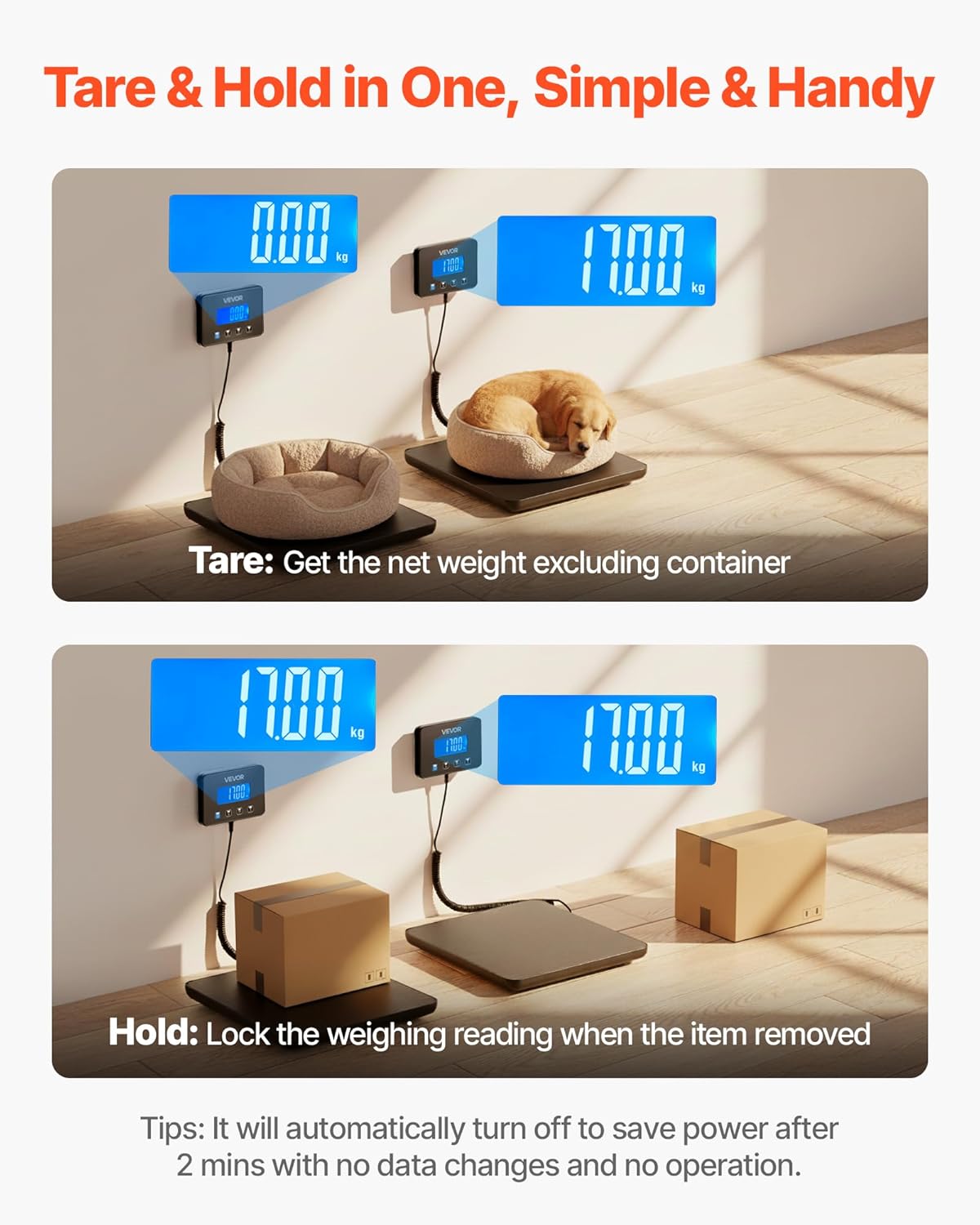
Image: The scale's thin profile don sauƙin ajiya.
9. Shirya matsala
| Matsala | Dalili mai yiwuwa | Magani |
|---|---|---|
| Sikeli baya kunna | Low or dead batteries; No power from USB; Loose connection. | Replace AAA batteries; Ensure USB cable is securely connected and power source is active; Check coiled cable connection. |
| Karatuttuka mara inganci | Scale not on a flat surface; Overloaded; Needs calibration; Interference. | Place on a firm, level surface; Do not exceed 440 lbs; Perform calibration (see Section 7); Avoid strong electromagnetic fields. |
| Nunin yana nuna 'Lo' | Alamar ƙarancin baturi. | Replace AAA batteries or recharge the built-in battery via USB. |
| Display shows 'O_Ld' | Alamun wuce gona da iri. | Remove item immediately to prevent damage. Do not exceed 440 lbs. |
10. Ƙayyadaddun bayanai
| Siffar | Ƙayyadaddun bayanai |
|---|---|
| Lambar Samfurin Abu | Postal Scale 0.35 oz Accuracy (P6H) |
| Kayan abu | Tempered Glass, PVC & ABS |
| Matsakaicin Ƙarfin Auna | 440 lbs / 200 kg |
| Minimum Weighing | 0.06 lbs / 30 g |
| Daidaito | 0-20 kg (10 g) / 0-44 lbs (0.02 lbs) 20-200 kg (100 g) / 44-440 lbs (0.2 lbs) |
| Raka'a masu nauyi | kg, lb, oz, lb:oz |
| Batirin da aka gina a ciki | 1 x 3.7V 250mAh Lithium Ion |
| Yanayin Wuta | 2 x AAA Batteries (included) / USB Powered |
| Tsawon Kebul Na Tsawon | 8.2ft/2.5m |
| Retracted Cable Length | 2.6 ft / 0.8 meter |
| Nauyin samfur | 2.6 lbs / 1.2 kg |
| Girman samfur | 10.9 x 10.9 x 1 inci / 277 x 277 x 26 mm |
| Salon Nuni | LCD |
11. Bidiyon Samfura
Watch these official product videos for visual demonstrations of the VEVOR Digital Postal Scale's features and operation.
Bidiyo: Overview of the VEVOR Digital Postal Scale (0:45).
Video: Detailed features and usage demonstration (1:41).
Video: Quick demonstration of scale functions (0:43).
Video: Scale in various usage scenarios (0:40).
Video: Vertical format product demonstration (0:44).
12. Garanti da Tallafawa
VEVOR products are designed for durability and performance. For any issues or questions regarding your VEVOR Digital Postal Scale, please refer to the retailer's return policy or contact VEVOR customer support. Please retain your proof of purchase for warranty claims.


