Gabatarwa
This manual provides detailed instructions for the safe and efficient operation, installation, and maintenance of your Silonn Commercial Ice Maker, model SLIM12T. Please read this manual thoroughly before using the appliance and retain it for future reference.
The Silonn SLIM12T is designed to produce up to 150 lbs of ice per day with a 33 lbs storage capacity, suitable for various commercial and home settings.

Image: Silonn Commercial Ice Maker SLIM12T, showcasing its stainless steel exterior and the included accessories: an ice scoop, drain hose, water quick connector, and water hose.

Image: A visual representation of the Silonn ice maker's versatility, showing its application in diverse environments such as coffee shops, food trucks, bars, and outdoor entertaining areas.
Mabuɗin Siffofin
The Silonn SLIM12T Commercial Ice Maker incorporates advanced design and technology for efficient and reliable ice production:
- Babban Ƙarfi: Produces up to 150 lbs of ice in 24 hours with a 33 lbs storage bin.
- Saurin Samar da Kankara: Ice ready in 8-15 minutes per cycle.
- Daidaitaccen Kaurin Kankara: Customize ice cubes to thin, medium, or thick.
- Tsaftace Kai ta atomatik: Simplifies maintenance and ensures hygiene.
- Dual Water Supply Options: Manual fill or direct connection to a water source.
- Intuitive LCD Control Panel: Easy operation with timer and light functions.
- Gina Mai Dorewa: Anyi da bakin karfe don tsawon rai.

Image: An illustration detailing the four key system upgrades that contribute to the ice maker's efficient ice production and fast cooling, including air cooling, a high-efficiency compressor, multi-fan cooling, and a thickened insulation layer.
Muhimman Bayanan Tsaro
Domin rage haɗarin gobara, girgizar lantarki, ko rauni yayin amfani da injin yin kankara, bi waɗannan matakan kariya:
- Karanta duk umarnin kafin amfani.
- Haɗa zuwa tashar ƙasa kawai.
- Do not immerse the power cord, plug, or the appliance in water or other liquids.
- Kula da yara lokacin da na'urar ke aiki.
- Kada a yi aiki da igiya ko filogi da ta lalace.
- Kada ku yi amfani da waje.
- Tabbatar da samun iska mai kyau a kusa da naúrar.
- Yi amfani da ruwan sha kawai.
- Cire plug ɗin kafin tsaftacewa ko sabis.
Abubuwan Kunshin
Tabbatar cewa duk abubuwa suna nan a cikin marufi:
- Silonn Commercial Ice Maker (SLIM12T)
- Dankin kankara
- Drain Hose (6.6 ft)
- Water Quick Connector
- Water Hose (9.1 ft)
- Manual Umarni (wannan takarda)
Saita da Shigarwa
1. Sanyawa
- Sanya mai yin ƙanƙara a kan shimfidar wuri mai kwanciyar hankali.
- Ensure adequate clearance (at least 5 inches) around the unit for proper ventilation.
- Guji hasken rana kai tsaye ko tushen zafi.
- The ambient temperature should be between 10°C (50°F) and 32°C (90°F).
2. Water Supply Connection
The SLIM12T offers two water supply options:
- Manual Water Addition: Open the top lid and pour potable water directly into the water reservoir. The unit will alert you when water runs low.
- Haɗin Ruwa Kai tsaye: For continuous operation, connect the ice maker to a potable water source.
- Locate the water inlet port at the back of the unit.
- Attach the provided water hose to the water quick connector, then connect it to your water supply.
- Tabbatar cewa duk hanyoyin haɗin gwiwa suna amintacce don hana yadudduka.
3. Drain Hose Connection
Connect the provided drain hose to the drain outlet at the back of the unit. Route the drain hose to a suitable drain point, ensuring it has a continuous downward slope for proper water drainage.

Hoto: Dalla-dalla view of the rear panel connections, illustrating the tap water inlet hose, power cord, and water drain hose. An installation guide for hose connections is also shown.
4. Farkon Tsaftacewa
Before first use, it is recommended to clean the ice maker. Refer to the "Maintenance" section for detailed cleaning instructions, including how to use the self-cleaning function.
Umarnin Aiki
Control Control Overview
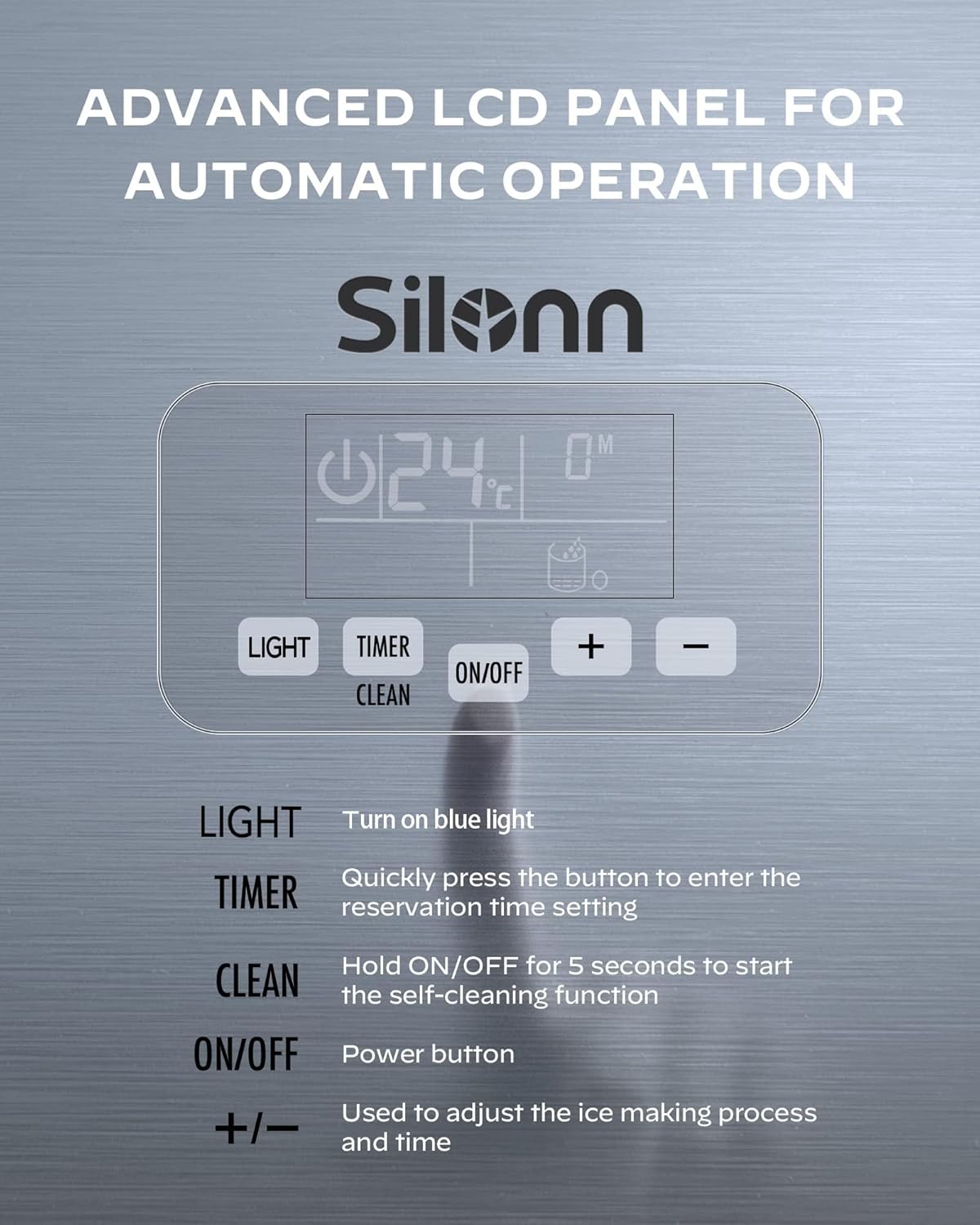
Image: Close-up of the Silonn ice maker's advanced LCD control panel, detailing the functions of the LIGHT, TIMER, ON/OFF (with CLEAN function), and +/- buttons for adjusting settings.
- HASKE: Press to turn the internal blue light on or off.
- TIMER: Quickly press to enter the reservation time setting mode.
- KUNNA/KASHE: Latsa don kunna naúrar ko kashewa.
- TSAFTA: Hold the ON/OFF button for 5 seconds to activate the self-cleaning function.
- +/-: Use these buttons to adjust the ice making process duration and time settings (e.g., ice thickness, timer).
Tsarin Yin Kankara
- Ensure the water supply is connected or the reservoir is filled.
- Danna maɓallin KASHE/KASHE button to start the ice making cycle.
- Adjust ice thickness (thin, medium, or thick) using the +/- buttons if desired. The ice making cycle typically takes 8-15 minutes.
- The unit will automatically produce ice until the ice bin is full or the water level is low.
- An alarm will sound if the water runs out, prompting a refill.

Image: Illustration demonstrating the adjustable ice thickness settings (Thin, Medium, Thick) and their corresponding production times, allowing customization for various beverage types.

Image: Infographic highlighting the Silonn ice maker's daily production capacity, indicating it can produce over 7000 ice cubes, sufficient for more than 800 drinks per day.
Aiki mai ƙidayar lokaci
The timer function allows you to set a reservation time for the ice maker to start or stop.
- Danna maɓallin TIMER maballin.
- Yi amfani da +/- buttons to set the desired delay time (e.g., 8 hours, 10 hours).
- The unit will automatically begin or end operation after the set time.

Image: Visual representation of the 24-hour time reservation feature, demonstrating how users can schedule ice production for specific times during the day or night.
Kulawa
Ayyukan Tsabtace Kai
The ice maker is equipped with an automatic self-cleaning function to simplify maintenance.
- Ensure the unit is connected to a water supply or the reservoir is filled.
- Rike da KASHE/KASHE button for 5 seconds. The unit will enter self-cleaning mode.
- The cleaning cycle will run automatically. Once complete, drain any remaining water.
Tsabtace A kai a kai
- Na waje: Shafa waje da taushi, damp zane. Kada a yi amfani da masu tsabtace abrasive ko sauran ƙarfi.
- Ice Bin: Periodically remove the ice bin and wash it with mild soap and water. Rinse thoroughly and dry before replacing.
- Ruwa Ruwa: If using manual fill, regularly clean the water reservoir to prevent mineral buildup.
- Magudanar ruwa: Ensure the drain hose is clear and free of obstructions.
For optimal performance and hygiene, perform regular cleaning and utilize the self-cleaning function as needed.
Shirya matsala
Kafin tuntuɓar tallafin abokin ciniki, da fatan za a koma ga batutuwa gama gari da mafita:
| Matsala | Dalili mai yiwuwa | Magani |
|---|---|---|
| Mai yin kankara baya samar da kankara. | No water supply; unit not powered on; ambient temperature too high. | Check water connection/reservoir; ensure unit is plugged in and turned on; move to a cooler location. |
| Ice cubes are too small or soft. | Water temperature too high; ice making cycle too short. | Use colder water; adjust ice thickness setting to "Thick" using the +/- buttons. |
| "Add Water" indicator is on. | Ma'ajiyar ruwa babu komai ko kuma an katse samar da ruwa. | Refill water reservoir or check direct water connection. |
| Naúrar tana hayaniya. | Unit not level; normal compressor operation. | Ensure unit is on a level surface; some noise during operation is normal. |
Ƙayyadaddun bayanai

Image: Diagram illustrating the physical dimensions (Width, Depth, Height) and weight of the Silonn ice maker, along with a visual list of included accessories.
| Siffar | Daki-daki |
|---|---|
| Lambar Samfura | SLIM12T |
| Ƙarfin Samar da Kankara | 150 lbs / 24 hours |
| Ƙarfin Ajiyar Ƙanƙara | 33 lbs |
| Girman samfur (W x D x H) | 40 cm x 44.8 cm x 79.8 cm (15.7 x 17.6 x 31.4 inci) |
| Nauyin samfur | 31 kg (68.3 lbs) |
| Watatage | 320 watts |
| Voltage | 115 Volts |
| Mai firiji | R290 |
| Kayan abu | Bakin Karfe |
| UPC | 850054443991 |
Garanti da Tallafin Abokin Ciniki
Silonn provides excellent customer care. For warranty information, product support, or assistance with setup and operation, please contact our U.S.-based customer care team. Refer to your purchase documentation or the Silonn website don takamaiman bayanan tuntuɓar.
Please have your model number (SLIM12T) and purchase date available when contacting support.


